
1. Giriş
Aldığınız üçün təşəkkür edirikasing the JVC XS-N3214PB Portable Bluetooth Party Speaker. This manual provides important information regarding the setup, operation, and maintenance of your speaker. Please read it thoroughly before using the product to ensure proper function and to maximize your listening experience. Keep this manual for future reference.
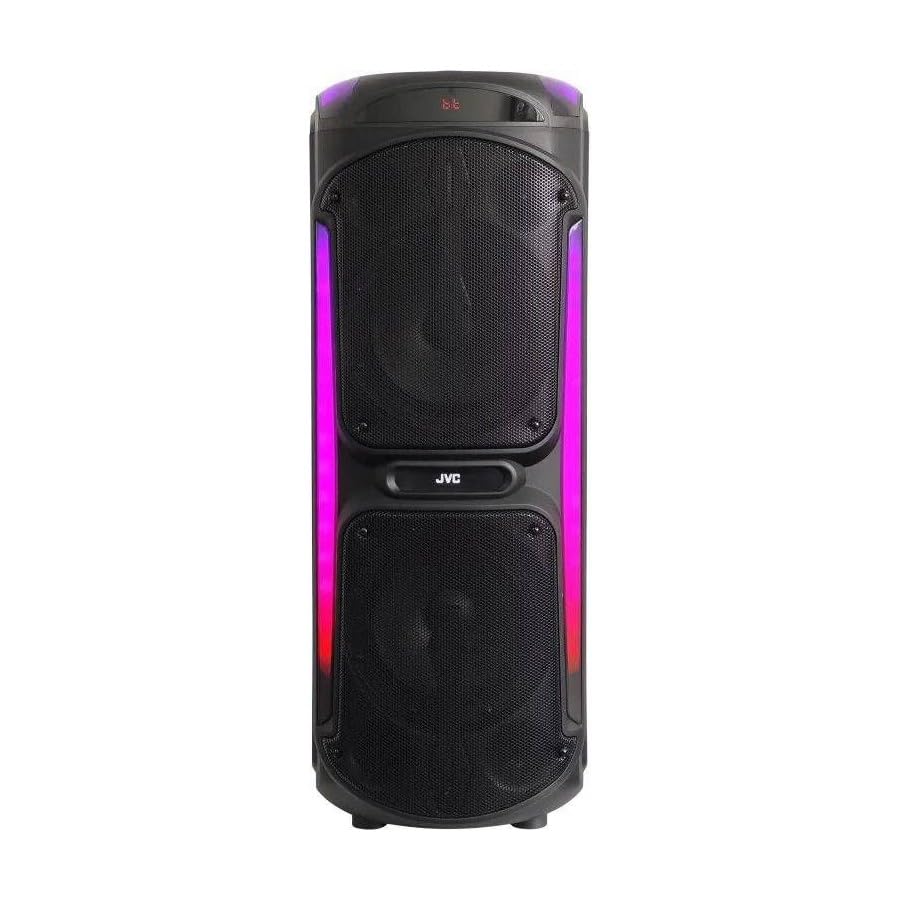
Image: The JVC XS-N3214PB Portable Bluetooth Party Speaker, shown with two microphones, highlighting its versatile connectivity options including Bluetooth, FM Radio, MP3 playback, AUX input, and USB input. The speaker features integrated LED lighting.
2. Təhlükəsizlik Məlumatı
Təhlükəsiz işləməyi təmin etmək və zərərin qarşısını almaq üçün aşağıdakı ehtiyat tədbirlərinə əməl edin:
- Dinamiki suya, nəmə və ya həddindən artıq temperatura məruz qoymayın.
- Dinamiki sökməyə və ya dəyişdirməyə çalışmayın. Bütün xidmət işlərini ixtisaslı mütəxəssislərə həvalə edin.
- Dinamiki istilik mənbələrindən, birbaşa günəş işığından və tezalışan materiallardan uzaq tutun.
- Use only the specified charging adapter.
- Dinamikin üzərinə ağır əşyalar qoymaqdan çəkinin.
- Dinamiki yumşaq, quru parça ilə təmizləyin. Maye təmizləyicilərdən və ya aerozollardan istifadə etməyin.
- İstifadə zamanı dinamik ətrafında düzgün ventilyasiya olmasını təmin edin.
3. Paketin məzmunu
Bütün əşyaların paketdə olduğunu yoxlayın:
- JVC XS-N3214PB Portable Bluetooth Party Speaker (1 unit)
- Power Adapter/Charging Cable (1 unit)
- Uzaqdan idarəetmə (1 ədəd)
- İstifadəçi Təlimatı (bu sənəd)
- (Optional: Microphone, if included with your specific purchase)
4. Məhsul bitdiview
4.1. Xüsusiyyətlər
- Powerful 800W Audio Output
- Bluetooth simsiz əlaqə
- Taşınabilirlik üçün Daxili Şarj Edilə bilən Batareya
- Integrated LED Party Lights
- FM Radio Tuner
- USB Oynatma
- AUX Giriş
- Microphone Input for Karaoke
- Uzaqdan İdarəetmə Əməliyyatı
- Deep Bass Performance
4.2. Nəzarət və Portlar
Familiarize yourself with the speaker's control panel and connection ports. (Refer to diagrams in the full printed manual for exact locations).
- Güc düyməsi: Dinamiki yandırır/söndürür.
- Rejim düyməsi: Bluetooth, FM, USB və AUX rejimləri arasında keçid edir.
- Səs səviyyəsinə nəzarət: Master həcmini tənzimləyir.
- Oynat/Pauza düyməsi: Medianın oxudulmasına nəzarət edir.
- Əvvəlki/Sonrakı Track Düymələri: Musiqi parçaları və ya FM stansiyaları arasında naviqasiya edir.
- LED işıq düyməsi: Toggles LED lighting effects.
- Mikrofon Səs/Eko Nəzarətləri: Adjusts microphone input and echo effect.
- USB Port: USB sürücüsünü oxutmaq üçün.
- AUX Girişi (3.5 mm): Xarici audio cihazlarını birləşdirmək üçün.
- Mikrofon Girişi (6.35 mm): Simli mikrofonu qoşmaq üçün.
- DC IN Limanı: For connecting the power adapter to charge the speaker.
5. Quraşdırma
5.1. Dinamikin doldurulması
- Connect the power adapter to the DC IN port on the speaker.
- Elektrik adapterinin digər ucunu rozetkaya qoşun.
- The charging indicator light will illuminate (color may vary) to show the speaker is charging.
- Allow approximately 4-6 hours for a full charge. The indicator light may change or turn off when fully charged.
- Disconnect the power adapter once charging is complete or when using the speaker on battery power.
5.2. Açma / Söndürmə
- Yandırmaq üçün: Press and hold the Power button for a few seconds until the display illuminates.
- Söndürmək üçün: Press and hold the Power button again for a few seconds until the display turns off.
6. Əməliyyat Təlimatları
6.1. Bluetooth Cütləşdirmə
- Power on the speaker. It will automatically enter Bluetooth pairing mode, indicated by a flashing Bluetooth icon or voice prompt.
- Mobil cihazınızda (smartfon, planşet və s.) Bluetooth-u aktivləşdirin və mövcud cihazları axtarın.
- Select "JVC XS-N3214PB" from the list of devices.
- Once paired, the speaker will confirm with an audible tone or a solid Bluetooth icon.
- İndi siz cihazınızdan səsi dinamik vasitəsilə oxuya bilərsiniz.
6.2. FM Radio
- Press the Mode button until "FM" is displayed.
- Mövcud FM stansiyalarını avtomatik olaraq skan etmək və saxlamaq üçün Oxutma/Pauza düyməsini basın.
- Saxlanmış stansiyalar arasında hərəkət etmək üçün Əvvəlki/Növbəti Track düymələrindən istifadə edin.
6.3. USB Oynatma
- MP3 audio ehtiva edən USB flash sürücüsünü (FAT32 formatında) daxil edin files USB portuna daxil edin.
- The speaker will automatically switch to USB mode and begin playing the first track. If not, press the Mode button to select USB.
- Oxutmanı idarə etmək üçün Oxutma/Pauza və Əvvəlki/Növbəti Trek düymələrindən istifadə edin.
6.4. AUX Giriş
- 3.5 mm audio kabelin bir ucunu (daxil deyil) dinamikdəki AUX IN portuna qoşun.
- Kabelin digər ucunu xarici cihazınızın (məsələn, MP3 pleyer, noutbuk) səs çıxışına qoşun.
- Press the Mode button until "AUX" is displayed.
- Xarici cihazınızdan oxutma və səs səviyyəsinə nəzarət edin.
6.5. Microphone and Karaoke Function
- Connect a wired microphone (not included) to the Microphone Input port.
- Adjust the microphone volume and echo effect using the dedicated controls on the speaker.
- Play music via Bluetooth, USB, or AUX, and sing along through the microphone.
6.6. LED Əyləncə İşıqları
Press the LED Light button to cycle through different lighting modes or to turn the lights off.
6.7. Uzaqdan idarəetmə
The included remote control allows for convenient operation of the speaker from a distance. Functions include power on/off, mode selection, volume adjustment, track control, and LED light control. Ensure the remote control has working batteries and is pointed towards the speaker's sensor.
7. Baxım
- Təmizləmə: Dinamikin xarici hissəsini yumşaq, quru və tüksüz bir parça ilə silin. Aşındırıcı təmizləyicilərdən, mumlardan və ya həlledicilərdən istifadə etməyin.
- Yaddaş: If storing the speaker for an extended period, ensure it is fully charged, then power it off. Store in a cool, dry place away from direct sunlight. Recharge the battery every few months to maintain its lifespan.
- Batareyaya qulluq: To prolong battery life, avoid fully discharging the speaker frequently. Charge it before the battery is completely depleted.
8. Giderme
| Problem | Mümkün Səbəb | Həll |
|---|---|---|
| Dinamik işə düşmür. | Batareya bitib. Elektrik kabeli qoşulmayıb. | Charge the speaker. Ensure power cable is securely connected to both speaker and outlet. |
| Səs yoxdur. | Volume is too low. Incorrect mode selected. Device not paired (Bluetooth). AUX cable loose. | Increase volume on speaker and source device. Press Mode button to select correct input. Re-pair Bluetooth device. Check AUX cable connection. |
| Bluetooth cihazı qoşa bilməz. | Dinamik cütləşmə rejimində deyil. Cihaz çox uzaqdır. Müdaxilə. | Ensure speaker is in Bluetooth mode and flashing. Move device closer to speaker. Turn off other Bluetooth devices. |
| USB oxutma işləmir. | USB drive not formatted correctly (FAT32). Unsupported file format. USB drive faulty. | Ensure USB drive is FAT32 and contains MP3 files. Fərqli USB sürücüsünü sınayın. |
| Pult işləmir. | Batteries depleted. Obstruction between remote and speaker. | Replace remote control batteries. Ensure clear line of sight to speaker's IR sensor. |
9. Spesifikasiyalar
| Model nömrəsi | XS-N3214PB |
| Brend | JVC |
| Çıxış Gücü | 800W (pik) |
| Bağlantı | Bluetooth, USB, AUX (3.5mm), FM Radio, Microphone Input (6.35mm) |
| Səs Çıxış Modu | Stereo |
| Material | plastik |
| Montaj növü | Mərtəbə daimi |
| Nəzarət metodu | Pult, Düymə |
| Ölçülər (D x G x Y) | 35D x 31W x 94H santimetr |
| Daxil olan komponentlər | 1 x JVC XS-N3214PB 800W Party Portable Bluetooth Speaker, Power Adapter, Remote Control, User Manual |
10. Zəmanət və Dəstək
10.1. Zəmanət Məlumatı
This JVC XS-N3214PB speaker comes with a 1 İl Zəmanət satın alındığı tarixdən. Bu zəmanət normal istifadə zamanı istehsal qüsurlarını və işlənməni əhatə edir. Bu, sui-istifadə, qəzalar, icazəsiz dəyişikliklər və ya normal köhnəlmə nəticəsində dəyən zərəri əhatə etmir. Zəmanət iddiaları üçün satınalma sübutunuzu özündə saxlayın.
10.2. Müştəri dəstəyi
For technical assistance, warranty claims, or product inquiries, please contact JVC customer support through the retailer where the product was purchased or visit the official JVC webbölgənizə xas əlaqə məlumatları üçün sayt.