
1. Giriş
Aldığınız üçün təşəkkür edirikasing the JVC XS-N1154B Bluetooth Speaker. This manual provides essential information for the safe and efficient operation of your device. Please read it thoroughly before use and retain it for future reference.
2. Təhlükəsizlik Məlumatı
- Dinamiki həddindən artıq temperatura, birbaşa günəş işığına və ya yüksək rütubətə məruz qoymayın.
- Natiqi yerə endirməkdən və ya güclü təsirlərə məruz qalmaqdan çəkinin.
- Dinamiki sökməyə və ya dəyişdirməyə çalışmayın. Bu, zəmanəti ləğv edəcək.
- Keep the speaker away from water and liquids, despite its waterproof rating, to prevent damage to internal components.
- Yalnız qeyd olunmuş doldurma kabelindən və güc adapterindən istifadə edin.
- Dinamiki yumşaq, quru parça ilə təmizləyin. Aşındırıcı təmizləyicilərdən və ya həlledicilərdən istifadə etməyin.
3. Paketin məzmunu
Bütün əşyaların paketdə olduğundan əmin olun:
- JVC XS-N1154B Bluetooth Speaker
- Doldurma kabeli
- İstifadəçi təlimatı
- Uzaqdan idarəetmə (daxildirsə)
4. Məhsul bitdiview
Dinamikin komponentləri və idarəetmə vasitələri ilə tanış olun.
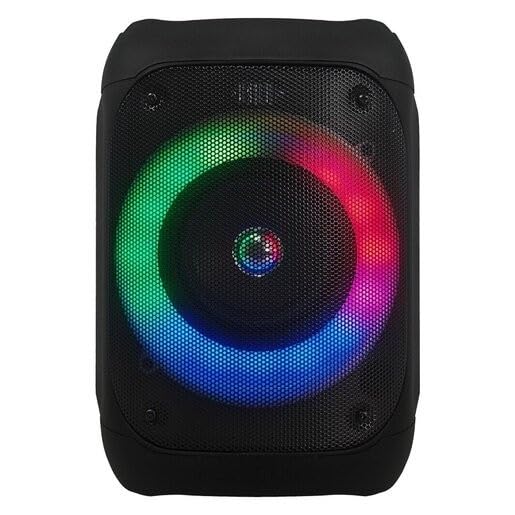
Şəkil 1: Ön view of the JVC XS-N1154B Bluetooth Speaker, showcasing the speaker grille and integrated music-activated LED lights.
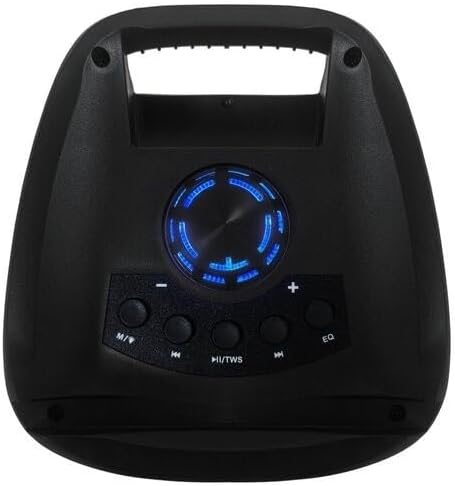
Şəkil 2: Üst view of the JVC XS-N1154B Bluetooth Speaker, displaying the control panel with various buttons and the volume knob.
İdarəetmə Panelinin Funksiyaları:
- Güc düyməsi: Dinamiki yandırır və ya söndürür.
- Rejim (M) düyməsi: Switches between Bluetooth, USB, SD Card, and FM Radio modes.
- Play/Pause (►||) / TWS Button: Plays or pauses audio. Long press for TWS (True Wireless Stereo) pairing.
- Previous Track (◀◀) Button: Skips to the previous track or tunes down in FM mode.
- Next Track (►►) Button: Skips to the next track or tunes up in FM mode.
- EQ Düyməsi: Ekvalayzer əvvəlcədən ayarları arasında dövr edir.
- Səs düyməsi: Rotates to adjust the volume level.
5. Quraşdırma
5.1 Dinamikin doldurulması
- Şarj kabelini dinamikin şarj portuna qoşun.
- Kabelin digər ucunu uyğun USB güc adapterinə (daxil deyil) və ya enerjili USB portuna qoşun.
- Doldurma zamanı şarj göstəricisi işığı, adətən qırmızı rəngdə yanacaq.
- Once fully charged, the indicator light may change color (e.g., turn off or turn blue/green). Disconnect the speaker from the power source.
5.2 Yandırma/Söndürmə
- Yandırmaq üçün: Press and hold the Power button until the speaker powers on and you hear an audible prompt.
- Söndürmək üçün: Dinamik sönənə qədər Güc düyməsini yenidən basın və saxlayın.
6. Əməliyyat Təlimatları
6.1 Bluetooth Qoşulması
- Ensure the speaker is powered on and in Bluetooth mode. If not, press the Mode (M) button to switch to Bluetooth mode. The speaker will indicate it is ready for pairing (e.g., a blinking LED or audible prompt).
- Mobil cihazınızda (smartfon, planşet, noutbuk) Bluetooth-u aktivləşdirin və mövcud cihazları axtarın.
- Select "JVC XS-N1154B" from the list of devices.
- Cütləşdirildikdən sonra dinamik səsli təsdiqi təmin edəcək və Bluetooth göstərici işığı möhkəm olacaq.
- İndi siz cihazınızdan səsi dinamik vasitəsilə oxuya bilərsiniz.
6.2 USB/SD Kart Oxutma
- Insert a USB flash drive or an SD card (with supported audio files) into the corresponding port on the speaker.
- The speaker will automatically switch to USB or SD card mode and begin playing audio. If not, press the Mode (M) button to select the correct input.
- Use the Previous Track (◀◀), Next Track (►►), and Play/Pause (►||) buttons to control playback.
6.3 FM Radio Əməliyyatı
- FM Radio rejiminə keçmək üçün Rejim (M) düyməsini basın.
- To auto-scan and save available stations, press and hold the Play/Pause (►||) button. The speaker will scan and store stations automatically.
- Use the Previous Track (◀◀) and Next Track (►►) buttons to navigate between saved FM stations.
6.4 LED İşıq Rejimi
The speaker features music-activated LED lights. These lights typically synchronize with the audio playback. There may be an additional button or a combination of buttons to cycle through different light modes or to turn them off. Refer to the remote control section for specific controls if available.
6.5 Səs səviyyəsinə nəzarət
Rotate the Volume Knob on the top panel clockwise to increase volume and counter-clockwise to decrease volume.
6.6 Uzaqdan İdarəetmədən İstifadə
If your package includes a remote control, it provides convenient access to various functions:
- Güc: Yandır/Söndür
- Rejim: Switch input sources (Bluetooth, USB, SD, FM)
- Həcm +/-: Səs səviyyəsini tənzimləyin
- Oynat/Pauza: Oxumağa nəzarət edin
- Əvvəlki/Sonrakı: Skip tracks/stations
- EQ: Change equalizer presets
- LED: Control LED light modes (if applicable)
7. Baxım
7.1 Təmizləmə
Wipe the speaker's exterior with a soft, dry, lint-free cloth. Do not use liquid cleaners, sprays, or solvents, as these may damage the finish or internal components. Ensure all ports are dry before use, especially given its waterproof nature.
7.2 Saxlama
When not in use for extended periods, store the speaker in a cool, dry place, away from direct sunlight and extreme temperatures. It is recommended to charge the battery periodically to maintain its lifespan.
8. Giderme
| Problem | Mümkün Səbəb | Həll |
|---|---|---|
| Dinamik işə düşmür. | Batareya bitib. | Dinamiki tam doldurun. |
| Səs yoxdur. | Volume is too low or muted. Device not paired correctly. | Increase volume. Re-pair Bluetooth device. Check audio source. |
| Bluetooth qoşması alınmadı. | Dinamik cütləşmə rejimində deyil. Cihaz çox uzaqdır. Müdaxilə. | Dinamikin Bluetooth cütləşdirmə rejimində olduğundan əmin olun. Cihazı yaxınlaşdırın. Digər Bluetooth cihazlarını söndürün. |
| USB/SD kart işləmir. | Səhv file format. Kart/sürücü düzgün daxil edilməyib. | Səsi təmin edin files are in a supported format. Reinsert the USB drive/SD card. Press Mode button to select correct input. |
| FM radio qəbulu zəifdir. | Zəif siqnal. | Dinamiki daha yaxşı qəbul edilən əraziyə köçürün. |
9. Spesifikasiyalar
- Model: XS-N1154B
- Brend: JVC
- Bağlantı: Bluetooth, USB, SD kart
- Radio: Rəqəmsal FM Radio
- Güc Çıxışı: 4 Vt
- Səs Çıxış Rejimi: Stereo
- Nəzarət metodu: Uzaqdan
- Material: plastik
- Suya davamlı: Bəli
- Güc mənbəyi: Batareya ilə işləyir
- Ölçülər: Təxminən 18.6D x 18.9W x 25.5H sm
- Çəki: Təxminən 1.2 kq
- Uyğun Cihazlar: Noutbuk, smartfon
10. Zəmanət və Dəstək
10.1 Zəmanət Məlumatı
This JVC XS-N1154B Bluetooth Speaker comes with a 1 İl Zəmanət satın alındığı tarixdən etibarən. Bu zəmanət normal istifadə zamanı istehsal qüsurlarını və işçiliyi əhatə edir. Sui-istifadə, qəzalar, icazəsiz modifikasiyalar və ya normal aşınma və yırtılma nəticəsində yaranan zərərləri əhatə etmir.
10.2 Müştəri dəstəyi
For technical assistance, warranty claims, or further inquiries, please contact JVC customer support through their official website or the retailer where the product was purchased. Please have your product model number (XS-N1154B) and proof of purchase ready when contacting support.