
1. Giriş
The CIO NovaPort SLIM QUAD for DESK 67W is an ultra-thin, high-performance USB charger designed for desktop use. It features a compact form factor and offers versatile charging capabilities for a wide range of devices, from laptops to smartphones and gaming consoles. Equipped with CIO's proprietary NovaIntelligence and NovaSafety2.0 technologies, it ensures optimal power distribution and enhanced safety during charging.

Figure 1: NovaPort SLIM QUAD charger in white and black, showcasing its compact design and four charging ports (3x USB-C, 1x USB-A).
2. Təhlükəsizlik Məlumatı
Please read all safety instructions carefully before using this product to prevent injury or damage to the device.
- Şarj cihazını suya, nəmə və ya həddindən artıq temperatura məruz qoymayın.
- Şarj cihazını yerə salmaqdan və ya güclü zərbələrə məruz qoymaqdan çəkinin.
- Do not disassemble, modify, or attempt to repair the charger yourself. Contact qualified service personnel for assistance.
- Ensure the power cable is fully inserted into the wall outlet and the charger.
- Şimşək fırtınası zamanı və ya uzun müddət istifadə edilmədikdə şarj cihazını elektrik rozetkasından ayırın.
- Uşaqların əli çatmayan yerdə saxlayın.
- The charger may become warm during operation, especially under heavy load. This is normal. Ensure adequate ventilation.
3. Quraşdırma
Follow these steps to set up your NovaPort SLIM QUAD charger:
- Elektrik kabelini qoşun: Insert the included 1.5m power cable (figure-8 type) into the charger's power input port.
- Rozetə daxil edin: Connect the other end of the power cable to a standard AC wall outlet (100-240VAC, 50/60Hz). The charger features a yelləncək fiş for flexible placement, allowing it to fit in narrow spaces or behind furniture.
- Cihazlarınızı birləşdirin: Use appropriate USB-C or USB-A cables (not included) to connect your devices to the available charging ports on the NovaPort SLIM QUAD.

Figure 2: The swing plug allows for flexible positioning in tight spaces, such as behind furniture or desks.
4. Əməliyyat Təlimatları
The NovaPort SLIM QUAD is designed for simple and efficient charging.
4.1. Multi-Device Charging
This charger features three USB Type-C ports and one USB Type-A port, allowing you to charge up to four devices simultaneously. The total output can reach up to 65W when multiple devices are connected.

Figure 3: Simultaneous charging of multiple devices, including a laptop, smartphone, smartwatch, and earbuds.
4.2. NovaIntelligence Technology
The NovaPort SLIM QUAD incorporates NovaIntelligence technology, which automatically adjusts power distribution to connected devices. This means you do not need to worry about which port to use for specific devices; the charger will optimize the output for the fastest possible charging.

Figure 4: NovaIntelligence automatically allocates optimal power to each connected device.
4.3. Rapid Charging Quick Reference
Refer to the table below for detailed output specifications when charging one or more devices.
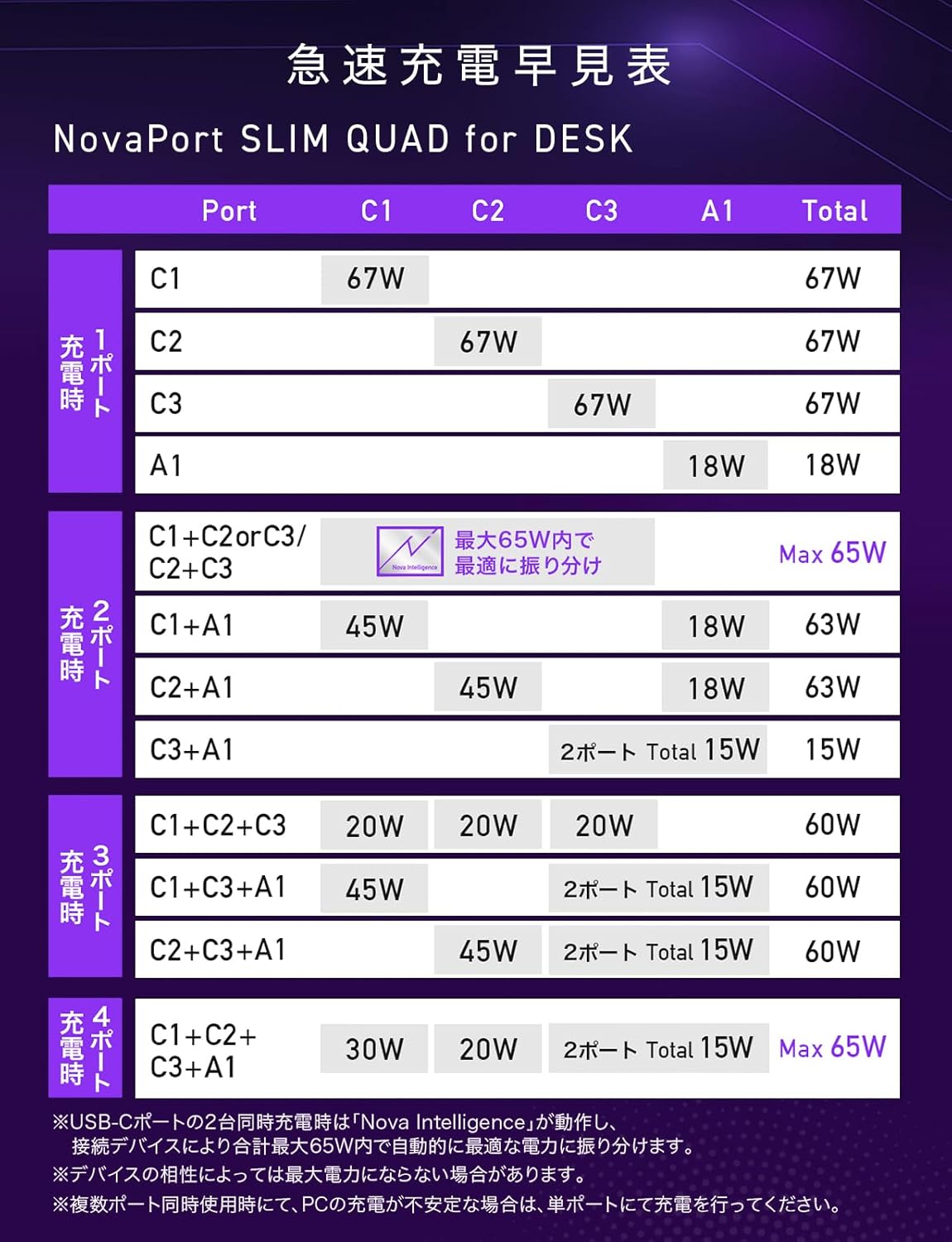
Figure 5: Rapid Charging Quick Reference Table for NovaPort SLIM QUAD, showing power output configurations.
Note: Maximum output may not be achieved for all devices due to compatibility. For PC charging, verify the required voltage və wattage with your PC manufacturer.
5. Baxım
To ensure the longevity and optimal performance of your NovaPort SLIM QUAD charger, follow these maintenance guidelines:
- Təmizləmə: Təmizləmədən əvvəl şarj cihazını elektrik rozetkasından və bütün cihazlardan ayırın. Səthi silmək üçün yumşaq, quru bir parça istifadə edin. Maye təmizləyicilərdən və ya aerozollardan istifadə etməyin.
- Yaddaş: Şarj cihazını birbaşa günəş işığından və həddindən artıq temperaturdan uzaq sərin, quru yerdə saxlayın.
- Sürüşməyə qarşı baza: The charger features an anti-slip silicone base to prevent accidental movement and protect your desk surface.
- Çizilməyə davamlı bitirmə: The surface material has a textured finish designed to resist minor scratches, helping to maintain its appearance over time.

Figure 6: The anti-slip silicone base ensures stability and protects surfaces.
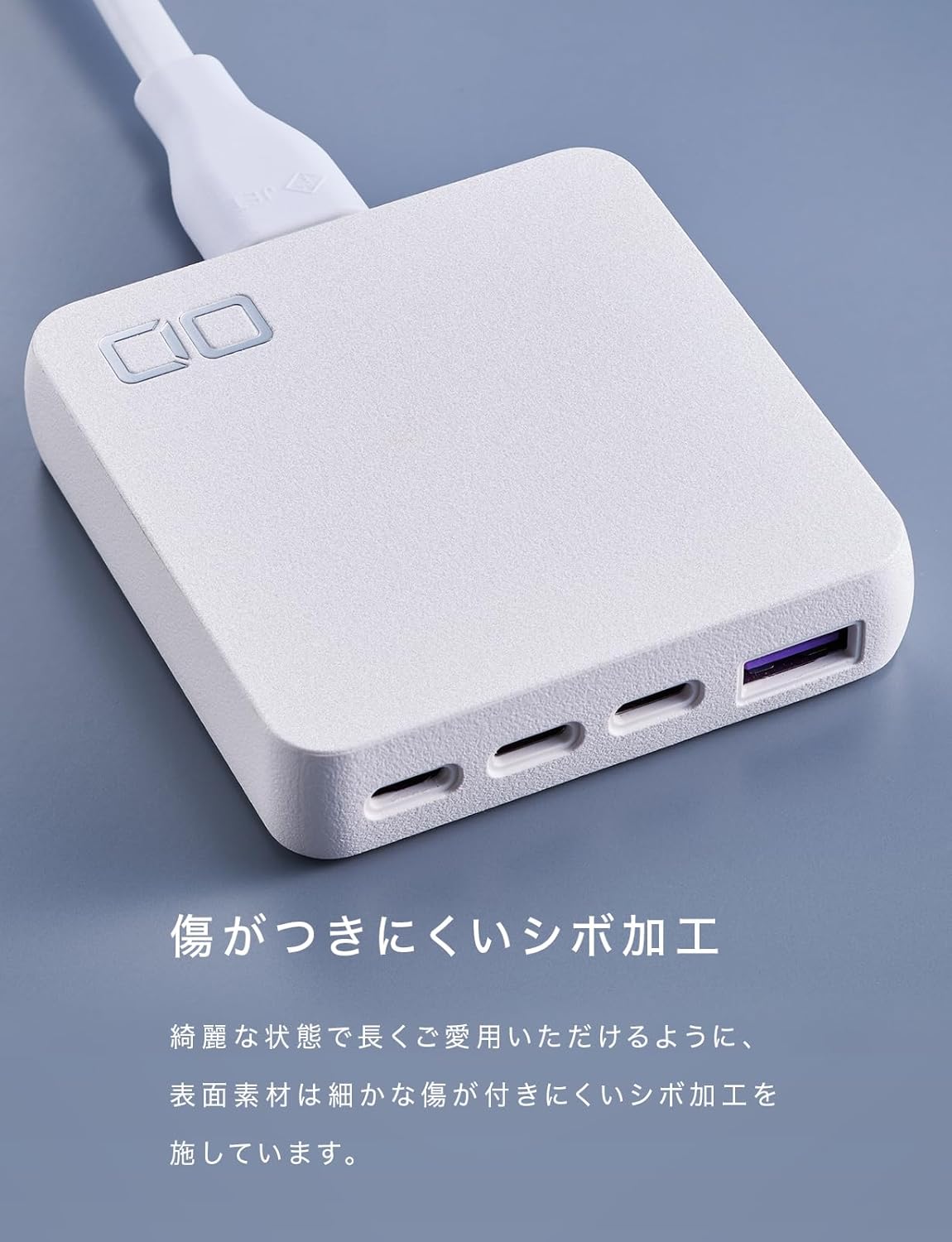
Figure 7: The textured finish helps prevent scratches and maintain the charger's aesthetic.
6. Giderme
If you encounter issues with your NovaPort SLIM QUAD, refer to the following common problems and solutions:
- Device not charging or charging slowly:
- Ensure the charger is properly connected to a power outlet.
- Check that the charging cable is securely connected to both the charger and your device.
- Verify that your device and cable support the charging standards (PD3.0, QC4.0+, PPS) and power output of the charger.
- If charging multiple devices, the power is distributed. For maximum speed on a single device, try charging it alone.
- Şarj cihazı isti hiss edir:
- It is normal for the charger to become warm during operation, especially when charging multiple devices or high-power devices like laptops.
- Ensure the charger has adequate ventilation and is not covered.
- The NovaSafety2.0 technology monitors product temperature and automatically adjusts power to prevent overheating.
- Power output fluctuates or devices disconnect briefly when a new device is connected:
- This is a normal behavior for multi-port chargers with intelligent power distribution (NovaIntelligence). When a new device is connected, the charger performs a 're-handshake' to re-evaluate and redistribute power optimally among all connected devices. This may cause a brief interruption in charging for other devices.
- PC charging is unstable with multiple devices:
- If you experience unstable charging for your laptop when other devices are also connected, try charging the laptop on a single, dedicated USB-C port for optimal performance.
7. Spesifikasiyalar
Below are the detailed technical specifications for the CIO NovaPort SLIM QUAD for DESK 67W charger.

Şəkil 8: Ətraflı məhsul spesifikasiyası.
| Xüsusiyyət | Detal |
|---|---|
| Model nömrəsi | CIO-G67W3C1AD-S |
| Giriş | 100-240VAC, 50/60Hz, 1.5A |
| USB Portları | 3 x USB Type-C, 1 x USB Type-A (Total 4 ports) |
| USB-C Output (C1/C2/C3) | 5V=3A / 9V=3A / 12V=3A / 15V=3A / 20V=3.35A (Max 67W) PPS:5-11V=5A |
| USB-A Çıxış | 5V=3A / 9V=2A / 12V=1.5A (Max 18W) |
| Multi-Port Output (Example) | USB-(C1+C2/C1+C3/C2+C3): 30W+30W or 45W+20W or 20W+45W (Max 65W) USB-(C1+A/C2+A): 45W+18W (Max 63W) USB-(C1+C2+C3): 20W+20W+20W (Max 60W) USB-(C1+C2+A): 20W+20W+18W (Max 58W) USB-(C1/C2+(C3+A)): 45W+15W (Max 60W) USB-(C3+A): 5V=3A (Max 15W) USB-(C1+C2+(C3+A)): 30W+20W+15W (Max 65W) |
| Dəstəklənən Sürətli Doldurma | PD3.0 / QC4.0+ / PPS |
| Ölçülər | Təxminən. 70 x 72 x 16.8 mm |
| Çəki | təqribən. 136 q |
| Daxil olan Kabel Uzunluğu | 1.5 m |
| Included Cable Weight | təqribən. 100 q |
| Rəng | White (This variant) |
| Xüsusiyyətlər | Multi-device charging, Lightweight design, High-speed charging, NovaIntelligence, NovaSafety2.0 |
8. Zəmanət və dəstək
For warranty information and customer support, please refer to the documentation included with your product or visit the official CIO website. The included accessories are an instruction manual (Japanese/English) and a 1.5m power cord.
Contact information for support can typically be found on the manufacturer's websaytda və ya məhsulun qablaşdırmasında.