
1. Giriş
This manual provides detailed instructions for the setup, operation, and maintenance of your HISTTON H4-T Industrial Mini PC. Please read this manual thoroughly before using the device to ensure proper functionality and safety.
2. Təhlükəsizlik Məlumatı
- Enerji təchizatı voltage cihaz tələblərinə uyğundur.
- Cihazı nəmə, həddindən artıq temperatura və ya birbaşa günəş işığına məruz qoymayın.
- Havalandırma deliklərini bağlamaqdan çəkinin.
- Cihazı özünüz açmağa və ya təmir etməyə çalışmayın. İxtisaslı xidmət personalına müraciət edin.
- Cihazı güclü maqnit sahələrindən uzaq tutun.
3. Paketin məzmunu
Bütün əşyaların paketdə olduğunu yoxlayın:
- 1 x HISTTON Mini PC
- 1 x Enerji Adapteri
- 1 x İstifadəçi Təlimatı (bu sənəd)
- 1 x HDMI kabeli
- Screws (for mounting/storage installation)
- WiFi antenalar
- VESA Mount (if included with specific models)
- SATA Cable (for 2.5-inch drive installation)

4. Məhsul bitdiview
The HISTTON H4-T Mini PC is a compact, fanless industrial computer designed for various applications requiring stable performance and extensive connectivity. It features an Intel Core i7-10710U processor and supports multiple display outputs.
4.1 Ön və Arxa Panellər

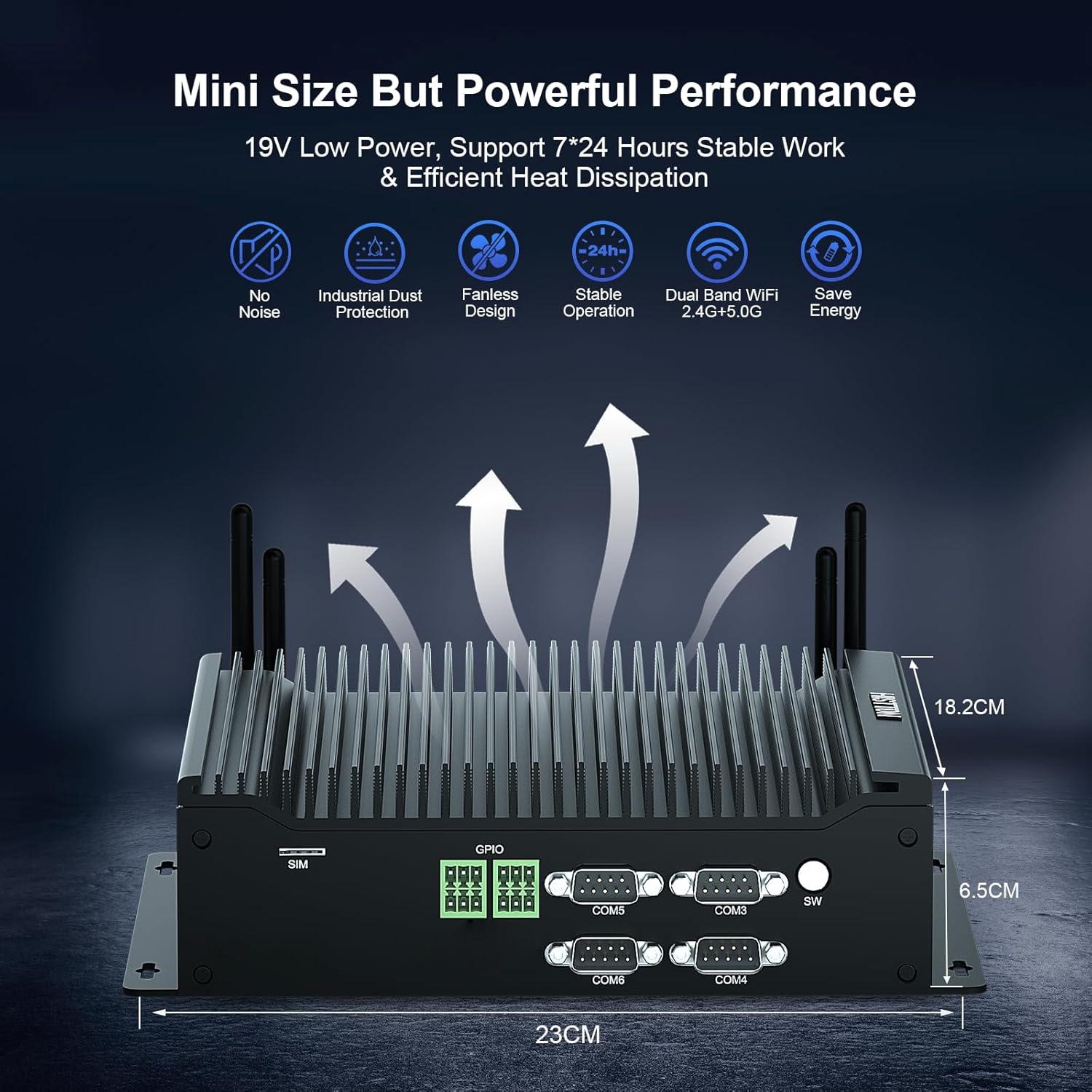
The device features a comprehensive set of ports for various industrial and general computing needs. These include multiple USB ports, LAN ports, COM ports, and video outputs.
4.2 Əsas Xüsusiyyətlər
- Prosessor: Intel Core i7-10710U (10th Gen) with up to 4.70 GHz turbo frequency.
- Qrafik: Intel UHD Graphics for 10th Gen Processors, supporting 4K resolution.
- Yaddaş: Dual DDR4 SO-DIMM slots, expandable up to 64GB.
- Yaddaş: M.2 2280 NVME PCIe 3.0x4 / SATA 3 SSD slot and a 2.5-inch SATA HDD/SSD bay.
- Ekran çıxışı: HD, DisplayPort (DP), and Type-C for triple 4K display support.
- Şəbəkə: 2 x RJ45 Intel I210/211 Gigabit LAN, Dual-band WiFi 5 (2.4G+5.0G), Bluetooth 4.2.
- Bağlantı: 4 x USB 3.0, 4 x USB 2.0, 6 x DB9pin COM ports (configurable for RS232/RS422/RS485), 2 x 6pin GPIO, 1 x SIM card slot.
- Soyutma: Fanless design for silent operation and industrial dust protection.
- Əməliyyat sistemi: Pre-installed Windows 11 Pro (64-bit, activated) with support for Ubuntu.


5. Quraşdırma Təlimatları
5.1 Periferik qurğuların birləşdirilməsi
- Ekranı qoşun: Use the provided HDMI cable or a DisplayPort/Type-C cable to connect your monitor(s) to the Mini PC. The device supports up to three 4K displays simultaneously.
- Klaviatura və Siçanı Qoşun: USB klaviatura və siçanınızı mövcud olan istənilən USB portuna (USB 2.0 və ya USB 3.0) qoşun.
- Şəbəkəyə qoşulun: For a wired connection, connect an Ethernet cable to one of the RJ45 LAN ports. For wireless, attach the included WiFi antennas to the designated ports.
- Audionu birləşdirin: If using external speakers or headphones, connect them to the SPK (speaker) port. A microphone can be connected to the MIC port.

5.2 Yandırılır
- Güc adapterini birləşdirin: Plug the power adapter into the DC 19V 5A input port on the Mini PC, then plug the adapter into a power outlet.
- Güc düyməsi: Press the power button located on the front panel to turn on the Mini PC.
- The system will boot into Windows 11 Pro. Follow the on-screen instructions for initial setup if prompted.
6. Əməliyyat Təlimatları
6.1 Əməliyyat sistemi
Your HISTTON H4-T Mini PC comes with Windows 11 Pro (64-bit) pre-installed and activated. It also supports other operating systems like Ubuntu, allowing for flexible deployment in various environments.
- Windows 11 Pro: Utilize standard Windows features for productivity, multimedia, and internet browsing.
- Ubuntu Support: For users preferring Linux-based systems, the hardware is compatible with Ubuntu installations. Refer to Ubuntu's official documentation for installation procedures.
6.2 Şəbəkə bağlantısı
- Simli LAN: The two Gigabit Ethernet ports provide stable and high-speed wired network access.
- Wireless (WiFi & Bluetooth): The dual-band WiFi 5 (2.4G+5.0G) and Bluetooth 4.2 modules enable wireless internet access and connection to Bluetooth peripherals. Ensure antennas are securely attached for optimal performance.

6.3 Sənaye Xüsusiyyətləri
The H4-T is designed for industrial applications, offering robust connectivity:
- COM Portları: Six DB9pin COM ports support RS232, with four of them configurable for RS422/RS485, suitable for connecting industrial control devices.
- GPIO: Two 6pin GPIO interfaces provide programmable input/output capabilities for custom applications.
- SİM kart yuvası: Supports 4G/5G modules (module not included by default) for mobile network connectivity in remote locations.
7. Baxım
The fanless design of the HISTTON H4-T Mini PC significantly reduces maintenance requirements by eliminating moving parts and minimizing dust accumulation. However, regular care is still recommended.
- Təmizləmə: Periodically wipe the exterior of the Mini PC with a soft, dry cloth. Avoid using liquid cleaners or solvents.
- Proqram təminatı yeniləmələri: Optimal performans və təhlükəsizliyi təmin etmək üçün əməliyyat sisteminizi və drayverlərinizi yeniləyin.
- Ekoloji Şərtlər: Ensure the device is operated within recommended temperature and humidity ranges to prolong its lifespan.
- Yaddaş genişləndirilməsi: If installing additional storage (2.5-inch HDD/SSD or M.2 SSD), ensure the device is powered off and disconnected from power. Follow proper anti-static procedures.
8. Giderme
If you encounter issues with your HISTTON H4-T Mini PC, refer to the following common problems and solutions:
| Problem | Mümkün Səbəb | Həll |
|---|---|---|
| Enerji yoxdur / Cihaz açılmır | Power adapter not connected or faulty; Power outlet issue; Power button not pressed correctly. | Ensure power adapter is securely connected to both the PC and a working power outlet. Try a different outlet. Press the power button firmly. |
| Monitorda ekran yoxdur | Display cable loose or faulty; Incorrect input selected on monitor; Monitor off or faulty. | Check display cable connections. Ensure monitor is on and set to the correct input source (HDMI, DP, Type-C). Test with a different monitor or cable if possible. |
| İnternet bağlantısı yoxdur (simli) | Ethernet cable loose or faulty; Router/modem issue; Network driver issue. | Verify Ethernet cable is securely connected. Restart your router/modem. Check network adapter status in OS. |
| No internet connection (wireless) | WiFi antennas not connected; WiFi disabled; Incorrect WiFi password; Router issue. | Ensure WiFi antennas are attached. Check WiFi settings in OS. Verify WiFi password. Restart your router. |
| Peripherals (USB devices) not working | Loose connection; Driver issue; Faulty peripheral. | Try a different USB port. Reinstall or update drivers for the peripheral. Test the peripheral on another computer. |
9. Spesifikasiyalar
| Xüsusiyyət | Detal |
|---|---|
| Model Adı | H4-T |
| Prosessor | Intel Core i7-10710U (10th Gen), 6 Cores, 12 Threads, 12M Cache, up to 4.70 GHz |
| Qrafik koprosessor | 10-cu nəsil Intel prosessorları üçün Intel UHD Qrafikası |
| RAM | 32GB DDR4 SO-DIMM (Expandable up to 64GB) |
| Sərt Disk | 512GB M.2 NVMe SSD (Supports M.2 2280 NVME PCIe 3.0x4 / SATA 3 SSD and 2.5 inch SATA HDD/SSD) |
| Əməliyyat sistemi | Windows 11 Pro (64-bit, activated), Supports Ubuntu |
| Ekran Çıxışı | HD, DisplayPort (DP), Type-C (Supports Triple 4K Display) |
| LAN | 2 x RJ45 Intel I210/211 Gigabit LAN |
| Simsiz Bağlantı | Dual-band WiFi 5 (2.4G+5.0G), Bluetooth 4.2 |
| USB Portları | 4x USB 3.0, 4x USB 2.0 |
| COM Limanları | 6 x DB9pin (2 x RS232, 4 x RS422/RS485 configurable) |
| Digər interfeyslər | 2 x 6pin GPIO, 1 x SIM card slot, 1 x SPK, 1 x MIC |
| Enerji təchizatı | DC19V 5A |
| Enerji istehlakı | 15W-20W |
| Soyutma | Fanatsız dizayn |
| Ölçülər (UxGxY) | 9.06 x 7.17 x 2.56 düym (23 x 18.2 x 6.5 sm) |
| Maddə Çəkisi | 6.38 funt (təqribən 2.9 kq) |
10. Zəmanət Məlumatı
HISTTON products are covered by a standard manufacturer's warranty. Please refer to the warranty card included with your product or visit the official HISTTON webətraflı zəmanət şərtləri üçün sayt. Zəmanət iddiaları üçün satınalma sübutunuzu saxlayın.
11. Müştəri dəstəyi
For technical assistance, troubleshooting, or any questions regarding your HISTTON H4-T Mini PC, please contact HISTTON customer support. Contact information can typically be found on the official HISTTON websaytda və ya qablaşdırma materiallarında.
Onlayn Resurslar: For additional support and driver downloads, visit the official HISTTON websayt.