
Giriş
This manual provides detailed instructions for the installation, operation, and maintenance of your CHSTEK 8581A+Box Android 13 Car Radio. This advanced multimedia system is designed to enhance your driving experience with features such as Wireless CarPlay, Wired Android Auto, GPS navigation, and more. Please read this manual thoroughly before installation and use to ensure proper functionality and safety.
This unit is specifically compatible with Porsche 911 (997) 2005-2012, Porsche Boxster (987) 2004-2012, and Porsche Cayman (987) 2005-2013 models. Please note that this model does not include a DVD/CD player.
Quraşdırma və Quraşdırma
Proper installation is crucial for the optimal performance of your car radio. It is recommended that installation be performed by a qualified professional.
Uyğunluq Qeydləri
- Avtomobil Modelləri: Porsche 911 (997) 2005-2012, Porsche Boxster (987) 2004-2012, Porsche Cayman (987) 2005-2013.
- Audio Systems: If your vehicle is equipped with a Harman Kardon or BOSE audio system, a separate fiber optic box is required to ensure sound output. Please contact support for assistance if your vehicle has one of these systems.
- Sükan idarəediciləri: Some high-grade versions of compatible vehicles (e.g., Cayman 2010-2012) may not fully support steering wheel control keys.
Quraşdırma Bitdiview
The unit is designed for a plug-and-play installation. Ensure your car's dashboard matches the provided images for proper fitment.

Şəkil: Comparison of the car dashboard before and after the installation of the CHSTEK Android 13 Car Radio. The 'Before installation' image shows the original car radio, while the 'After installation' image displays the new unit seamlessly integrated into the dashboard, running a CarPlay interface.

Şəkil: The CHSTEK 8581A+Box car radio unit shown with its included components, including a microphone and various wiring harnesses. This image highlights the necessary connections for installation, including the fiber optic box if required.
Əməliyyat Təlimatları
Wireless CarPlay and Wired Android Auto
The car radio supports both wireless Apple CarPlay and wired Android Auto, allowing seamless integration with your smartphone. Once connected, you can access navigation, make calls, send messages, and enjoy music directly from the car's display.
- Səslə Nəzarət: Activate Siri or Google Assistant for hands-free operation.
- Qeyd: Samsung devices may not be fully supported for Android Auto.

Şəkil: The car radio display showing the Wireless CarPlay interface. Features like online maps, Siri voice control, call functions, and music playback are visible, demonstrating the integrated smartphone experience.
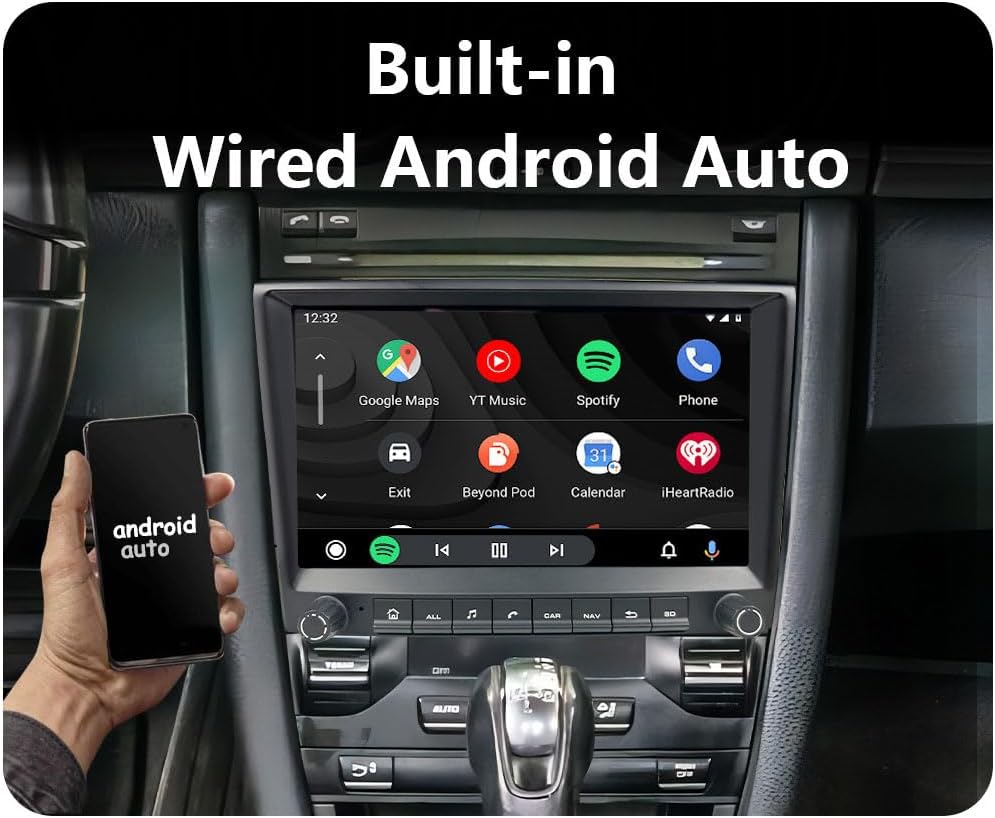
Şəkil: The car radio display showing the Wired Android Auto interface. Various Android applications such as Google Maps, YouTube Music, Spotify, and Phone are displayed, indicating the functionality of mirroring an Android device.
GPS Naviqasiya və WiFi
The head unit features built-in GPS navigation and WiFi connectivity. You can use both online and offline maps. Download necessary offline maps for navigation without an internet connection. Real-time road conditions help optimize routes.
- 4G Bağlantısı: Supports 4G with a dedicated SIM card slot and antenna for enhanced online functionality.
- Onlayn Media: Connect to WiFi to stream movies, browse the web, və onlayn məzmuna daxil olun.

Şəkil: The car radio unit highlighting its support for 4G and WiFi connectivity. An illustration shows the 4G SIM card slot and antenna, emphasizing the ease of replacing the SIM card without disassembling the unit.
Multiple UI Desktop Themes & Split Screen Function
Customize your user experience with multiple built-in UI desktop themes. The split-screen function allows you to run two applications simultaneously, such as navigation and music playback.

Şəkil: The car radio display demonstrating the split-screen functionality. Examples include video playback alongside navigation, and navigation combined with a music player, showcasing the ability to multitask.
Bluetooth Hands-free & FM Radio
- Bluetooth: Supports hands-free calling, Bluetooth music streaming, and phonebook synchronization. An external microphone ensures clear communication.
- FM Radiosu: Features 18 preset stations (FM 87.50-108.0 MHz) with RDS function for stable frequency selection, especially for European users.
- EQ funksiyası: Provides sound equalization options for an optimized audio experience.

Şəkil: The car radio display showing the FM radio interface. It illustrates the frequency selection (e.g., 90.50 MHz), preset stations, and other radio controls, highlighting the built-in RDS function.
Baxım
To ensure the longevity and optimal performance of your CHSTEK car radio, follow these maintenance guidelines:
- Təmizləmə: Ekranı və xarici hissəni təmizləmək üçün yumşaq, quru bir parça istifadə edin. Aşındırıcı təmizləyicilərdən və ya həlledicilərdən istifadə etməyin.
- Temperatur: Cihazı uzun müddət həddindən artıq temperatur və ya birbaşa günəş işığına məruz qoymayın.
- Proqram təminatı yeniləmələri: Periodically check for and install software updates to ensure the system runs efficiently and securely.
Problemlərin aradan qaldırılması
This section addresses common issues you might encounter with your car radio.
- Səs yoxdur: If your car has a Harman Kardon or BOSE audio system and there is no sound after installation, ensure you have installed the required fiber optic box. Without it, the system will not produce audio.
- Connectivity Issues (CarPlay/Android Auto): Ensure your phone's Bluetooth and Wi-Fi are enabled. For wired Android Auto, check the USB cable connection. If issues persist, try restarting both the car radio and your smartphone. Note that some Samsung devices may have compatibility limitations with Android Auto.
- GPS siqnal itkisi: GPS antennasının düzgün quraşdırıldığından və şəffaf olduğundan əmin olun view of the sky. Check for any obstructions that might block the signal.
- Sükan çarxının idarəediciləri işləmir: Verify that your vehicle model is fully compatible with the steering wheel control feature. Some specific high-grade versions may not support this functionality.
Spesifikasiyalar
| Xüsusiyyət | Spesifikasiya |
|---|---|
| Model nömrəsi | 8581A+Box |
| Əməliyyat sistemi | Android 13 |
| Ekran Ölçüsü | 8 düym |
| Ekran Çözünürlüğü | 1280*720P HD |
| Prosessor | 8 Core 1.6GHz |
| Yaddaş (RAM) | 2 GB |
| Yaddaş (ROM) | 32 GB |
| Bağlantı | Wireless CarPlay, Wired Android Auto, Bluetooth, GPS, 4G, WiFi |
| Xüsusi Xüsusiyyətlər | Touchscreen, Split Screen, Multiple UI Themes, RDS Function, EQ Function |
| Maddə Çəkisi | 4.4 funt sterlinq |
| Paket Ölçüləri | 11.81 x 9.84 x 7.87 düym |
| Daxil olan komponentlər | As shown (includes microphone) |
Zəmanət
This CHSTEK car radio comes with a 1 il zəmanət from the date of purchase. Please retain your proof of purchase for any warranty claims. The warranty covers manufacturing defects but does not cover damage caused by improper installation, misuse, accidents, or unauthorized modifications.
Dəstək
For any questions, technical assistance, or troubleshooting beyond what is covered in this manual, please contact CHSTEK customer support. Online help is available to assist you with installation queries, compatibility concerns (e.g., fiber optic box requirements), and operational guidance.
Please refer to your purchase documentation for specific contact details or visit the official CHSTEK webdəstək resursları üçün sayt.