
1. Giriş
The FIREBAT X3 Wired RGB Gaming Mouse is designed for precision and comfort, suitable for various computing tasks including gaming, office work, and general use. This manual provides detailed instructions for setting up, operating, and maintaining your mouse.

Bitdiview of the FIREBAT X3 Wired RGB Gaming Mouse highlighting its main features.
2. Quraşdırma
2.1 Siçanın qoşulması
The FIREBAT X3 Gaming Mouse features a simple plug-and-play design for easy setup.
- Locate an available USB-A port on your computer or laptop.
- Insert the USB connector of the mouse into the USB-A port.
- Your operating system will automatically detect and install the necessary drivers. No additional software installation is required for basic functionality.

The FIREBAT X3 mouse connects via a standard USB-A port for immediate use.
3. Əməliyyat
3.1 Düymə funksiyaları
The FIREBAT X3 Gaming Mouse is equipped with 6 programmable buttons for enhanced control.
- Sol Düymə: Standart klik funksiyası.
- Sağ Düymə: Standart sağ klikləmə funksiyası.
- Sürüşmə çarxı: Scrolls up and down. Can also be pressed for a middle-click function.
- DPI Adjustment Key: Changes the mouse sensitivity (DPI).
- İrəli Düymə: İrəli gedir web brauzerlər və ya file kəşfiyyatçılar.
- Geri düyməsi: Geriyə doğru hərəkət edir web brauzerlər və ya file kəşfiyyatçılar.

Illustration of the 6-button layout on the FIREBAT X3 Gaming Mouse.
3.2 DPI-nin (Həssaslıq) tənzimlənməsi
The mouse features 4 adjustable DPI levels to suit different tasks and preferences.
- düyməsini basın DPI Adjustment Key (located behind the scroll wheel) to cycle through the preset DPI settings.
- The default DPI levels are 1200, 1800, 2400, and 3600.
- Each press will switch to the next DPI level, allowing you to find the optimal sensitivity for your current activity.

The DPI adjustment key allows for quick changes in mouse sensitivity.
3.3 RGB İşıqlandırma Rejimi
The FIREBAT X3 mouse features 7 dynamic RGB backlit modes to enhance your setup.
- The RGB lighting automatically cycles through its 7 distinct modes.
- There is no manual button to change the RGB mode; the mouse will continuously display various lighting effects.
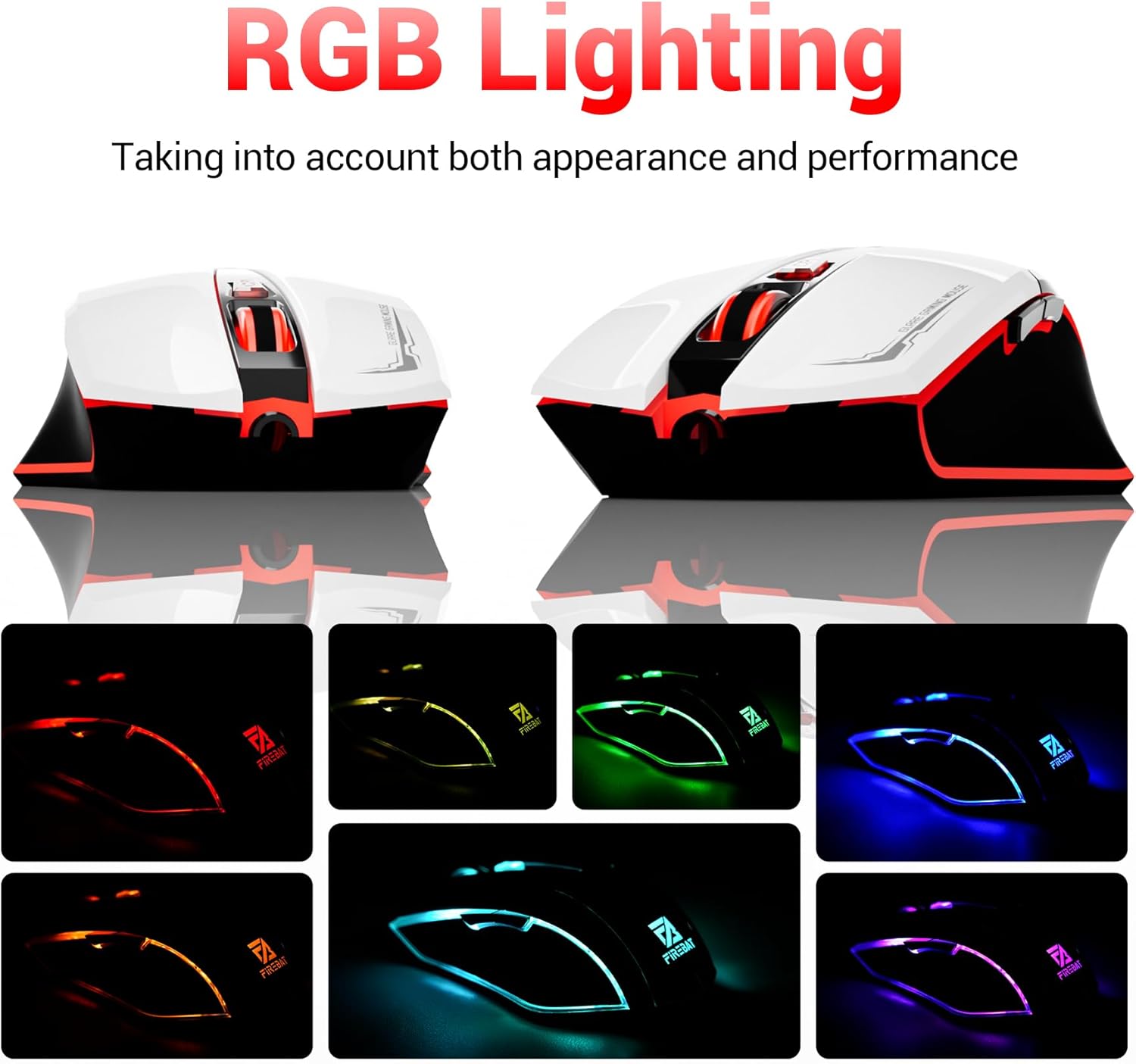
The mouse features vibrant RGB lighting with multiple dynamic modes.
3.4 Erqonomik Dizayn və Rahatlıq
The mouse is designed with an ergonomic shape to provide a comfortable grip and reduce hand fatigue during extended use, suitable for both right and left-hand users.

The ergonomic design ensures comfort during prolonged use.
3.5 Quiet Click Feature
The mouse incorporates a 'Heavy Bass Design' for its key sounds, ensuring soft clicks without excessive noise, which is beneficial in quiet environments.

The mouse features quiet clicks, minimizing noise during use.
4. Baxım
4.1 Təmizləmə
To ensure optimal performance and longevity, keep your mouse clean.
- Təmizləmədən əvvəl siçanı kompüterinizdən ayırın.
- Yumşaq, tüysüz parçadan yüngülcə istifadə edin dampSiçanın səthini silmək üçün su və ya yumşaq təmizləyici məhlul ilə silin.
- Sərt kimyəvi maddələrdən, aşındırıcı təmizləyicilərdən və ya həddindən artıq nəmdən istifadə etməkdən çəkinin, çünki bunlar siçana zərər verə bilər.
- For the optical sensor, use a cotton swab to gently remove any dust or debris.
4.2 Saxlama
İstifadə edilmədikdə, siçanı təmiz, quru bir mühitdə, həddindən artıq temperaturdan və birbaşa günəş işığından uzaqda saxlayın.
5. Giderme
5.1 Siçan Cavab Vermir
- USB bağlantısını yoxlayın: USB kabelinin kompüterinizdəki işləyən USB portuna etibarlı şəkildə qoşulduğundan əmin olun. Başqa bir USB portu sınayın.
- Kompüteri yenidən başladın: Bəzən sadə bir yenidən başlatma bağlantı problemlərini həll edə bilər.
- Başqa bir kompüterdə test edin: If possible, test the mouse on another computer to determine if the issue is with the mouse or your computer's setup.
5.2 Cursor Movement is Erratic or Jumpy
- Təmiz Optik Sensor: Dust or debris on the optical sensor can cause erratic movement. Refer to the cleaning instructions in the Maintenance section.
- Use a Mouse Pad: Ensure you are using the mouse on a suitable surface. Reflective, transparent, or uneven surfaces can interfere with the optical sensor.
5.3 RGB İşıqlandırma İşləmir
- USB gücünü yoxlayın: Ensure the mouse is receiving sufficient power through the USB connection.
- No Manual Control: Remember that the RGB lighting cycles automatically and does not have a manual control button. If the mouse is functioning otherwise, the lighting should be active.
6. Spesifikasiyalar
| Xüsusiyyət | Detal |
|---|---|
| Model nömrəsi | X3 Gaming Mouse |
| Brend | FIREBAT |
| Bağlantı texnologiyası | USB kabelli |
| Hərəkat aşkarlanması | Optik |
| DPI səviyyələri | 1200/1800/2400/3600 |
| Düymələrin sayı | 6 (Proqramlaşdırıla bilən) |
| Arxa işıq | 7 RGB rejimi |
| Məhsul Ölçüləri | 5 x 3 x 0.1 düym (12.7 x 7.6 x 0.25 sm) |
| Maddə Çəkisi | 5.1 unsiya (144.6 qram) |
| Erqonomika | Right or Left Hand Use |
| İstehsalçı | FIREBAT |
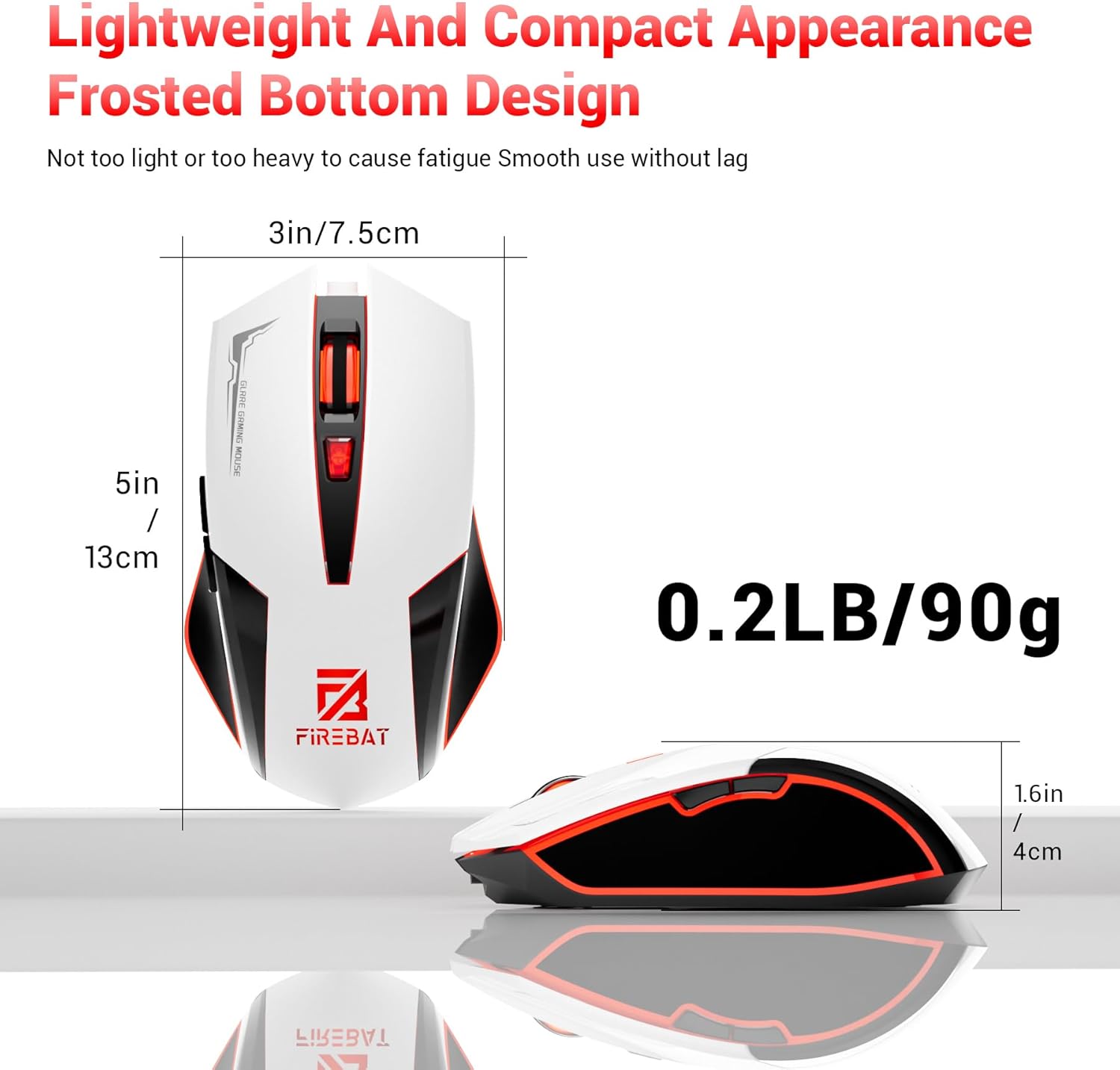
Physical dimensions and weight of the FIREBAT X3 Gaming Mouse.
7. Zəmanət və Dəstək
7.1 Zəmanət Məlumatı
FIREBAT products are manufactured to high-quality standards. For specific warranty details, please refer to the warranty card included with your product or visit the official FIREBAT website. Typically, products come with a limited warranty covering manufacturing defects.
7.2 Müştəri dəstəyi
If you encounter any issues or have questions regarding your FIREBAT X3 Gaming Mouse, please contact our customer support team:
- E-poçt: support@firebatpc.com
- Websayt: www.firebatpc.com
Please provide your product model number (X3 Gaming Mouse) and a detailed description of your issue when contacting support for faster assistance.