
1. Giriş
Thank you for choosing the Generic X5 Mini WiFi Camera. This compact and versatile camera is designed for various monitoring needs, including home security and outdoor surveillance. It features HD1080P video recording, a wide-angle lens, night vision, and remote access via Wi-Fi. Please read this manual carefully to ensure proper setup and operation of your device.
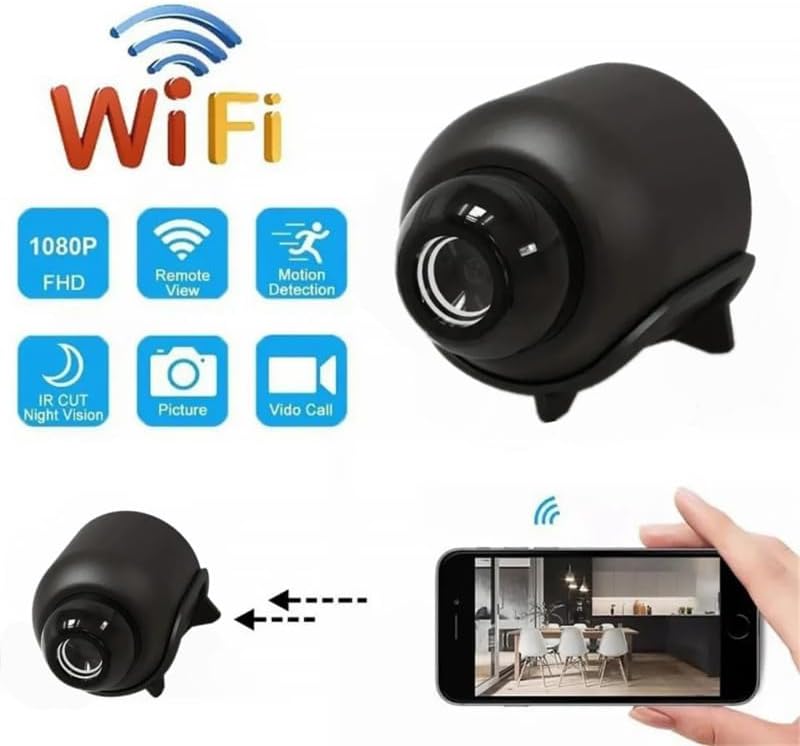
Image 1.1: The X5 Mini WiFi Camera highlighting its key features such as 1080P FHD, Remote View, Motion Detection, IR Cut Night Vision, Picture, and Video Call capabilities.
2. Paketin məzmunu
Zəhmət olmasa paketi aşağıdakı maddələr üçün yoxlayın:
- 1 x X5 Mini WiFi Camera
- 1 x İstifadəçi Təlimatı
- 1 x Dəstək Braketi
- 1 x Type-C Kabel
3. Məhsul bitdiview
Familiarize yourself with the camera's components and dimensions.

Image 3.1: Labeled components of the X5 Mini Camera, including the TF Card slot, Infrared Lamp, Button, and Charging Jack.

Şəkil 3.2: Ön view of the X5 Mini Camera, indicating the photosensitive sensor, HD lens, and built-in microphone.

Image 3.3: Dimensions of the X5 Mini Camera, showing approximate measurements of 4cm (1.57inch) length, 3.5cm (1.38inch) height, and 3cm (1.18inch) width.
4. Spesifikasiyalar
| Xüsusiyyət | Spesifikasiya |
|---|---|
| Qətnamə | 1080P |
| Video Format | AVI |
| Şəkil Formatı | JPG |
| Şəkil Ölçüsü | 16:9 |
| Video kadr tezliyi | 30 kadr/s |
| Geniş Bucaqlı Obyektiv | 140° |
| Gecə Görmə Aralığı | Up to 10 meters (with four infrared lights) |
| Bağlantı | WiFi (2.4GHz band only) |
| Tətbiq | YsxLite |
| Doldurma Portu | Tip-C |
| Material | ABS |
| Ölçülər | 4.3 x 3.3 x 3.3 sm (təxminən) |
| Xüsusi Xüsusiyyətlər | WiFi Remote, Circular Recording, Mobile Detection, Built-in Microphone, Cloud Storage (subscription required) |

Image 4.1: Visual comparison demonstrating the superior clarity and detail of 1080P resolution compared to 720P, ensuring clear footage 10 metrə qədər.
5. Quraşdırma Bələdçisi
Follow these steps to set up your X5 Mini WiFi Camera:
- Enerji təchizatı: Plug the camera into a 5V/1A power supply using the provided Type-C cable.
- App Download: Download the 'YsxLite' application on your mobile phone. You can find it in your device's app store or by scanning a QR code if provided in the physical manual.
- Router Konfiqurasiyası: Ensure your Wi-Fi router is configured to operate on the 2.4GHz band. The camera only supports 2.4GHz Wi-Fi. If your router uses both 2.4GHz and 5GHz, you may need to adjust settings to ensure the camera connects to the 2.4GHz network.
- Yaddaş Kartını daxil edin: Insert an extra purchased memory card (TF card) into the designated slot on the camera. This is required for local recording.
- Tətbiqə qoşulun:
- First, connect your mobile phone to the camera's intranet (hotspot) if prompted by the app.
- Then, connect the camera to your router's 2.4GHz Wi-Fi network through the app. Follow the on-screen instructions in the YsxLite app for successful connection.
- Lazım gələrsə sıfırlayın: If the connection process is unsuccessful, please reset the camera and repeat the above steps.

Image 5.1: Illustration of connecting the camera to a WiFi hotspot for real-time viewing and remote access via the YsxLite app on Apple/Android smartphones.
6. Əməliyyat Təlimatları
6.1 Əsas qeyd
The camera supports circular recording. Once a memory card is inserted and the camera is powered on, it will begin recording. Older footage will be overwritten when the memory card is full.
6.2 Remote Monitoring (WiFi)
After successfully connecting the camera to your home Wi-Fi network via the YsxLite app, you can view canlı footage and control camera functions remotely from your smartphone.
6.3 Hərəkətin aşkarlanması
The camera features mobile detection. When motion is detected, the camera can send alerts to your smartphone via the YsxLite app. You can configure motion detection sensitivity and alert settings within the app.

Image 6.1: Demonstration of the AI Human Detection feature, which detects humans or animals in motion and sends activity alerts to your phone.
6.4 Gecə Görünüşü
Equipped with four infrared lights, the camera provides night vision up to 10 meters, allowing for clear footage in low-light and nighttime conditions. You can control the infrared lights (on/off) from your phone via the app.
6.5 Cloud Storage
Cloud storage is supported for your recordings (subscription required). Refer to the YsxLite app for details on cloud storage plans and activation.
6.6 User Sharing
The camera supports multi-user real-time sharing. The main account can add multiple sub-accounts to view videos, allowing family members to monitor simultaneously.

Image 6.2: Illustration of the user sharing feature, allowing multiple family members to view the camera feed simultaneously.
7. Baxım
- Təmizləmə: Kamera linzasını və korpusunu təmizləmək üçün yumşaq, quru bir parça istifadə edin. Sərt kimyəvi maddələrdən və ya aşındırıcı materiallardan istifadə etməkdən çəkinin.
- Yaddaş: Kameranı istifadə edilmədikdə, onu sərin, quru və birbaşa günəş işığından və həddindən artıq temperaturdan uzaq yerdə saxlayın.
- Batareyaya qulluq: To prolong battery life, avoid fully discharging the camera frequently. Charge it regularly, especially if storing for extended periods.
8. Giderme
If you encounter issues with your X5 Mini WiFi Camera, refer to the following common problems and solutions:
- Kamera yanmır:
- Ensure the camera is properly connected to a 5V/1A power source.
- Check the Type-C cable for damage.
- Güc düyməsini bir neçə saniyə basıb saxlayın.
- Wi-Fi-a qoşulmaq mümkün deyil:
- Confirm your router is broadcasting a 2.4GHz Wi-Fi signal. The camera does not support 5GHz Wi-Fi.
- Kameranın Wi-Fi routerinizin əhatə dairəsində olduğundan əmin olun.
- Reset the camera and attempt the connection process again.
- Tətbiqə daxil edilmiş Wi-Fi parolunun düzgün olduğunu yoxlayın.
- Zəif video keyfiyyəti:
- Kamera obyektivinin təmiz və toz və ya ləkələrdən təmiz olduğundan əmin olun.
- Wi-Fi siqnal gücünü yoxlayın; zəif siqnal yayım keyfiyyətinə təsir göstərə bilər.
- Ensure adequate lighting for optimal image capture, especially during the day.
- Hərəkət aşkarlanması işləmir:
- Verify that motion detection is enabled in the YsxLite app settings.
- Hərəkət aşkarlanması üçün həssaslıq parametrlərini tənzimləyin.
- Kameranın olduğundan əmin olun view mane olmur.
- No recording to memory card:
- Ensure a compatible TF card is inserted correctly.
- Check if the memory card is full; the camera supports circular recording, but initial setup might require formatting.
- Format the memory card through the app if issues persist.
9. Zəmanət və Dəstək
This product comes with a standard manufacturer's warranty. For specific warranty details, please refer to the product packaging or contact your retailer. For technical support or further assistance, please reach out to the seller or manufacturer through the platform where the product was purchased.


