
1. Giriş
This manual provides essential information for setting up, operating, maintaining, and troubleshooting your realme Note 70T smartphone. Please read this guide thoroughly to ensure optimal performance and longevity of your device.
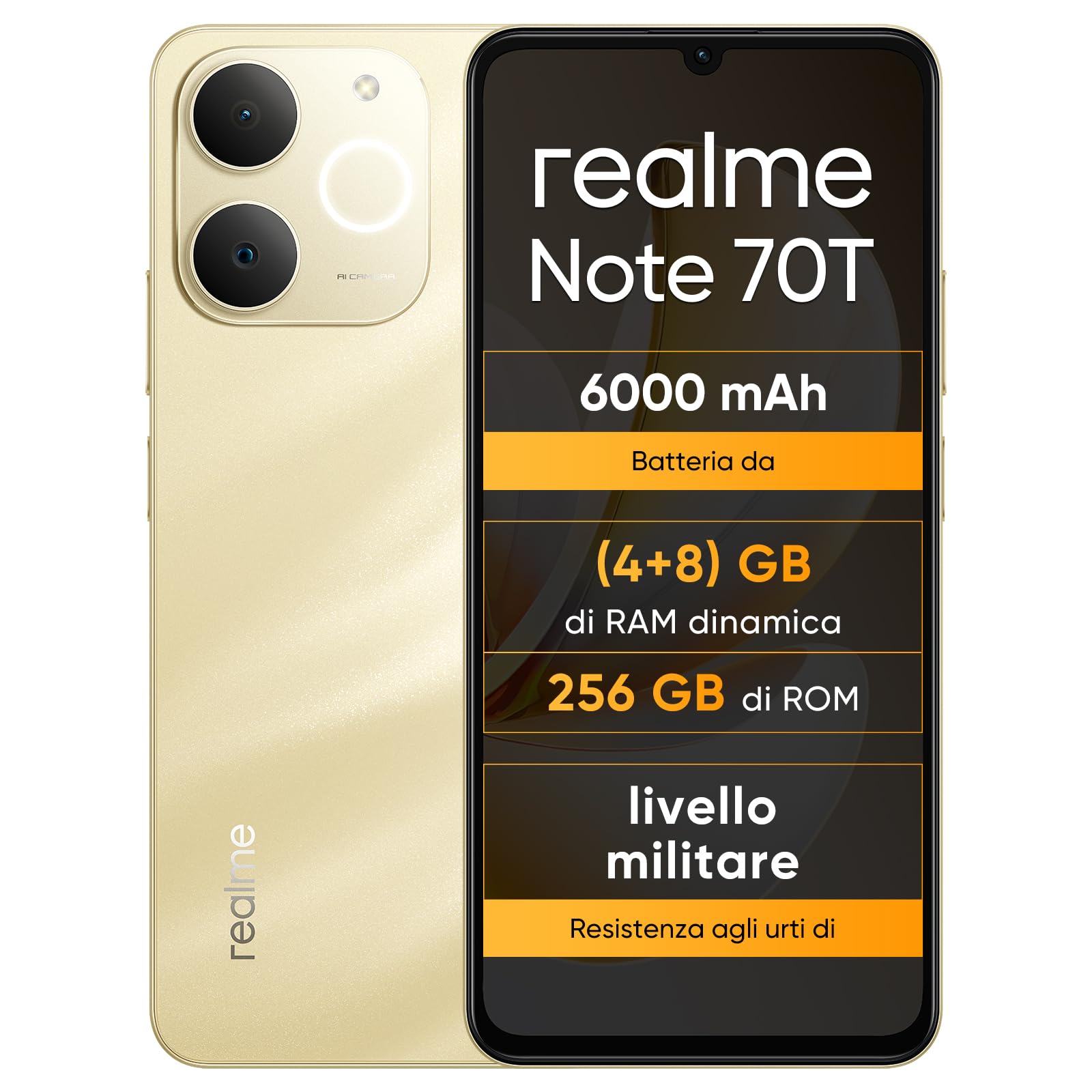
Şəkil: Ön və arxa view of the realme Note 70T smartphone.
2. Quraşdırma Bələdçisi
2.1 Paketin məzmunu
Paketinizdə aşağıdakı elementlərin olduğunu yoxlayın:
- realme Note 70T Smartphone
- USB kabel
- Telefon qutusu
- Qoruyucu film
2.2 SIM kartın daxil edilməsi və yandırılması
- Locate the SIM card tray on the side of the device. Use the provided SIM ejector tool to open the tray.
- Carefully place your Nano-SIM card(s) and/or microSD card into the tray, ensuring correct orientation. The realme Note 70T supports Dual SIM.
- Telefonun gövdəsi ilə üst-üstə düşənə qədər qabı yavaşca yuvaya itələyin.
- Press and hold the Power button (located on the right side) until the realme logo appears on the screen.

Şəkil: Yan view of the realme Note 70T, illustrating the location of the SIM card tray.
2.3 İlkin Doldurma
Before first use, it is recommended to fully charge your device. Connect the USB cable to the phone's USB-C port and the other end to a compatible power adapter (not included) or a computer's USB port.

Şəkil: Aşağı view of the realme Note 70T, highlighting the USB-C charging port.
3. Əməliyyat Təlimatları
3.1 Əsas funksiyalar
- Yandırma/Söndürmə: Press and hold the Power button. Select 'Power off' or 'Restart'.
- Səs səviyyəsinə nəzarət: Cihazın yan tərəfindəki Səs artırma və azaltma düymələrindən istifadə edin.
- Ekran kilidi/kilidini aç: Ekranı kilidləmək və ya kilidini açmaq üçün Güc düyməsini qısaca basın.
- Üz tanıma: Configure facial recognition in Settings for quick and secure unlocking.

Şəkil: Yan view of the realme Note 70T, showing the power and volume buttons.
3.2 Ekran Xüsusiyyətləri
The realme Note 70T features a 6.75-inch Eye Comfort Display with a 90Hz refresh rate. This provides smooth visuals and reduces eye strain. The display offers vivid clarity and comfortable viewing.

Image: The realme Note 70T display showcasing its 90Hz refresh rate and eye comfort features with a vibrant beach scene.
3.3 Kamera Funksiyaları
Capture every moment with the 13MP rear camera and 5MP front camera. The device includes advanced AI features to enhance your photography:
- Süni intellekt Şəffaf Üz: Improves blurry portraits for sharper results.
- Süni intellekt pozucusu: Removes unwanted elements from photos.
- AI Image Matting: Allows you to easily remove subjects from backgrounds.

Image: Demonstration of the AI Clear Face feature, showing a blurry portrait before and after AI enhancement.

Image: Demonstration of the AI Eraser feature, showing an object removed from a photo.

Image: Demonstration of the AI Image Matting feature, showing a person isolated from the background.
3.4 Batareyanın idarə edilməsi
The 6000mAh battery provides up to two days of usage on a single charge. It supports extended standby and includes 38 levels of charging protection for long-term battery health.

Image: Illustration of the realme Note 70T's 6000mAh battery capacity and estimated usage times for various activities.
3.5 Performance and Audio
Powered by an octa-core chipset with speeds up to 1.8 GHz, the realme Note 70T ensures smooth performance for gaming and applications. It supports fast app launch times and keeps up to 16 apps active in the background.
Experience enhanced audio with 300% ultra volume and AI Call 2.0, which provides intelligent noise reduction for clear calls.

Image: Visual representation of the realme Note 70T's octa-core processor.

Image: Illustration of the AI Call 2.0 feature, demonstrating noise reduction during calls.
4. Baxım
4.1 Suya və toza davamlılıq (IP54)
The realme Note 70T is rated IP54 for water and dust resistance, protecting against splashes and dust ingress. The speaker vibrates at a specific frequency to expel accumulated water. This feature ensures the device remains functional in various daily situations.

Image: The realme Note 70T being splashed with water, demonstrating its IP54 water resistance.
4.2 ArmorShell Protection
The device features ArmorShell protection, having passed the MIL-STD 810H military-grade shock resistance test. This includes multi-angle drop tests and high-intensity impact tests, ensuring durability against accidental drops from up to 1.8 meters.

Image: The realme Note 70T being dropped onto a rocky surface, illustrating its military-grade resistance.
4.3 Ümumi qulluq
- Keep the device clean using a soft, dry cloth. Avoid abrasive materials.
- Telefonu uzun müddət həddindən artıq temperatur və ya birbaşa günəş işığına məruz qoymaqdan çəkinin.
- Cihazı özünüz sökməyə və ya təmir etməyə çalışmayın, çünki bu, zəmanəti ləğv edə və zədələnməyə səbəb ola bilər.
5. Giderme
5.1 Ümumi məsələlər və həll yolları
- Cihaz açılmır: Batareyanın doldurulduğundan əmin olun. Şarj cihazına qoşun və yenidən cəhd edin.
- Ekran cavab vermir: Restart the device by holding the Power button for an extended period (usually 10-15 seconds).
- Proqramlar çökür və ya yavaş işləyir: Close background applications. Utilize the AI Optimization feature to improve app smoothness.

Image: Screenshot of the AI Optimization feature on the realme Note 70T, showing options to improve app smoothness.
5.2 Zavod parametrlərinə sıfırlama
Problemlər davam edərsə, zavod parametrlərinə yenidən qurmağı düşünə bilərsiniz. Xəbərdarlıq: This will erase all data on your device. Back up important information before proceeding. Navigate to Parametrlər > Sistem > Seçimləri sıfırla > Bütün məlumatları sil (zavod parametrlərinə sıfırlama).
6. Spesifikasiyalar
| Xüsusiyyət | Spesifikasiya |
|---|---|
| Brend | realme |
| Model Adı | realme Note 70T |
| Əməliyyat sistemi | Android 15 |
| RAM ölçüsü | 4 GB |
| Saxlama Tutumu | 256 GB |
| Ekran Ölçüsü | 6.75 düym |
| Qətnamə | 720 x 1600 |
| Yeniləmə dərəcəsi | 90 Hz |
| Hüceyrə Texnologiyası | 4G |
| Bağlantı texnologiyası | Bluetooth |
| Rəng | Sandy Gold |
| Number of SIM Card Slots | İki SIM |
| Doldurma Portunun Tipi | USB-C |
| Biometric Identification Features | Üz tanıma |
| Suya davamlılıq səviyyəsi | Suya davamlı (IP54) |
| Qulaqlıq yuvası | No 3.5 mm Jack |
| Maximum Supported Flash Memory Size | 256 GB |
| Front Camera Sensor Resolution | 5 MP |
| Rear Camera Sensor Resolution | 13 MP |
| Number of Rear Cameras | 1 |
| Number of Front Cameras | 1 |
| Maksimum Batareya Gücü | 6000 milyonamper-hour (mAh) |
| Element Ölçüləri | 15.7 x 7.4 x 0.9 sm |
| Orta Batareya Ömrü | 2 Gün |
| Video çəkiliş həlli | 1080p |
| Çərçivə Tezliyi | 30 fps |
| GPS and Georeferencing Features | Doğrudur |
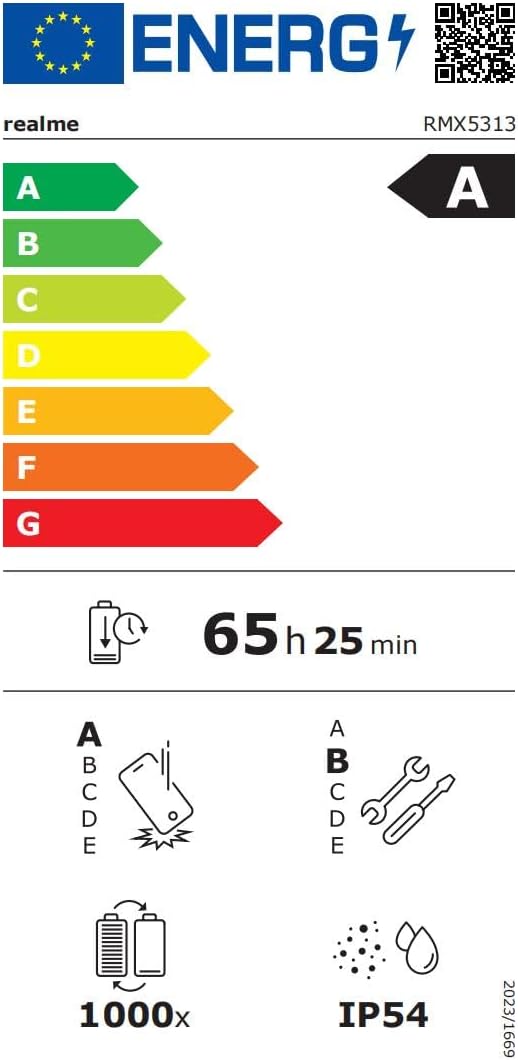
Image: EU Energy Label for realme Note 70T, showing energy efficiency, battery life, and IP54 rating. For more details, visit eprel.ec.europa.eu/qr/2361473.
7. Zəmanət Məlumatı
Your realme Note 70T smartphone comes with a limited manufacturer's warranty. Please refer to the warranty card included in your package or visit the official realme webzəmanət əhatə dairəsi, müddəti və xidmət prosedurları ilə bağlı ətraflı şərtlər və qaydalar üçün sayta daxil olun.
8. Müştəri dəstəyi
For further assistance, technical support, or service inquiries, please contact realme customer support through their official website or the contact information provided in your product documentation. You can also find FAQs and troubleshooting tips on the realme support portal.
Additional resources, including a Data Transparency Declaration, can be found burada.