
1. Giriş
Thank you for choosing the Technoview CY900 Smart Projector. This manual provides essential information for setting up, operating, and maintaining your projector to ensure optimal performance and longevity. The CY900 is designed to deliver a high-quality visual experience with its Full HD 1080P resolution, 4K support, and integrated Android 13 operating system.
Key features include electronic focus, auto keystone correction, 300 ANSI lumens brightness, dual-band WiFi, Bluetooth connectivity, and a built-in 5W speaker, making it a versatile solution for home entertainment, presentations, and gaming.
2. Əhəmiyyətli Təhlükəsizlik Məlumatı
- l olduqda proyektorun obyektivinə birbaşa baxmayınamp aktivdir. Güclü işıq gözə zərər verə bilər.
- Proyektorun ətrafında düzgün havalandırma təmin edin. Havalandırma dəliklərini bağlamayın.
- Yalnız proyektorla birlikdə verilən enerji adapterindən istifadə edin.
- Proyektoru sudan, nəmdən və həddindən artıq temperaturdan uzaq tutun.
- Proyektoru özünüz sökməyə və ya təmir etməyə çalışmayın. Bütün xidmət işlərini ixtisaslı mütəxəssislərə həvalə edin.
- Proyektorun yıxılmasının qarşısını almaq üçün onu sabit, düz bir səthə qoyun.
3. Paketin məzmunu
Zəhmət olmasa, paketinizdə bütün əşyaların olub olmadığını yoxlayın:
- 1 x Technoview CY900 Smart Projector
- 1 x Uzaqdan İdarəetmə
- 1 x Enerji Adapteri
- 1 x İstifadəçi Təlimatı (bu sənəd)
4. Məhsul bitdiview
4.1 Proyektor Komponentləri
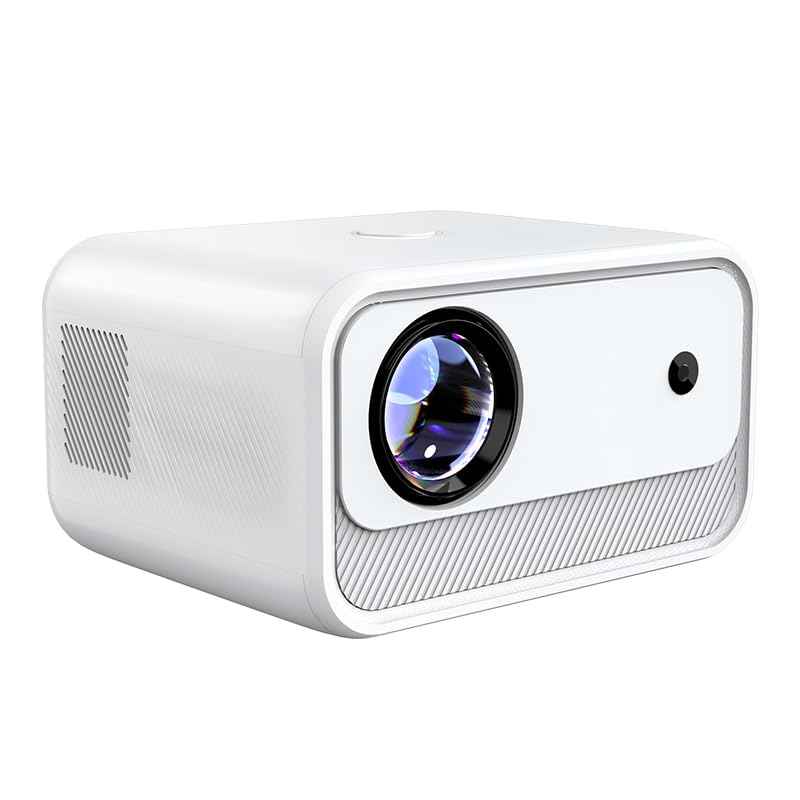
Şəkil 4.1: Ön View
Shows the projector lens and front sensor. The sleek white design integrates well into various environments.

Şəkil 4.2: Yan View
Illustrates the ventilation grilles on the side, crucial for heat dissipation and maintaining optimal operating temperature.

Şəkil 4.3: Arxa View Portlarla
Displays the various input/output ports including HDMI, USB, and AV, allowing for diverse connectivity options.
4.2 Interface Ports
- HDMI portu: Connect to laptops, gaming consoles, Blu-ray players, and other HDMI-enabled devices.
- USB Port: Connect USB drives for media playback or external devices.
- AV portu: AV kabelindən istifadə edərək köhnə cihazlara qoşulun.
- Güc Girişi: Təchiz olunan güc adapterini qoşun.
5. Quraşdırma
5.1 Yerləşdirmə
Place the projector on a stable, flat surface. Ensure there is adequate space around the projector for ventilation. The optimal projection distance ranges from 4 feet to 15 feet, depending on the desired screen size.
5.2 Enerji Bağlantısı
- Güc adapterini proyektorun güc giriş portuna qoşun.
- Elektrik adapterini rozetkaya qoşun.
- Yandırmaq üçün proyektorun və ya pultdakı güc düyməsini basın.
5.3 Initial Focus and Keystone Correction
The Technoview CY900 features electronic focus and auto keystone correction for a clear and properly aligned image.
- Elektron Fokus: The projector will automatically adjust the focus. If manual adjustment is needed, use the remote control's focus buttons.
- Avtomatik Açar Daşı Korreksiyası: The projector automatically corrects image distortion caused by angled projection. For fine-tuning, manual horizontal and vertical keystone correction options are available in the settings menu.

Figure 5.1: Keystone Correction
Illustrates how keystone correction adjusts the image to be rectangular, even when the projector is not perfectly centered.
6. Əməliyyat Təlimatları
6.1 Android 13 Smart OS
The projector runs on Android 13, providing a smart TV experience. You can access pre-installed applications like Netflix, YouTube, and Prime Video directly. Connect to your Wi-Fi network to enable online streaming.

Figure 6.1: Powerful Chip and Memory
Highlights the internal hardware that ensures smooth operation and low latency for streaming and applications.
6.2 Ekran Yansıtma
Share content from your smartphone or tablet directly to the projector screen.
- Mobil cihazınızın və proyektorun eyni Wi-Fi şəbəkəsinə qoşulduğundan əmin olun.
- Select the 'Screen Mirroring' or 'Cast' option on the projector's home screen.
- On your mobile device, enable screen mirroring (e.g., 'Smart View' for Android, 'Screen Mirroring' for iOS) and select the projector from the list of available devices.

Figure 6.2: Screen Mirroring Functionality
Shows how to cast content from both Android and iOS devices to the large projector screen.
6.3 Audio Çıxış
The projector features a built-in 5W speaker for integrated audio. For an enhanced audio experience, you can connect external speakers or headphones via Bluetooth.

Figure 6.3: High-Fidelity Speaker
Illustrates the integrated speaker system, providing clear audio without the need for external speakers.
7. Bağlantı
7.1 Wi-Fi bağlantısı
The projector supports dual-band Wi-Fi (2.4GHz and 5GHz) for stable and fast internet access.
- Go to 'Settings' on the projector's home screen.
- "Şəbəkə və İnternet" bölməsini seçin.
- Wi-Fi-ı yandırın və siyahıdan istədiyiniz şəbəkəni seçin.
- Tələb olunduqda parolu daxil edin və qoşulun.
7.2 Bluetooth bağlantısı
Connect Bluetooth-enabled devices such as soundbars, headphones, or game controllers.
- Go to 'Settings' on the projector's home screen.
- "Qoşulmuş Cihazlar" və ya "Bluetooth" seçin.
- Turn on Bluetooth and put your device into pairing mode.
- Select your device from the list and confirm pairing.
7.3 Wired Connections (HDMI, USB, AV)
To use external devices:
- Connect your device (e.g., laptop, USB drive) to the corresponding port on the projector.
- On the projector's home screen, select the appropriate input source (e.g., HDMI, USB, AV).
8. Baxım
8.1 Lensin təmizlənməsi
Xüsusi olaraq optik linzalar üçün nəzərdə tutulmuş yumşaq, tüysüz parçadan istifadə edin. Toz və ya ləkələri təmizləmək üçün linzanı yumşaq bir şəkildə silin. Aşındırıcı təmizləyicilərdən və ya həddindən artıq gücdən istifadə etməyin.
8.2 Proyektor korpusunun təmizlənməsi
Proyektorun xarici hissəsini yumşaq, quru parça ilə silin. İnadkar izlər üçün bir az damp parça, ardınca quru parça istifadə edilə bilər. Sərt kimyəvi maddələrdən istifadə etməkdən çəkinin.
8.3 Havalandırma
Regularly check that the ventilation openings are clear of dust and debris to prevent overheating. Do not obstruct the airflow during operation.
9. Giderme
| Problem | Mümkün Səbəb | Həll |
|---|---|---|
| Güc yoxdur | Elektrik kabeli qoşulmayıb; Elektrik rozetkası nasazdır | Elektrik kabelinin etibarlı şəkildə qoşulduğundan əmin olun; Başqa bir elektrik rozetkasını sınayın. |
| Şəkil yoxdur | Incorrect input source; Device not connected; Projector in standby | Select correct input source (HDMI, USB, AV); Check cable connections; Press power button to wake. |
| Şəkil bulanıq | Fokus tənzimlənməyib | Use the remote control to adjust electronic focus. |
| Təsvir təhrif olunmuş (trapesiya) | Keystone not corrected | Allow auto keystone correction to run; Adjust manual keystone in settings. |
| Səs yoxdur | Volume too low; Muted; External audio device not connected/selected | Increase volume; Unmute; Check Bluetooth connection or external audio settings. |
| Wi-Fi bağlantısı problemləri | Yanlış parol; Router problemləri; Siqnal müdaxiləsi | Re-enter Wi-Fi password; Restart router; Move projector closer to router. |
10. Spesifikasiyalar
- Brend: TEXNOVIEW
- Model: CY900
- Doğma Çözünürlük: 1920 x 1080 (Full HD)
- Maksimum Ekran Çözünürlüğü: 3840 x 2160 (4K Dəstəklənir)
- Parlaqlıq: 300 ANSI Lümeni
- Kontrast nisbəti: 1000:1
- Əməliyyat sistemi: Android 13
- Bağlantı: Dual Wi-Fi, Bluetooth, HDMI, USB, AV
- Natiq: Quraşdırılmış 5W Dinamik
- Xüsusi Xüsusiyyətlər: Electronic Focus, Auto Keystone Correction, 180° Rotation
- İşıq mənbəyinin işləmə müddəti: 50,000 saat
- Minimum atış məsafəsi: 4 Fut
- Maksimum atış məsafəsi: 15 Fut
- Ölçülər (U x G x Y): 20.7 x 16.5 x 12.2 Santimetre
- Maddə çəkisi: 1.53 kiloqram
11. Zəmanət və Dəstək
The Technoview CY900 Smart Projector comes with a standard manufacturer's warranty. Please refer to the warranty card included in your package for specific terms and conditions.
For technical support, troubleshooting assistance, or warranty claims, please contact Technoview customer service through their official website or the contact information provided with your purchase. Please have your model number (CY900) and purchase details ready when contacting support.