
1. Giriş
Thank you for choosing the Pisichen 24 inch Touch Screen Gaming Monitor. This manual provides essential information for setting up, operating, and maintaining your monitor. Please read it thoroughly before use to ensure optimal performance and safety.
This monitor features a 24-inch QHD (2560x1440P) display with a 165Hz refresh rate, 2ms response time, and 10-point projected capacitive touchscreen functionality. It supports FreeSync and HDR, offering a vibrant and responsive visual experience for both gaming and professional applications.

Image: The Pisichen 24-inch 2K 165Hz Touch Screen Monitor highlighting its key features like HDR, IPS Panel, and 10-point Touch.
2. Paketin məzmunu
Before proceeding with the setup, please verify that all components are present in the package:
- Pisichen 24 inch Touch Screen Monitor
- Monitor Stend (Baza və Boyun)
- DP kabeli
- HDMI Kabel
- USB B Touch Cable
- USB CC kabeli
- DC Güc Adapteri
- İstifadəçi Təlimatı (bu sənəd)
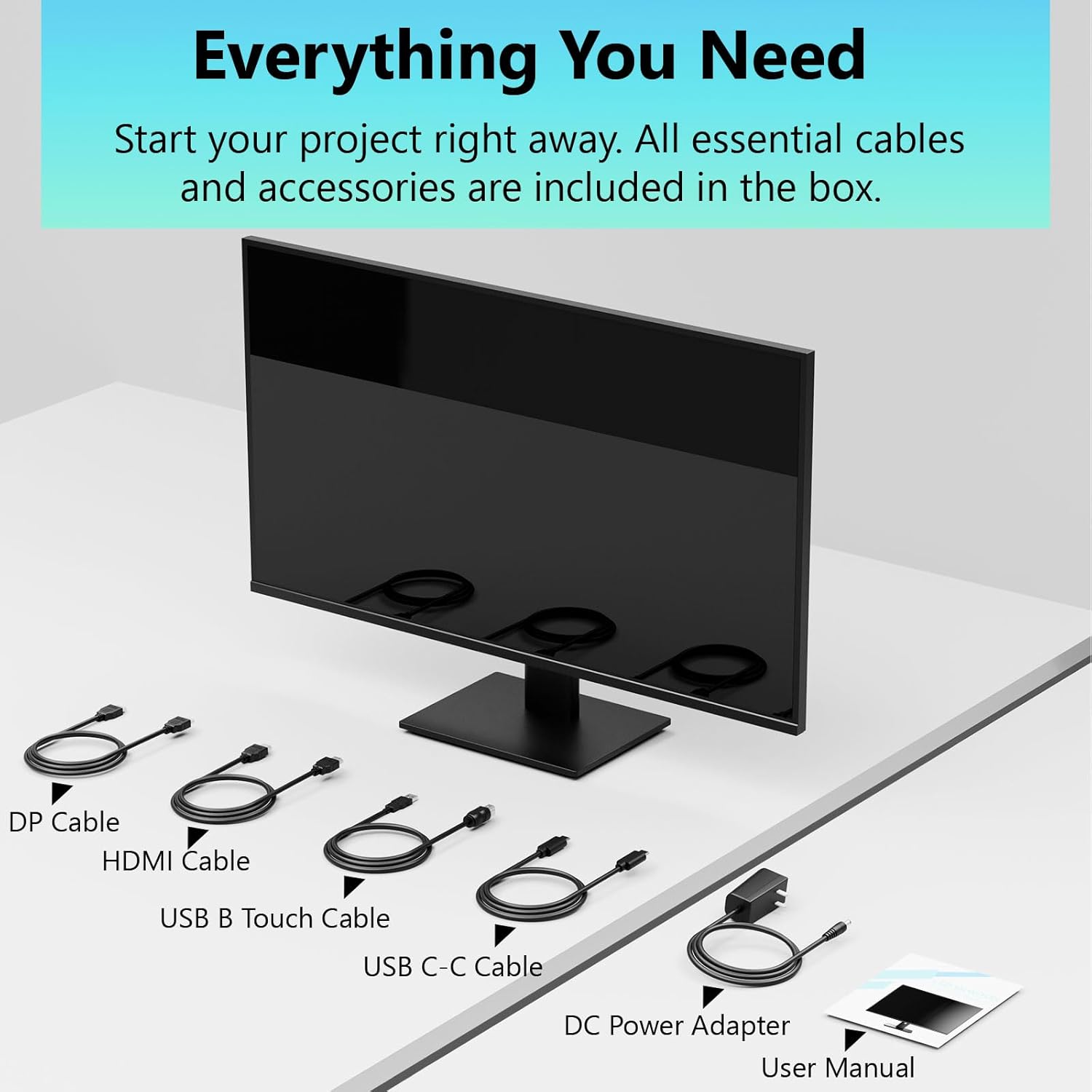
Image: All essential cables and accessories included in the box for the monitor setup.
3. Quraşdırma Təlimatları
3.1 Stendin yığılması
- Cızıqların qarşısını almaq üçün monitoru qablaşdırmasından diqqətlə çıxarın, üzü aşağı yumşaq və təmiz bir səthə qoyun.
- Attach the stand neck to the monitor's rear panel.
- Verilmiş vintlərdən istifadə edərək dayaq əsasını dayaq boynuna bərkidin.
- Ensure all connections are firm before placing the monitor upright.
3.2 VESA Montaj Quraşdırılması (İsteğe bağlı)
This monitor supports VESA mounting. If you plan to use a VESA-compatible arm or wall mount, remove the stand and attach the VESA mount according to the mount's instructions. The VESA pattern is typically 75x75mm or 100x100mm (refer to specifications for exact details).
3.3 Cihaza qoşulma
Monitor bir neçə əlaqə seçimini təklif edir:
- HDMI: Connect one end of the HDMI cable to the monitor's HDMI port and the other end to your computer's HDMI output.
- DisplayPort (DP): Connect one end of the DP cable to the monitor's DP port and the other end to your computer's DP output.
- USB Type-C: For compatible devices, connect the USB C-C cable to the monitor's USB Type-C port and your device's USB Type-C port. This single cable can transmit video, data, and power (charging).
- USB Type-B (for Touch Functionality): To enable the touch screen feature, connect the USB B Touch Cable from the monitor's USB Type-B port to an available USB Type-A port on your computer.

Image: The monitor's rear panel with various connectivity options, including HDMI, DisplayPort, and USB-C ports.
3.4 Enerji Bağlantısı
Connect the DC Power Adapter to the monitor's power input port, then plug the adapter into a power outlet.
3.5 Initial Power On and Touch Compatibility
Press the power button on the monitor. The display should light up. If no image appears, ensure all cables are securely connected and the correct input source is selected on the monitor (via the OSD menu).
For touch functionality, ensure the USB B Touch Cable is connected to your computer. Touch compatibility may vary by operating system and device. Most Windows PCs support multi-touch. For Mac devices, single-touch click is generally supported, but multi-touch may require specific drivers or configurations. Game consoles (PS3/4/5, Xbox, Steam Deck) and some other devices (Fire TV, Apple products like iPhone/iPad) typically do not support touch functionality.

Image: A compatibility chart illustrating which devices support multi-touch or single-touch, and which devices do not support touch functionality with the monitor.
4. Əməliyyat Təlimatları
4.1 Yandırma/Söndürmə
Monitoru yandırmaq və ya söndürmək üçün üzərində yerləşən güc düyməsini basın. Güc göstəricisi işığı monitorun vəziyyətini göstərəcək.
4.2 Ekranda Ekran (OSD) Menyu
The OSD menu allows you to adjust various monitor settings. Use the control buttons (usually located on the back or bottom of the monitor) to navigate the menu. Common menu options include:
- Şəkil Parametrləri: Brightness, Contrast, Sharpness, Color Temperature, HDR mode.
- Ekran parametrləri: Aspect Ratio, Input Source selection (HDMI, DP, USB-C).
- Oyun Parametrləri: FreeSync, Response Time (Overdrive), Crosshair.
- Audio Parametrlər: Volume (if internal speakers or audio output are present).
- Sistem Parametrləri: Language, OSD Transparency, Reset to Factory Defaults.
4.3 Sensorlu Ekran Funksionallığı
The monitor supports 10-point multi-touch, allowing for intuitive interaction directly on the screen. Ensure the USB B Touch Cable is connected to your computer for this feature to work.
- Bir kran: Equivalent to a left-click.
- Vurun və saxlayın: Sağ klikləməyə bərabərdir.
- Böyütmək üçün Çimdik: Use two fingers to zoom in or out.
- Çalmak: Navigate through content or scroll.

Image: A user interacting with the monitor's touch screen, highlighting its precision and responsiveness for creative tasks.
4.4 Erqonomik Tənzimləmələr
The monitor stand allows for tilt adjustments to achieve the most comfortable viewing and touch angle. Gently adjust the screen to your preferred position.
4.5 Gözə Qulluq Xüsusiyyətləri
The monitor includes advanced eye-comfort features such as Flicker-Free technology and Low Bluelight mode to reduce eye strain during prolonged use. These settings can typically be adjusted within the OSD menu.

Image: Visual representation of the monitor's advanced eye-comfort features, including Flicker-Free and Low Bluelight technologies.
5. Baxım
5.1 Monitorun təmizlənməsi
- Təmizləməzdən əvvəl həmişə monitoru söndürün və elektrik kabelini ayırın.
- Yumşaq, tüysüz parçadan yüngülcə istifadə edin dampsu və ya yumşaq, aşındırıcı olmayan ekran təmizləyicisi ilə tamamlanır.
- Təmizləyicini birbaşa ekrana səpməyin. Əvvəlcə onu parçaya çəkin.
- Benzol, durulaşdırıcı, ammonyak əsaslı təmizləyicilər və ya aşındırıcı materiallardan istifadə etməkdən çəkinin, çünki bunlar ekran səthinə zərər verə bilər.
5.2 Saxlama
When storing the monitor for an extended period, ensure it is powered off, unplugged, and stored in a cool, dry place away from direct sunlight and extreme temperatures. Use the original packaging if available for best protection.
6. Giderme
Monitorunuzla bağlı problemlərlə qarşılaşsanız, aşağıdakı ümumi problemlərin aradan qaldırılması addımlarına baxın:
- Güc yoxdur: Enerji adapterinin həm monitora, həm də işləyən elektrik rozetkasına etibarlı şəkildə qoşulduğundan əmin olun. Enerji göstərici işığının yanıb-yanmadığını yoxlayın.
- Şəkil/Siqnal Yoxdur:
- Verify that the video cable (HDMI, DP, or USB-C) is securely connected to both the monitor and your computer.
- Monitorun OSD menyusunda düzgün giriş mənbəyinin seçildiyinə əmin olun.
- Check your computer's display settings to ensure the monitor is detected and enabled.
- Toxunma funksiyası yoxdur:
- Confirm the USB B Touch Cable is connected from the monitor to your computer.
- Check your computer's device manager to see if the touch screen driver is installed and functioning correctly.
- Refer to the "Initial Power On and Touch Compatibility" section for device-specific limitations.
- Fırtınalı və ya təhrif olunmuş şəkil:
- Video kabelində zədələnmə və ya boş əlaqə olub olmadığını yoxlayın.
- Try a different video cable or port.
- Kompüterinizin ekran parametrlərində yeniləmə sürətini tənzimləyin.
- Ölü piksellər: A small number of bright or dark pixels are common in LCD/LED technology and are not considered a defect unless they exceed manufacturer specifications.
Bu addımları sınadıqdan sonra problem davam edərsə, müştəri dəstəyi ilə əlaqə saxlayın.
7. Spesifikasiyalar
| Xüsusiyyət | Spesifikasiya |
|---|---|
| Brend | Pisichen |
| Model nömrəsi | 24IN165HZ-QHD |
| Ekran Ölçüsü | 23.8 düym |
| Qətnamə | QHD Wide 1440p (2560 x 1440) |
| Aspekt nisbəti | 16:9 |
| Yeniləmə dərəcəsi | 165 Hz |
| Cavab vaxtı | 2 Millisaniyə |
| Ekran növü | LED IPS |
| Parlaqlıq | 400 Candela (cd/m²) |
| Kontrast nisbəti | 3000:1 |
| Viewaçı | 178 dərəcə |
| Rəng Gamutu | 99% |
| Picture Quality Enhancement | HDR |
| Adaptiv Sinxronizasiya | FreeSync |
| Bağlantı texnologiyası | DisplayPort, HDMI, USB Type-C, USB Type-B |
| Əlavə Xüsusiyyətlər | Tilt Adjustment, 10-Point Touchscreen |
| Element Ölçüləri (D x G x Y) | 0.75"D x 21.5"W x 12.7"H |
| Maddə Çəkisi | 5.38 kiloqram |
| Rəng | Qara |
8. Zəmanət Məlumatı
This product comes with a 1-year limited warranty from the date of purchase. The warranty covers manufacturing defects and workmanship under normal use. It does not cover damage caused by misuse, accidents, unauthorized modifications, or external factors. Please retain your proof of purchase for warranty claims.
9. Müştəri dəstəyi
For technical assistance, warranty claims, or further inquiries, please contact Pisichen customer support. You may find contact information on the official Pisichen websayt və ya satıcınız vasitəsilə.
Əlavə resurslar və məhsul haqqında məlumat üçün ziyarət edin Pisichen Store on Amazon.