1. Giriş
Thank you for choosing the Baseus E20 True Wireless Earbuds. These earbuds are designed to provide a high-quality audio experience with powerful bass, clear calls, and reliable connectivity. This manual will guide you through the setup, operation, and maintenance of your new earbuds.
2. Qutuda nə var
- Baseus E20 True Wireless Earbuds (Left and Right)
- Doldurma qutusu
- USB-C şarj kabeli
- İstifadəçi təlimatı

Image: Baseus E20 True Wireless Earbuds shown inside their charging case, highlighting key features like powerful bass, IPX5 water resistance, 33 hours listening time, and environmental noise cancellation.
3. Məhsul bitdiview
3.1 Qulaqlıq komponentləri
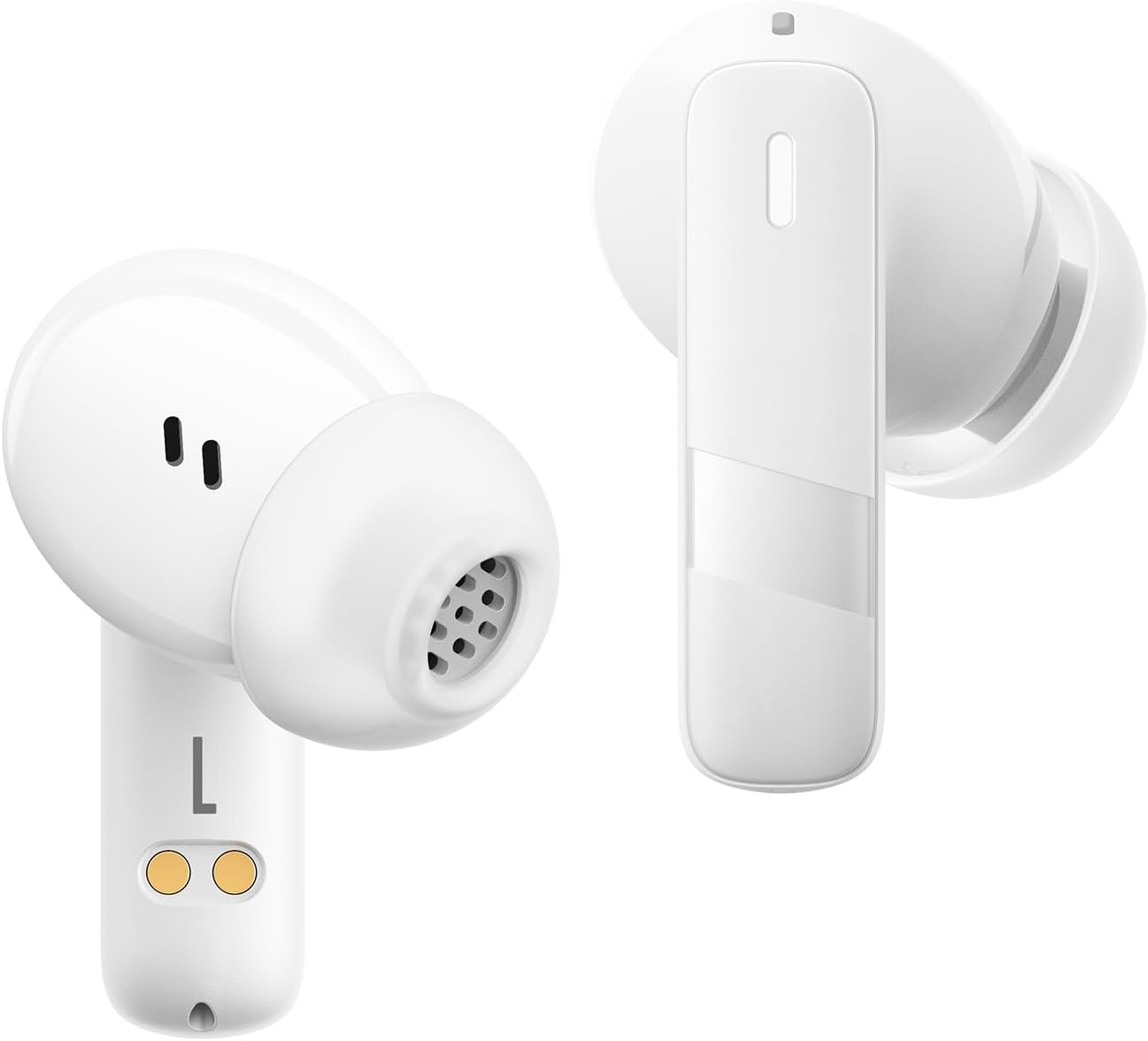
Şəkil: Yaxın plan view of the Baseus E20 True Wireless Earbuds, showing the ergonomic design, speaker grille, and charging contacts.
- Toxunma İdarəetmə Sahəsi: Oxutmanı, zəngləri və rejimləri idarə etmək üçün.
- Mikrofon: For calls and voice commands (2 ENC Mics).
- Natiq: Delivers audio (12mm drivers).
- Doldurma kontaktları: For charging the earbuds in the case.
3.2 Şarj qutusu
- Doldurma Portu: Çantanı doldurmaq üçün USB-C portu.
- Göstərici işığı: Şarj vəziyyətini və batareya səviyyəsini göstərir.
4. Quraşdırma
4.1 Qulaqlıqların və qutunun doldurulması
İlk istifadə etməzdən əvvəl qulaqcıqları və doldurma qutusunu tam doldurun.
- Qulaqlıqları doldurma qutusuna qoyun. Doldurma kontaktlarının hizalandığından əmin olun.
- USB-C şarj kabelini korpusdakı şarj portuna və enerji mənbəyinə qoşun.
- The indicator light on the case will show the charging status. Once fully charged, the light will indicate completion or turn off.

Image: The Baseus E20 charging case is shown connected to a USB-C charging cable, illustrating the charging process and highlighting the 33-hour total listening time.
4.2 Bluetooth Qoşulması
Pair your Baseus E20 earbuds with your device for the first time.
- Şarj qutusunu açın. Qulaqlıqlar avtomatik olaraq cütləşdirmə rejiminə keçəcək və onların göstərici işıqları yanıb-sönəcək.
- Cihazınızda (smartfon, planşet, noutbuk) Bluetooth-u aktivləşdirin.
- axtarın "Baseus E20" in the list of available Bluetooth devices and select it to connect.
- Qoşulduqdan sonra qulaqcıq indikator işıqları sönəcək və ya sabit bir işıq göstərəcək və təsdiq səsi eşidəcəksiniz.
Qeyd: After the initial pairing, the earbuds will automatically connect to the last paired device when taken out of the case, provided Bluetooth is enabled on the device.

Image: A detailed diagram illustrating the Bluetooth 5.3 chip, emphasizing a more stable and efficient connection for the Baseus E20 earbuds.
5. Əməliyyat Təlimatları
The Baseus E20 earbuds feature intuitive touch controls. The following table outlines the common functions:

Image: A visual guide to the touch control areas on the Baseus E20 earbuds, detailing single, double, and triple tap functions for various operations.
| Fəaliyyət | Funksiya |
|---|---|
| Double Tap (L or R) | Answer/Hang up Call, Play/Pause Music |
| Üçqat Tap (Sol və ya Sağ) | Səsli köməkçini aktivləşdirin |
| Long Press (L or R) | Cycle Noise Cancellation Modes (Default > Normal > Transparency) |
| Long Press (L or R) | Cycle Spatial Audio Modes (Music Mode > Theater Mode > Normal) |
Qeyd: Specific functions may vary slightly depending on your connected device and operating system.
5.1 Zənglərin idarə edilməsi
- Zəngə Cavab Vermək/Bitirmək: Qulaqlıqlardan hər hansı birinə iki dəfə toxunun.
- Zəngi rədd edin: İstənilən qulaqcığı 2 saniyə basıb saxlayın.

Image: An internal diagram of the Baseus E20 earbud highlighting the dual-mic Environmental Noise Cancellation (ENC) system for clear calls.
5.2 Musiqi oxutma
- Oynat/Pauza: Qulaqlıqlardan hər hansı birinə iki dəfə toxunun.
5.3 Səs köməkçisi
- Səs köməkçisini aktivləşdirin: Qulaqlıqlardan hər hansı birinə üç dəfə toxunun.
5.4 Səs-küyə nəzarət rejimləri
The Baseus E20 earbuds offer different noise control modes:
- Noise Cancellation (Default): İmmersiv dinləmə təcrübəsi üçün ətrafdakı səs-küyü azaldır.
- Normal rejim: Aktiv səs-küy nəzarəti olmadan standart səs oxutma.
- Şəffaflıq rejimi: Audioya qulaq asarkən ətrafınızı eşitməyə imkan verir.
To cycle through modes: İstənilən qulaqcığa uzun basın.
6. Baxım
6.1 Təmizləmə
- Regularly clean the earbuds, especially the ear tips and speaker grilles, with a soft, dry, lint-free cloth.
- Şarj problemlərinin qarşısını almaq üçün həm qulaqcıqların, həm də qutunun şarj kontaktlarının təmiz və quru olduğundan əmin olun.
- Aşındırıcı materiallar, həlledicilər və ya sərt kimyəvi maddələrdən istifadə etməyin.
6.2 Saxlama
- Qulaqlıqları qorumaq və doldurulmuş vəziyyətdə saxlamaq üçün istifadə edilmədikdə onları doldurma qutusunda saxlayın.
- Həddindən artıq temperaturda və ya yüksək rütubətdə saxlamaqdan çəkinin.
6.3 Suya davamlılıq (IPX5)
The Baseus E20 earbuds are IPX5 water-resistant, meaning they can withstand splashes and sweat. They are not designed for submersion in water or exposure to pressurized water jets. Ensure earbuds are dry before placing them back in the charging case to prevent damage.

Image: The Baseus E20 earbuds and charging case are depicted with water splashing around them, illustrating their IPX5 water-resistant capability for reliable performance in various conditions.
7. Giderme
| Problem | Mümkün Həll |
|---|---|
| Qulaqlıqlar birləşdirilmir |
|
| Bir qulaqcıqdan səs gəlmir |
|
| Doldurma qutusu doldurulmur |
|
| Zəng keyfiyyətinin aşağı olması |
|
8. Spesifikasiyalar
| Xüsusiyyət | Detal |
|---|---|
| Model Adı | E20 |
| Bluetooth versiyası | 5.3 |
| Sürücü ölçüsü | 12 mm |
| Ümumi oyun vaxtı | 33 saata qədər (şarj qutusu ilə) |
| Earbuds Playback Time | 6 saata qədər (tək şarj) |
| Suya davamlılıq | IPX5 |
| Mikrofonlar | 2 ENC Mics for Clear Calls |
| Nəzarət növü | Nəzarətə toxunun |
| Doldurma Portu | USB-C |
| Maddə Çəkisi | 3.2 unsiya |
| Uyğun Cihazlar | Cellphones, Laptops, Tablets, Devices with Bluetooth Audio Capability (iOS, Android, Windows, Mac OS, Switch) |

Image: A cutaway diagram illustrating the 12mm PU diaphragm driver, emphasizing its role in producing strong and accurate ultra-low frequencies for powerful bass.
9. Məhsul bitdiview Video
Video: Məmur bitdiview of the Baseus E20 True Wireless Earbuds, demonstrating features such as touch controls, powerful bass, IPX5 water resistance, 33-hour battery life, ENC for clear calls, and Bluetooth 5.3 connectivity. The video shows the earbuds in various usage scenarios, including listening to music, making calls, and being used in different weather conditions.
10. Zəmanət və Dəstək
Baseus products come with a standard manufacturer's warranty. For detailed warranty information, product support, or service inquiries, please refer to the warranty card included in your product packaging or visit the official Baseus websayt. Satınalma qəbzinizi zəmanət iddiaları üçün satınalmanın sübutu kimi saxlayın.
Onlayn dəstək: Əlavə yardım üçün müraciət edin Baseus Official Store on Amazon və ya onların vəzifəli şəxsləri websayt.