
Giriş
Thank you for choosing the Digitus DA-70919 USB-C 8K 12-Port Docking Station. This device is designed to expand the connectivity of your USB-C enabled laptop or computer, providing a comprehensive solution for video output, data transfer, network access, and power delivery. Please read this manual carefully to ensure proper installation and operation.
Məhsul Bitdiview
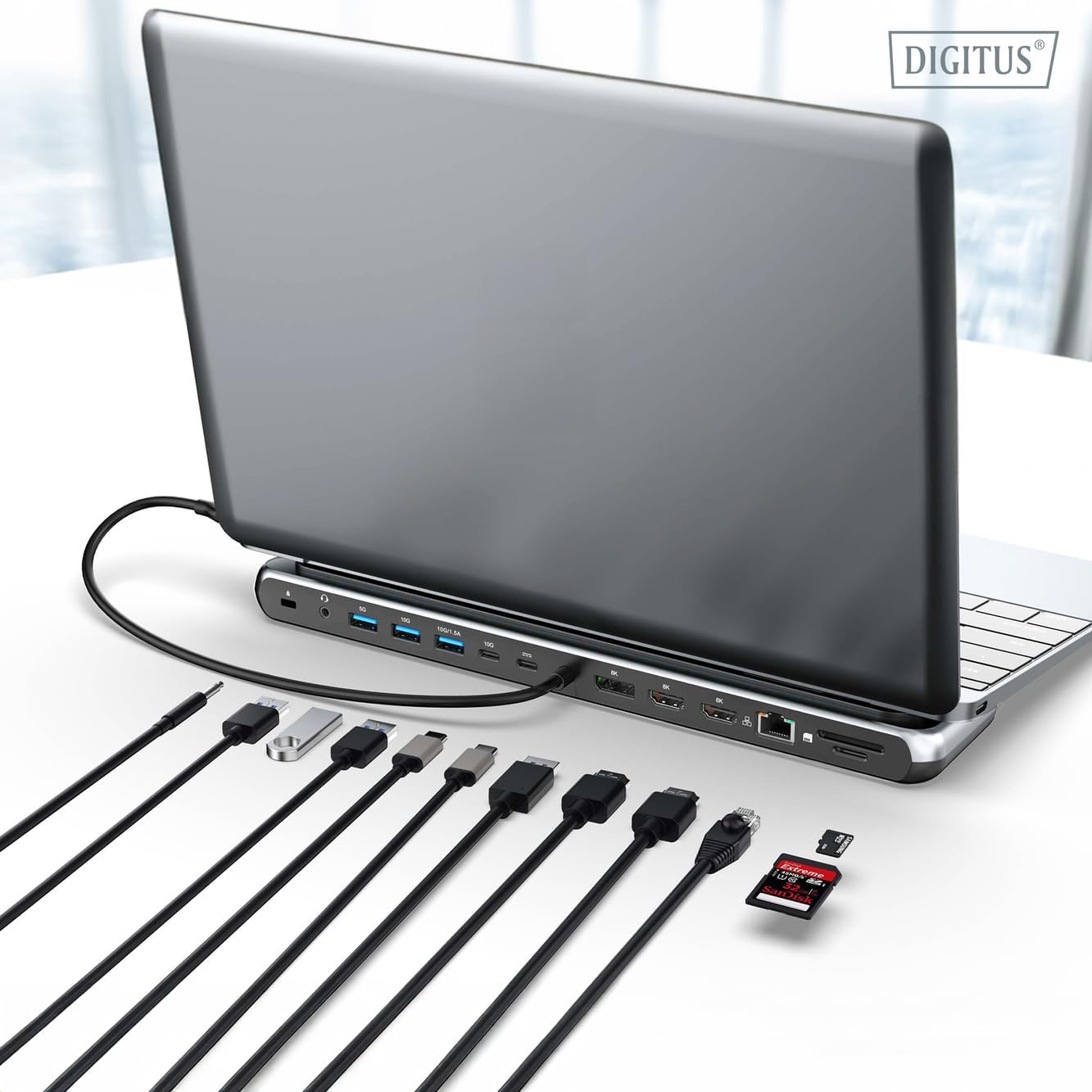
The Digitus DA-70919 docking station offers 12 essential ports to enhance your workspace. It supports high-resolution video output, fast data transfer, and efficient power delivery to your host device.

Şəkil 1: Detailed diagram of the Digitus DA-70919 docking station ports and their functions. This diagram labels each of the 12 ports on the docking station, including Audio Jack, USB-A, USB-C, USB-C PD, DisplayPort, HDMI, RJ45 Gigabit Ethernet, and SD/MicroSD card slots, along with anti-theft protection.

Şəkil 2: Ön view of the Digitus DA-70919 docking station showing all accessible ports. A clear view of the docking station's front panel, displaying the various input and output ports including USB-A, USB-C, HDMI, DisplayPort, Ethernet, and card readers.
Əsas Xüsusiyyətlər:
- Video Çıxışı: 2x HDMI, 1x DisplayPort (DP) supporting up to 8K/30Hz for single display, or multi-display configurations.
- USB Məlumat Portları: 2x USB-A 3.2 Gen 2 (10Gbps), 1x USB-A 3.2 Gen 1 (5Gbps), 1x USB-C 3.2 Gen 2 (10Gbps).
- Enerji Çatdırılması (PD): USB-C PD 3.0 port for charging your host laptop (up to 85W output).
- Şəbəkə: Gigabit Ethernet (RJ45) for stable wired internet connection.
- Kart oxuyucular: SD and MicroSD card slots with 104 MBps transfer speed.
- Audio: 3.5mm audio jack for headphones or speakers.
Quraşdırma Təlimatları
Follow these steps to set up your Digitus DA-70919 docking station:
- Check Host USB-C Port Compatibility: Ensure your laptop's USB-C port supports DisplayPort Alternate Mode (DP Alt Mode) for video output and Power Delivery for charging. Without DP Alt Mode, video output will not function.

Şəkil 3: Guide to USB-C port compatibility for DisplayPort Alternate Mode. This graphic explains which types of USB-C ports on your laptop support the full functionality of the docking station, specifically highlighting the requirement for DisplayPort Alternate Mode (DP Alt Mode) for video output.
- Host Cihazına qoşulun: Connect the integrated USB-C cable from the docking station to the USB-C port on your laptop.
- Güc Adapterini Qoşun (İsteğe bağlı, lakin tövsiyə olunur): If you wish to charge your laptop via the docking station or power high-demand peripherals, connect a USB-C Power Delivery adapter (not included, up to 100W recommended) to the USB-C PD input port on the docking station.
- Xarici Displeyləri Qoşun: Monitorlarınızı müvafiq kabellərdən istifadə edərək dok stansiyasındakı HDMI və/və ya DisplayPort çıxışlarına qoşun.
- Periferiyaları birləşdirin: Plug in your USB devices (keyboard, mouse, external drives), Ethernet cable, SD/MicroSD cards, and audio devices to the corresponding ports on the docking station.
- Sürücünün quraşdırılması: In most cases, the docking station is plug-and-play and does not require additional drivers. If prompted, allow your operating system to install any necessary drivers automatically.
Əməliyyat Təlimatları
Ekran rejimləri
The docking station supports various display configurations:
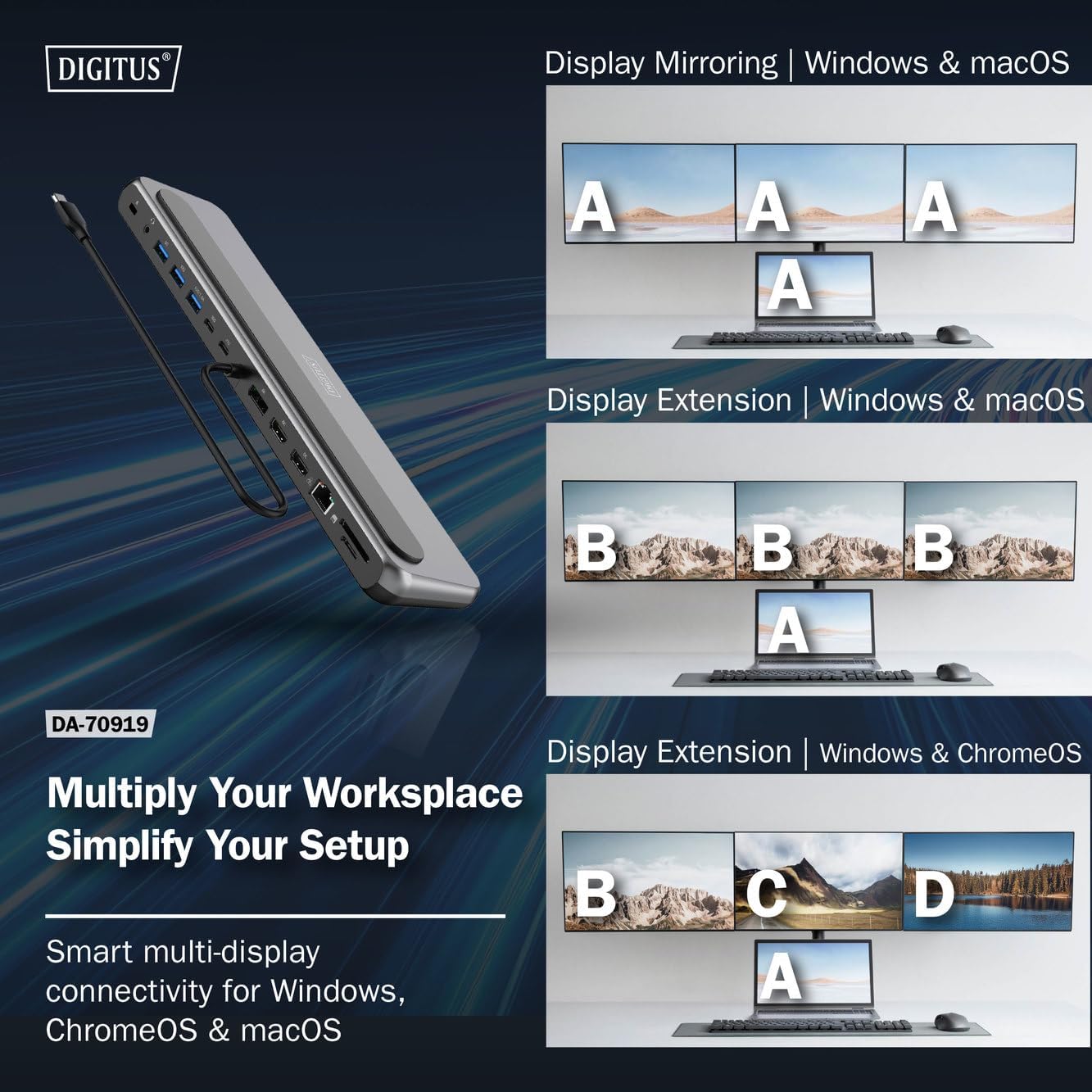
Şəkil 4: Diagram showing display mirroring and extension modes for Windows, macOS, and ChromeOS. This image illustrates the various display configurations supported by the docking station, including mirroring your screen or extending it across multiple external monitors on Windows, macOS, and ChromeOS.
- Güzgü rejimi: Duplicates your laptop's display onto the external monitors.
- Extend Mode (Windows/ChromeOS): Extends your desktop across multiple external monitors, allowing for a multi-tasking environment. Supports dual monitors (2x 4K/60Hz) and triple monitors (1x 4K/60Hz + 2x 4K/30Hz) in MST (Multi Stream Transport) mode.
- Extend Mode (macOS): macOS typically supports extended desktop to one external monitor, with other external monitors mirroring each other.
To configure display settings, access your operating system's display settings (e.g., Windows Display Settings, macOS System Preferences > Displays).
Məlumat ötürülməsi
Utilize the USB-A and USB-C data ports for connecting external storage devices, keyboards, mice, and other USB peripherals. The USB 3.2 Gen 2 ports offer speeds up to 10Gbps, while the USB 3.2 Gen 1 port offers speeds up to 5Gbps.
Enerji Çatdırılması
When a compatible USB-C PD power adapter is connected to the docking station's PD input port, the docking station can deliver up to 85W of power to charge your connected laptop. This allows you to power your laptop and peripherals through a single USB-C connection.
Şəkil 5: Illustration of the docking station's fast charging capability via USB-C Power Delivery. This image demonstrates the Power Delivery function, showing a 100W input to the docking station and an 85W output to charge the connected laptop.
Şəbəkə bağlantısı
Connect an Ethernet cable to the RJ45 port for a stable and high-speed wired network connection (10/100/1000 Mbps Gigabit Ethernet).
Kart oxuyucular
Insert SD or MicroSD cards into the dedicated slots for quick access to photos, videos, and other files. The card readers support transfer speeds up to 104 MBps.
Audio Çıxış
Connect your headphones or speakers to the 3.5mm audio jack for audio output.
Baxım
- Təmizləmə: Use a soft, dry cloth to clean the surface of the docking station. Avoid using liquid cleaners or solvents.
- Yaddaş: Dok stansiyasını sərin, quru yerdə, birbaşa günəş işığından və həddindən artıq temperaturdan uzaq saxlayın.
- İdarəetmə: Cihazı yerə salmaqdan və ya güclü zərbələrə məruz qoymaqdan çəkinin. Dok stansiyasını sökməyə çalışmayın.
Problemlərin aradan qaldırılması
If you encounter issues with your docking station, please refer to the following common solutions:
- Ekran çıxışı yoxdur:
- Ensure your laptop's USB-C port supports DisplayPort Alternate Mode.
- Check all video cables (HDMI/DP) are securely connected to both the docking station and the monitor.
- Monitorun işə salındığını və düzgün giriş mənbəyinə quraşdırıldığını yoxlayın.
- Problemi həll etmək üçün bir monitoru bir-bir qoşmağa çalışın.
- Laptopun qrafik drayverlərini yeniləyin.
- No Power Delivery to Laptop:
- Ensure a compatible USB-C PD power adapter (up to 100W) is connected to the docking station's PD input port.
- Noutbukunuzun USB-C portunun Power Delivery-i dəstəklədiyini yoxlayın.
- Check the power adapter and cable for damage.
- USB Cihazları Tanınmır:
- USB cihazını dok stansiyasındakı fərqli bir porta yenidən qoşun.
- Ensure the docking station is properly connected to the host laptop.
- If using a high-power USB device, ensure the docking station is connected to an external power adapter.
- Ethernet Bağlantı Problemləri:
- Həm dok stansiyasına, həm də router/modeminizə Ethernet kabel bağlantısını yoxlayın.
- Laptopunuzda şəbəkə parametrlərini yoxlayın.
- Routerinizi/modeminizi və laptopunuzu yenidən başladın.
- Card Reader Not Working:
- Ensure the SD/MicroSD card is inserted correctly and fully.
- Test the card with another device to confirm it is not damaged.
Spesifikasiyalar
| Xüsusiyyət | Spesifikasiya |
|---|---|
| Model | DA-70919 |
| Host bağlantısı | USB-C (inteqrasiya olunmuş kabel) |
| Video Çıxışı | 2x HDMI, 1x DisplayPort (DP) |
| Max. Single Display Resolution | 8K (7680x4320) @ 30Hz |
| Max. Dual Display Resolution (MST) | 2x 4K (3840x2160) @ 60Hz |
| Max. Triple Display Resolution (MST) | 1x 4K@60Hz + 2x 4K@30Hz |
| USB-A Məlumat Portları | 2x USB 3.2 Gen 2 (10Gbps), 1x USB 3.2 Gen 1 (5Gbps) |
| USB-C Məlumat Portu | 1x USB 3.2 Gen 2 (10Gbps) |
| Power Delivery (PD) Input | USB-C PD 3.0 (up to 100W) |
| Power Delivery (PD) Output to Host | 85 Vt-a qədər |
| Ethernet | RJ45 Gigabit (10/100/1000 Mbps) |
| Kart oxuyucular | SD, MicroSD (104 MBps) |
| Audio | 1x 3.5 mm Audio giriş |
| Uyğunluq | Windows, macOS, ChromeOS |
| İşləmə temperaturu | 0°C - 45°C (32°F - 113°F) |
| Saxlama temperaturu | -10°C - 70°C (14°F - 158°F) |
Zəmanət və Dəstək
The Digitus DA-70919 USB-C 8K 12-Port Docking Station comes with a 2 il zəmanət satın alındığı tarixdən. Bu zəmanət istehsal qüsurlarını əhatə edir və məhsulun normal istifadədə təsvir olunduğu kimi funksiyalarını təmin edir.
For technical support, warranty claims, or further assistance, please contact your retailer or visit the official Digitus website for contact information. Please have your product model number (DA-70919) and proof of purchase ready when seeking support.