
1. Giriş
The AJAZZ AKP03 Macro Keypad Stream Controller is a versatile device designed to enhance productivity and streamline workflows for gamers, streamers, and professionals. Featuring six programmable keys with LCD displays, three physical knobs, and three toggle switches, it offers extensive customization options for various tasks.
This manual provides detailed instructions for setting up, operating, and maintaining your AKP03 device, ensuring optimal performance and user experience.
2. Məhsulun xüsusiyyətləri
- Six Programmable Macro Keys: Customizable LCD displays for single or continuous actions.
- Three Physical Knobs: For precise control over various functions.
- Three Toggle Switches: Additional control options.
- One-Click Operation: Instant execution of macro commands, text input, application launches, and media control.
- Intuitive Driver Software: Drag-and-drop functionality for easy key assignment and property configuration.
- Geniş Uyğunluq: Seamless integration with platforms like Streamlabs, Twitch, YouTube, and various software applications on Windows and Mac.
- Removable 40° Stand: Provides an ergonomic viewing angle and stable placement.

Şəkil 2.1: bitdiview of the AJAZZ AKP03 Macro Keypad, highlighting its programmable buttons, toggle switches, and scroll wheels.
3. Paketin məzmunu
Bütün əşyaların paketinizdə olduğunu yoxlayın:
- AJAZZ AKP03 Macro Keypad Stream Controller
- USB-C-dən USB-A kabelinə
- Removable 40° Stand
- İstifadəçi Təlimatı (bu sənəd)
4. Quraşdırma
4.1 Fiziki əlaqə
- Attach the removable 40° stand to the bottom of the AKP03 for an ergonomic angle, if desired.
- Connect the provided USB-C cable to the USB-C port on the AKP03.
- Kabelin USB-A ucunu kompüterinizdə (PC və ya Mac) mövcud USB portuna qoşun.
- Cihaz avtomatik olaraq işə düşəcək.

Figure 4.1: Attaching the removable 40° stand to the AKP03.
4.2 Proqram təminatının quraşdırılması
To unlock the full customization capabilities of your AKP03, you must install the dedicated driver software.
- Açın web browser and navigate to the official AJAZZ websayt: www.a-jazz.com.
- Locate the 'Driver Download' section.
- axtarın 'AKP03' or browse for the corresponding driver for your model.
- Download the driver software compatible with your operating system (Windows or macOS).
- Quraşdırıcını işə salın və quraşdırmanı başa çatdırmaq üçün ekrandakı təlimatları izləyin.
- Tələb olunarsa, kompüterinizi yenidən başladın.
Video 4.1: Demonstrates the software installation process and initial setup for the AJAZZ Macro Keypad.
5. Əməliyyat Təlimatları
5.1 Customizing Keys and Knobs
The AKP03's driver software provides a user-friendly interface for customization:
- Launch the 'Stream Dock AJAZZ' software from your desktop or applications folder.
- The software will display a visual representation of your AKP03.
- To assign an action, drag and drop a desired function (e.g., launch application, media control, macro command) from the software's library onto one of the six programmable keys.
- For knobs, select the knob in the software and assign functions such as volume control, scrolling, or zooming.
- You can configure properties for each assigned action, including specific file yollar, web URLs, or macro sequences.
- The LCD displays on the keys will update to show the assigned icon or text.
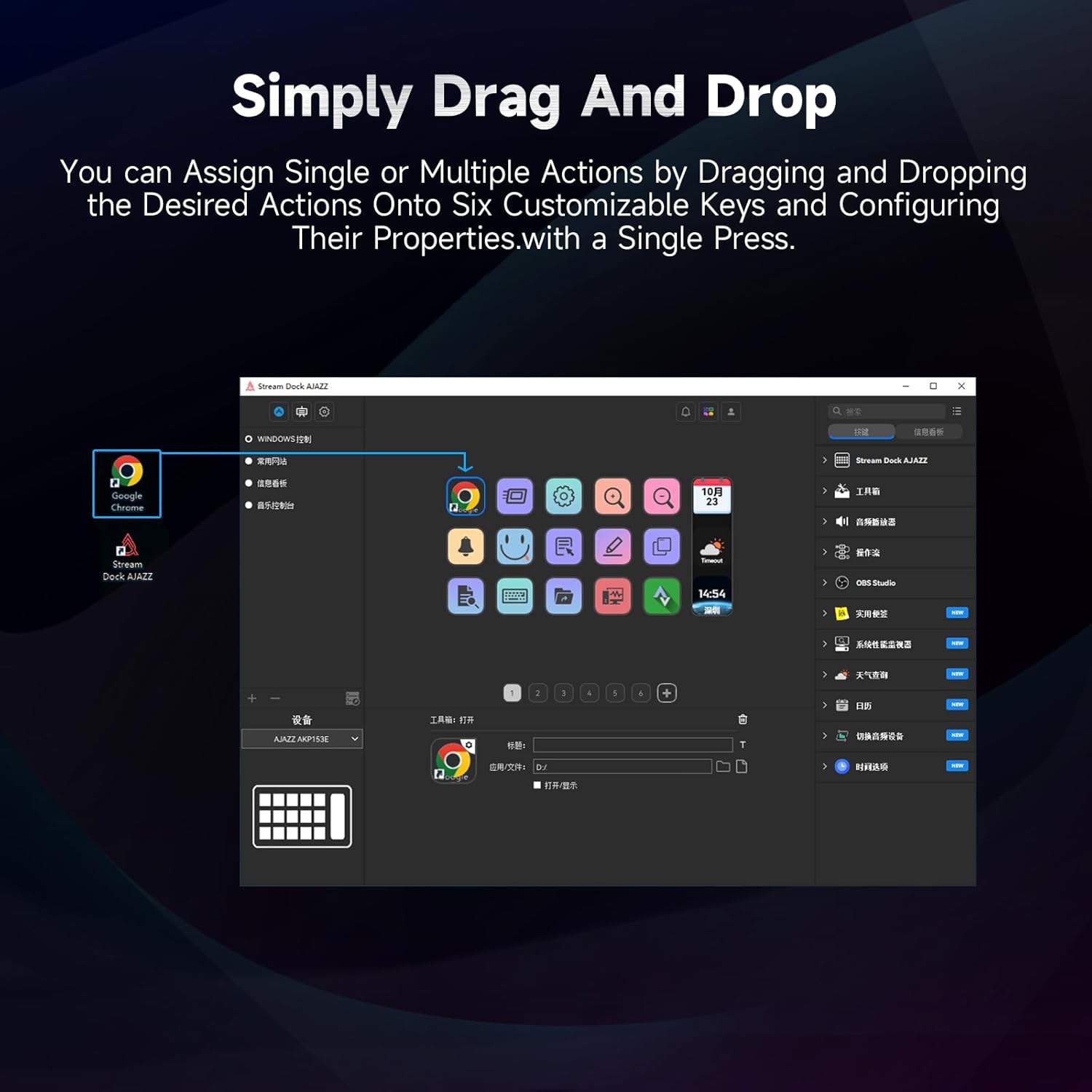
Figure 5.1: Customizing keys using the drag-and-drop interface in the AJAZZ software.
Video 5.1: Demonstration of assigning actions to keys for launching web pages and software with a single click.
5.2 Using Profiles and Pages
The software supports multiple profiles and pages, allowing you to switch between different sets of key assignments for various applications or tasks.
- Yeni peşəkar yaradınfiles for specific games, editing software, or streaming setups.
- Hər peşəkar daxilindəfile, you can create multiple pages of key assignments, accessible by navigating through the device's buttons or software interface.
- The AKP03 automatically switches to the relevant profile when a linked application is in focus.
Video 5.2: Illustrates the multi-functional capabilities and profile switching of the AKP03 for various tasks.
6. Baxım
To ensure the longevity and optimal performance of your AJAZZ AKP03, follow these maintenance guidelines:
- Təmizləmə: Use a soft, dry cloth to wipe the surface of the device. Avoid abrasive cleaners or solvents.
- Yaddaş: Cihazı birbaşa günəş işığından və həddindən artıq temperaturdan uzaq sərin, quru yerdə saxlayın.
- Kabel Baxımı: Zərərlərin qarşısını almaq üçün USB kabeli həddindən artıq əyməkdən və ya bükməkdən çəkinin.
- Proqram təminatı yeniləmələri: Regularly check the AJAZZ website for software and firmware updates to ensure compatibility and access to new features.
7. Giderme
If you encounter issues with your AKP03, refer to the following common troubleshooting steps:
- Cihaz tanınmır:
- Ensure the USB cable is securely connected to both the AKP03 and your computer.
- Fərqli USB portuna qoşulmağa cəhd edin.
- Kompüterinizi yenidən başladın.
- Verify that the driver software is correctly installed and up to date.
- Cavab verməyən açarlar:
- Check the software to ensure keys are properly assigned and the correct profile aktivdir.
- Ensure the driver software is running in the background.
- Proqram təminatı problemləri:
- Reinstall the driver software.
- Check for software updates on the AJAZZ websayt.
8. Spesifikasiyalar
| Xüsusiyyət | Detal |
|---|---|
| Brend | AJAZZ |
| Model Adı | AKP03 |
| Uyğun Cihazlar | PC, Noutbuk |
| Nəzarətçi növü | Klaviatura |
| Bağlantı texnologiyası | USB-C |
| Düymə Miqdarı | 6 Programmable Keys (with LCD displays), 3 Physical Knobs, 3 Toggle Switches |
| Maddə Çəkisi | 0.32 kiloqram |
| Element Ölçüləri (U x G x Y) | 5 x 3 x 2 düym |
| Güc mənbəyi | Kabelli Elektrik |
9. Zəmanət və Dəstək
9.1 Zəmanət Məlumatı
The AJAZZ AKP03 Macro Keypad Stream Controller comes with a 1 İl Məhdud Zəmanət satın alındığı tarixdən. Bu zəmanət normal istifadə zamanı istehsal qüsurlarını və nasazlıqları əhatə edir. Yanlış istifadə, qəzalar, icazəsiz dəyişikliklər və ya düzgün quraşdırma nəticəsində dəyən zərəri əhatə etmir.
Zəmanət iddiaları üçün satınalma sübutunuzu özündə saxlayın.
9.2 Müştəri dəstəyi
For technical assistance, troubleshooting, or warranty inquiries, please contact AJAZZ customer support:
- Websayt: www.a-jazz.com (Refer to the 'Support' or 'Contact Us' section)
- E-poçt: [Insert Customer Support Email, if available]
- Telefon: [Insert Customer Support Phone Number, if available]
Our support team is available to assist you with any questions or concerns regarding your product.