
1. Giriş
Welcome to your new xinwld A97 Pro Wireless Earbuds. These earbuds are designed to provide a high-fidelity audio experience with deep bass, advanced Bluetooth 5.4 connectivity, and effective environmental noise cancellation (ENC) for clear calls. This manual will guide you through the setup, operation, and maintenance of your earbuds.
Əsas Xüsusiyyətlər:
- Bluetooth 5.4: Sabit və səmərəli simsiz əlaqə üçün.
- HiFi Stereo Sound with Deep Bass: Delivers rich audio quality.
- 40 saata qədər oyun müddəti: Extended listening with the charging case.
- 4 ENC Noise Cancelling Microphones: Ətraf mühit səs-küyünü azaltmaqla zənglərin aydın olmasını təmin edir.
- IP7 suya davamlılıq: Protects earbuds from water splashes and sweat (earbuds only).
- İntuitiv toxunma nəzarətləri: Musiqi və zənglərin asan idarə olunması.
- LED Rəqəmsal Ekran: Shows battery level of the charging case and earbuds.
2. Paketin məzmunu
Zəhmət olmasa paketi aşağıdakı maddələr üçün yoxlayın:
- xinwld A97 Pro Wireless Earbuds (Left and Right)
- Doldurma qutusu
- USB-C şarj kabeli
- İstifadəçi təlimatı
- (Optional) Various Sizes of Eartips
3. Məhsul bitdiview
Familiarize yourself with the components of your xinwld A97 Pro Wireless Earbuds.
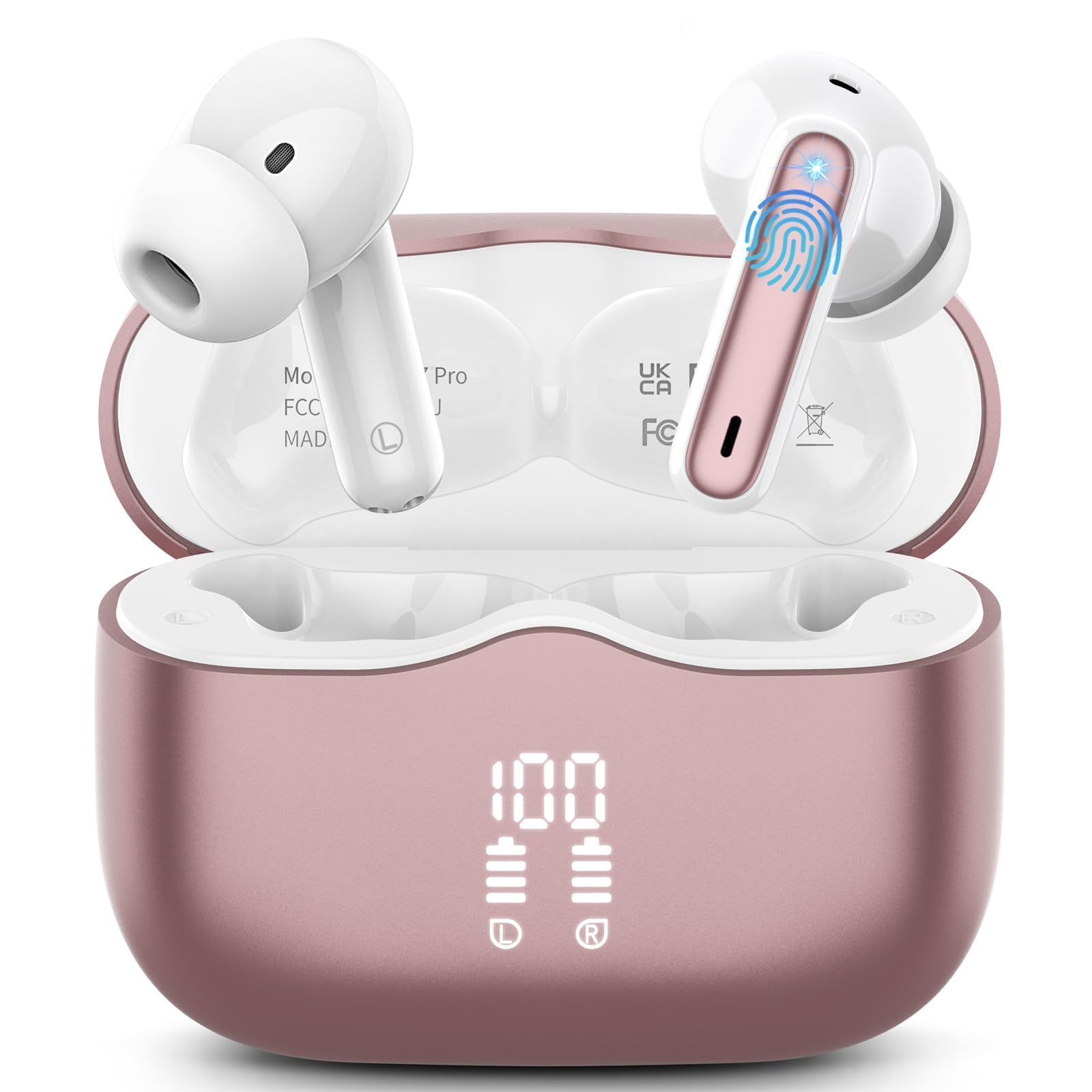
Şəkil 1: xinwld A97 Pro Wireless Earbuds and Charging Case. The image shows the black earbuds placed inside their charging case, which features a digital LED display on the front indicating battery levels.
Qulaqlıq komponentləri:
- Toxunma İdarəetmə Sahəsi: Oxutma, zənglər və səs köməkçisini idarə etmək üçün.
- Mikrofon: For calls and ENC functionality.
- Doldurma kontaktları: Enerji üçün şarj qutusuna qoşulur.
- Qulaq ucu: Provides comfort and sound isolation; replaceable.
Doldurma qutusu komponentləri:
- LED Rəqəmsal Ekran: Shows the battery level of the case and charging status of the earbuds.
- USB-C şarj portu: Kassanı doldurmaq üçün.
- Qulaqcıq doldurma yuvaları: Holds and charges the earbuds when placed inside.
4. Quraşdırma Bələdçisi
4.1. İlkin Doldurma
İlk istifadə etməzdən əvvəl qulaqcıqları və doldurma qutusunu tam doldurun.
- Hər iki qulaqlığı şarj qutusuna yerləşdirin.
- Connect the USB-C charging cable to the charging port on the case and the other end to a USB power adapter (not included).
- Şarj qutusundakı LED displey batareyanın faizini göstərəcəktage. The charging indicators for the earbuds will also be visible.
- Tam doldurulduqdan sonra şarj kabelini ayırın.
4.2. Cihazınızla Qoşulma
- Qulaqlıqların doldurulduğundan əmin olun.
- Open the charging case. The earbuds will automatically power on and enter pairing mode, indicated by flashing lights.
- Cihazınızda (smartfon, planşet və s.) Bluetooth parametrlərinə keçin və Bluetooth-u aktivləşdirin.
- axtarın available devices. Select "xinwld A97 Pro" from the list.
- Once connected, you will hear a confirmation sound, and the earbud indicator lights will turn off or flash slowly.
- Cütləşmə uğursuz olarsa, qulaqcıqları yenidən qutuya yerləşdirin, qapağı bağlayın, bir neçə saniyə gözləyin və sonra addımları təkrarlayın.
5. Əməliyyat Təlimatları
5.1. Gücü yandırın/söndürün
- Güc Aktivdir: Şarj qutusunu açın və qulaqcıqlar avtomatik olaraq yanacaq. Alternativ olaraq, hər iki qulaqcığın toxunma idarəetmə sahəsini 3 saniyə basıb saxlayın.
- Söndürmək: Place the earbuds back into the charging case and close the lid. They will automatically power off and begin charging. Alternatively, disconnect them from Bluetooth, and they will power off after 5 minutes of inactivity.
5.2. Qulaqcıqların taxılması
Insert the earbuds into your ears and gently rotate them to find a comfortable and secure fit. Ensure the microphones are facing downwards for optimal call quality. Experiment with different eartip sizes (if included) for the best seal and sound.
5.3. Nəzarət elementlərinə toxunun
The xinwld A97 Pro earbuds feature intuitive touch controls on each earbud. The functions are generally mirrored on both earbuds unless specified.
| Funksiya | Fəaliyyət |
|---|---|
| Musiqi çalın/pauza verin | Hər iki qulaqcığa bir dəfə toxunun |
| Növbəti Track | Hər iki qulaqcığa iki dəfə toxunun |
| Əvvəlki Track | Hər iki qulaqcığa üç dəfə toxunun |
| Zəngə Cavab Vermək/Bitirmək | Hər iki qulaqcığa bir dəfə toxunun |
| Zəngi rədd et | Hər hansı qulaqcığı 2 saniyə basıb saxlayın |
| Səsli köməkçini aktivləşdirin | Hər hansı qulaqcığı 3 saniyə basıb saxlayın |
| Səs səviyyəsinə nəzarət | Control via your connected device (earbuds do not have direct volume control) |
5.4. Environmental Noise Cancellation (ENC)
The earbuds feature 4 ENC microphones to reduce ambient noise during calls, ensuring clearer conversations for both you and the person you are speaking with. This feature is automatically active during phone calls.
6. Baxım və qulluq
6.1. Təmizləmə
- Qulaqlıqları və şarj qutusunu mütəmadi olaraq yumşaq, quru, tüysüz parça ilə təmizləyin.
- Do not use harsh chemicals, cleaning solvents, or strong detergents, as these may damage the product.
- Gently clean the charging contacts on both the earbuds and inside the case to ensure proper charging and connectivity.
6.2. Suya davamlılıq (IP7)
The earbuds are rated IP7 water-resistant, meaning they can withstand immersion in water up to 1 meter for 30 minutes. This rating applies to the earbuds only, not the charging case.
- Do not submerge the charging case in water.
- Avoid using the earbuds in saunas, steam rooms, or during water sports.
- If the earbuds get wet, dry them thoroughly with a soft cloth before placing them back in the charging case to prevent damage to the charging contacts.
6.3. Saxlama
When not in use, store the earbuds in their charging case to protect them from dust, scratches, and accidental damage.
6.4. Batareyaya qulluq
To prolong battery life, avoid fully discharging the earbuds and charging case frequently. Charge them regularly, even if not in constant use, to maintain optimal battery health.
7. Giderme
Hər hansı bir problemlə qarşılaşsanız, aşağıdakı ümumi həllərə baxın:
7.1. Earbuds not pairing with device:
- Cihazınızda Bluetooth-un aktiv olduğundan əmin olun.
- Qulaqlıqların doldurulduğundan və şarj qutusundan çıxarıldığından əmin olun.
- Try forgetting "xinwld A97 Pro" from your device's Bluetooth list and re-pairing.
- Cihazınızı yenidən başladın.
- Place earbuds back in the case, close the lid, wait 10 seconds, then open to re-enter pairing mode.
7.2. Only one earbud working:
- Hər iki qulaqcığın doldurulduğundan əmin olun.
- Hər iki qulaqcığı şarj qutusuna yerləşdirin, qapağı bağlayın və yenidən açın.
- Hər iki qulaqlıqdakı və qutunun içindəki doldurma kontaktlarını təmizləyin.
7.3. Earbuds not charging:
- Doldurma kabelinin həm korpusa, həm də enerji mənbəyinə etibarlı şəkildə qoşulduğundan əmin olun.
- Qulaqlıqlardakı və qutunun içərisindəki şarj kontaktlarının təmiz və zibilsiz olub olmadığını yoxlayın.
- Fərqli USB-C kabeli və ya güc adapterini sınayın.
7.4. Poor sound quality:
- Qulaqlıqların qulaqlarınıza düzgün oturduğundan əmin olun.
- Daha yaxşı sızdırmazlıq üçün müxtəlif ölçülü qulaqlıqları sınayın.
- Qulaqcıq burunlarından qulaq kirini və ya zibili təmizləyin.
- Ensure your device's volume is not too low.
- Müdaxilə etməmək üçün qoşulmuş cihazınıza yaxınlaşın.
8. Spesifikasiyalar
| Xüsusiyyət | Detal |
|---|---|
| Brend | xinwld |
| Model Adı | A97 Pro |
| Model nömrəsi | A97 |
| Bağlantı texnologiyası | Simsiz (Bluetooth) |
| Bluetooth versiyası | 5.4 |
| Qulaqların Yerləşdirilməsi | Qulaqda |
| Nəzarət növü | Nəzarətə toxunun |
| Suya davamlılıq reytinqi | IP7 (Yalnız qulaqcıqlar) |
| Oyun vaxtı | 40 saata qədər (şarj qutusu ilə) |
| Mikrofonlar | 4 ENC Noise Cancelling Mics |
| Material | plastik |
9. Zəmanət və Dəstək
9.1. Zəmanət Məlumatı
Your xinwld A97 Pro Wireless Earbuds come with a limited warranty. Please refer to the warranty card included in your package or visit the official xinwld website for detailed warranty terms and conditions. The warranty period is typically 1 year from the date of purchase, covering manufacturing defects.
9.2. Müştəri dəstəyi
For any questions, technical assistance, or warranty claims, please contact xinwld customer support through the following channels:
- E-poçt: Please check your product packaging or the official xinwld website for direct customer support email.
- Websayt: Visit the xinwld Store on Amazon (for general inquiries or to find official contact information).
When contacting support, please have your product model (A97 Pro) and purchase details ready to expedite assistance.