
1. Giriş
This manual provides essential information for setting up, operating, and maintaining your ASUS NUC 15 Pro Mini Desktop Computer. This compact and powerful AI Mini PC features an Intel Series 2 Core Ultra 7 255H processor, Intel Arc 140T GPU, 32GB DDR5 RAM, and a 1TB PCIe SSD, running on Windows 11 Pro. It is designed for demanding tasks such as AI computing, video editing, 3D rendering, and gaming, offering 8K/Quad 4K HDR display support and advanced connectivity options like Thunderbolt 4 and WiFi 7.
2. Paketin məzmunu
Bütün əşyaların paketinizdə olduğunu yoxlayın:
- ASUS NUC 15 Pro Mini PC
- AC Adapter və Elektrik kabeli
- VESA dağı
- Simsiz Klaviatura
- Simsiz Siçan
- İstifadəçi Təlimatı (bu sənəd)
3. Məhsul bitdiview
3.1 Əsas Xüsusiyyətlər
- Prosessor: Intel Series 2 Core Ultra 7 255H (16 cores, 16 threads, up to 5.1 GHz, 24 MB Intel Smart Cache)
- Qrafik: Integrated Intel Arc 140T GPU
- Yaddaş: 32GB DDR5 RAM (upgradeable to 128GB)
- Yaddaş: 1TB PCIe 4.0 SSD (upgradeable to 48TB)
- Əməliyyat sistemi: Windows 11 Pro
- Ekran dəstəyi: Up to 8K or Quad 4K HDR via HDMI 2.1 and Thunderbolt 4
- Bağlantı: Wi-Fi 7, Bluetooth 5.4, 2.5G Gigabit Ethernet
- Limanlar: 1x USB 3.2 Gen2 x 2 Type-C, 3x USB 3.2 Gen2 Type-A, 1x USB 2.0 Gen2 Type-A, 2x HDMI 2.1, 2x Thunderbolt 4, 1x 2.5G Gigabit Ethernet
3.2 Processor and AI Capabilities
The Intel Series 2 Core Ultra 7 255H processor, with its 16 cores and 16 threads, provides robust performance for demanding applications. The integrated Intel Arc 140T GPU and built-in AI Acceleration Engine enhance AI computing, video editing, and 3D rendering tasks.

Şəkil 3.2.1: Bitdiview of the Intel Core Ultra 7 255H processor specifications, highlighting 16 cores, 16 threads, 24 MB cache, 96 TOPS, and 5.1 GHz max turbo frequency.

Şəkil 3.2.2: Illustration of the Neural Processing Unit (NPU) for on-device AI acceleration, supporting applications like Midjourney, DeepSeek, Photoshop, and Premiere Pro.
3.3 Portlar və Bağlantı
The ASUS NUC 15 Pro offers a comprehensive array of ports for connecting various peripherals and displays.

Şəkil 3.3.1: Diagram illustrating the various ports on the ASUS NUC 15 Pro, including USB 3.2 Gen2 x 2 Type-C, USB 3.2 Gen2 Type-A, USB 2.0 Type-A, HDMI 2.1, Thunderbolt 4, and 2.5G Ethernet.
4. Quraşdırma Bələdçisi
4.1 İlkin qoşulma
- Ekranı qoşun: Connect your monitor(s) to the HDMI 2.1 or Thunderbolt 4 ports. The system supports up to four 4K HDR displays or one 8K display.
- Periferiyaları birləşdirin: Plug in the wireless keyboard and mouse receiver into an available USB port. Connect any other USB devices as needed.
- Güc bağlayın: Connect the AC adapter to the DC-In port on the mini PC, then plug the power cord into an electrical outlet.
- Şəbəkə bağlantısı: For wired internet, connect an Ethernet cable to the 2.5G Gigabit Ethernet port. For wireless internet, ensure your Wi-Fi network is available.
- Güc Aktivdir: Press the power button located on the front of the device.

Şəkil 4.1.1: Visual representation of the ASUS NUC 15 Pro connected to multiple displays, demonstrating its support for quad 4K or 8K display configurations via HDMI and Thunderbolt ports.
4.2 Əməliyyat sisteminin qurulması
Upon first boot, the Windows 11 Pro operating system will guide you through the initial setup process, including language selection, network configuration, and user account creation. Follow the on-screen instructions to complete the setup.
5. Əməliyyat Təlimatları
5.1 Ümumi istifadə
Your ASUS NUC 15 Pro is ready for a wide range of applications, from everyday computing to intensive tasks.
- Multitasking: Leverage the powerful Intel Core Ultra 7 processor for seamless multitasking across various applications.
- AI Computing: Utilize the integrated AI capabilities for enhanced performance in AI-driven software.
- Yüksək Çözünürlüklü Ekranlar: Connect multiple high-resolution monitors for an expansive workspace or immersive entertainment.
5.2 Bağlantı
The mini PC offers advanced connectivity options for fast and reliable data transfer and network access.
- Wi-Fi 7: Yüksək sürətli simsiz internet üçün.
- Bluetooth 5.4: For connecting wireless peripherals such as headphones, speakers, and game controllers.
- İldırım 4: Provides high-bandwidth connections for external GPUs, high-speed storage, and display output.
- 2.5G Ethernet: For ultra-fast wired network connections.

Şəkil 5.2.1: Diagram highlighting the advanced connectivity features of the ASUS NUC 15 Pro, including Wi-Fi 7, Bluetooth 5.4, and 2.5G LAN for uninterrupted network performance.
5.3 İstifadə Ssenariləri
The ASUS NUC 15 Pro is versatile and suitable for various applications:
- Graphic Design / Video Processing: Utilize the powerful CPU and GPU for demanding creative tasks.
- Oyun: Enjoy a smooth gaming experience with the Intel Arc 140T GPU.
- NAS (Şəbəkəyə Qoşulmuş Yaddaş): Its compact size and connectivity make it suitable for home server applications.
- Ev kinoteatrı: Connect to your TV for 8K or 4K HDR media playback.

Şəkil 5.3.1: Examples of how the ASUS NUC 15 Pro can be used, including graphic design, video processing, gaming, network attached storage (NAS), and as a home theater PC.
6. Baxım və Təkmilləşdirmələr
6.1 Yaddaş və Yaddaş Təkmilləşdirmələri
The ASUS NUC 15 Pro features a tool-free design for easy upgrades of RAM and SSD.
- RAM: Supports 16GB–64GB DDR5 RAM, upgradeable to 128GB.
- SSD: Supports 512GB–2TB PCIe 4.0 SSDs, upgradeable to 48TB.
- Prosedur: Refer to the detailed instructions in the physical user manual for safe access and installation of components.
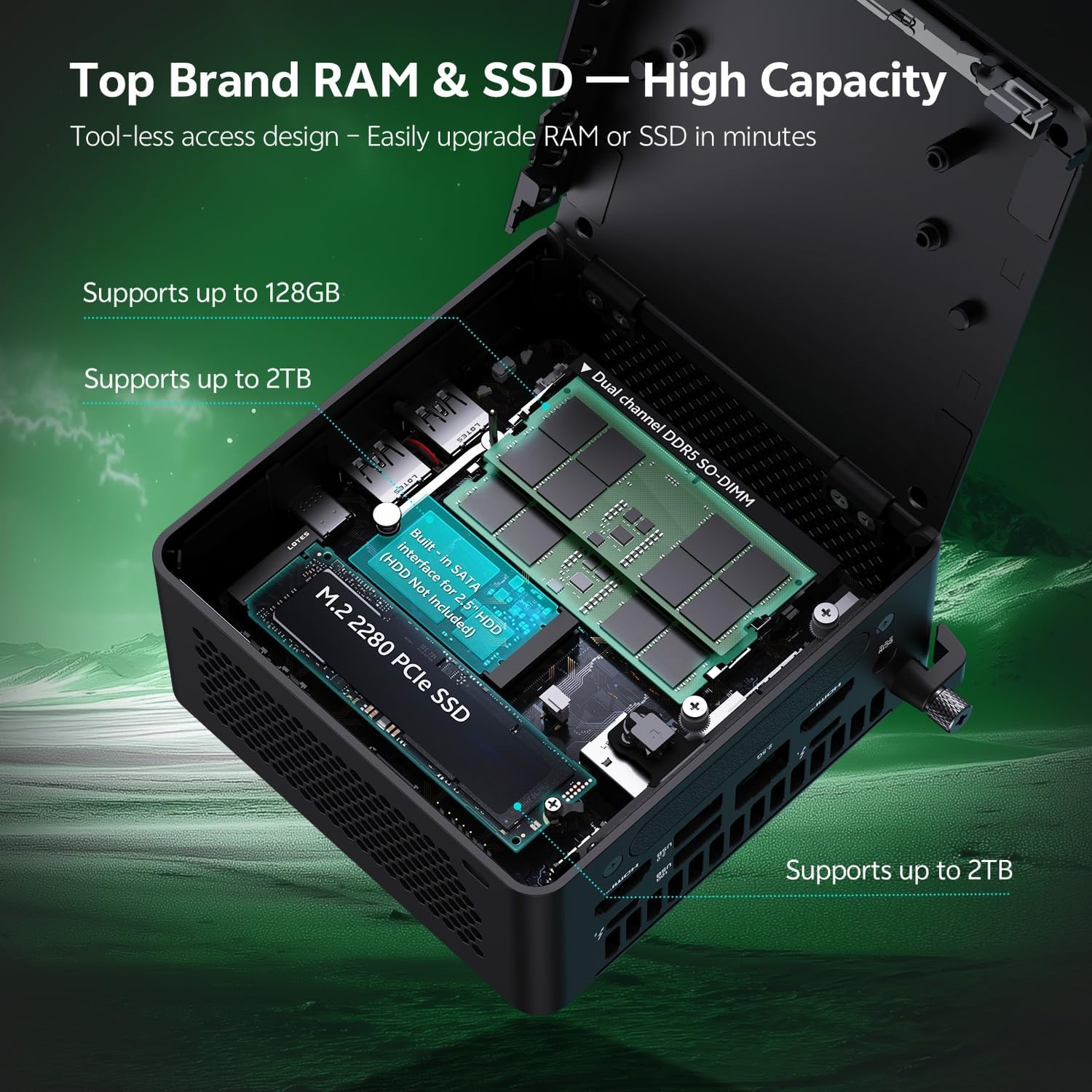
Şəkil 6.1.1: Internal layout of the ASUS NUC 15 Pro, illustrating the dual-channel DDR5 SO-DIMM slots for RAM and the M.2 2280 PCIe SSD slot, both designed for tool-less access and upgrades.
6.2 Soyutma sistemi
The device incorporates a Smart Silent Cooling System with dual heat pipes and a large fan to ensure efficient heat dissipation and stable performance.
- Həddindən artıq istiləşmənin qarşısını almaq üçün mini PC ətrafında düzgün havalandırma təmin edin.
- Periodically clean dust from the vents using compressed air to maintain optimal cooling efficiency.

Şəkil 6.2.1: Partladı view diagram of the ASUS NUC 15 Pro's Smart Silent Cooling System, showing dual heat pipes and a large fan designed for efficient thermal management and multi-ventilation.
7. Giderme
If you encounter issues with your ASUS NUC 15 Pro, refer to the following common troubleshooting steps:
- Güc yoxdur:
- Ensure the AC adapter is securely connected to both the mini PC and a working power outlet.
- Verify the power cord is not damaged.
- Ekran yoxdur:
- Check that the display cable (HDMI or Thunderbolt) is firmly connected to both the mini PC and the monitor.
- Monitorun işə salındığından və düzgün giriş mənbəyinə təyin olunduğundan əmin olun.
- Mümkünsə, fərqli bir ekran kabeli və ya monitor sınayın.
- İnternet bağlantısı yoxdur:
- Simli bağlantılar üçün Ethernet kabelinin və routerin vəziyyətini yoxlayın.
- For Wi-Fi, ensure Wi-Fi is enabled in Windows settings and you are connected to the correct network.
- Restart your router/modem and the mini PC.
- Periferik cihazlar cavab vermir:
- Ensure wireless keyboard/mouse receivers are properly inserted into a USB port.
- Check battery levels for wireless peripherals.
- Periferik cihazları fərqli USB portlarına qoşmağa çalışın.
8. Spesifikasiyalar
| Xüsusiyyət | Detal |
|---|---|
| Brend | ASUS |
| Model Adı | RNUC15HU7 |
| Əməliyyat sistemi | Windows 11 Pro |
| CPU Modeli | Intel Core Ultra 7 255H |
| CPU Sürəti | 5.1 GHz-ə qədər |
| Qrafik koprosessor | Intel Arc 140T GPU |
| Quraşdırılmış RAM Yaddaş Ölçüsü | 32 GB DDR5 (Upgradeable to 128 GB) |
| Yaddaş Saxlama Tutumu | 1 TB PCIe SSD (Upgradeable to 48 TB) |
| Avadanlıq interfeysi | HDMI, Thunderbolt 4, USB 2.0 Type A, USB 3.2 Gen 2 |
| Bağlantı texnologiyası | Bluetooth 5.4, Wi-Fi 7, Ethernet (2.5G) |
| Video çıxış interfeysi | HDMI 2.1, Thunderbolt 4 |
| Element Ölçüləri (U x G x Y) | 4.6 x 4.4 x 2.1 düym |
| Çəki | 1.36 funt |
| Rəng | Qara |
| UPC | 197105156340 |
9. Zəmanət və Dəstək
9.1 Zəmanət Məlumatı
Your ASUS NUC 15 Pro Mini Desktop Computer comes with a 12-month warranty. This warranty covers manufacturing defects and issues arising from normal use. Please retain your proof of purchase for warranty claims.
Note: The manufacturer box is opened by professional engineers for customizing and testing. Factory defects and blemishes are significantly reduced by this in-depth inspection and testing process.
9.2 Texniki Dəstək
For technical assistance, troubleshooting beyond this manual, or warranty inquiries, please contact ASUS customer support.
- Rəsmi ASUS dəstəyinə baş çəkin website for drivers, FAQs, and contact information.
- Have your product model (RNUC15HU7) and serial number ready when contacting support.