
Giriş
This manual provides detailed instructions for the Saitake Wireless Arcade Fight Stick Joystick. It covers product features, setup, operation, connection methods, and troubleshooting to ensure optimal performance across various platforms including PC, Android, iOS, Nintendo Switch, PS3, and PS4.
Məhsul Bitdiview
Video: Bitdiview of the Saitake Arcade Fight Stick, showcasing its design, joystick, buttons, and key features.
Əsas Xüsusiyyətlər
- Çox Platforma Uyğunluğu: Compatible with Windows PC, Android, iOS, Nintendo Switch 1/2, PS3, and PS4.
- Three Connection Methods: Supports Bluetooth, 2.4GHz wireless (with included receiver), and wired (Type-C) connections.
- Integrated Display Screen: A 1.9-inch functional display screen shows function options, volume, lighting effects, brightness, and language settings.
- 3.5 mm qulaqlıq girişi: For audio output and communication.
- TURBO funksiyası: Equipped with standard turbo and upgraded auto turbo modes for rapid input execution.
- Makro funksiyası: Customize button mappings and create macro commands with up to 18 keystrokes, including trigger timestamps.
- High Precision Joystick: Features an adjustable RGB light ring with 4 modes and 7 colors.
- Aşağı Profile Qırmızı açarlar: Buttons utilize low-profile red switches for light pressure and quick response.
- Erqonomik Dizayn: Designed for comfortable and extended gaming sessions.
Məhsul Düzeni və Düymə Funksiyaları
Familiarize yourself with the layout and functions of the arcade fight stick's buttons and controls.

Image: Detailed diagram of the Saitake Arcade Fight Stick showing the location and labels of all buttons and features.
- A: Menyu Seçimi
- B: Joystick Function Option
- C: Joystick
- D: Ekran görüntüsü
- E: Turbo düyməsi
- F: SEÇİM Düyməsi
- G: START düyməsi
- H: HOME düyməsi
- I: Qoşulma Seçimi
- J: Touch Panel (for PS4 platform)
- K: Earphone & Microphone Option
- L: LSB düyməsi
- M: RSB düyməsi
- N: LB düyməsi
- O: LT düyməsi
- P: Qulaqlıq rozeti
- Q: MACRO Button
- R: Bir Düymə
- S: X düyməsi
- T: B Düyməsi
- U: Y düyməsi
- V: RT düyməsi
- W: RB düyməsi
Quraşdırma və Bağlantı
Cihazın doldurulması
The arcade stick has a built-in 1000mAh rechargeable lithium battery. Connect the included USB Type-C cable to the device and a power source (e.g., computer USB port, USB wall adapter) to charge. The display screen will indicate charging status.
Qoşulma üsulları
The Saitake Arcade Fight Stick supports three primary connection methods:

Image: Visual representation of the Bluetooth switch, 2.4G receiver, and Type-C wired connection port.
- Bluetooth bağlantısı:
- Ensure the arcade stick is powered on and in Bluetooth pairing mode (refer to the display screen for status).
- On your device (Android, iOS, Switch, PS3, PS4, PC with Bluetooth), search for available Bluetooth devices.
- Select "Saitake Arcade Stick" to pair.
- 2.4GHz Simsiz Bağlantı:
- Locate the 2.4GHz receiver in the hidden compartment on the back of the arcade stick.
- Plug the 2.4GHz receiver into a USB port on your PC, Switch dock, or PS3/PS4 console.
- The arcade stick should automatically connect to the receiver.
- Simli Bağlantı:
- Connect the USB Type-C cable from the arcade stick to a USB port on your PC, Switch dock, or PS3/PS4 console.
- The device will automatically detect the wired connection.
Çox Platforma Uyğunluğu
The Saitake Arcade Fight Stick is designed for broad compatibility. The image below illustrates the supported systems.

Image: Icons representing Android, iOS, PC, Nintendo Switch, PS3, and PS4, indicating multi-system support.
Əməliyyat Təlimatları
Ümumi istifadə
Once connected, the arcade stick functions as a standard controller for compatible games. Use the joystick for directional input and the action buttons for in-game commands. The 1.9-inch display screen provides real-time information and allows for various adjustments.
TURBO funksiyası
The TURBO function allows for rapid, repeated input of a button press. This can be useful in games requiring fast button mashing.
- Standard Turbo: düyməsini basın TURBO button and the desired action button simultaneously to activate. The button will now rapidly repeat its input when held down.
- Avtomatik Turbo: Some modes may offer an auto-turbo feature where the button repeats without needing to be held. Refer to the on-screen display for specific settings.
- Tənzimləmə sürəti: The display screen and encoder allow for adjusting the turbo speed settings.
- Deactivating Turbo: düyməsini basın TURBO button and the action button again to deactivate.
Makro funksiyası
The MACRO function allows you to record a sequence of up to 18 keystrokes and assign them to a single button for complex command execution.
- Recording a Macro:
- düyməsini basın MAKRO button to enter recording mode. The display screen will indicate recording status.
- Perform the desired sequence of button presses and joystick movements.
- düyməsini basın MAKRO qeydi dayandırmaq üçün yenidən düyməsini basın.
- Assign the recorded macro to a specific button by pressing that button.
- Executing a Macro: Press the assigned button to execute the recorded sequence.
- Makronun təmizlənməsi: Refer to the display screen options or the full manual for instructions on clearing recorded macros.

Image: Visual explanation of the Turbo and Macro functions, highlighting their benefits for efficient gaming.
Display Screen and Audio Jack
- 1.9-inch Functional Display Screen: Use the encoder and buttons near the screen to navigate menus and adjust settings such as volume, lighting effects, brightness, and language. The screen also provides status updates.
- 3.5 mm qulaqlıq girişi: Located on the side of the unit, this jack allows you to connect headphones or a headset for in-game audio and voice chat (if supported by the connected platform).
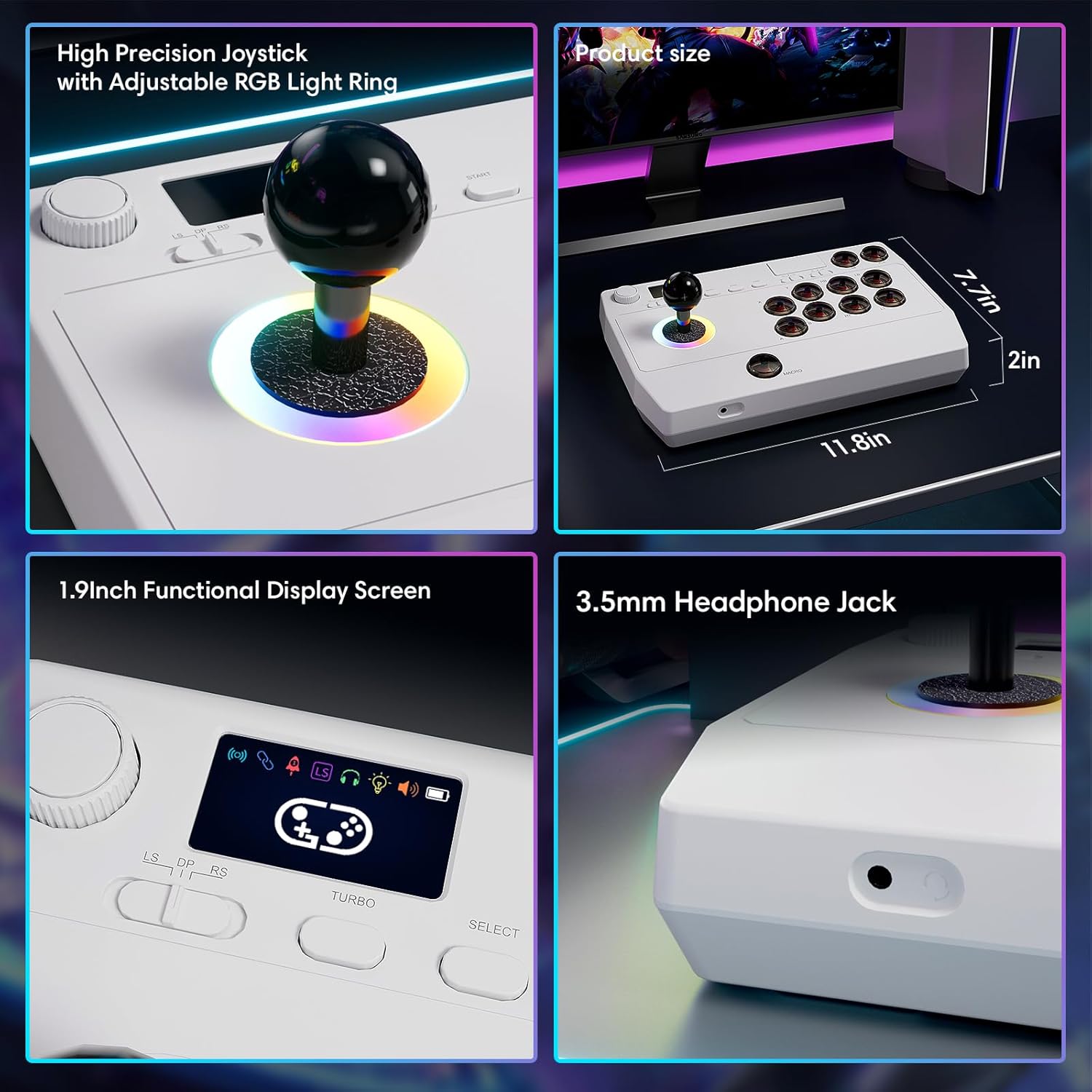
Şəkil: Yaxından views of the high-precision joystick with RGB lighting, the 1.9-inch functional display screen, and the 3.5mm headphone jack.
Baxım
- Yumşaq, quru bir parça ilə silməklə cihazı təmiz saxlayın.
- Cihazı həddindən artıq temperatura, rütubətə və ya birbaşa günəş işığına məruz qoymayın.
- Do not attempt to disassemble the device, as this may void the warranty.
- Store the 2.4GHz receiver in its designated compartment when not in use to prevent loss.
Problemlərin aradan qaldırılması
- Cihaz yanmır:
- Ensure the device is fully charged. Connect it to a power source using the USB Type-C cable.
- Cannot connect wirelessly:
- For Bluetooth, ensure the device is in pairing mode and your host device's Bluetooth is enabled.
- For 2.4GHz, ensure the receiver is securely plugged into a USB port and the arcade stick is in 2.4GHz mode.
- Try restarting both the arcade stick and the host device.
- Buttons or joystick are unresponsive:
- Ensure the device is properly connected (wired or wireless).
- Test the device on a different game or platform to rule out software issues.
- Check for any physical obstructions or damage to the buttons or joystick.
- Audio issues with 3.5mm jack:
- Qulaqlıqların tam qoşulduğundan əmin olun.
- Check the volume settings on both the arcade stick's display and the host device.
- Test with a different pair of headphones.
Spesifikasiyalar
| Model Adı | arkada çubuğu |
| Brend | Saitake |
| Uyğun Cihazlar | Android, iOS, Nintendo Switch 1/2, PC, PlayStation 3/4 |
| Nəzarətçi növü | Joystick |
| Bağlantı texnologiyası | Bluetooth, USB (2.4GHz wireless, Wired Type-C) |
| Əlavə Xüsusiyyətlər | Ergonomic, Headphone Jack, Portable, Wireless, 1.9-inch Display Screen, TURBO Function, Macro Function, RGB Lighting |
| Avadanlıq Platforması | Desktop, Gaming Console, Laptop, Smartphone, Tablet, Television |
| Güc mənbəyi | Batareya ilə işləyir (Daxili 1000mAh Litium Batareya) |
| Element Ölçüləri | 11.61 x 0.71 x 7.68 düym |
| Rəng | Ağ |
Zəmanət və Dəstək
The Saitake Wireless Arcade Fight Stick Joystick comes with a 1 il zəmanət satın alındığı tarixdən.
For technical support, troubleshooting assistance, or warranty claims, please contact Saitake customer service through their official website or the retailer where the product was purchased. Please have your purchase receipt and product model information ready.