
1. Giriş
This user manual provides comprehensive instructions for the installation, operation, and maintenance of your Polarlander B5350 Car Stereo. Please read this manual thoroughly before using the product to ensure proper functionality and to prevent damage. Keep this manual for future reference.
2. Təhlükəsizlik Məlumatı
- Sürücülük Təhlükəsizliyi: Always prioritize safe driving. Do not operate the system in a way that distracts you from the road.
- Quraşdırma: Professional installation is recommended. Ensure all wiring is correctly connected to prevent short circuits or damage.
- Enerji təchizatı: Connect the unit to a 9-30V DC power supply. Incorrect voltage zərər verə bilər.
- Temperatur: Operate the unit within the specified temperature range of -20℃ to 60℃.
- Nəmlik: Cihazı sudan və həddindən artıq nəmdən uzaq tutun.
3. Paketin məzmunu
Bütün əşyaların paketdə olduğunu yoxlayın:
- Main Unit (Car Stereo)
- Waterproof Power Cord
- Fixed Mounting Bracket Set (Hardware bracket + Sunshade)
- MINI-USB to USB2.0 Cable
- İstifadəçi Təlimatı (bu sənəd)

Image 3.1: Contents of the Polarlander B5350 package, including the main unit, power cord, mounting bracket, and USB cable.
4. Məhsul bitdiview
The Polarlander B5350 is a double DIN car stereo featuring a 5.0-inch touchscreen display with 800x480 resolution. It supports wireless CarPlay and Android Auto, Bluetooth 5.0, and various media playback options.
4.1 Ön Panel və Ekran
The front panel features the 5.0-inch touchscreen, which is the primary interface for controlling the unit. The display provides access to various functions including navigation, media playback, and phone calls.

Şəkil 4.1: Məsamples of the user interface display, showing various application icons and menu layouts.
4.2 Yan və Arxa Bağlantılar
The unit includes several ports for connectivity and expansion:
- Qulaqlıq Jack: Şəxsi audio dinləmə üçün.
- TF Kart Yuvası: For media playback from a TransFlash (MicroSD) card.
- MINI to USB Interface: For connecting USB devices or the provided MINI-USB to USB2.0 cable.
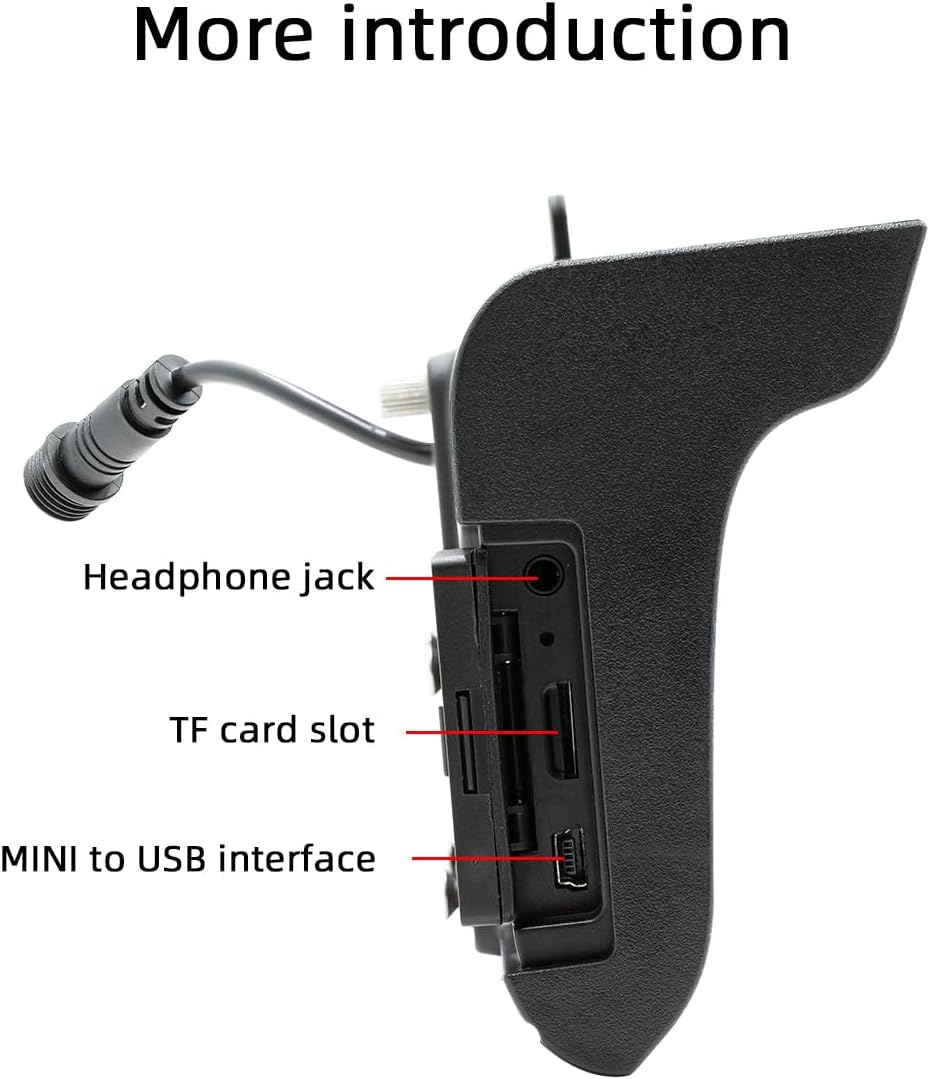
Şəkil 4.2: Yan view illustrating the headphone jack, TF card slot, and MINI to USB interface.
The rear of the unit houses a built-in 1W speaker and mounting points for the bracket.

Şəkil 4.3: Arxa view of the unit, highlighting the built-in 1W speaker.
5. Quraşdırma
This unit is designed for double DIN installation. Due to the complexity of vehicle wiring and dashboard configurations, professional installation is highly recommended. Incorrect installation can lead to vehicle damage or malfunction of the stereo unit.
5.1 Ümumi Quraşdırma Addımları (Bir mütəxəssislə məsləhətləşin)
- Elektrik qısaqapanmasının qarşısını almaq üçün avtomobilin akkumulyatorunu ayırın.
- Remove the existing car stereo or dashboard trim to access the double DIN slot.
- Connect the wiring harness from the vehicle to the stereo's power and speaker connections. Ensure correct polarity.
- Connect any additional inputs/outputs such as the reversing camera, AUX-in, or RCA audio outputs.
- Mount the stereo securely into the double DIN slot using the provided mounting bracket set.
- Avtomobilin batareyasını yenidən qoşun və cihazın funksionallığını yoxlayın.
- Alət panelinin bəzəyini yenidən yığın.
Note: The waterproof power cord should be routed carefully to avoid damage and ensure proper sealing.
6. İlkin Quraşdırma
6.1 Yandırma/Söndürmə
The unit will power on automatically when the vehicle's ignition is turned on. To power off, turn off the vehicle's ignition.
6.2 Dil Parametrləri
Upon first use, you may be prompted to select your preferred language. Navigate through the on-screen menu to select from English, Chinese, Spanish, Portuguese, Russian, German, French, Polish, Turkish, Arabic, Hebrew, Italian, Czech, Japanese, or Korean.
7. Əməliyyat Təlimatları
7.1 Toxunma ekranı naviqasiyası
The 5-inch touchscreen is the primary control interface. Tap icons to open applications, swipe to navigate menus, and use pinch-to-zoom gestures where applicable (e.g., in navigation apps).
7.2 Sükan çarxına nəzarət
If your vehicle supports steering wheel controls, connect the appropriate wires during installation. The unit supports programmable steering wheel controls, allowing you to map functions like volume, track skip, and mode selection to your vehicle's buttons.
7.3 Seven-Color Key Backlights
The unit features adjustable seven-color key backlights. Access the settings menu to customize the backlight color to match your vehicle's interior lighting or your personal preference.
8. Bağlantı
8.1 Bluetooth 5.0
The unit features Bluetooth 5.0 for wireless audio streaming and hands-free calling. The default Bluetooth name is "SWL-BT".
- Cib telefonunuzda Bluetooth -u aktiv edin.
- On the car stereo, navigate to the Bluetooth menu.
- axtarın available devices on your phone and select "SWL-BT".
- Tələb olunduqda cütləşdirmə kodunu təsdiqləyin.
The unit supports connecting to two Bluetooth devices simultaneously, such as a mobile phone and a Bluetooth earphone.

Image 8.1: Illustration of the dual Bluetooth connection capability, powered by a Bluetooth 5.0 chip.
8.2 Wireless & Wired CarPlay / Android Auto
Connect your smartphone to access functions like navigation, phone calls, messages, and music directly on the car stereo display. Both wired and wireless connections are supported.

Image 8.2: Display showing the CarPlay and Android Auto interfaces, demonstrating mobile phone function integration.
8.2.1 Simsiz əlaqə
For wireless CarPlay or Android Auto, ensure your phone's Wi-Fi and Bluetooth are enabled. Follow the on-screen prompts on the car stereo to pair your device wirelessly.
8.2.2 Simli əlaqə
Uyğun USB kabelindən istifadə edərək smartfonunuzu cihazın USB portuna qoşun. Sistem avtomatik olaraq CarPlay və ya Android Auto-nu aşkarlayacaq və işə salacaq.
9. Media Playback
The Polarlander B5350 supports multiple methods for media playback:
- Bluetooth (BT) Playback: Stream audio wirelessly from your paired smartphone.
- TF Kart Oynatma: Insert a TF (MicroSD) card into the designated slot to play audio and video files.
- USB oxutma: Connect a USB flash drive to the USB port for audio and video file oxutma.
- AUX girişi: Xarici audio cihazlarını köməkçi giriş vasitəsilə birləşdirin.
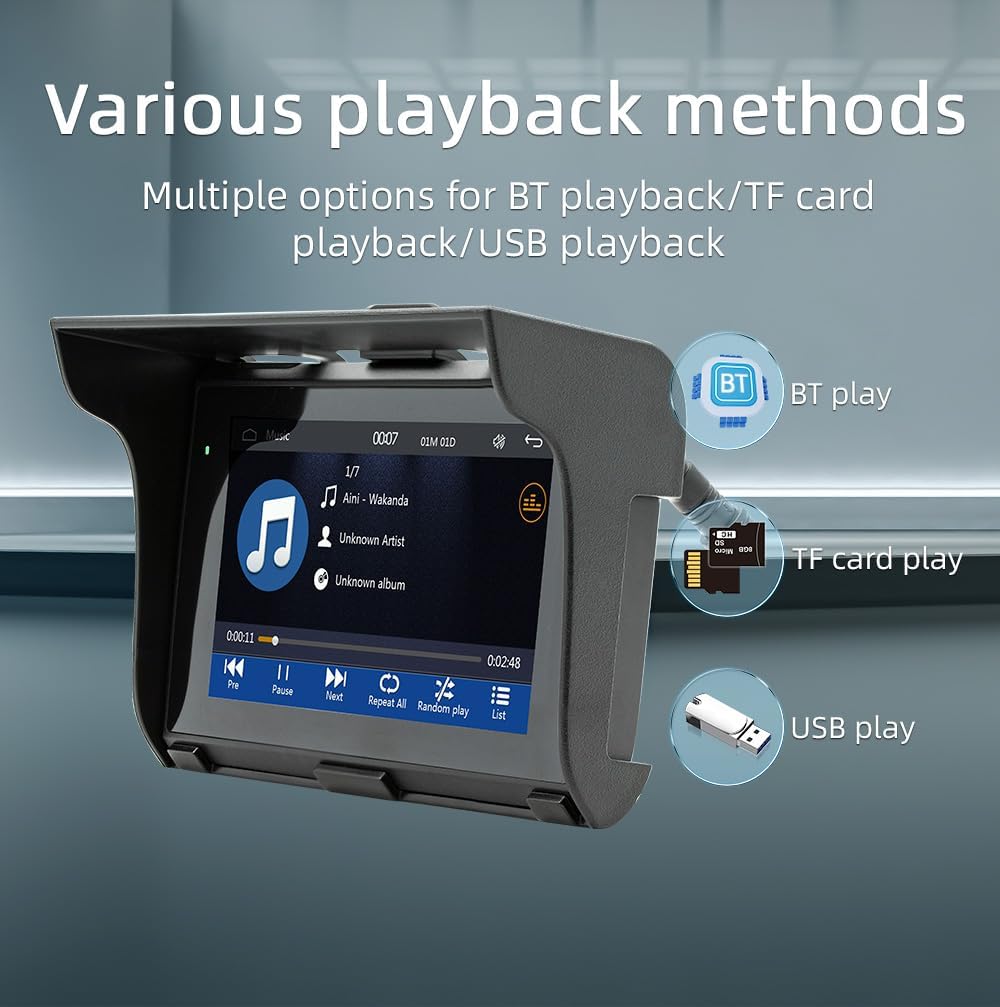
Image 9.1: Visual representation of the various media playback methods available: Bluetooth, TF card, and USB.
9.1 Dəstəklənən Media Formatları
- Audio formatlar: MP3, AAC, APE, OGG, M4A, RA, WAV
- Video Formatları: H263, H264, H265, DIVX HD, AVI, FLV, MKV, MPEG, MP4, WMV9, VC, ASF, TS, QT
- Şəkil Formatları: JPEG, PNG, BMP, GIF, TIFF
10. AM/FM Radio Əməliyyatı
The unit includes an AM/FM radio receiver. To access the radio function, select the "Radio" icon from the main menu.
- Skan olunur: Mövcud radio stansiyalarını avtomatik olaraq axtarmaq və saxlamaq üçün skan funksiyasından istifadə edin.
- Əl ilə tənzimləmə: Manually tune to specific frequencies using the on-screen controls.
- Əvvəlcədən: Tez giriş üçün sevimli stansiyalarınızı əvvəlcədən təyin edilmiş düymələrə saxlayın.
The radio allows you to stay updated with real-time traffic, news broadcasts, and weather forecasts.
11. Driving Recorder Function (Optional)
The Polarlander B5350 supports an optional car driving recorder. When connected, the unit can display and record your driving dynamics, providing additional security and peace of mind.

Image 11.1: The car stereo displaying footage from an optional driving recorder camera.
Note: The driving recorder camera is an optional accessory and is not included in the standard package.
12. Giderme
| Problem | Mümkün Səbəb | Həll |
|---|---|---|
| Cihaz işə düşmür. | No power connection or incorrect wiring. | Check power cables and fuse. Ensure correct 9-30V DC supply. |
| Səs yoxdur. | Volume too low, mute activated, or speaker wiring issue. | Increase volume, check mute status, verify speaker connections. |
| Bluetooth bağlantısı uğursuz oldu. | Bluetooth not enabled on phone/unit, or device out of range. | Ensure Bluetooth is active on both devices. Move phone closer to unit. Re-pair device. |
| CarPlay/Android Auto qoşulmur. | Incorrect cable, phone settings, or app issues. | Use a certified USB cable. Check phone settings for CarPlay/Android Auto. Restart phone and unit. |
| Toxunma ekranı cavab vermir. | System freeze or temporary software issue. | Restart the unit (turn off/on ignition). If issue persists, consult support. |
13. Spesifikasiyalar
| Xüsusiyyət | Detal |
|---|---|
| Məhsul növü | Car Stereo (Double Din) |
| Ekran Ölçüsü | 5.0 düym |
| Ekran Çözünürlüğü | 800x480 |
| Çıxış Gücü | Quraşdırılmış 1W dinamik |
| İşçi cildtage | 9~30V DC |
| İşləmə temperaturu | -20 ℃ ilə 60 ℃ arasında |
| Bluetooth versiyası | 5.0 (Default name: SWL-BT) |
| Çalışan Yaddaş | 1Gbit DRAM |
| Dəstəklənən Audio Formatlar | MP3, AAC, APE, OGG, M4A, RA, WAV |
| Dəstəklənən Video Formatları | H263, H264, H265, DIVX HD, AVI, FLV, MKV, MPEG, MP4, WMV9, VC, ASF, TS, QT |
| Dəstəklənən şəkil formatları | JPEG, PNG, BMP, GIF, TIFF |
| Giriş/Çıxış | SD Card, USB, AUX-in, RCA Audio output, Reversing camera input |
| İstehsalçı Hissə nömrəsi | B5350 |
14. Baxım
- Ekranın təmizlənməsi: Toxunma ekranını yumşaq bir şəkildə silmək üçün yumşaq, tüysüz parçadan istifadə edin. Aşındırıcı təmizləyicilərdən və ya həlledicilərdən istifadə etməyin.
- Ümumi təmizləmə: Keep the unit free from dust and debris. Use a soft brush or compressed air for hard-to-reach areas.
- Kabel Bağlantıları: Bütün kabel birləşmələrinin etibarlı olduğundan əmin olmaq üçün vaxtaşırı yoxlayın.
15. Zəmanət və Dəstək
Zəmanət məlumatı və texniki dəstək üçün satınalma zamanı təqdim olunan sənədlərə müraciət edin və ya satıcınızla əlaqə saxlayın. Hər hansı bir zəmanət iddiası üçün satınalma sübutunuzu saxlayın.
For further assistance, visit the official Polarlander websaytına daxil olun və ya müştəri xidməti şöbəsi ilə əlaqə saxlayın.