
1. Giriş
Thank you for choosing the xinwld Air3 Pro Wireless Earbuds. This manual provides detailed instructions on how to set up, operate, and maintain your new earbuds. Please read this manual carefully before use to ensure optimal performance and longevity of your device. Keep this manual for future reference.
2. Paketin məzmunu
Bütün əşyaların paketdə olduğundan əmin olun:
- xinwld Air3 Pro Wireless Earbuds (Left and Right)
- Doldurma qutusu
- USB Type-C Şarj Kabeli
- Multiple Ear Tip Sizes (S, M, L)
- İstifadəçi təlimatı
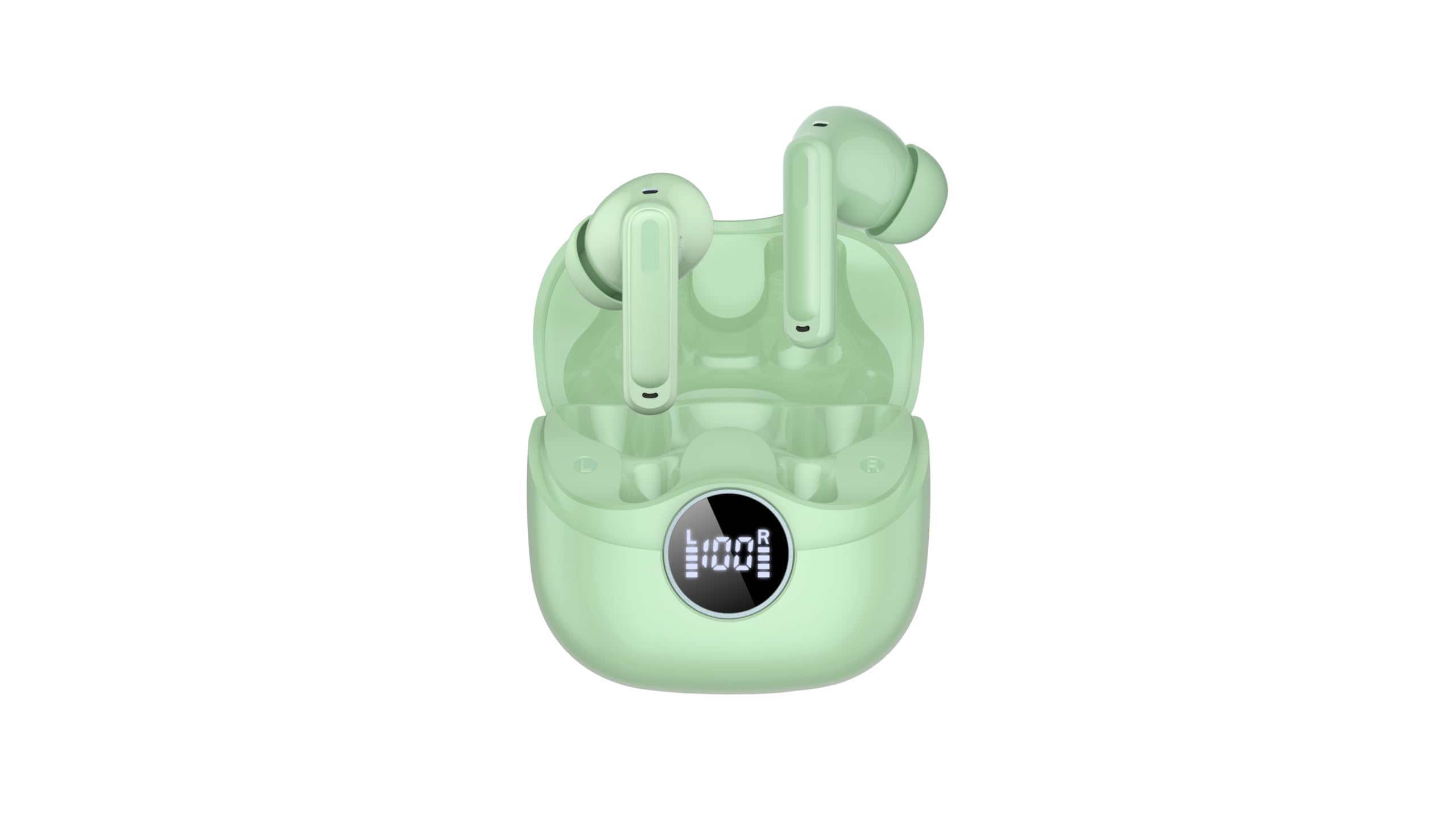
Image 2.1: xinwld Air3 Pro Wireless Earbuds and Charging Case with accessories.
3. Məhsul bitdiview
The xinwld Air3 Pro Wireless Earbuds are designed for a superior audio experience with advanced features.
Əsas Xüsusiyyətlər:
- Bluetooth 5.4: Sabit və səmərəli simsiz əlaqə təmin edir.
- 4 ENC Noise Cancelling Microphones: Enhances call clarity by reducing environmental noise.
- HiFi Stereo Deep Bass: Delivers rich, immersive audio quality.
- 40 saatlıq oyun vaxtı: Şarj qutusu ilə batareya ömrünü uzadın.
- IP7 suya davamlı: Tər və yağışa davamlıdır, məşqlər və açıq hava fəaliyyətləri üçün uyğundur.
- LED ekran: Şarj qutusunun və fərdi qulaqcıqların batareya vəziyyətini göstərir.
- Toxunma İdarəsi: Intuitive control for music, calls, and voice assistant.
Şəkil 3.1: Yaxından view of the xinwld Air3 Pro Wireless Earbuds.
4. Doldurma
The earbuds and charging case come with a partial charge. It is recommended to fully charge them before first use.
Doldurma qutusunun doldurulması:
- Verilən USB Type-C kabelini korpusdakı şarj portuna qoşun.
- Kabelin digər ucunu USB güc adapterinə (daxil deyil) və ya kompüterin USB portuna qoşun.
- The LED display on the case will show the charging progress. A full charge typically takes about 1 hour.
Qulaqlıqların doldurulması:
- Qulaqlıqları şarj qutusundakı müvafiq yuvalara yerləşdirin. Şarj kontaktlarının uyğun olduğundan əmin olun.
- Close the charging case lid. The earbuds will automatically begin charging.
- The LED display on the case will indicate the charging status of each earbud.
Qeyd: The earbuds can be recharged 2-3 times by a fully charged case, providing up to 40 hours of total playtime.
5. Initial Setup and Bluetooth Pairing
Follow these steps to pair your xinwld Air3 Pro earbuds with your device:
- Qulaqlıqları doldurun: Həm qulaqcıqların, həm də şarj qutusunun kifayət qədər doldurulduğundan əmin olun.
- Güc Aktivdir: Open the charging case lid. The earbuds will automatically power on and enter pairing mode. You may see indicator lights flashing on the earbuds.
- Bluetooth-u aktivləşdirin: Smartfonunuzda, planşetinizdə və ya digər Bluetooth aktiv cihazınızda Bluetooth parametrlərinə keçin və Bluetooth-u aktivləşdirin.
- axtarın Cihaz: In the list of available devices, select "Air3 Pro".
- Qoşulun: Once selected, your device should connect to the earbuds. A voice prompt or indicator light change will confirm successful pairing.
- Sonrakı istifadə: After the initial pairing, the earbuds will automatically connect to the last paired device when removed from the charging case, provided Bluetooth is enabled on your device.
Qeyd: If pairing fails, place the earbuds back into the case, close the lid, and repeat the steps. Ensure the earbuds are close to your device during pairing.
6. Əməliyyat Təlimatları
Toxunma İdarəetmələri:
The xinwld Air3 Pro earbuds feature intuitive touch controls on each earbud. The specific functions may vary slightly depending on your device and application.
| Fəaliyyət | Sol Qulaqlıq | Sağ Qulaq |
|---|---|---|
| Musiqi çalın/pauza verin | Tək toxunma | Tək toxunma |
| Növbəti Track | İki dəfə vurun | İki dəfə vurun |
| Əvvəlki Track | Üç dəfə toxunun | Üç dəfə toxunun |
| Zəngə Cavab Vermək/Bitirmək | Tək toxunma | Tək toxunma |
| Zəngi rədd et | Uzun basma (2s) | Uzun basma (2s) |
| Səsli köməkçini aktivləşdirin | Uzun basma (2s) | Uzun basma (2s) |
Qulaqcıqların taxılması:
Optimal səs keyfiyyəti və rahatlığı üçün qulaqcıqların düzgün taxıldığından əmin olun.
- Qulaq uclarını seçin: Choose the ear tips that provide the best seal and comfort for your ears.
- Qulaqcıqları daxil edin: Hər bir qulaqcığı qulaq kanalınıza yavaşca yerləşdirin.
- Mövqeyi Tənzimləyin: Rotate the earbud slightly until it fits snugly and securely. The microphone should be pointing towards your mouth for clear calls.
7. Baxım və qulluq
Proper care ensures the longevity and performance of your earbuds.
- Təmizləmə: Qulaqcıqları və şarj qutusunu mütəmadi olaraq yumşaq, quru və tüksüz bir parça ilə təmizləyin. Sərt kimyəvi maddələrdən və ya aşındırıcı materiallardan istifadə etməyin.
- Qulaq ucunun təmizlənməsi: Qulaq uclarını çıxarın və lazım olduqda yumşaq sabun və su ilə təmizləyin. Yenidən bağlamadan əvvəl onların tamamilə quruduğundan əmin olun.
- Yaddaş: İstifadə edilmədikdə, qulaqcıqları tozdan və zədədən qorumaq üçün onları həmişə şarj qutusunda saxlayın.
- Batareyaya qulluq: Avoid fully discharging the battery frequently. Charge the earbuds and case regularly, even if not in use for extended periods, to maintain battery health.
- Suya davamlılıq: While IP7 waterproof, avoid prolonged submersion in water. Dry the earbuds completely if they get wet before placing them back in the charging case.
- Həddindən artıq temperaturdan çəkinin: Do not expose the earbuds or charging case to extreme temperatures (hot or cold) or high humidity.
8. Giderme
Qulaqlıqlarınızla bağlı problemlərlə qarşılaşsanız, aşağıdakı ümumi problemlərə və həll yollarına müraciət edin:
- Qulaqlıqlar cihazla birləşdirilmir:
- Cihazınızda Bluetooth-un aktiv olduğundan əmin olun.
- Qulaqlıqların doldurulduğundan və şarj qutusundan çıxarıldığından əmin olun.
- Forget "Air3 Pro" from your device's Bluetooth list and try pairing again.
- Cihazınızı və qulaqcıqlarınızı yenidən başladın (onları qutuya qoyub çıxararaq).
- Bir və ya hər iki qulaqlıqdan səs yoxdur:
- Həm cihazınızda, həm də qulaqlıqlarda səs səviyyəsini yoxlayın.
- Qulaqlıqların cihazınıza düzgün qoşulduğundan əmin olun.
- Try resetting the earbuds (refer to the manual for specific reset instructions if available, or try placing them in the case, closing, and reopening).
- Qulaqlıq dinamik şəbəkəsindəki hər hansı zibildən təmizləyin.
- Doldurma qutusu doldurulmur:
- USB Type-C kabelinin həm korpusa, həm də enerji mənbəyinə etibarlı şəkildə qoşulduğundan əmin olun.
- Fərqli USB kabel və ya güc adapterini sınayın.
- Qutunun şarj portunda hər hansı bir zibil olub olmadığını yoxlayın.
- Zəng keyfiyyətinin aşağı olması:
- Qulaqlıqların qulaqlarınıza düzgün oturduğundan əmin olun.
- Check for strong environmental noise; the ENC feature works best within its limits.
- Ensure your device has good network reception.
9. Məhsulun Spesifikasiyası
Detailed technical specifications for the xinwld Air3 Pro Wireless Earbuds:
| Xüsusiyyət | Spesifikasiya |
|---|---|
| Model Adı | Air3 Pro |
| Bağlantı texnologiyası | Simsiz (Bluetooth) |
| Bluetooth versiyası | 5.4 |
| Səs-küyə Nəzarət Xüsusiyyətləri | Ətraf səs -küyün ləğvi (ENC) |
| Batareya Ömrü | 40 saata qədər (şarj qutusu ilə) |
| Suya davamlılıq səviyyəsi | IP7 suya davamlı |
| Nəzarət metodu | Toxun |
| Qulaqlıq forması | Qulaqda |
| Audio sürücü növü | Bas sürücüsü |
| Uyğun Cihazlar | Smartfonlar, noutbuklar, planşetlər, ağıllı dinamiklər |
| Maddə Çəkisi | 0.071 ounces (earbuds) |
10. Təhlükəsizlik Məlumatı
Cihazınıza xəsarət yetirməmək və ya zədələnməmək üçün xahiş edirik bu təhlükəsizlik qaydalarını oxuyun və əməl edin:
- Məhsulu sökməyin, təmir etməyin və ya dəyişdirməyin. Bu, yanğına, elektrik şokuna və ya məhsulun tam zədələnməsinə səbəb ola bilər.
- Keep the earbuds and charging case away from extreme temperatures, direct sunlight, and high humidity.
- Eşitmə orqanlarının zədələnməsinin qarşısını almaq üçün qulaqcıqları uzun müddət həddindən artıq yüksək səslə istifadə etməkdən çəkinin.
- Keep out of reach of children and pets to prevent accidental ingestion of small parts.
- Do not use the earbuds in situations where you need to hear your surroundings, such as driving, cycling, or walking in traffic.
- Yalnız təqdim edilmiş və ya sertifikatlaşdırılmış şarj kabellərindən və adapterlərindən istifadə edin.
11. Zəmanət və Dəstək
xinwld products are designed and manufactured to the highest quality standards. For warranty information, technical support, or customer service inquiries, please refer to the warranty card included in your package or contact xinwld customer support through the retailer where you purchased the product. Please have your product model number (Air3 Pro) and ASIN (B0GHC3X3BP) ready when contacting support.