
Giriş
This manual provides instructions for the proper use and maintenance of your SBS TWS Twin Spike Earphones with Charging Case. Please read this manual thoroughly before using the product to ensure optimal performance and longevity.
Paketin məzmunu
Bütün əşyaların paketdə olduğunu yoxlayın:
- SBS TWS Twin Spike Earphones (Left and Right)
- Doldurma qutusu
- USB-C şarj kabeli
- İstifadəçi Təlimatı (bu sənəd)
Məhsul Bitdiview
The SBS TWS Twin Spike earphones are designed for wireless audio playback and hands-free calling. They feature an in-ear design for comfort and stability, touch controls, and a portable charging case.
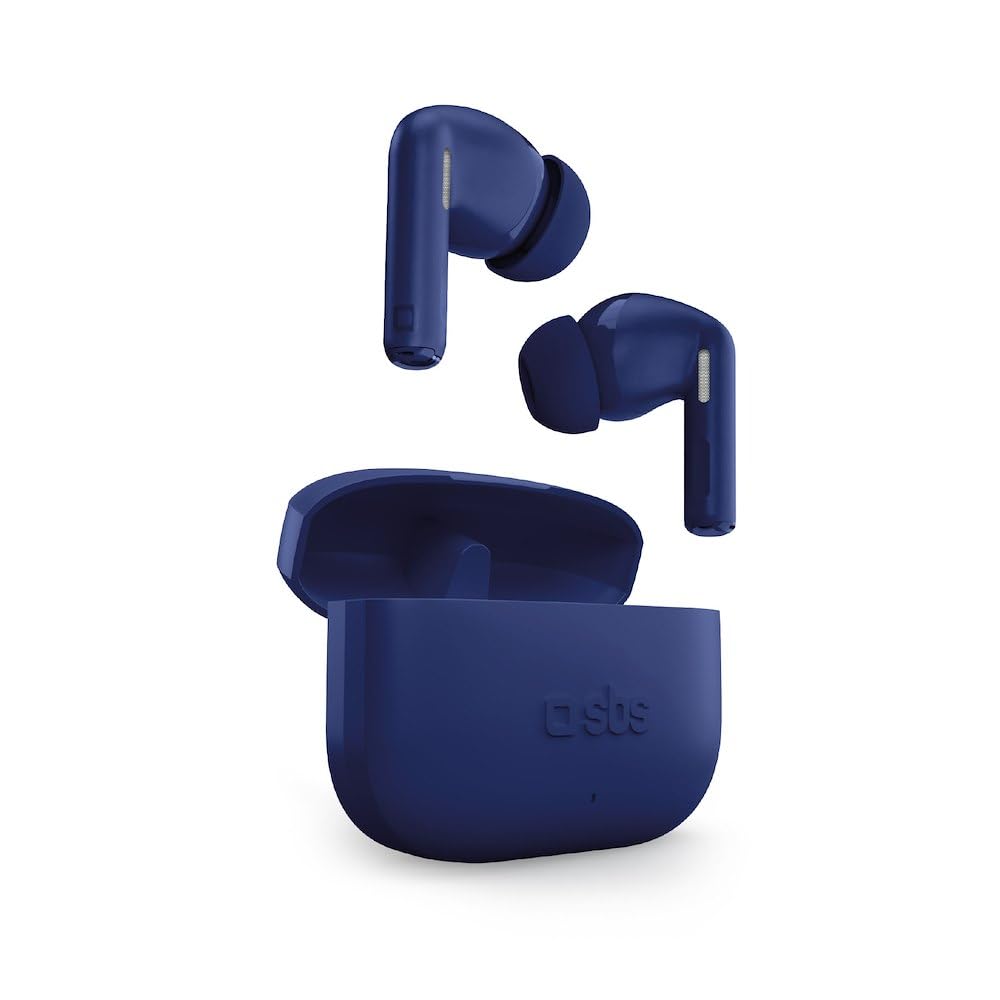
Image: SBS TWS Twin Spike Earphones and Charging Case. This image displays the compact charging case and the two in-ear earphones.
Komponentlər:
- Qulaqlıqlar: Left and Right, each with touch control surface and audio output.
- Şarj qutusu: Stores and recharges the earbuds. Features a USB-C port for charging the case itself.
- LED göstəriciləri: On both earbuds and charging case, indicating power, charging status, and pairing.
Quraşdırma
1. Doldurma qutusunun doldurulması
Before initial use, fully charge the charging case. Connect the provided USB-C cable to the charging port on the case and the other end to a USB power source (e.g., computer, wall adapter). The LED indicator on the case will show charging status and turn off or change color when fully charged.
2. Qulaqlıqların doldurulması
Place the earphones into the charging case. Ensure they are correctly seated in their respective slots. The earphones will begin charging automatically. LED indicators on the earphones will show their charging status. They will turn off or change color when fully charged.
3. Cihazla İlkin Cütləşmə
- Qulaqlıqların doldurulduğundan əmin olun.
- Open the charging case. The earphones will automatically power on and enter pairing mode (indicated by flashing LEDs).
- Smartfonunuzda və ya Bluetooth-u aktivləşdirən cihazınızda Bluetooth parametrlərinə keçin.
- axtarın available devices and select "SBS TWS Twin Spike" (or similar name).
- Once connected, a voice prompt will confirm successful pairing, and the earphone LEDs will stop flashing.
Qeyd: The earphones feature a Hall Switch system for instant connection. After the first pairing, simply opening the case will automatically connect them to your previously paired device if Bluetooth is enabled on that device.
Əməliyyat Təlimatları
Nəzarətlərə toxunun
The SBS TWS Twin Spike earphones feature intuitive touch controls on the outer surface of each earbud. Functions may vary slightly depending on the device and application.
- Oynat/Pauza: Hər iki qulaqcığa bir dəfə toxunun.
- Növbəti trek: Sağ qulaqcığa iki dəfə toxunun.
- Əvvəlki Track: Sol qulaqcığa iki dəfə toxunun.
- Zəngə Cavab Vermək/Bitirmək: Daxil olan və ya aktiv zəng zamanı qulaqcıqdan bir dəfə toxunun.
- Zəngi rədd edin: Daxil olan zəng zamanı qulaqcıqlardan hər hansı birini təxminən 2 saniyə basıb saxlayın.
- Səs köməkçisini aktivləşdirin: Hər iki qulaqcığa üç dəfə toxunun (məsələn, Siri, Google Assistant).
Qeyd: Volume control is typically managed directly from your connected device.
Baxım
- Təmizləmə: Qulaqlıqları və şarj qutusunu təmizləmək üçün yumşaq, quru, tüksüz bir parça istifadə edin. Aşındırıcı təmizləyicilərdən və ya həlledicilərdən istifadə etməyin.
- Yaddaş: İstifadə edilmədikdə, qulaqlıqları qorumaq və doldurulmuş vəziyyətdə saxlamaq üçün onları şarj qutusunda saxlayın.
- Suya məruz qalma: Bu qulaqlıqlar suya davamlı deyil. Suya, nəmə və ya həddindən artıq temperaturlara məruz qalmaqdan çəkinin.
- Batareyaya qulluq: To prolong battery life, avoid fully discharging the earphones and charging case frequently. Charge them regularly.
Problemlərin aradan qaldırılması
Qulaqlıqlar qoşulmur və ya qoşulmur:
- Hər iki qulaqlığın doldurulduğundan əmin olun.
- Cihazınızda Bluetooth-un aktiv olduğundan əmin olun.
- Place the earphones back into the charging case, close the lid, wait a few seconds, then open it again to re-initiate pairing mode.
- Forget the device ("SBS TWS Twin Spike") from your device's Bluetooth settings and attempt to pair again.
- Ensure the earphones are within the Bluetooth range of your device (typically 10 meters).
Yalnız bir qulaqcıq işləyir:
- Check the battery level of the non-working earphone.
- Place both earphones back into the charging case, close the lid, and then open it again. This often re-syncs them.
- Try resetting the earphones (refer to specific reset instructions if available, otherwise, a full charge and re-pairing often resolves this).
Poor audio quality or disconnections:
- Cihazınızla qulaqlıq arasında heç bir maneə olmadığından əmin olun.
- Qoşulmuş cihazınıza yaxınlaşın.
- Güclü Wi-Fi və ya digər simsiz müdaxilələrin olduğu mühitlərdən çəkinin.
- Check if the earphones or your device require a software update.
Spesifikasiyalar
| Xüsusiyyət | Detal |
|---|---|
| Brend | SBS |
| Model nömrəsi | Stereo |
| Bağlantı texnologiyası | Simsiz (Bluetooth) |
| Qulaqlıq növü | Qulaqda |
| Batareya Ömrü (Qulaqlıqlar) | Şarj başına 4 saata qədər |
| Ümumi Batareya Ömrü (Qabı ilə) | 16 saata qədər |
| Doldurma qutusunun tutumu | 200 mAh |
| Doldurma Portu | USB-C |
| Nəzarət növü | Nəzarətə toxunun |
| Çəki | 50 Grams (item weight) |
| Tezlik diapazonu | 20 Hz - 20,000 Hz |
| Material | plastik |
| GTIN | 08018417513473 |
Zəmanət və Dəstək
Specific warranty information for SBS products is typically provided with the product packaging or available on the official SBS website. Please refer to the documentation included with your purchase for detailed warranty terms and conditions.
For technical support or customer service, please visit the official SBS website or contact their customer support channels. Keep your proof of purchase for any warranty claims.