
1. Giriş
Aldığınız üçün təşəkkür edirikasing the PHILIPS SPK7858 Wireless Ergonomic Mouse. This manual provides detailed instructions for setup, operation, and maintenance to ensure optimal performance and longevity of your device. Please read this manual thoroughly before use.

Image: The PHILIPS SPK7858 Wireless Ergonomic Mouse, showcasing onun parlaq dizaynı.
2. Paketin məzmunu
- PHILIPS SPK7858 Wireless Ergonomic Mouse
- USB-A qəbuledicisi
- USB-C qəbuledicisi
- USB-C şarj kabeli
- İstifadəçi təlimatı
3. Məhsul bitdiview
Familiarize yourself with the various buttons and components of your mouse:

Image: Diagram illustrating the 7 buttons and 3D scroll wheel on the PHILIPS SPK7858 mouse.
- Sağ Klik Butonu
- Sol Klik Düyməsi
- Scroll Wheel (3D Wheel): For vertical scrolling and middle-click function.
- DPI düyməsi: Adjusts sensitivity (800-4000 DPI).
- Yan sürüşmə çarxı: For horizontal scrolling.
- Geri düyməsi: Navigates back in web brauzerlər və ya file kəşfiyyatçılar.
- İrəli Düymə: Navigates forward in web brauzerlər və ya file kəşfiyyatçılar.
- Device Switch Button (Bottom): Switches between connected devices (up to 3).
4. Connectivity & Setup
The PHILIPS SPK7858 mouse supports three connection methods: 2.4GHz USB-A, 2.4GHz USB-C, and Bluetooth 5.0.

Image: Visual representation of the three connection options: USB-A, USB-C, and Bluetooth 5.0.
4.1. 2.4GHz Wireless Connection (USB-A or USB-C Receiver)
- Insert the desired USB receiver (USB-A or USB-C) into an available port on your computer.
- Aşağıda yerləşən güc açarından istifadə edərək siçanı yandırın.
- Siçan avtomatik olaraq kompüterinizə qoşulmalıdır.
4.2. Bluetooth 5.0 bağlantısı
- Aşağıda yerləşən güc açarından istifadə edərək siçanı yandırın.
- Press and hold the device switch button on the bottom of the mouse until the indicator light starts blinking, indicating pairing mode.
- On your computer or device, go to Bluetooth settings and search for "PHILIPS SPK7858".
- Select the mouse to pair. Once connected, the indicator light will stop blinking.
4.3. Cihazlar arasında keçid
The mouse can be paired with up to 3 devices (2 via 2.4GHz receivers, 1 via Bluetooth). Use the device switch button on the bottom of the mouse to cycle through connected devices.
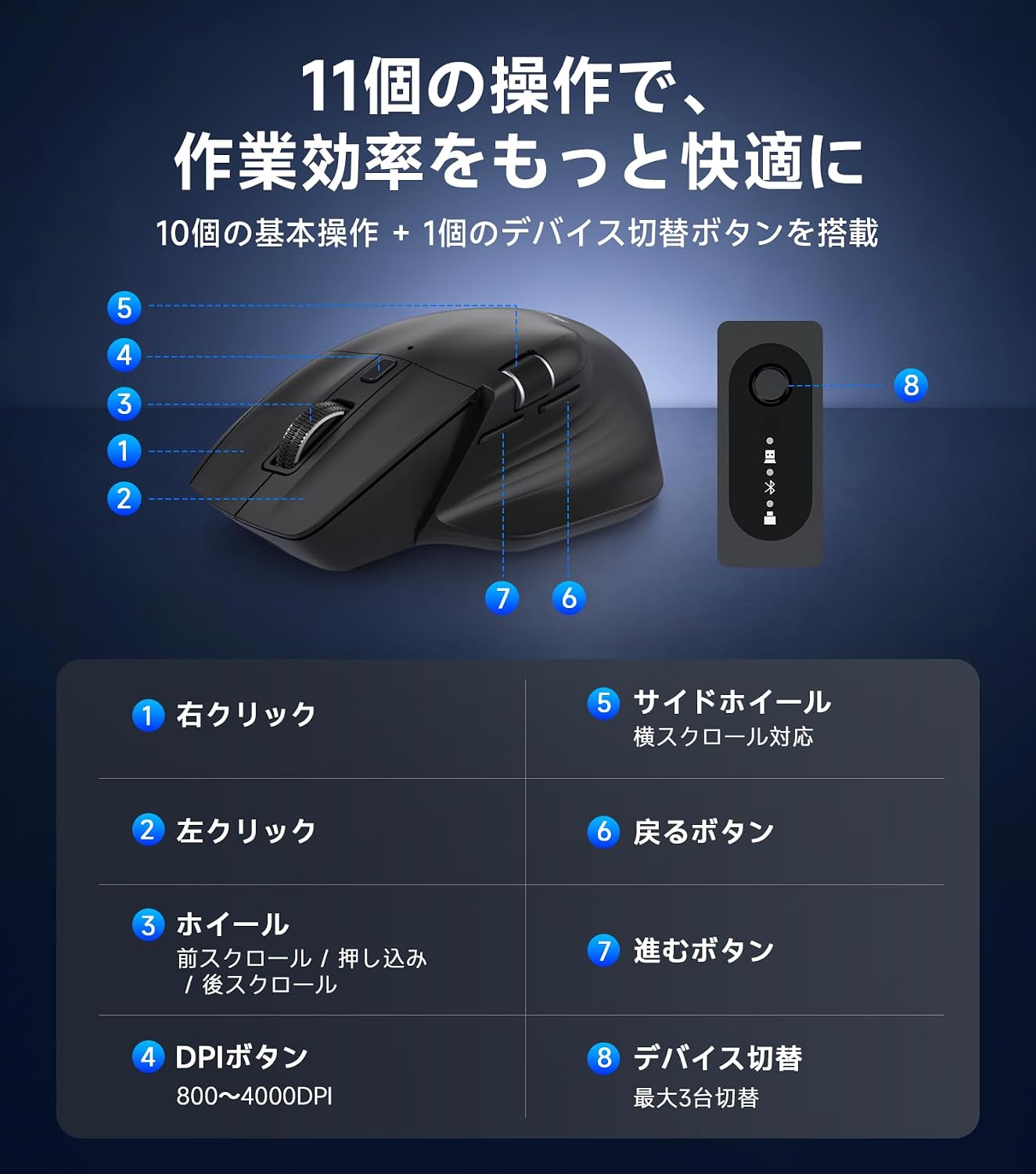
Image: The PHILIPS SPK7858 mouse connected to and controlling four different devices, demonstrating cross-screen functionality.
5. Əməliyyat Təlimatları
5.1. DPI Tənzimlənməsi
The mouse features 5-stage DPI adjustment (800/1600/2400/3200/4000 DPI) to suit various tasks. Press the DPI button (4) to cycle through the sensitivity settings. A lower DPI is suitable for precise work like graphic design, while a higher DPI is ideal for faster cursor movement across large screens.

Image: Graphic showing the 5 DPI settings (800-4000) and the DPI switch button on the mouse.
5.2. Horizontal Scrolling
Utilize the side scroll wheel (5) for efficient horizontal navigation, especially useful for wide spreadsheets, timelines, or web səhifələr.

Image: Illustration demonstrating the use of the side scroll wheel for horizontal navigation in applications like Excel.
5.3. Səssiz Klik Xüsusiyyəti
The left and right click buttons are designed with silent switches, reducing click noise for a quiet working environment. This is beneficial in offices, libraries, cafes, or during late-night work.

Image: A hand operating the mouse with a visual indicator of reduced click sound, suitable for quiet environments.
6. Doldurma və Güc İdarəetmə
6.1. Siçanın doldurulması
The mouse is equipped with a built-in 500mAh rechargeable battery. Connect the included USB-C charging cable to the mouse's USB-C port and to a power source (e.g., computer USB port, USB wall adapter). The indicator light will show charging status.

Image: The PHILIPS SPK7858 mouse connected via USB-C cable for charging, highlighting the 500mAh battery and 100-hour usage.
6.2. Automatic Sleep Function
To conserve power, the mouse will automatically enter sleep mode after a period of inactivity. Move the mouse or click any button to wake it up. After approximately 30 minutes of inactivity, it enters a deep sleep state for more efficient power saving.
7. Erqonomik Dizayn
The SPK7858 mouse features an ergonomic design specifically for right-handed users, providing a comfortable grip that supports the palm and reduces wrist strain during extended use. Its lightweight design (approx. 93g) ensures smooth and effortless operation.

Şəkil: Ətraflı view of the ergonomic design, showing the natural tilt, thumb rest curve, and streamlined shape for comfortable hand fit.
8. Baxım
- Təmizləmə: Use a soft, dry cloth to clean the mouse. For stubborn dirt, slightly dampparçanı su və ya yumşaq təmizləyici məhlul ilə örtün. Sərt kimyəvi maddələrdən çəkinin.
- Saxlama: Store the mouse in a cool, dry place away from direct sunlight and extreme temperatures.
- Batareyaya qulluq: To prolong battery life, avoid fully discharging the mouse frequently. Charge it when the battery low indicator appears.
9. Giderme
| Problem | Həll |
|---|---|
| Siçan cavab vermir | Ensure the mouse is powered on. Check battery level and charge if necessary. For 2.4GHz connection, ensure the receiver is properly inserted and try a different USB port. For Bluetooth, ensure it's paired correctly and try re-pairing. |
| Kursorun hərəkəti qeyri-sabitdir | Clean the optical sensor on the bottom of the mouse. Ensure you are using the mouse on a suitable surface (avoid reflective or transparent surfaces). Adjust DPI settings. |
| Bluetooth vasitəsilə qoşulmaq mümkün deyil | Ensure your device's Bluetooth is enabled. Put the mouse into pairing mode (blinking indicator). Remove previous pairings of the mouse from your device and try connecting again. |
| Side scroll wheel not working | Ensure the application you are using supports horizontal scrolling. Some applications may require specific settings or may not support this feature. |
10. Spesifikasiyalar

Image: A table summarizing the key specifications of the PHILIPS SPK7858 mouse.
| Xüsusiyyət | Detal |
|---|---|
| Model | SPK7858 |
| Bağlantı | 2.4GHz USB-A, 2.4GHz USB-C, Bluetooth 5.0 |
| DPI parametrləri | 800/1600/2400/3200/4000 |
| Düymələr | 7 Buttons + 3D Scroll Wheel + Side Scroll Wheel |
| Batareya | 500mAh Rechargeable (3.7V) |
| Batareya Ömrü | 100 saata qədər (davamlı istifadə) |
| Doldurma Portu | USB-C |
| Sensor | PixArt 3215 Optik Sensor |
| Uyğun OS | Windows 7/8/10/11, Mac OS X 10.5 and later |
| Çəki | təqribən. 93q |
| Ölçülər | Təxminən. 123.0 x 82.7 x 44.8 mm |

Image: Diagram showing the dimensions of the PHILIPS SPK7858 mouse and its included accessories (USB-A and USB-C receivers).
11. Zəmanət və dəstək
Bu məhsul a ilə gəlir 1 illik istehsalçı zəmanəti from the date of purchase. In the unlikely event of a product defect, repair or replacement will be provided free of charge.
For customer support, please contact us through your Amazon account:
- "Sifarişləriniz" bölməsinə keçin.
- Find the relevant order for this product.
- "Satıcı ilə əlaqə" düyməsini basın.
Our Japanese customer support team is available to assist you promptly and courteously.
Dəstək Saatları: 10:00 - 19:00 (Excluding weekends and manufacturer holidays)
*Please note that damage caused by human error, disasters, or other force majeure events is not covered under warranty.