
1. artıqview
The Philips TAZ2200 is a versatile portable sound machine designed for enjoying various audio formats. It features a top-loading CD player, a front-loading cassette player, FM radio, Bluetooth 6.0 connectivity, USB playback, and a 3.5mm audio input. Equipped with dynamic bass boost and 6W stereo speakers, it delivers rich sound. The unit can be powered by AC mains or batteries and includes a carrying handle for portability.
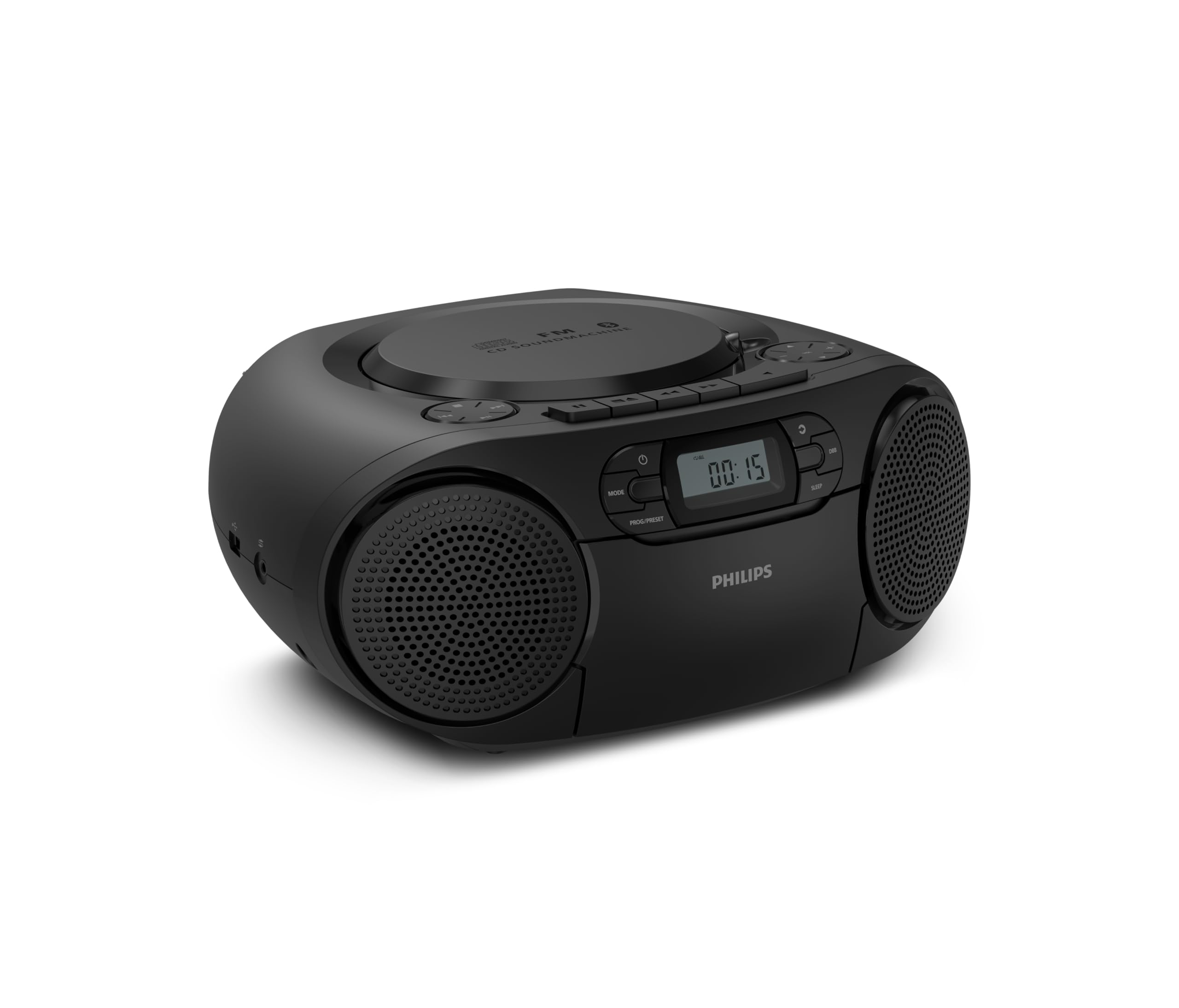
Ön view of the Philips TAZ2200 CD Soundmachine, showing the main display and control buttons.
2. Təhlükəsizlik Məlumatı
Please read these safety instructions carefully before using your device and keep them for future reference. Incorrect use may result in hazards.
- Güc mənbəyi: Yalnız göstərilən güc adapterindən və ya batareyalardan istifadə edin. Səs səviyyəsinintage bölmənin tələblərinə uyğundur.
- Su və nəm: Cihazı yağışa, nəmə, damlamaya və ya sıçramağa məruz qoymayın. Vaza kimi maye ilə dolu əşyaları cihazın üzərinə qoymayın.
- Havalandırma: Kifayət qədər ventilyasiya təmin edin. Heç bir ventilyasiya dəliyini bağlamayın. Kifayət qədər ventilyasiya üçün cihazın ətrafında minimum məsafə saxlayın.
- İstilik: Cihazı radiatorlar, istilik registrləri, sobalar və ya digər cihazlar (o cümlədən) kimi istilik mənbələrinin yaxınlığında qoymayın. ampistilik əmələ gətirən qaldırıcılar).
- Batareyalar: Follow correct polarity when inserting batteries. Do not mix old and new batteries, or different types of batteries. Remove batteries if the unit is not used for a long period.
- Təmizləmə: Təmizləməzdən əvvəl cihazı elektrik rozetkasından ayırın. Yumşaq, quru bir parça istifadə edin. Maye təmizləyicilərdən və ya aerozol təmizləyicilərdən istifadə etməyin.
- Xidmət: Bu məhsula özünüz xidmət göstərməyə çalışmayın. Bütün xidmətlər üçün ixtisaslı xidmət personalına müraciət edin.
3. Qutuda nə var
Qablaşdırmanı açarkən, aşağıda sadalanan bütün əşyaların mövcud olduğundan əmin olun:
- Philips TAZ2200 CD Soundmachine
- Elektrik kabeli
- Sürətli başlanğıc təlimatı
- Zəmanət kitabçası
- Təhlükəsizlik vərəqi
4. Nəzarət və əlaqələr
Ön Panel İdarəetmələri
The front panel features the main display, power button, mode selection, program/preset buttons, and dynamic bass boost (DBB) control. Playback controls for CD and USB are also located here.

Ətraflı ön view showing the display, power, mode, program/preset, and DBB buttons.
Side and Rear Connections
The side of the unit provides a USB port for digital audio playback and a 3.5mm audio input jack for connecting external devices.

Yan view illustrating the USB port and Audio Input jack.
The top of the unit houses the CD compartment and additional playback controls, while the rear features the AC power input and the FM antenna.

Üst view showing the CD compartment and associated controls.

Arxa view displaying the AC power input and the telescopic FM antenna.
5. Quraşdırma
5.1 Enerji təchizatı
AC Gücü
- Cihazın söndürüldüyünə əmin olun.
- Connect the supplied power cable to the AC IN socket on the rear of the sound machine.
- Plug the other end of the power cable into a wall power outlet.
Batareya Gücü
For portable use, the unit can operate on 6 x C-type batteries (not included).
- Bölmənin altındakı batareya bölməsinin qapağını açın.
- Insert 6 C-type batteries, ensuring correct polarity (+/-) as indicated inside the compartment.
- Batareya bölməsinin qapağını etibarlı şəkildə bağlayın.
5.2 Antenanın Tənzimlənməsi
For optimal FM radio reception, fully extend the telescopic antenna located at the rear of the unit. Adjust its position and angle to achieve the clearest signal.
6. Əməliyyat Təlimatları
6.1 Ümumi əməliyyat
- Yandırma/Söndürmə: düyməsini basın GÜC cihazı açmaq və ya söndürmək üçün düyməni basın.
- Səs səviyyəsinə nəzarət: istifadə edin VOL+ or VOL - səs səviyyəsini tənzimləmək üçün düymələr.
- Dinamik Bass Gücləndiricisi (DBB): düyməsini basın DBB button to activate or deactivate the dynamic bass boost feature for enhanced bass sound.
- Rejim seçimi: düyməsini basın MODE button repeatedly to switch between CD, Cassette, FM Radio, Bluetooth, USB, and Audio Input modes.
6.2 CD Oynatma
- Open the CD compartment cover on top of the unit.
- Place a CD (CD, CD-R, or CD-RW) with the label side facing up onto the spindle.
- CD bölməsinin qapağını bağlayın.
- düyməsini basın MODE CD rejimini seçmək üçün düyməni basın.
- düyməsini basın OYNA/FASIL EDİN oynatmağa başlamaq üçün düymə.
- istifadə edin KEÇİN düymələr (|< or >> |) parçaları keçmək üçün.
- Basın və saxlayın |< or >> | bir trek daxilində axtarış etmək.
- düyməsini basın STOP oynatmayı dayandırmaq üçün düyməni basın.
6.3 Kasetin səsləndirilməsi
- Open the cassette compartment door on the front of the unit.
- Açıq kənarı yuxarıya baxaraq kaset lentini daxil edin.
- Kaset bölməsinin qapısını bağlayın.
- düyməsini basın MODE Kasset rejimini seçmək üçün düyməni basın.
- düyməsini basın OYNA oynatmağa başlamaq üçün düymə.
- istifadə edin Sürətli İrəli or GERİ YÜRÜŞ lenti tez bir zamanda irəli və ya geri sarmaq üçün düymələr.
- düyməsini basın STOP oynatmayı dayandırmaq üçün düyməni basın.
6.4 FM Radio
- düyməsini basın MODE button to select FM Radio mode.
- Avtomatik Tarama: basın və saxlayın PROG/PRESET Mövcud FM stansiyalarını avtomatik olaraq skan etmək və saxlamaq üçün düyməni basın.
- Əl ilə tənzimləmə: düyməsini basın TUNING düymələr (|< or >> |) to manually tune to a desired frequency.
- Əvvəlcədən parametrləri saxlamaq: After tuning to a station, press PROG/PRESET once, then use |< or >> | əvvəlcədən təyin edilmiş nömrəni seçmək üçün basın və basın PROG/PRESET təsdiq etmək üçün yenidən.
- Əvvəlcədən xatırlama: FM rejimində basın PROG/PRESET repeatedly to cycle through saved preset stations.
6.5 Bluetooth oxutma
- düyməsini basın MODE button to select Bluetooth mode. The display will show 'BT' and flash, indicating it's in pairing mode.
- Bluetooth aktivləşdirilmiş cihazınızda (smartfon, planşet) Bluetooth-u aktivləşdirin və mövcud cihazları axtarın.
- Select "Philips TAZ2200" from the list of devices.
- Once paired, the unit will emit a confirmation sound, and 'BT' will stop flashing.
- Start playing audio on your connected device. The sound will be streamed to the sound machine.
6.6 USB Oynatma
- Insert a USB flash drive into the USB port on the side of the unit.
- düyməsini basın MODE USB rejimini seçmək üçün düymə.
- Cihaz avtomatik olaraq uyğun səsi aşkarlayacaq və çalmağa başlayacaq files (MP3, WAV, WMA).
- Oxutma nəzarətlərindən istifadə edin (OYNA/FASIL EDİN, KEÇİN, STOP) as you would for CD playback.
6.7 Audio Girişi (AUX)
- Connect one end of a 3.5mm audio cable (not included) to the AUDIO IN jack on the side of the sound machine.
- Connect the other end of the audio cable to the headphone jack or audio output of your external device (e.g., MP3 player, turntable).
- düyməsini basın MODE button to select Audio Input mode.
- Start playing audio on your external device. The sound will be played through the sound machine.
7. Baxım
- Cihazın təmizlənməsi: Wipe the exterior of the unit with a soft, slightly damp parça. Aşındırıcı təmizləyicilərdən və ya həlledicilərdən istifadə etməyin.
- CD pleyerə qulluq: Keep the CD compartment clean. If the lens is dirty, use a specialized CD lens cleaner. Avoid touching the lens.
- Kasetçaya qulluq: Lent başlıqlarını və sıxma silindrlərini vaxtaşırı pambıq çubuqla yüngülcə təmizləyin dampizopropil spirti ilə tamamlanır.
- Batareyanın dəyişdirilməsi: If using batteries, replace all 6 C-type batteries when the unit's performance diminishes or if the unit will not be used for an extended period.
- Yaddaş: İstifadə edilmədikdə, cihazı təmiz, quru yerdə, birbaşa günəş işığından və həddindən artıq temperaturdan uzaq saxlayın.
8. Giderme
If you encounter any issues with your Philips TAZ2200, please refer to the table below for common problems and solutions.
| Problem | Mümkün Səbəb | Həll |
|---|---|---|
| Güc yoxdur | Elektrik kabeli qoşulmayıb; Batareyalar tükənib və ya səhv yerləşdirilib. | Check AC power connection; Replace batteries or ensure correct polarity. |
| Səs yoxdur | Səs çox aşağıdır; Səhv rejim seçilib; Qulaqlıqlar qoşulub. | Increase volume; Select the correct source mode (CD, FM, BT, etc.); Disconnect headphones. |
| CD oxunmur | CD səhv daxil edilib; CD çirklidir və ya cızıqlanıb; CD formatı dəstəklənmir. | Insert CD with label side up; Clean or replace CD; Ensure CD is CD-R/RW compatible. |
| Cassette not playing | Cassette inserted incorrectly; Tape is damaged. | Insert cassette correctly; Try a different cassette. |
| Zəif FM qəbulu | Anten uzadılmamış və ya düzgün yerləşdirilməmiş; Zəif siqnal. | Teleskopik antenanı tam uzadın və tənzimləyin; Cihazı başqa bir yerə köçürməyə çalışın. |
| Bluetooth qoşulmur | Unit not in pairing mode; Bluetooth device too far; Device already paired with another unit. | Ensure unit is in Bluetooth mode and flashing; Move device closer; Disconnect from other devices. |
| USB oxutma problemləri | USB sürücüsü düzgün daxil edilməyib; Uyğun deyil file format; USB drive corrupted. | Reinsert USB drive; Ensure files are MP3, WAV, or WMA; Try a different USB drive. |
9. Spesifikasiyalar
| Xüsusiyyət | Spesifikasiya |
|---|---|
| Brend | PHILIPS |
| Model nömrəsi | TAZ2200/10 |
| Bağlantı texnologiyası | Bluetooth 6.0, USB, Audio Input (3.5mm) |
| Dinamik növü | Stereo (2 speakers) |
| Çıxış Gücü | 6 Vatt (maksimum) |
| Dəstəklənən Media | CD, CD-R, CD-RW, Cassette, USB (MP3, WAV, WMA) |
| Radio Tuner | Digital FM with 20 presets |
| Güc mənbəyi | AC (wired), 6 x C-type batteries (not included) |
| Ölçülər (UxGxY) | 24.5 x 28.5 x 12.5 sm |
| Çəki | 1.35 kiloqram |
| Rəng | Gümüş |
10. Zəmanət və Dəstək
10.1 Məhsul Zəmanəti
This Philips TAZ2200 CD Soundmachine comes with a 2 il zəmanət satın alındığı tarixdən etibarən. Zəmanət tələbləri üçün satın alma sənədinizi saxlayın. Zəmanət normal istifadə şəraitində istehsal qüsurlarını və nasazlıqları əhatə edir.
10.2 Müştəri dəstəyi
For technical assistance, troubleshooting beyond this manual, or warranty service, please refer to the contact information provided in the warranty booklet included with your product. You can also visit the official Philips support website for your region for further assistance and FAQs.