Giriş
This manual provides instructions for the setup, operation, and maintenance of your Logitech Wingman Force Joystick, model 963155-0403. This device is designed to enhance your PC gaming experience with force feedback technology and programmable controls.
Paketin məzmunu
Paketinizdə aşağıdakı elementlərin olduğunu yoxlayın:
- Logitech Wingman Force Joystick
- Güc adapteri
- USB Cable (integrated or separate)
- Software CD (if applicable, for WingMan Software)
- İstifadəçi Təlimatı (bu sənəd)
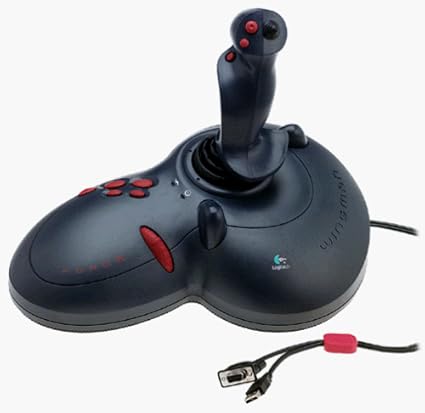
Figure 1: The Logitech Wingman Force Joystick packaging, showing the joystick and its features.
Quraşdırma
- Güc bağlayın: Plug the power adapter into the joystick and then into a standard electrical outlet.
- PC-yə qoşulun: Connect the joystick's USB cable to an available USB port on your computer. The joystick also supports serial interfaces.
- Proqram təminatını quraşdırın: Insert the WingMan Software CD (if provided) into your computer's CD-ROM drive and follow the on-screen instructions to install the drivers and WingMan Software. If no CD is provided, drivers may be automatically installed by your operating system or available for download from the Logitech support websayt.
- Sistem Tələbləri: Ensure your computer runs a compatible Windows operating system.
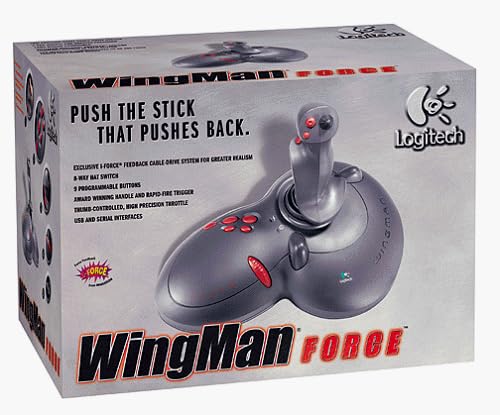
Figure 2: The Logitech Wingman Force Joystick, illustrating its ergonomic design and button layout.
Əməliyyat Təlimatları
Üzərində Nəzarətlərview
- Joystick Handle: Provides precise control for in-game movement.
- 9 proqramlaşdırıla bilən düymələr: Customize these buttons using the WingMan Software for various in-game actions.
- 8-Way Hat Switch: Located on top of the joystick, this switch allows for quick camera views or directional commands.
- Thumb-Controlled Throttle: Adjust speed or thrust with the integrated throttle control.
Force Feedback Technology
The Wingman Force Joystick utilizes Logitech's exclusive I-Force force feedback technology with a cable-drive system. This system provides realistic tactile feedback, such as vibrations from impacts, recoil from weapons, and resistance during maneuvers, enhancing immersion in compatible games.
Using WingMan Software
The WingMan Software allows you to:
- Program the 9 buttons for specific game functions.
- Birdən çox peşəkar yaradın və saxlayınfilemüxtəlif oyunlar üçün.
- Adjust force feedback intensity settings.
- Calibrate the joystick for optimal performance.
Refer to the WingMan Software's help documentation for detailed instructions on customization and profile idarəetmə.
Baxım
To ensure the longevity and optimal performance of your joystick:
- Təmizləmə: Use a soft, dry cloth to wipe the surface of the joystick. Avoid using abrasive cleaners or solvents.
- Yaddaş: Store the joystick in a clean, dry environment away from extreme temperatures and direct sunlight.
- Kabel Baxımı: Avoid bending or crimping the cables excessively.
Problemlərin aradan qaldırılması
- Problem: Joystick not recognized by computer.
- Həlli:
- Ensure the USB cable is securely connected to both the joystick and the computer.
- Fərqli USB portuna qoşulmağa cəhd edin.
- Verify that the power adapter is properly connected and the joystick is receiving power.
- Reinstall the WingMan Software drivers.
- Problem: Inconsistent or absent force feedback.
- Həlli:
- Check the force feedback settings within the WingMan Software and ensure they are set to an appropriate level.
- Ensure the game you are playing supports force feedback and that it is enabled in the game's settings.
- Restart your computer and the game.
- Bütün bağlantıların təhlükəsiz olduğunu yoxlayın.
- Problem: Buttons or controls are unresponsive.
- Həlli:
- Calibrate the joystick using the WingMan Software.
- Ensure the joystick drivers are up to date.
- Test the joystick in a different game or application to determine if the issue is game-specific.
Spesifikasiyalar
| Xüsusiyyət | Detal |
|---|---|
| Model nömrəsi | 963155-0403 |
| Brend | Logitech |
| Nəzarətçi növü | Joystick |
| Bağlantı texnologiyası | USB, Serial |
| Uyğun Cihazlar | Windows kompüterləri |
| Məhsul Ölçüləri | 13.5 x 9.63 x 9.25 düym |
| Maddə Çəkisi | 4.14 funt sterlinq |
| Geribildirimi məcbur edin | I-Force feedback cable-drive system |
| Düymələr | 9 proqramlaşdırıla bilən düymələr |
| Şapka açarı | 8 yollu papaq açarı |
| Qaz | Thumb-controlled, high precision throttle |
Zəmanət və Dəstək
Zəmanət məlumatı və texniki dəstək üçün məhsulunuzla birlikdə gələn sənədlərə baxın və ya rəsmi Logitech dəstəyinə baş çəkin. websayt. Adətən sürücüləri, tez-tez verilən sualları və müştəri xidmətləri üçün əlaqə məlumatlarını orada tapa bilərsiniz.
Logitech Dəstəyi Websayt: www.logitech.com/support