Giriş
This manual provides detailed instructions for the proper use and care of your Audiovox CE-145G Personal CD Player. Please read this manual thoroughly before operating the device to ensure optimal performance and longevity.
Məhsul Xüsusiyyətləri
- 40-Second Anti-Skip Protection: Ensures continuous audio playback even during movement, utilizing a digital buffer.
- Multi-Directional Anti-Roll Sensors: Provides additional protection against playback interruption from various movements.
- 22-Track Programmable Memory: Allows customization of CD playback order.
- Bass Boost System: Aşağı tezlikli audio çıxışı gücləndirir.
- 3-Beam Laser Pickup: Designed for accurate CD tracking and clear sound reproduction.
- Çoxsaylı oxutma rejimi: Includes random play and various repeat functions.
- Düyməni saxlayın: Prevents accidental button presses and program changes.
- Avtomatik söndürmə: Conserves battery life by automatically shutting down the player when not in use.
- Line-Out Jack: For connecting to external audio systems or power adapters.
- Built-in Rechargeable Circuitry: Supports the use of rechargeable Ni-Cad batteries (not included).
- Stereo Headphones: Included for immediate listening.
Quraşdırma
1. Batareyanın quraşdırılması
The Audiovox CE-145G operates on two (2) AA batteries (not included) or an optional AC/car adapter (not included) connected via the line-out jack. For rechargeable Ni-Cad batteries, the unit features built-in charging circuitry.
- Locate the battery compartment on the underside of the CD player.
- Batareya bölməsinin qapağını sürüşdürərək açın.
- Bölmənin içərisində göstərildiyi kimi düzgün polyarlığı (+/-) təmin edərək iki (2) AA batareyasını yerləşdirin.
- Batareya bölməsinin qapağını etibarlı şəkildə bağlayın.

Image: The Audiovox CE-145G Personal CD Player in translucent green, shown with included stereo headphones. This image illustrates the overall product design and the headphones that come with the unit.
2. Qulaqlıqların qoşulması
Insert the stereo headphone plug into the headphone jack located on the side of the CD player.

Image: A close-up of the stereo headphones included with the Audiovox CE-145G CD player, showing the earcups and the 3.5mm audio jack.
Əməliyyat Təlimatları
1. Əsas CD Oxutma
- Open the CD compartment lid by pressing the "OPEN" button or sliding the latch.
- Etiket tərəfi yuxarı baxaraq mərkəzi milə CD yerləşdirin.
- CD bölməsinin qapağını klik səsi eşidilənə qədər möhkəm bağlayın.
- düyməsini basın OYNA/FASIL EDİN button to begin playback. The track number and elapsed time will display.
- Oxumağı dayandırmaq üçün basın OYNA/FASIL EDİN yenə. Davam etmək üçün bir daha basın.
- Oynatmağı dayandırmaq üçün düyməsini basın STOP düyməsi.
- Növbəti treki keçmək üçün düyməsini basın İLƏ İLKƏ Sıçrayın düyməsi (►►|).
- To return to the beginning of the current track or go to the previous track, press the GERİ KEÇİRİN düyməsi (|◄◄).
- Bir trek daxilində irəli və ya geri çəkmək üçün düyməni basıb saxlayın İLƏ İLKƏ Sıçrayın or GERİ KEÇİRİN müvafiq olaraq düymə.
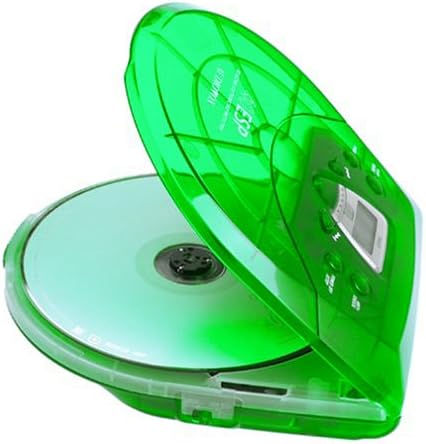
Image: The Audiovox CE-145G Personal CD Player with its translucent green lid open, revealing a compact disc placed inside the compartment.
2. Anti-Skip Protection (ESP)
The CE-145G features a 40-second Electronic Skip Protection (ESP) buffer. This system stores up to 40 seconds of audio data, allowing for uninterrupted playback even if the player experiences minor shocks or vibrations. This feature is automatically active during playback.
3. Programmable Memory (22 Tracks)
Müəyyən bir ardıcıllıqla ifa etmək üçün 22-yə qədər treki proqramlaşdıra bilərsiniz.
- STOP rejimində düyməsini basın PROQRAM düyməsi. Ekranda "PROG" və "01" göstərilir.
- istifadə edin İLƏ İLKƏ Sıçrayın or GERİ KEÇİRİN buttons to select the desired first track.
- basın PROQRAM again to confirm the track. The display will show "02".
- Repeat steps 2 and 3 to add up to 22 tracks to your program.
- After programming the last track, press OYNA/FASIL EDİN to start playback of your programmed sequence.
- To clear the program, press the STOP düyməsini iki dəfə.
4. Bass gücləndirilməsi
To enhance the bass frequencies, locate the BAS GÜÇLÜ switch (or button) on the unit and activate it. Deactivate it to return to standard audio output.
5. Tutma funksiyası
The BAXIN switch prevents accidental button presses. Slide the BAXIN switch to the "ON" position to disable all control buttons. Slide it to "OFF" to re-enable controls.
6. Auto Power-Off
To conserve battery life, the CD player will automatically power off after a period of inactivity (e.g., when a CD finishes playing and no buttons are pressed). To restart, press the OYNA/FASIL EDİN düyməsi.
Baxım
- Cihazın təmizlənməsi: Wipe the exterior of the player with a soft, damp parça. Aşındırıcı təmizləyicilərdən və ya həlledicilərdən istifadə etməyin.
- Cleaning the CD Lens: If playback issues occur due to a dirty lens, use a specialized CD lens cleaning kit. Do not touch the lens directly.
- CD Baxımı: CD-ləri kənarlarından tutun. Onları təmiz və cızıqlardan təmizləyin. İstifadə edilmədikdə onları öz qutularında saxlayın.
- Batareyaya qulluq: Sızmanın qarşısını almaq üçün cihaz uzun müddət istifadə edilməyəcəksə, batareyaları çıxarın.
Problemlərin aradan qaldırılması
| Problem | Mümkün Səbəb | Həll |
|---|---|---|
| Güc yoxdur | Batteries are dead or incorrectly inserted; AC adapter not connected or faulty. | Replace batteries, check polarity, or ensure AC adapter is properly connected and functional. |
| CD keçir və ya dayanır | CD is dirty or scratched; unit is subjected to excessive shock; lens is dirty. | Clean CD, use a different CD, avoid strong impacts, clean the CD lens. |
| Səs yoxdur | Headphones not connected properly; volume too low; headphones faulty. | Ensure headphones are fully plugged in, increase volume, try different headphones. |
| Düymələr cavab vermir | HOLD düyməsi aktivdir. | Slide the HOLD switch to the "OFF" position. |
Spesifikasiyalar
- Model: CE-145G
- Brend: Audiovox
- Atlamadan qorunma: 40 seconds (Electronic Skip Protection)
- Programmable Tracks: 22
- Güc mənbəyi: 2 x AA batteries (not included) or optional AC/car adapter
- Audio Çıxış: 3.5mm headphone jack, Line-out jack
- Ölçülər (təxminən): 11.8 x 8.3 x 2.6 düym (Paket Ölçüləri)
- Ağırlıq (təxminən): 1.35 funt (məqbul çəki)
- Rəng: Translucent Green
Zəmanət və Dəstək
The Audiovox CE-145G Personal CD Player is backed by a 90-day parts-and-labor warranty satın alındığı tarixdən. Zəmanət iddiaları üçün satınalma sübutunuzu özündə saxlayın.
For technical support or warranty service, please refer to the contact information provided with your product packaging or visit the official Audiovox websayt.


