Giriş
This manual provides essential instructions for the safe and efficient operation of your NEC VT670 Value LCD Video Projector. Please read this manual thoroughly before using the projector and keep it for future reference. The NEC VT670 is designed for clear image projection with a native resolution of 1024 x 768 and a brightness of up to 2,100 ANSI lumens.
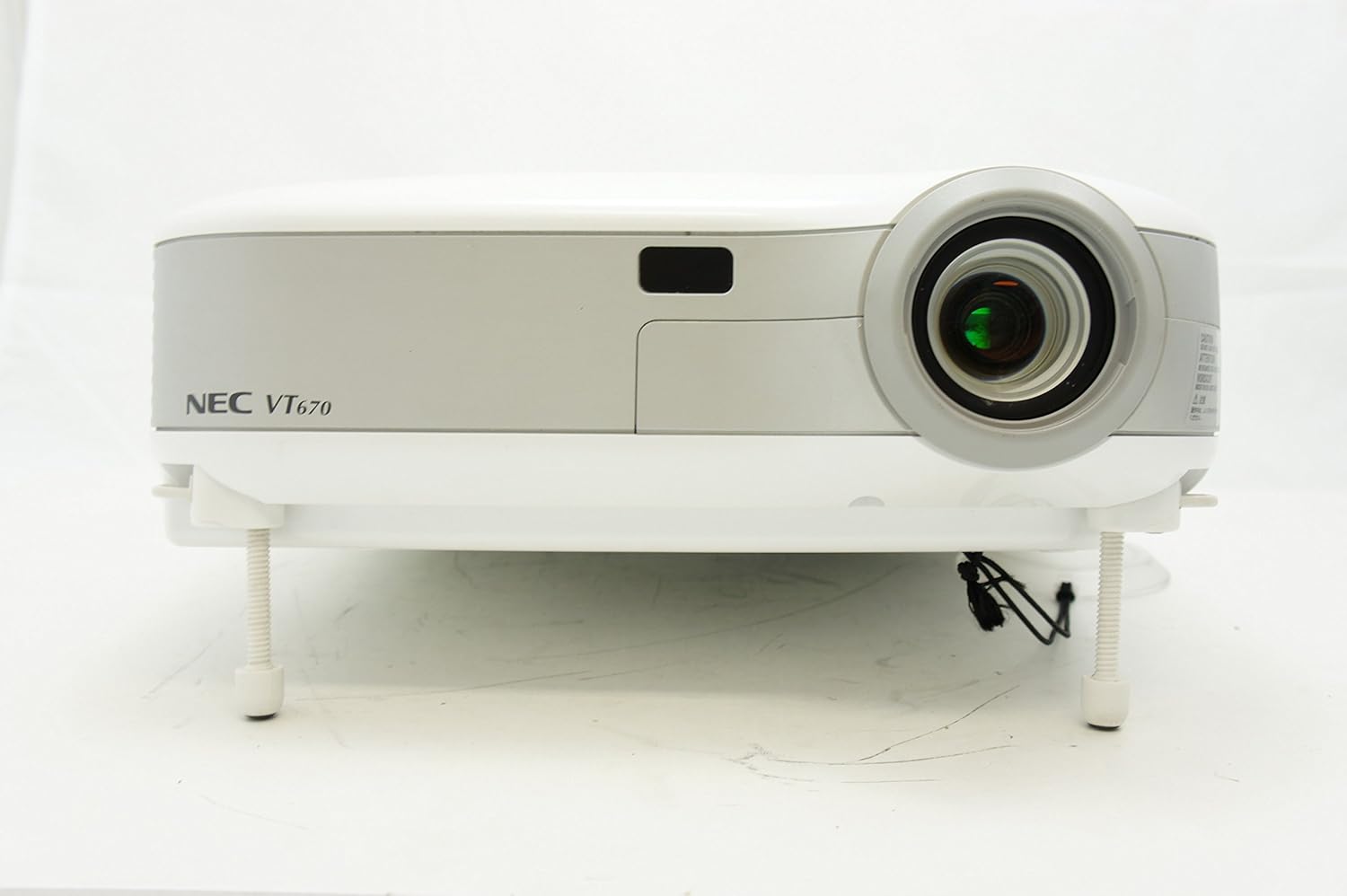
Şəkil 1: Ön view of the NEC VT670 projector, showing the lens and front panel.
Quraşdırma
Follow these steps to set up your NEC VT670 projector:
- Yerləşdirmə: Position the projector on a stable, flat surface or mount it according to the instructions for your specific mounting solution. Ensure adequate ventilation around the unit. The projector is designed for tabletop mounting.
- Enerji bağlantısı: Elektrik kabelini proyektorun elektrik girişinə, sonra isə torpaqlanmış elektrik rozetkasına qoşun.
- Mənbə bağlantısı: Connect your video source (e.g., computer, DVD player) to the appropriate input port on the projector. The VT670 supports VGA (D-Sub), S-Video, and composite video inputs. Use the color-coded connections for ease of setup.
- Kabel Bağlantıları: Ensure all necessary cables, such as the VGA cable for computer input, are securely connected to both the projector and the source device.
- Səs bağlantısı: If your source provides audio, connect it to the projector's audio input ports. The projector features built-in speakers.
- İlkin işə salınma: Cihazı yandırmaq üçün proyektordakı və ya pultdakı güc düyməsini basın.

Şəkil 2: Rear panel of the NEC VT670 projector, illustrating various input and output ports including VGA, S-Video, and audio connections.

Şəkil 3: Example of a VGA cable (left) and a power cable (right) used for connecting the projector.
Əməliyyat Təlimatları
This section details the basic operation of your projector.
Gücü yandırın/söndürün
- Yandırmaq üçün düyməsini basın GÜC button once. The power indicator will illuminate.
- Söndürmək üçün düyməsini basın GÜC button twice. The projector will enter a cooling cycle before shutting down completely.
Daxiletmə Mənbəsinin Seçimi
- istifadə edin GİRİŞ or dedicated source buttons (e.g., KOMPUTER 1, VİDEO) on the control panel or remote to cycle through available input sources.

Şəkil 4: Top control panel of the NEC VT670 projector, showing power, input selection, and navigation buttons.
Fokus və Zoom Ayarlanması
- tənzimləyin FOCUS ring on the lens until the image is sharp and clear.
- istifadə edin ZOOM lever on the lens to adjust the image size to fit your screen.
Menyu Naviqasiya
- düyməsini basın MENU button to access the on-screen display (OSD) menu.
- Ox düymələrindən istifadə edin (UP, AŞAĞI, SOL, SAĞ) to navigate through menu options.
- basın ENTER or SEÇİN seçimi təsdiqləmək üçün.
- basın EXIT or MENU again to close the OSD menu.
Baxım
Daimi texniki qulluq optimal performansı təmin edir və proyektorunuzun xidmət müddətini uzadır.
Lamp Dəyişdirmə
Proyektor lamp məhdud ömrü var. Zaman lamp indicator lights up or the image becomes dim, the lamp may need replacement. Refer to the full service manual for detailed lamp dəyişdirmə prosedurları. l cəhd etməzdən əvvəl həmişə proyektorun tamamilə soyumasına icazə verinamp əvəz.
Hava Filtrinin Təmizlənməsi
Dust accumulation on the air filter can reduce cooling efficiency and affect projector performance. Clean the air filter regularly (e.g., every 100 hours of operation) by removing it and gently brushing off dust or using a vacuum cleaner. Replace the filter if it is damaged.
Lenslərin təmizlənməsi
Proyektor linzasını optik səthlər üçün xüsusi olaraq hazırlanmış yumşaq, tüksüz parça ilə yumşaq bir şəkildə silin. Aşındırıcı təmizləyicilərdən və ya həddindən artıq gücdən istifadə etməyin.
Problemlərin aradan qaldırılması
Bu bölmə qarşılaşa biləcəyiniz ümumi problemlərin həllini təqdim edir.
| Problem | Mümkün Səbəb | Həll |
|---|---|---|
| Heç bir şəkil göstərilməyib |
|
|
| Şəkil bulanıqdır |
|
|
| Səs yoxdur |
|
|
Spesifikasiyalar
Key technical specifications for the NEC VT670 Value LCD Video Projector:
- Model Adı: VT670
- Ekran növü: LCD
- Doğma Çözünürlük: 1024 x 768 (XGA)
- Maksimum Parlaqlıq: 2,100 ANSI lümeni
- Kontrast nisbəti: 400:1
- Bağlantı texnologiyası: VGA (D-Sub), S-Video, Composite Video
- Avadanlıq Bağlantısı: D-Sub, VGA
- Maksimum Şəkil Ölçüsü: 300 düym
- Forma faktoru: Portativ
- Montaj növü: Stolüstü montaj
- Nəzarətçi növü: Düymə İdarəsi
- Maddə çəkisi: 9.2 funt sterlinq
- Əlavə Xüsusiyyətlər: Daxili dinamiklər
- Dəstəklənən Siqnallar: PC, NTSC, PAL, SECAM, HDTV
Zəmanət Məlumatı
The NEC VT670 Value LCD Video Projector comes with a 2 il zəmanət. This warranty covers defects in materials and workmanship under normal use. For specific terms and conditions, please refer to the warranty card included with your product or contact NEC customer support.
Dəstək
For further assistance, technical support, or service inquiries regarding your NEC VT670 projector, please visit the official NEC website or contact their customer service department. Keep your product model number (VT670) and serial number ready when contacting support.
Onlayn Resurslar: www.nec.com


