1. Giriş
This manual provides essential information for the safe and efficient use of your Hama USB 7.1 Surround Sound Card, Model 00051620. Please read these instructions carefully before using the device and keep them for future reference. This external sound card allows you to connect headphones, microphones, or speakers with a 3.5mm jack to your computer or tablet via a USB-A port, enhancing your audio experience with simulated 7.1 surround sound.
2. Təhlükəsizlik Təlimatları
- Do not open the device. Opening the device voids the warranty and may lead to electric shock.
- Məhsulu kirdən, nəmdən və həddindən artıq istidən qoruyun.
- Məhsulu yalnız təyinatı üzrə istifadə edin.
- Do not drop the product or expose it to severe shocks.
- Bütün elektrik məhsulları kimi bu məhsulu uşaqların əli çatmayan yerdə saxlayın.
- Qablaşdırma materialını yerli qaydalara uyğun olaraq dərhal atın.
3. Paketin məzmunu
Paketinizdə aşağıdakı elementlərin olduğunu yoxlayın:
- 1x Hama USB 7.1 Surround Sound Card (Model 00051620)
- 1x Təlimat kitabçası
4. Məhsul bitdiview
The Hama USB 7.1 Surround Sound Card is a compact audio adapter designed to provide enhanced sound capabilities for your computer or tablet. It features a USB-A connector for easy plug-and-play functionality and includes dedicated ports for audio input and output.
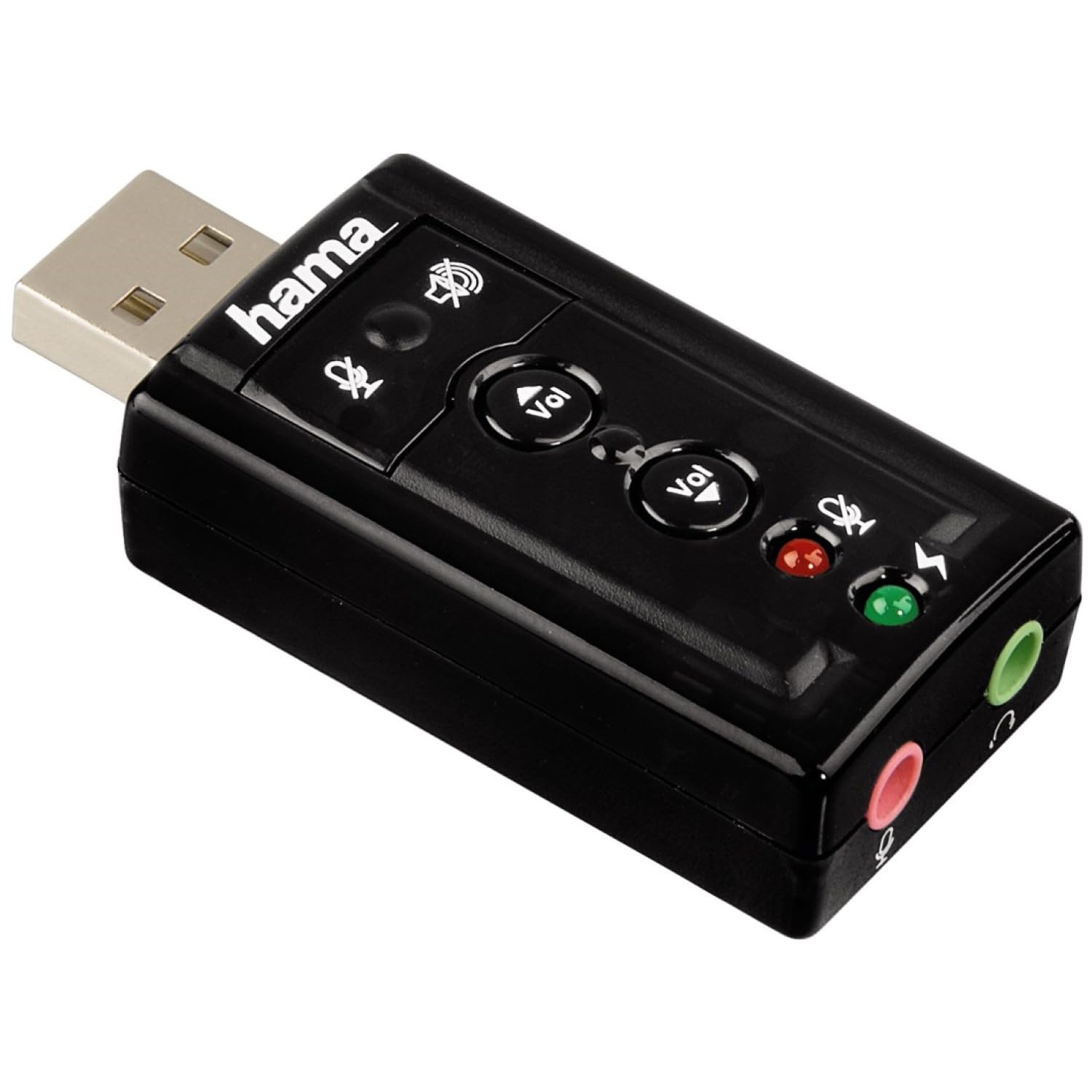
Şəkil 1: Yuxarı view of the Hama USB 7.1 Surround Sound Card, showing the USB-A connector, volume control buttons, and mute indicators.
Nəzarət və Portlar:
- USB-A Connector: For connecting to your computer or tablet.
- Səs artırma / aşağı düymələri: Audio çıxış həcmini tənzimləyir.
- Mikrofon Səssiz Düyməsi: Mutes or unmutes the connected microphone.
- Dinamiki Səssizləşdir Düyməsi: Mutes or unmutes the audio output to headphones/speakers.
- 3.5mm Microphone Jack (Red): Xarici mikrofonu qoşmaq üçün.
- 3.5mm Headphone/Speaker Jack (Green): Qulaqlıqları və ya dinamikləri qoşmaq üçün.

Image 2: End view of the Hama USB 7.1 Surround Sound Card, highlighting the red microphone input jack and the green headphone/speaker output jack.
5. Sistem Tələbləri
- Operating System: Windows, macOS, or compatible tablet OS.
- Available USB-A port.
- Headphones, microphone, or speakers with a 3.5mm jack connector.
6. Quraşdırma və Quraşdırma
- Connect the Sound Card: Plug the USB-A connector of the Hama USB 7.1 Surround Sound Card into an available USB-A port on your computer or tablet.
- Sürücünün quraşdırılması: The device is typically plug-and-play, and your operating system should automatically detect and install the necessary drivers. If prompted, follow the on-screen instructions.
- Audio Cihazları birləşdirin:
- For headphones or speakers, connect the 3.5mm jack into the yaşıl port on the sound card.
- For a microphone, connect the 3.5mm jack into the qırmızı port on the sound card.
- Səs Parametrlərini Konfiqurasiya Edin: Access your operating system's sound settings to ensure the Hama USB 7.1 Surround Sound Card is selected as the default playback and recording device.
- Proqram təminatının quraşdırılması (istəyə görə): For advanced features like XeaR-Sound 7.1 surround simulation, 10-band equalizer, and karaoke functions, install the dedicated software. Refer to the manufacturer's website for software downloads and installation instructions.
7. Əməliyyat
Basic Audio Control:
- Səs səviyyəsinin tənzimlənməsi: Use the 'Vol +' and 'Vol -' buttons on the sound card to increase or decrease the output volume.
- Mute Audio Output: Press the speaker mute button to temporarily silence the audio output. Press again to unmute.
- Mute Microphone Input: Press the microphone mute button to temporarily disable microphone input. Press again to enable.
Təkmil Proqram Xüsusiyyətləri:
If you have installed the optional software, you can access the following features:
- XeaR-Sound Technology: Enables simulated 7.1 crystal-clear surround sound for stereo speakers or headsets.
- 10-Band Ekvalayzer: Customize your audio experience with various presets (e.g., Jazz, Rock, Classic) or create your own.
- Additional Sound Effects: Apply various sound effects to your audio.
- Adjustable Room Acoustics: Modify the perceived acoustic environment.
- Karaoke Recording: Record karaoke performances with original voice suppression and tone adjustment capabilities.
8. Baxım
The Hama USB 7.1 Surround Sound Card requires minimal maintenance.
- Cihazı yalnız bir az d ilə təmizləyinamp, tüysüz parça. Aqressiv təmizləyici vasitələrdən istifadə etməyin.
- Ensure the USB port and audio jacks are free from dust and debris.
9. Giderme
Səs Çıxışı yoxdur:
- Ensure the sound card is securely plugged into a USB port.
- Check if your headphones/speakers are correctly connected to the green jack.
- Verify that the speaker mute button on the sound card is not active.
- Confirm that the Hama USB 7.1 Surround Sound Card is selected as the default playback device in your operating system's sound settings.
- Adjust the volume using the sound card's buttons and your computer's volume controls.
Mikrofon İşləmir:
- Ensure your microphone is correctly connected to the red jack.
- Verify that the microphone mute button on the sound card is not active.
- Confirm that the Hama USB 7.1 Surround Sound Card is selected as the default recording device in your operating system's sound settings.
- Əməliyyat sisteminizdə mikrofonun məxfilik parametrlərini yoxlayın.
Səs Keyfiyyəti Problemləri:
- Bütün əlaqələrin təhlükəsiz olduğundan əmin olun.
- Try connecting the sound card to a different USB port.
- If using the optional software, check equalizer settings and disable any sound effects that might be causing distortion.
10. Spesifikasiyalar
| Xüsusiyyət | Detal |
|---|---|
| Brend | Hama |
| Model nömrəsi | 00051620 (həmçinin 51620 kimi tanınır) |
| Rəng | Qara |
| Bağlayıcı | USB A male |
| USB standartı | USB 2.0 |
| Dinamik Bağlantısı | 3.5mm female jack |
| Qulaqlıq bağlantısı | 3.5mm female jack |
| Səs səviyyəsinə nəzarət | Yes, with mute function |
| Səs Çıxış Modu | Ətraf |
| Ətraf Səs Kanalının Konfiqurasiyası | 7.1 (simulated with software) |
| Maksimum Sampling dərəcəsi | 48 kHz |
| Uyğun Cihazlar | USB (PC, Laptop, Tablets) |
| İstehsalçı | Hama EURL |
11. Utilizasiya haqqında məlumat
Observe the applicable local regulations for the disposal of electronic devices. The product must not be disposed of with normal household waste. Dispose of the product according to the European Directive 2012/19/EU on waste electrical and electronic equipment (WEEE) at a designated collection point for electrical and electronic equipment.
12. Zəmanət
Hama GmbH & Co KG provides a limited warranty for this product. For detailed warranty terms and conditions, please refer to the official Hama websayta daxil olun və ya yerli satıcınızla əlaqə saxlayın. Zəmanət iddiaları üçün satınalma sübutunuzu saxlayın.
13. Müştəri dəstəyi
If you have any questions about this product or require technical assistance, please contact Hama customer support. You can find contact information on the official Hama webSayt (www.hama.com) or through your local retailer.


