1. Giriş
Thank you for choosing the SHARP KC850U Air Purifier and Humidifier. This appliance is designed to improve indoor air quality and maintain optimal humidity levels in medium-sized rooms. It combines a multi-stage filtration system with Plasmacluster Ion Technology to effectively reduce airborne particles, odors, and maintain a comfortable environment.
Təhlükəsiz və səmərəli istifadəni təmin etmək üçün cihazı işə salmazdan əvvəl bu təlimatı diqqətlə oxuyun. Gələcəkdə istinad üçün bu təlimatı saxlayın.
2. Təhlükəsizlik Məlumatı
To reduce the risk of electric shock, fire, or injury, always follow basic safety precautions when using electrical appliances:
- Cihazı zədələnmiş şnur və ya fişlə işlətməyin.
- Cihazı istilik mənbələrinin yaxınlığında və ya birbaşa günəş işığı altında qoymayın.
- Cihazın sabit, düz bir səthə yerləşdirildiyinə əmin olun.
- Hava giriş və çıxışlarını bağlamayın.
- Təmizləmədən və ya hər hansı texniki xidmət göstərmədən əvvəl cihazı elektrik şəbəkəsindən ayırın.
- Cihazı suya və ya digər mayelərə batırmayın.
- Uşaqların və ev heyvanlarının əli çatmayan yerdə saxlayın.
- Use only genuine SHARP replacement parts and filters.
3. Məhsul bitdiview
The SHARP KC850U integrates air purification and humidification functions into a single unit. Key components include the air intake, air outlet, control panel, dust and humidity sensors, and water tank.

Şəkil 3.1: Ön view of the SHARP KC850U Air Purifier and Humidifier, showing the control panel and display.
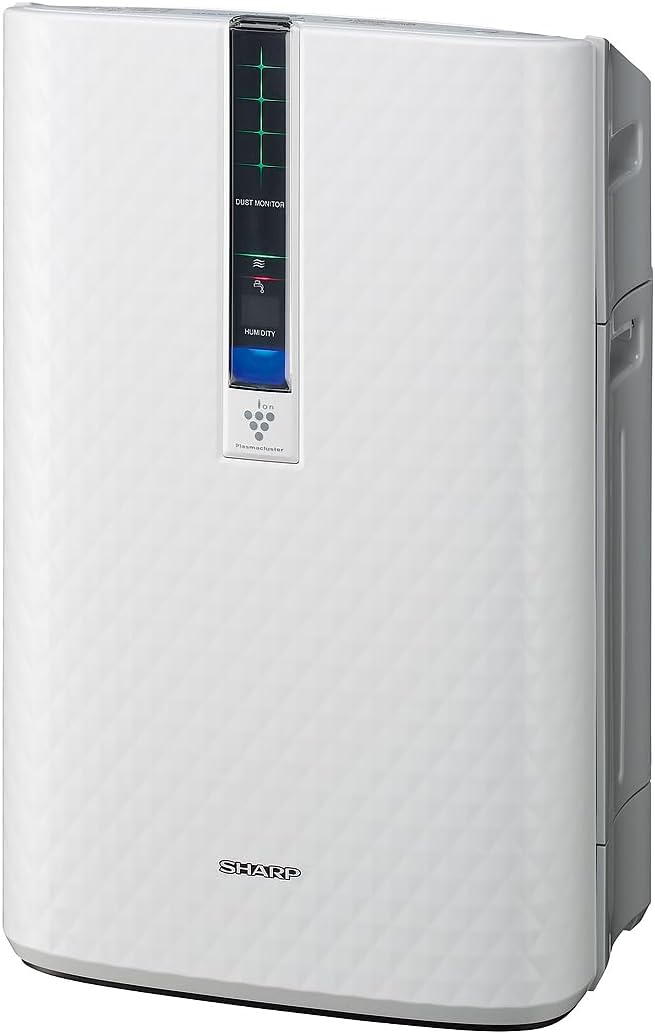
Şəkil 3.2: Yan view of the SHARP KC850U, illustrating its compact design.
İdarəetmə Paneli və Ekran
The unit features an intuitive control panel and a display that provides real-time information on air quality and humidity levels.

Şəkil 3.3: Üst view of the control panel, showing buttons for power, fan speed, modes, and light control.
- Güc düyməsi: Cihazı yandırır və ya söndürür.
- Fan sürəti düyməsi: Cycles through Max, Med, and Low fan speeds.
- Rejim düyməsi: Selects operating modes including Auto, Pollen, and Quick Clean.
- İşıq düyməsi: Adjusts the brightness of the display lights (Bright, Dim, Off).
- Dust Monitor: Visual indicator of air impurity levels (e.g., green for clean, red for high impurity).
- Rütubət Ekranı: Shows the current relative humidity percentage.
4. Quraşdırma
4.1 Qabın açılması
- Cihazı qablaşdırmadan ehtiyatla çıxarın.
- Bütün qoruyucu materialları və plastik torbaları çıxarın.
- Ensure all filters are properly installed before first use. Refer to the Maintenance section for filter installation details.
4.2 Yerləşdirmə
For optimal performance, place the air purifier in a location where air can circulate freely. Avoid placing it directly against a wall or furniture that might obstruct air intake or output.
- Recommended for use in bedrooms, living rooms, studies, or exercise rooms.
- Ensure at least 12 inches (30 cm) of clear space around the unit.
- Place on a firm, level surface.
4.3 Filling the Water Tank (for Humidification)
If you intend to use the humidification function, fill the water tank:
- Remove the water tank from the side of the unit.
- Open the tank cap and fill with clean tap water.
- Securely close the cap and reinsert the water tank into the unit.
5. Əməliyyat Təlimatları
5.1 Yandırma/Söndürmə
düyməsini basın Güc cihazı açmaq və ya söndürmək üçün düyməni basın.
5.2 Fan sürətinin seçimi
düyməsini basın Fan sürəti button repeatedly to cycle through the available fan speeds:
- Maks: Highest air purification and humidification.
- Med: Moderate operation.
- Aşağı: Quiet operation, suitable for sleeping (as quiet as 23 dBA).
5.3 Rejimin seçimi
düyməsini basın Rejim button repeatedly to select an operating mode:
- Avtomatik Rejim: The unit automatically adjusts fan speed and humidification based on sensor readings for air quality and humidity.
- Polen rejimi: Optimized for pollen removal.
- Tez təmizləmə rejimi: Releases high-density Plasmacluster ions for rapid air purification.
5.4 Plazma klaster ion texnologiyası
The Plasmacluster Ion Technology actively disperses positive and negative ions into the air to help reduce microscopic pollutants. This function operates automatically with the unit. A slight clicking sound may be audible during operation, which is normal.
5.5 Ekran İşığına Nəzarət
düyməsini basın İşıqlar button to adjust the brightness of the display indicators:
- Parlaq: Full illumination.
- Sönük: Reduced illumination.
- Deaktiv: Display lights are off, suitable for dark rooms.

Şəkil 5.1: Display showing 'Lo' for low humidity and green dust monitor indicators.

Şəkil 5.2: Display showing 'Hi' for high humidity and red dust monitor indicators, indicating higher impurity levels.
6. Baxım
Regular maintenance ensures optimal performance and extends the lifespan of your SHARP KC850U. Always unplug the unit before cleaning or replacing filters.
6.1 Filter System Overview
The KC850U utilizes a triple filtration system:
- Yuyula bilən ön filtr: Traps large airborne particles like dust and pet dander.
- Activated Carbon Deodorizing Filter: Helps reduce common household odors.
- Həqiqi HEPA filtri: Captures 99.97% of particles 0.3 microns and larger.
- Humidifying Filter: Used for the humidification function.

Şəkil 6.1: Diagram showing the air purification process through the humidifying filter, True HEPA filter, carbon filter, and pre-filter.
6.2 Filtrin Təmizlənməsi və Dəyişdirilməsi
- Ön Filtr: Clean regularly by vacuuming or washing with water. Allow to dry completely before reinstallation.
- Activated Carbon Deodorizing Filter: May be washed. Refer to the filter's specific instructions for cleaning frequency and method. Replace as needed, typically every 2-5 years depending on usage and environment.
- Həqiqi HEPA filtri: This filter is not washable. Replace typically every 2-5 years, depending on usage and environment. The unit will indicate when replacement is due.
- Humidifying Filter: Clean regularly to prevent mineral buildup. Replace as needed, typically every 2-5 years depending on water quality and usage.
Actual filter life may vary significantly based on air quality, usage frequency, and environmental conditions.
6.3 Ümumi təmizləmə
- Cihazın xarici hissəsini yumşaq bir parça ilə silin, damp parça.
- Clean the dust and humidity sensors periodically to ensure accurate readings.
- Clean the water tank and humidifying tray regularly to prevent mold or bacteria growth.
7. Giderme
If you encounter issues with your SHARP KC850U, refer to the following common problems and solutions:
| Problem | Mümkün Səbəb | Həll |
|---|---|---|
| Cihaz açılmır. | Power cord not properly plugged in; no power at outlet. | Check power connection; test outlet with another device. |
| Air purification/humidification is ineffective. | Filters are dirty or clogged; water tank is empty (for humidification). | Clean or replace filters as per Maintenance section; refill water tank. |
| Unusual noise (e.g., clicking). | Normal operation of Plasmacluster Ion generator; foreign object in fan. | A slight clicking is normal. If noise is excessive, unplug and check for obstructions. |
| Odor persists or unit emits strange smell. | Carbon filter saturated; new unit odor; mold in water tank. | Replace carbon filter; new unit odor will dissipate; clean water tank and humidifying filter. |
| Rütubət səviyyəsi artmayıbasing. | Water tank empty; humidifying filter dirty or damaged. | Refill water tank; clean or replace humidifying filter. |
If the problem persists after attempting these solutions, please contact SHARP customer support.
8. Spesifikasiyalar
| Xüsusiyyət | Spesifikasiya |
|---|---|
| Model nömrəsi | KC850U |
| Brend | Kəskin |
| Rəng | Ağ |
| Məhsulun Ölçüləri (D x G x Y) | 10.5" x 14.87" x 23.11" |
| Maddə Çəkisi | 20.5 funt sterlinq |
| Tövsiyə olunan Mərtəbə Sahəsi | 254 Square Feet (4.8 air changes/hour) |
| Səs-küy Səviyyəsi | 23 dBA (Quiet Sleep setting) to 36 dB (typical) |
| Hissəciklərin saxlanma ölçüsü | 0.3 Micrometer (HEPA filter) |
| Nəzarətçi növü | Düymə İdarəsi |
| Wattage | 50 vatt |
| CADR (Smoke / Dust / Pollen) | 164/164/174 |
| Sertifikatlar | ENERGY STAR Rated, AHAM Verifide Tested, CARB Certified |

Şəkil 8.1: Dimensions of the SHARP KC850U unit.

Şəkil 8.2: Room coverage diagram, showing 254 sq. ft. for 4.8 air changes per hour.
9. Zəmanət və Dəstək
9.1 Zəmanət Məlumatı
The SHARP KC850U Air Purifier and Humidifier comes with a 1 illik məhdud zəmanət. Please retain your proof of purchase for warranty claims. For detailed terms and conditions, refer to the warranty card included with your product or visit the official SHARP websayt.
9.2 Müştəri dəstəyi
For technical assistance, troubleshooting beyond this manual, or to inquire about replacement parts and filters, please contact SHARP customer support. Contact information can typically be found on the SHARP official websaytda və ya məhsulun qablaşdırmasında.