Giriş
This manual provides comprehensive instructions for the installation, operation, and maintenance of your Sony XM-GTX6041 600W Amplifier. Designed for car audio systems, this 4-channel amplifier delivers clear, precise, and distortion-free sound. It features advanced thermal control and a high-capacity air cooling system to ensure stable performance even under demanding conditions. Please read this manual thoroughly before using the amplifier to ensure proper setup and to maximize its performance and longevity.
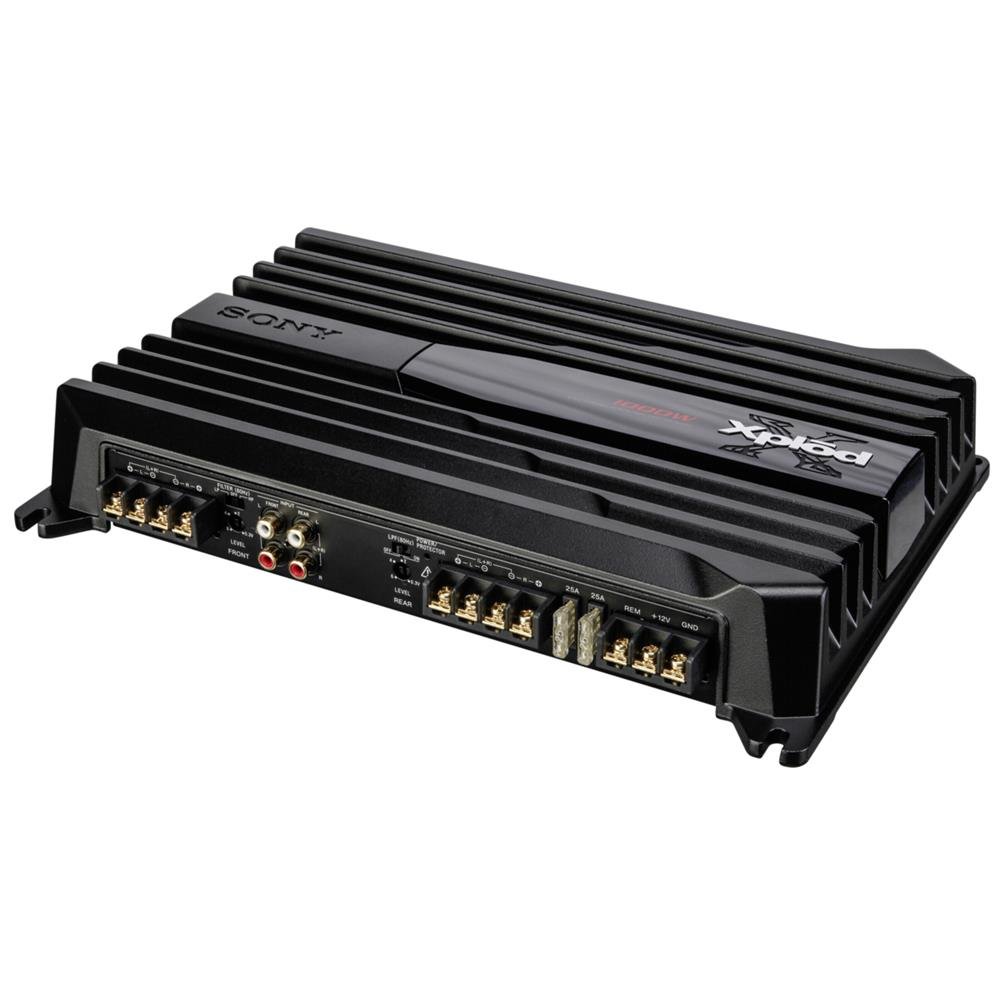
Image: Sony XM-GTX6041 600W Amplifier. This image shows the top view -nin amplifier unit, highlighting its compact design and connection terminals.
Təhlükəsizlik Məlumatı
- Enerji təchizatı: birləşdirin amplifier only to a 12V DC car battery with a negative ground.
- Naqillər: Ensure all wiring is correctly connected and insulated to prevent short circuits and electrical hazards. Use appropriate gauge wires for power and ground connections.
- Montaj: montaj edin ampQaldırıcını kifayət qədər havalandırmaya imkan verən və nəmdən və həddindən artıq istidən qorunan bir yerdə etibarlı şəkildə saxlayın.
- Səs Səviyyələri: Avoid prolonged listening at extremely high volume levels to prevent hearing damage.
- Professional quraşdırma: Hər hansı bir quraşdırma addımından əmin deyilsinizsə, ixtisaslı peşəkar avtomobil audio quraşdırıcısına müraciət edin.
Quraşdırma
1. Qablaşdırma
Diqqətlə çıxarın amplifier and all accessories from the packaging. Verify that all components are present before proceeding with installation.
2. Quraşdırma yeri
Montaj üçün bir yer seçin:
- Dry and protected from moisture.
- Well-ventilated to allow for proper heat dissipation.
- Secure and stable to prevent movement during vehicle operation.
- Away from direct sunlight or heat sources.
Common locations include under a seat, in the trunk, or behind a panel.
3. Naqil birləşmələri
Follow these general guidelines for wiring your ampömürlük:
- Güc (BATT+): Connect a heavy-gauge power cable directly from the positive terminal of your car battery to the BATT+ terminal on the amplifier. Install an in-line fuse (not supplied) as close to the battery as possible.
- Yer (GND): GND terminalından qalın ölçülü torpaqlama kabelini qoşun amplifier to a clean, unpainted metal surface of the vehicle chassis. Ensure a solid electrical connection.
- Uzaqdan (REM): Baş blokunuzun uzaq çıxışından uzaqdan işə salınan teli REM terminalına qoşun amplifier. This will turn the ampqaldırıcını baş bölmənizlə yandırın və söndürün.
- RCA Girişi: Connect RCA cables from your head unit's pre-out outputs to the RCA input jacks on the ampömürlük.
- Dinamik Çıxışı: Connect your speakers to the speaker output terminals on the amplifier. Ensure correct polarity (+ to + and - to -) for each speaker. The XM-GTX6041 supports 4-channel speaker configurations.
Always double-check all connections before applying power to the ampömürlük.
Əməliyyat Təlimatları
1. Açma / Söndürmə
The amplifier will automatically power on when your head unit is turned on (via the remote wire connection) and power off when the head unit is turned off.
2. Adjusting Gain Control
The gain control (often labeled "LEVEL" or "GAIN") matches the amplifier's input sensitivity to the output level of your head unit. To set the gain:
- çevirin amplifier's gain control to its minimum (fully counter-clockwise) setting.
- Turn your head unit volume up to about 75-80% of its maximum level.
- Yavaş -yavaş artırın amplifier's gain control until you hear distortion, then back it off slightly until the sound is clear.
The gain control is not a volume control; it is for matching signal levels.
3. Crossover Settings (High-Pass / Low-Pass Filters)
The XM-GTX6041 features built-in high-pass (HPF) and low-pass (LPF) filters to optimize sound output for different speakers:
- Yüksək keçid filtri (HPF): Tezliklərə icazə verir yuxarıda the set point to pass through. Use for full-range speakers or tweeters to prevent them from playing low bass frequencies they cannot reproduce effectively.
- Aşağı keçid filtri (LPF): Tezliklərə icazə verir aşağıda the set point to pass through. Use for subwoofers to ensure they only reproduce bass frequencies.
Bu filtrləri dinamik tiplərinizə və istədiyiniz səs pro-suna uyğun olaraq tənzimləyinfile. Refer to your speaker's specifications for recommended crossover points.
Baxım
1. Təmizləmə
Periodically clean the exterior of the amplifier with a soft, dry cloth. Do not use harsh chemicals or abrasive cleaners. Ensure that the cooling fins and ventilation openings are free from dust and debris to maintain optimal airflow.
2. Termal İdarəetmə
The XM-GTX6041 features an advanced thermal control system and high-capacity air cooling to prevent overheating. Ensure that the amplifier is mounted in a location with sufficient air circulation. Avoid blocking any ventilation openings. If the amplifier enters thermal protection mode (indicated by a protection light, if present), reduce the volume or allow it to cool down before continued use.
Problemlərin aradan qaldırılması
| Problem | Mümkün Səbəb | Həll |
|---|---|---|
| Gücsüz / Ampqaldırıcı açılmır |
|
|
| Səs çıxışı yoxdur |
|
|
| Təhrif edilmiş səs |
|
|
| Amplifier overheats / Enters protection mode |
|
|
Spesifikasiyalar
| Xüsusiyyət | Detal |
|---|---|
| Brend | Sony |
| Model nömrəsi | XMGTX6041 |
| Kanalların sayı | 4 |
| Maksimum Güc Çıxışı | 600 Vt |
| Cildtage | 12 Volt (DC) |
| Montaj növü | Səth montajı |
| İşləmə temperaturu | 125 dərəcə Selsiyə qədər |
| Ölçülər (U x G x Y) | 10 x 10 x 10 santimetr |
| International Article Code (UPC) | 04905524761740 |
Zəmanət və Dəstək
Zəmanət Məlumatı
Specific warranty details for the Sony XM-GTX6041 amplifier are typically provided with the product at the time of purchase or can be found on the official Sony websayt. Zəmanət iddiaları üçün satınalma sübutunuzu özündə saxlayın.
Müştəri dəstəyi
For further assistance, technical support, or service inquiries, please contact Sony customer support through their official websayt və ya məhsul sənədlərinizdə göstərilən əlaqə məlumatı.


