Giriş
Aldığınız üçün təşəkkür edirikasing the GPX Weatherx WR282B Weather and Alert Radio. This portable radio is designed to provide you with AM/FM radio reception and access to all 7 NOAA weatherband channels, ensuring you stay informed during various conditions. It offers flexible power options, operating on either AC power or D-size batteries, making it suitable for both indoor and outdoor use.
Please read this manual thoroughly before operating the device to ensure proper use and to maximize its performance and longevity.
Əhəmiyyətli Təhlükəsizlik Məlumatı
- Təlimatları oxuyun: Məhsulu işə salmazdan əvvəl bütün təhlükəsizlik və istismar təlimatları oxunmalıdır.
- Təlimatları saxla: Təhlükəsizlik və istismar təlimatları gələcək istinad üçün saxlanmalıdır.
- Xəbərdarlıqlara Diqqət Edin: Məhsulda və istismar təlimatlarında göstərilən bütün xəbərdarlıqlara əməl edilməlidir.
- Təlimatlara əməl edin: Bütün əməliyyat və istifadə təlimatlarına əməl edilməlidir.
- Su və nəm: Bu məhsulu suyun yaxınlığında (məsələn, vanna, lavabo, mətbəx lavabosu, camaşırxana yaxınlığında, yaş zirzəmidə və ya üzgüçülük hovuzunun yaxınlığında) istifadə etməyin.
- Təmizləmə: Yalnız quru parça ilə təmizləyin.
- Havalandırma: Heç bir ventilyasiya açılışını bağlamayın. İstehsalçının göstərişlərinə uyğun olaraq quraşdırın.
- İstilik: Radiatorlar, istilik registrləri, sobalar və ya digər aparatlar (o cümlədən) kimi istilik mənbələrinin yaxınlığında quraşdırmayın. ampistilik əmələ gətirən qaldırıcılar).
- Güc Şnurundan Qoruma: Elektrik kabelini, xüsusən də tıxaclarda, prizlərdə və onların aparatdan çıxdığı yerdə gəzməkdən və ya sıxılmaqdan qoruyun.
- İldırım: İldırım fırtınası zamanı və ya uzun müddət istifadə edilmədikdə bu cihazı elektrik şəbəkəsindən ayırın.
- Xidmət: Bütün xidmətlər üçün ixtisaslı xidmət personalına müraciət edin. Aparat hər hansı şəkildə zədələndikdə, məsələn, enerji təchizatı kabeli və ya tıxacı zədələndikdə, maye töküldükdə və ya cihazın içərisinə əşyalar düşdükdə, cihaz yağışa və ya nəmə məruz qaldıqda, normal işləmədikdə xidmət tələb olunur. , ya da atılıb.
Xüsusiyyətlər
- AM/FM Radio Tuner
- Weatherband - All 7 NOAA Channels
- Swivel Telescopic Antenna
- Səs səviyyəsinə nəzarət
- Audio Line Input (Auxiliary Input)
- İnteqrasiya olunmuş Dəstək
- Dual Power Options: AC/DC Adapter or 3 x 'D' Batteries
Paketin məzmunu
- GPX Weatherx WR282B Weather and Alert Radio
- AC/DC güc adapteri
- İstifadəçi Təlimatı (bu sənəd)
Nəzarət və Göstəricilər
Familiarize yourself with the various controls and indicators on your WR282B radio.
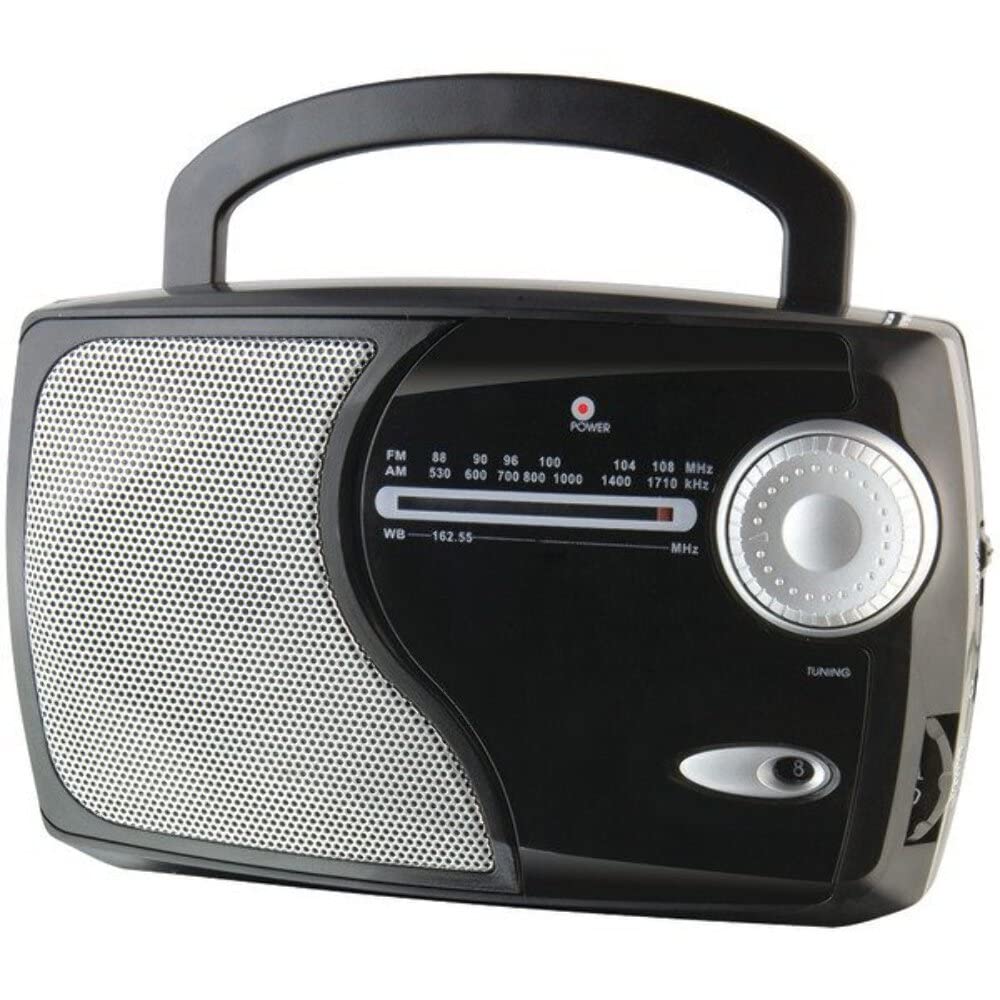
Şəkil: Ön view of the GPX Weatherx WR282B radio, showing the speaker, tuning dial, and control knobs.
- Güc/Səs Düyməsi: Turns the radio on/off and adjusts the audio output level.
- Bant Seçicisi Keçidi: Selects between AM, FM, and Weatherband (WB) modes.
- Tuning Düyməsi: Adjusts the frequency to tune into desired radio stations or weather channels.
- Tuning Indicator: Illuminates when a strong signal is received.
- Tezlik yığımı: Cari radio tezliyini göstərir.
- Teleskopik antena: Extendable antenna for improved FM and Weatherband reception.
- Auxiliary Input (AUX IN): Xarici audio cihazlarını birləşdirmək üçün 3.5 mm jak.
- AC Elektrik Girdi: Jack for connecting the included AC/DC power adapter.
- Batareya bölməsi: Located on the back, holds 3 'D' size batteries.
- Daşıma Dəstəyi: Asan daşınma üçün.
Quraşdırma
Radionun güclənməsi
The WR282B radio can be powered using either the included AC/DC power adapter or three 'D' size batteries.
1. AC Power Operation
- Ensure the radio is turned off by rotating the Power/Volume knob counter-clockwise until it clicks.
- Insert the small plug of the AC/DC power adapter into the AC Power Input jack on the radio.
- Plug the other end of the AC/DC power adapter into a standard wall outlet (AC 120V~60Hz).
- The radio is now ready for use with AC power.
Qeyd: When the AC adapter is connected, battery power is automatically disconnected.
2. Battery Power Operation
- Radionun söndürüldüyünə əmin olun.
- Radionun arxasındakı batareya bölməsini tapın.
- Batareya bölməsinin qapağını açın.
- Insert three (3) 'D' size batteries (not included) into the compartment, observing the correct polarity (+/-) as indicated inside the compartment.
- Batareya bölməsinin qapağını etibarlı şəkildə bağlayın.
- The radio is now ready for use with battery power.
Əhəmiyyətli: Remove batteries if the radio will not be used for an extended period to prevent leakage and damage.
Əməliyyat Təlimatları
1. Turning On and Adjusting Volume
- Döndürün Güc/Səs Düyməsi clockwise to turn on the radio. Continue rotating to increase the volume to a comfortable listening level.
- Radionu söndürmək üçün düyməni çevirin Güc/Səs Düyməsi counter-clockwise until it clicks.
2. Selecting a Radio Band (AM/FM/Weatherband)
- istifadə edin Bant seçici açarı to choose your desired listening mode:
- AM: üçün Amplitude Modulation radio stations.
- FM: For Frequency Modulation radio stations.
- DB: For NOAA Weatherband channels.
3. Tuning to a Station or Channel
- uzadın Teleskopik Antenna fully for optimal FM and Weatherband reception. For AM reception, the radio has a built-in antenna, and adjusting the radio's position may improve reception.
- Döndürün Düyməni tənzimləyin to scan through frequencies on the Tezlik Dialı.
- When a strong signal is received, the Tuning Göstərici işıq yanacaq.
- For Weatherband (WB) mode, tune to one of the 7 NOAA weather channels (162.400 MHz to 162.550 MHz).
4. Using the Auxiliary Input (AUX IN)
- Connect a 3.5mm audio cable (not included) from your external audio device (e.g., MP3 player, smartphone) to the Köməkçi Giriş (AUX IN) jack on the radio.
- Ensure the radio is turned on and the volume is adjusted.
- The audio from your external device will now play through the radio's speaker. Control playback and track selection from your external device.
Baxım
- Təmizləmə: Wipe the exterior of the radio with a soft, dry cloth. Do not use abrasive cleaners, waxes, or solvents.
- Batareyanın dəyişdirilməsi: Replace all three 'D' batteries when the radio's performance diminishes or if the unit will not be used for an extended period. Always replace with new batteries of the same type.
- Yaddaş: When storing the radio for a long time, remove the batteries to prevent leakage. Store in a cool, dry place away from direct sunlight and extreme temperatures.
- Antena Baxımı: Əyilməməsi və ya qırılmaması üçün teleskopik antenanı ehtiyatla tutun.
Problemlərin aradan qaldırılması
| Problem | Mümkün Səbəb | Həll |
|---|---|---|
| Güc yoxdur |
|
|
| Zəif radio qəbulu |
|
|
| No sound from AUX IN |
|
|
Spesifikasiyalar
- Model: WR282B
- Radio Qrupları: AM, FM, Weatherband (7 NOAA channels)
- Güc mənbəyi: AC 120V~60Hz (via included adapter) or 3 x 'D' Batteries (not included)
- Bağlantı: 3.5 mm köməkçi giriş
- Antena: Telescopic (FM/WB), Built-in Ferrite Bar (AM)
- Məhsul Ölçüləri: 8.86" L x 2.76" W x 5.51" H (approximately)
- Maddə çəkisi: 1.06 funt (batareyasız)
Zəmanət və Dəstək
For detailed warranty information and customer support, please refer to the warranty card included with your product or visit the official GPX websayt. Satınalma qəbzinizi hər hansı zəmanət iddiaları üçün satınalmanın sübutu kimi saxlayın.
If you experience issues not covered in the troubleshooting section, please contact GPX customer service for assistance.


