1. Giriş
Thank you for choosing the TFA 30.5027.02 Digital Thermometer/Hygrometer. This device is designed to accurately measure and display indoor temperature and humidity, providing a clear indication of the comfort level in your environment. Its ultra-flat design and high-gloss surface make it a discreet and functional addition to any room. Please read this manual carefully to ensure proper setup and operation.
2. Təhlükəsizlik Məlumatı
- Gələcəkdə istinad üçün bu təlimat kitabçasını saxlayın.
- Bu cihaz yalnız daxili istifadə üçün nəzərdə tutulub.
- Do not expose the device to extreme temperatures, direct sunlight, moisture, or strong vibrations.
- Cihazı suya və ya digər mayelərə batırmayın.
- Do not attempt to open or modify the device. This will void the warranty.
- Batareyaları uşaqların əli çatmayan yerdə saxlayın. Udulduqda dərhal həkimə müraciət edin.
- İstifadə olunmuş batareyaları yerli qaydalara uyğun atın.
- Cihazı yumşaq bir vasitə ilə təmizləyin, damp parça. Aşındırıcı təmizləyicilərdən və ya həlledicilərdən istifadə etməyin.
3. Paketin məzmunu
Zəhmət olmasa, bütün komponentlərin mövcud olduğunu və zədələnmədiyini yoxlayın:
- 1x TFA 30.5027.02 Digital Thermometer/Hygrometer
- 1x CR2 Lithium Battery (pre-installed or separate)
- 1x Təlimat Təlimatı (bu sənəd)
4. Məhsul bitdiview
The TFA 30.5027.02 features a clear digital display showing current temperature and humidity. It also includes a comfort level indicator and a maximum/minimum value memory function.

Şəkil 1: Ön view of the TFA 30.5027.02 Digital Thermometer/Hygrometer. The display shows temperature in Celsius and relative humidity percentage, along with a comfort level icon.
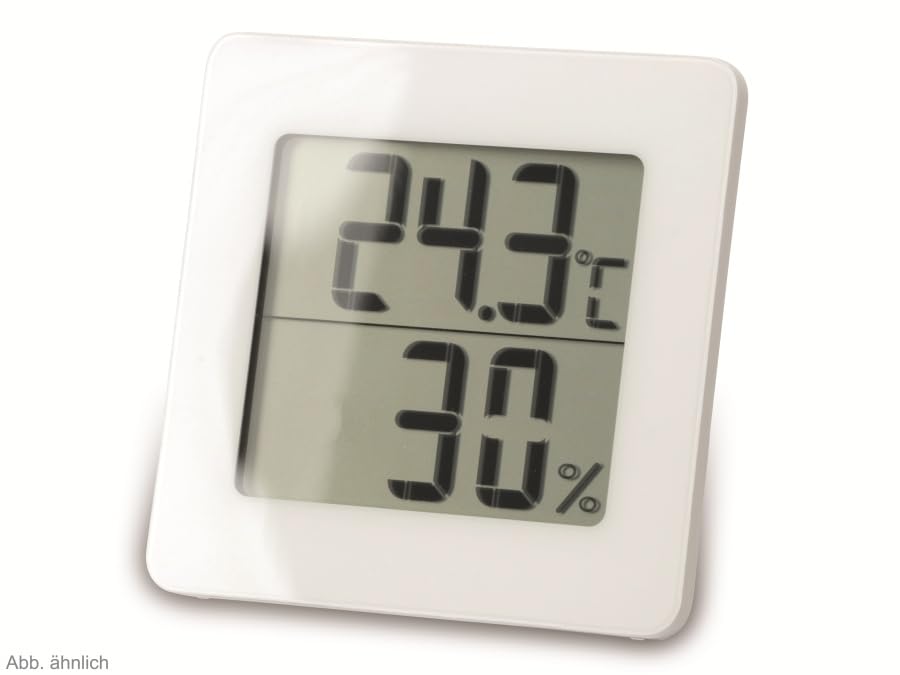
Şəkil 2: Alternativ view of the TFA 30.5027.02 showing different temperature and humidity readings, demonstrating the device's clear digital display.
Əsas Xüsusiyyətlər:
- Digital display for temperature (°C) and humidity (% RH)
- Ultra-flat design with high-gloss finish
- Comfort level indicator (smiley icon)
- Maximum and minimum value memory function
- Divara asmaq olar
5. Quraşdırma
5.1 Batareyanın quraşdırılması
- Cihazın arxasındakı batareya bölməsinin qapağını tapın.
- Qapağı sürüşdürərək və ya yumşaq bir şəkildə açaraq çıxarın.
- Insert one CR2 Lithium battery, ensuring the correct polarity (+/-) as indicated inside the compartment.
- Batareya bölməsinin qapağını etibarlı şəkildə dəyişdirin.
- The device display should activate, showing current temperature and humidity readings.
5.2 İlkin yerləşdirmə
For accurate readings, place the thermometer/hygrometer in a location free from direct sunlight, drafts, or heat sources. The device can be placed on a flat surface or mounted on a wall using the integrated mounting hole on the back.
- Divar montajı: Use a small screw (not included) suitable for your wall type. Hang the device securely.
- Stolüstü Yerləşdirmə: Ensure the device is stable on a flat, level surface.
6. Əməliyyat Təlimatları
6.1 Üzərində göstərinview
The large digital display shows two main values:
- Üst Ekran: Current temperature in degrees Celsius (°C).
- Aşağı Ekran: Current relative humidity in percentage (% RH).
- Rahatlıq Səviyyəsi Göstərici: A small icon (e.g., a smiley face) indicates the current indoor climate comfort level based on temperature and humidity.
6.2 Maks/Min Funksiya
The device records the maximum and minimum temperature and humidity values measured since the last reset. To access these values:
- düyməsini basın MAX/MIN button (if present, typically on the back or side). The display will show the maximum recorded temperature and humidity.
- düyməsini basın MAX/MIN üçün yenidən düyməsini basın view the minimum recorded temperature and humidity.
- düyməsini basın MAX/MIN button a third time to return to current readings.
To reset the MAX/MIN values, press and hold the MAX/MIN button for a few seconds while viewing the MAX or MIN values. The memory will clear, and new maximum and minimum values will begin recording from that point.
6.3 Rahatlıq Səviyyəsi Göstəricisi
The comfort level indicator provides a quick visual reference for indoor climate conditions:
- Happy Face: Indicates optimal comfort (e.g., 20-25°C and 40-70% RH).
- Neytral Üz: Indicates acceptable but not optimal conditions.
- Kədərli üz: Indicates uncomfortable conditions (e.g., too dry, too humid, too hot, or too cold).
Note: Specific ranges for comfort levels may vary slightly by model. Refer to the device's display for the exact icon representation.
7. Baxım
7.1 Təmizləmə
Cihazı yumşaq, bir az damp cloth. Do not use abrasive cleaning agents, solvents, or alcohol, as these can damage the surface and display.
7.2 Batareyanın dəyişdirilməsi
When the battery power is low, a low battery indicator (if available) will appear on the display. Replace the battery as follows:
- Cihazın arxasındakı batareya bölməsinin qapağını açın.
- Remove the old CR2 Lithium battery.
- Insert a new CR2 Lithium battery, observing the correct polarity (+/-).
- Batareya bölməsinin qapağını bağlayın.
Note: After battery replacement, the device may reset, and MAX/MIN values will be cleared.
8. Giderme
| Problem | Mümkün Səbəb | Həll |
|---|---|---|
| Ekran yoxdur və ya zəif ekran | Batareya bitib və ya səhv daxil edilib. | Replace the battery with a new CR2 Lithium battery, ensuring correct polarity. |
| Səhv oxunuşlar | Device is placed in an unsuitable location (e.g., near a window, heat source, or vent). | Relocate the device to a stable indoor environment away from direct influences. Allow 15-30 minutes for readings to stabilize. |
| Comfort indicator always shows the same face | Environmental conditions are consistently outside or within a specific comfort range. | This indicates the device is functioning correctly. Adjust your indoor environment if desired. |
9. Spesifikasiyalar
- Model nömrəsi: 30.5027.02
- Brend: TF uzadılması
- Rəng: Ağ
- Məhsulun Ölçüləri (U x G x Y): 10 x 1.2 x 8.2 sm (3.94 x 0.47 x 3.23 düym)
- Maddə çəkisi: 70 qram (2.47 unsiya)
- Batareya: 1 x CR2 Litium (daxildir)
- Montaj növü: Divar montajı
- Operational Humidity Range: 20% - 95% RH
- Upper Rated Temperature: 50°C (122°F)
- Temperatur Dəqiqliyi: ±1°C
- Temperaturun Oxunma Dəqiqliyi: ±1°C
10. Zəmanət və Dəstək
For warranty information and customer support, please refer to the terms and conditions provided by your retailer or contact the manufacturer directly. Keep your proof of purchase for any warranty claims.
İstehsalçı: TFA Dostmann GmbH & Co. KG
For further assistance, please visit the official TFA websaytına daxil olun və ya müştəri xidməti şöbəsi ilə əlaqə saxlayın.


