Giriş
This manual provides detailed instructions for the operation and maintenance of your PENTAX Q10 digital interchangeable lens camera. The PENTAX Q10 is a super-compact and lightweight camera designed to deliver high-quality photography with a 12.4MP CMOS image sensor and improved autofocus performance.
Qutuda nə var
- PENTAX Q10 Camera Body
- 02 Standard Zoom Lens (5-15mm)
- Şarj oluna bilən litium-ion batareya
- Batareya doldurucu
- USB kabel
- Kəmər
- Body Mount Cap
- Linza Qapaqları (ön və arxa)
- Proqram CD-ROMu
- Təlimat kitabçası (bu sənəd)
Kamera bitdiview

Şəkil 1: Ön View (Lens Removed) - This image displays the front of the Pentax Q10 camera body with the lens detached, revealing the image sensor and the Q-mount for interchangeable lenses. The 'PENTAX' logo is visible at the top, and 'SR' (Shake Reduction) is indicated on the grip.
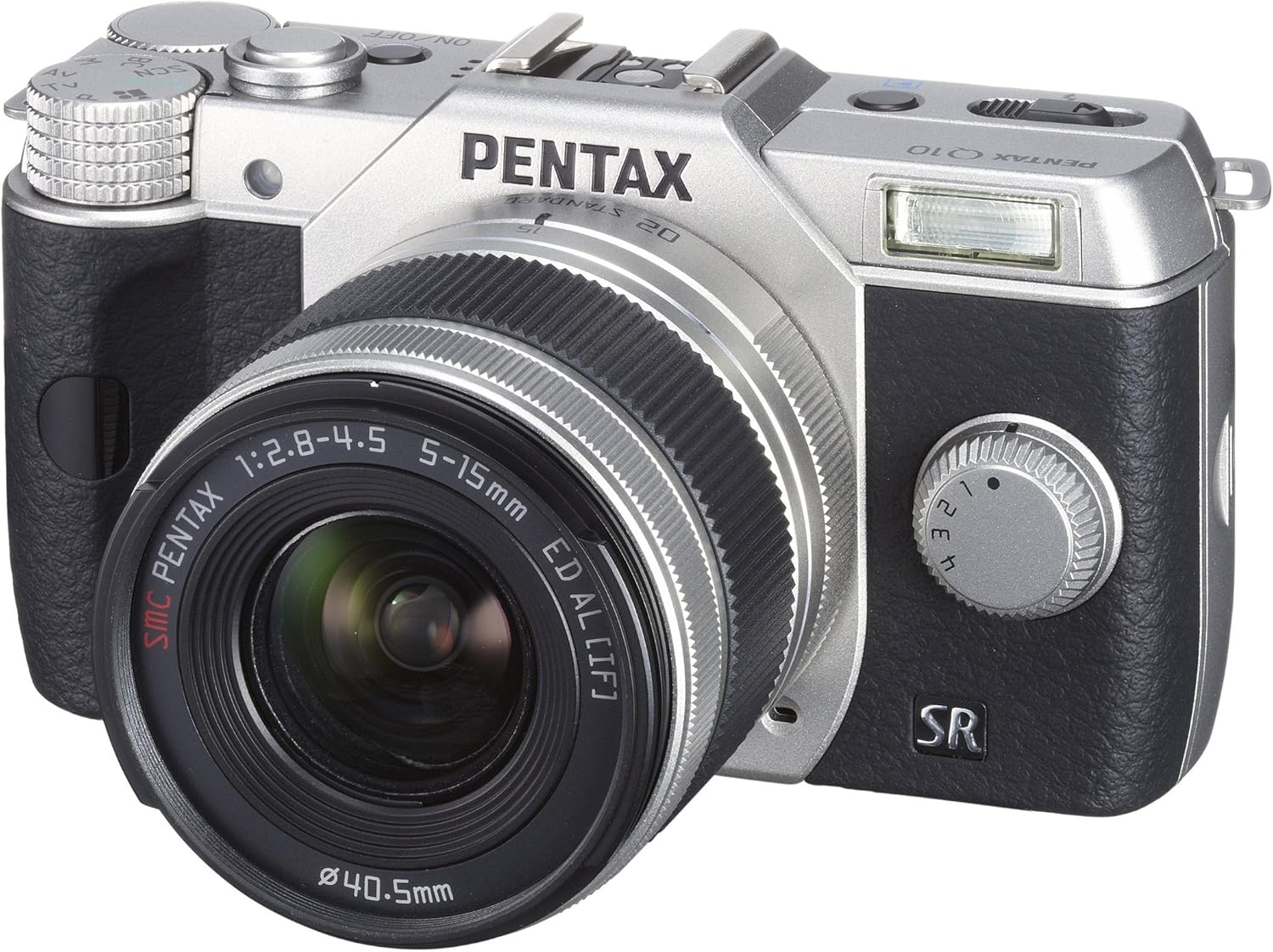
Şəkil 2: Ön View with Lens Attached - The Pentax Q10 camera is shown with the 02 Standard Zoom Lens (5-15mm) mounted. This view highlights the compact size of the camera with its standard kit lens.

Şəkil 3: Üst View - This overhead view of the Pentax Q10 shows the main controls on the top panel, including the mode dial (with Auto, P, Av, Tv, M, SCN settings), the power ON/OFF button, the shutter release button, and the hot shoe for external flash units.

Şəkil 4: Ön View with Flash Activated - The Pentax Q10 is depicted with its built-in pop-up flash extended, ready for use. This view also shows the 02 Standard Zoom Lens attached.

Şəkil 5: Arxa View - The back of the Pentax Q10 camera features the 3-inch LCD screen, along with various control buttons such as the playback button, delete button, ISO, OK, WB, and menu navigation buttons.
Əsas Quraşdırma
1. Batareyanın doldurulması
Insert the provided rechargeable battery into the battery charger. Connect the charger to a power outlet. The charging indicator light will show the charging status. Once fully charged, remove the battery.
2. Batareyanın və Yaddaş Kartının Yerləşdirilməsi
Open the battery/memory card compartment cover located at the bottom of the camera. Insert the charged battery with the correct orientation until it clicks into place. Insert an SD/SDHC/SDXC memory card into the card slot until it locks. Close the compartment cover securely.
3. Obyektivin qoşulması
Align the red dot on the lens with the red dot on the camera's lens mount. Rotate the lens clockwise until it clicks into place. To remove the lens, press the lens release button on the camera body and rotate the lens counter-clockwise.
4. İlkin Ayarlar
Upon first power-on, the camera may prompt you to set the date, time, and language. Follow the on-screen instructions using the control buttons and LCD screen.
Kameranın işlədilməsi
Gücü yandırın/söndürün
düyməsini basın ON/OFF button located on the top panel to power the camera on or off.
Çəkiliş rejimləri
İstədiyiniz çəkiliş rejimini seçmək üçün kameranın yuxarı hissəsindəki rejim çarxını çevirin:
- Avtomatik: İstifadənin rahatlığı üçün tam avtomatik çəkiliş.
- P (Proqram AE): Camera sets aperture and shutter speed, but allows for program shift.
- Av (Aperture Priority AE): Siz diyaframı təyin edirsiniz, kamera çekim sürətini təyin edir.
- Tv (Shutter Priority AE): Siz çekim sürətini təyin edirsiniz, kamera diyaframı təyin edir.
- M (Əl ilə): Siz həm diyafram, həm də çekim sürətini təyin edirsiniz.
- SCN (Səhnə Rejimləri): Pre-set modes for specific situations (e.g., Portrait, Landscape, Night Scene, Macro, Blue Sky, Forest, Blur control).
Şəkillərin çəkilməsi
- Select a shooting mode using the mode dial.
- LCD monitordan istifadə edərək çəkilişinizi çərçivəyə salın.
- Press the shutter release button halfway down to focus. The camera will confirm focus.
- Şəkil çəkmək üçün deklanşör düyməsini tam basın.
Video Qeydiyyat
The PENTAX Q10 supports Full 1080p HD video recording at 30 frames per second with H.264 compression. To record video:
- Switch the camera to movie mode (if available on the mode dial or via menu setting).
- Press the dedicated movie recording button (if present) or the shutter release button to start recording.
- Yazmağı dayandırmaq üçün düyməni yenidən basın.
Flaş əməliyyatı
The camera features a built-in pop-up flash. To activate the flash, slide the flash release lever. The flash has various modes (e.g., Auto, Flash On, Red-eye Reduction) which can be selected via the camera's menu or dedicated flash button.
Avtofokus sistemi
The PENTAX Q10 utilizes a contrast detection autofocus system with 25 autofocus points. Available AF modes include Continuous, Face Detection, Multi-area, Selective single-point, Single, and Tracking. Select the appropriate AF mode from the camera's menu to suit your shooting conditions.
Şəkil sabitləşməsi
The camera incorporates a sensor-shift shake reduction system to minimize blur caused by camera shake, especially in low light conditions or when using longer focal lengths.
Baxım
Kamera Korpusunun Təmizlənməsi
Kamera gövdəsini yumşaq, quru bir parça ilə silin. İnadkar kirlər üçün bir az dampen the cloth with water or a mild cleaning solution specifically designed for electronics. Avoid using strong solvents.
Lensin təmizlənməsi
Use a lens blower to remove dust from the lens surface. For smudges, use a specialized lens cleaning cloth and lens cleaning fluid. Never touch the lens surface with your fingers.
Sensorun Təmizlənməsi
The PENTAX Q10 features an integrated DRII (Dust Removal II) dust reduction system. If dust spots appear on your images, consult a professional service center for sensor cleaning. Attempting to clean the sensor yourself can cause damage.
Batareyaya qulluq
Store batteries in a cool, dry place. Do not expose them to extreme temperatures. If the camera will not be used for an extended period, remove the battery.
Problemlərin aradan qaldırılması
Kamera Yanmır
- Batareyanın tam doldurulduğundan və düzgün daxil edildiyindən əmin olun.
- Batareya kontaktlarının təmiz olub olmadığını yoxlayın.
Cannot Take Pictures
- Yaddaş kartının daxil edildiyini və kifayət qədər boş yerin olduğunu yoxlayın.
- Check if the lens is properly attached and unlocked.
- Kameranın oynatma rejimində olmadığından əmin olun.
- If the flash is set to a slow sync mode, the shutter may not release immediately.
Şəkillər bulanıqdır
- Lensin təmiz olduğundan əmin olun.
- Check if the camera is properly focused.
- Use a faster shutter speed or increase ISO in low light conditions.
- Confirm that the image stabilization (SR) is active if needed.
Yaddaş kartı xətası
- Yaddaş kartını yenidən daxil edin.
- Try a different, compatible memory card.
- Yaddaş kartını formatlayın (qeyd: bu, bütün məlumatları siləcək).
Spesifikasiyalar
| Model Adı | Pentax Q10 |
| Şəkil Sensoru | 12.4 MP Backlit CMOS (1/2.3-inch) |
| Effektiv Qətnamə | 12.4 MP |
| Lens montajı | Pentax Q-mount |
| Şəkil sabitləşməsi | Sensor sürüşməsi |
| Video Çözünürlük | Full HD 1080p (1920x1080) at 30fps (H.264) |
| Ekran | 3 düymlük LCD (460,000 nöqtə) |
| ISO həssaslığı | Genişləndirilmiş ISO Minimum 100 |
| Çekim Sürəti | 1/8000 ilə 30 saniyə |
| Avtofokus sistemi | Contrast Detection (25 points) |
| Davamlı Çəkiliş | 5 fps-ə qədər |
| Yaddaş Media | SD/SDHC/SDXC Yaddaş Kartı |
| Bağlantı | HDMI (Type C Mini), USB |
| Çəki (təxminən) | 0.44 Pounds (Body only) |
Qeyd: Texniki şərtlər xəbərdarlıq edilmədən dəyişdirilə bilər.
Zəmanət və Dəstək
Zəmanət Məlumatı
The PENTAX Q10 camera comes with a 1 il ehtiyyat hissələri və iş zəmanəti satın alındığı tarixdən etibarən. Zəmanət iddiaları üçün satın alma sənədinizi saxlayın. Bu zəmanət normal istifadə zamanı istehsal qüsurlarını və işçiliyi əhatə edir.
Müştəri dəstəyi
For technical assistance, service, or further inquiries, please visit the official Pentax support websaytına daxil olun və ya müştəri xidməti şöbəsi ilə əlaqə saxlayın. Əlaqə məlumatı adətən istehsalçının saytında tapıla bilər websaytda və ya məhsulunuzla birlikdə verilən zəmanət kartında.


