Giriş
This manual provides essential instructions for the safe and effective use of your Pentax MX-1 Digital Camera. Please read this manual thoroughly before using the camera and keep it in a safe place for future reference.
Məhsul Bitdiview
The Pentax MX-1 is a high-end compact digital camera featuring a 12-megapixel back-illuminated CMOS sensor and a 4x optical zoom lens (28-112mm equivalent) with an f/1.8-2.5 aperture. It includes a 3-inch tilting LCD display and a dual shake reduction system for clear images and video.

Şəkil 1: Ön view of the Pentax MX-1 Digital Camera.
Quraşdırma
1. Batareyanın quraşdırılması və doldurulması
- Kameranın alt hissəsində yerləşən batareya bölməsinin qapağını açın.
- Insert the provided Lithium-Ion battery, ensuring the correct orientation as indicated inside the compartment.
- Batareya bölməsinin qapağını etibarlı şəkildə bağlayın.
- Connect the camera to the AC adapter using the supplied USB cable. The charging indicator will illuminate.
- Charge the battery fully before first use. A full charge typically takes approximately 3 hours.
2. Yaddaş kartının quraşdırılması
- Locate the memory card slot, typically adjacent to the battery compartment or on the side of the camera.
- Insert an SD, SDHC, or SDXC memory card into the slot with the label facing the correct direction until it clicks into place.
- To remove the card, push it in gently until it springs out.

Şəkil 2: Yan view of the camera showing the open port cover for USB/HDMI connections.
3. İlkin Ayarlar
- düyməsinə basaraq kameranı yandırın ON/OFF düyməsi.
- Follow the on-screen prompts to set the language, date, and time.
- Format the memory card before first use to ensure optimal performance. Navigate to the MENU, seçin QURULUM, və sonra Kartı Formatlayın.
Kameranın işlədilməsi
1. Əsas Fotoqrafiya
- Güc Aktivdir: düyməsini basın ON/OFF düyməsi. Lens uzanacaq.
- Rejimi seçin: Rotate the mode dial on the top of the camera to select your desired shooting mode (e.g., Auto Pict, Program, Aperture Priority, Shutter Priority, Manual).
- Fokus: Point the camera at your subject. Press the shutter button halfway down to focus. The focus frame will turn green when focus is achieved.
- Çək: Press the shutter button fully down to take a picture.

Şəkil 3: Üst view of the camera showing the mode dial, shutter button, and exposure compensation dial.
2. Using the Tilting LCD Monitor
The 3-inch LCD monitor can be tilted up or down to facilitate shooting from various angles, such as low-angle shots or overhead shots. Gently pull the top or bottom edge of the LCD screen to adjust its position.
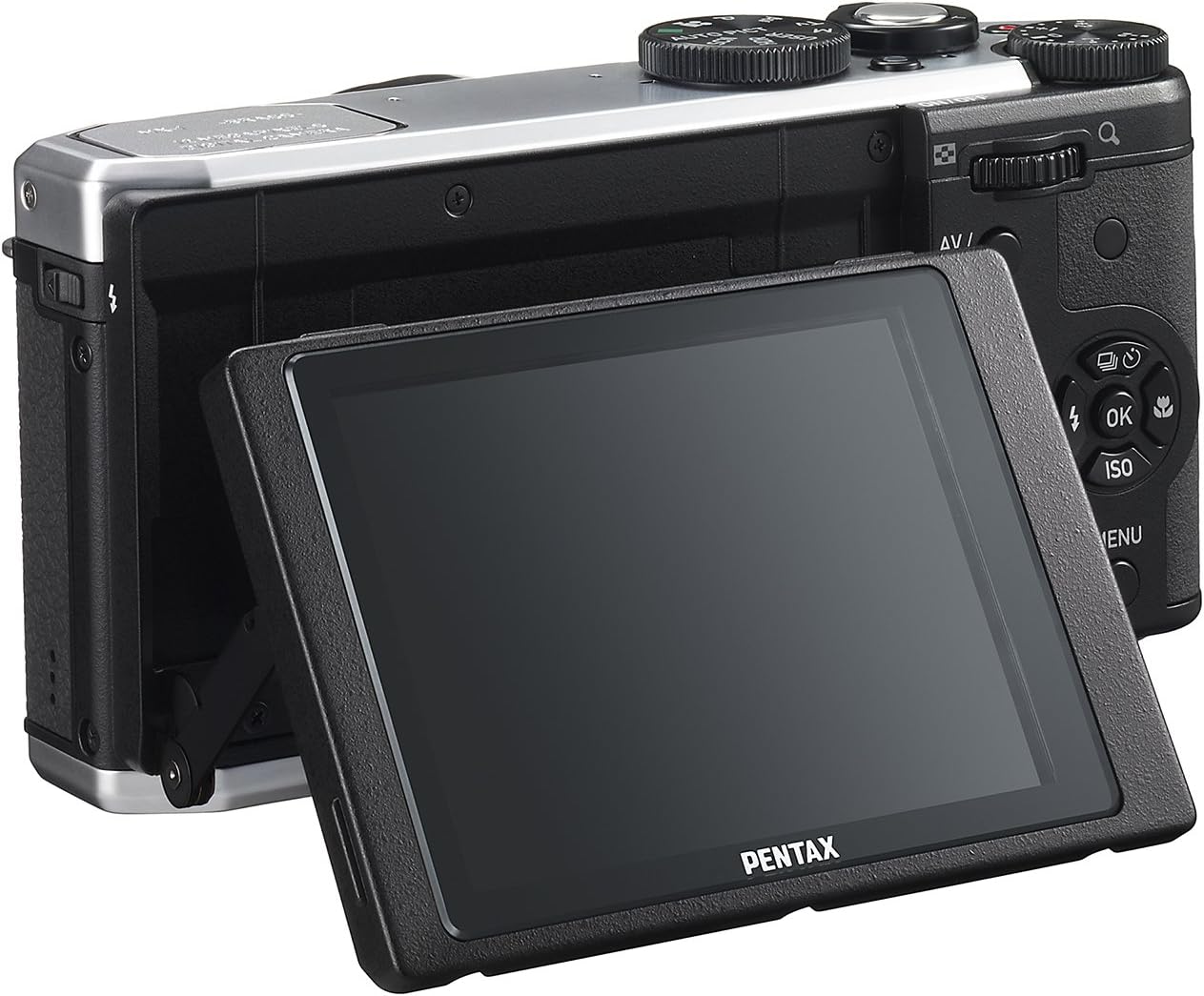
Şəkil 4: Arxa view of the camera demonstrating the tilting LCD screen.
3. Flaş əməliyyatı
To use the built-in flash, slide the flash release lever to pop up the flash unit. The flash modes (Auto, On, Off, Slow Sync, Rear Curtain Sync) can be selected via the camera's menu or a dedicated button, depending on the shooting mode.

Şəkil 5: Ön view of the camera with the pop-up flash in the extended position.
4. İzləmə rejimi
- düyməsini basın OYNA oxutma rejiminə daxil olmaq üçün düymə.
- Use the directional pad to scroll through your photos and videos.
- düyməsini basın OK düyməsini basın view information about the selected image or to play a video.
- düyməsini basın MENU button to access playback options such as deleting, rotating, or resizing images.
Baxım
1. Kameranın təmizlənməsi
- Kamera Gövdəsi: Kamera gövdəsini silmək üçün yumşaq, quru parça istifadə edin. İnadkar kirlər üçün bir az dampen the cloth with water or a mild cleaning solution. Avoid using organic solvents.
- Lens: Use a lens brush or a blower to remove dust. For smudges, use a lens cleaning cloth and lens cleaning fluid. Do not touch the lens surface with your fingers.
- LCD monitor: Gently wipe the screen with a soft, lint-free cloth. Avoid pressing hard on the screen.
2. Saxlama
- Uzun müddət istifadə edilmədikdə, batareyanı kameradan çıxarın.
- Store the camera in a cool, dry, and well-ventilated place, away from direct sunlight, high temperatures, and humidity.
- Use a desiccant to prevent mold growth if storing in humid environments.
Problemlərin aradan qaldırılması
If you encounter issues with your Pentax MX-1, refer to the table below for common problems and their solutions.
| Problem | Mümkün Səbəb | Həll |
|---|---|---|
| Kamera açılmır. | Batareya bitib və ya səhv daxil edilib. | Batareyanı doldurun və ya düzgün şəkildə yenidən daxil edin. |
| Şəkil çəkə bilmir. | Yaddaş kartı dolu, kilidlənib və ya daxil edilməyib. | Insert a memory card, unlock it, or delete unnecessary files. |
| Şəkillər bulanıqdır. | Kamera silkələnməsi, yanlış fokus və ya kirli obyektiv. | Kameranı sabit saxlayın, düzgün fokuslanmasını təmin edin və ya linzanı təmizləyin. |
| Flaş yanmır. | Flash is set to "Off" or not popped up. | Pop up the flash and set the flash mode to "Auto" or "On". |
| LCD screen is difficult to see in bright light. | Yüksək ətraf işıqlandırması. | Adjust the tilting LCD for a better viewing angle or find shade. |
Spesifikasiyalar
| Xüsusiyyət | Detal |
|---|---|
| Model Adı | Pentax MX-1 |
| Foto Sensor Çözünürlüğü | 12 MP |
| Foto Sensor Ölçüsü | 1/1.7-düym |
| Optik Zoom | 4x |
| Lens Fokus Uzunluğu | 28-112mm (35mm equivalent) |
| Diafraqma diapazonu | f/1.8-2.5 |
| Şəkil sabitləşməsi | Sensor sürüşməsi |
| Ekran Ölçüsü | 3 düym |
| Ekran növü | Tilting LCD |
| Dəstəklənir File Format | JPEG 2.3, RAW |
| Video Çözünürlük | FHD 1080p (H.264) |
| ISO diapazonu (Genişləndirilmiş) | 100-12800 |
| Sürət diapazonu | 30 saniyədən 1/8000 saniyəyə qədər |
| Yaddaş kartının növü | SD/SDHC/SDXC |
| Bağlantı | HDMI (Mini HDMI type-D), USB |
| Batareya növü | Litium ion |
| Maddə Çəkisi | 13.76 unsiya |
Zəmanət və Dəstək
Zəmanət Məlumatı
The Pentax MX-1 Digital Camera comes with a 1 il zəmanət covering parts and labor from the date of purchase. This warranty covers manufacturing defects and malfunctions under normal use. It does not cover damage caused by misuse, accidents, unauthorized repairs, or normal wear and tear. Please retain your proof of purchase for warranty claims.
Müştəri dəstəyi
For technical assistance, service, or further inquiries, please visit the official Pentax support website or contact their customer service department. Refer to the product packaging or the official Pentax webən aktual əlaqə məlumatları üçün sayt.
Visit the Pentax Store on Amazon əlavə məhsul məlumatı və aksesuarları üçün.


