1. Giriş
This manual provides comprehensive instructions for the installation, operation, and maintenance of your Swann SWDVK-163208S-US 3200S 16-Channel 960H DVR Security System. Please read this manual thoroughly before using the product to ensure proper setup and functionality. Keep this manual for future reference.
The system includes a 16-channel 960H Digital Video Recorder (DVR) with a pre-installed 1TB hard drive and eight 700TVL security cameras designed for both indoor and outdoor use. It supports continuous recording, motion detection, and remote viewimkanları.
2. Təhlükəsizlik Məlumatı
- Ensure all power connections are secure and correctly rated for the device.
- Do not expose the DVR or cameras to water or excessive moisture.
- DVR-ı birbaşa günəş işığına və ya istilik mənbələrinə yaxın yerə qoymayın.
- Use only the power adapters supplied with the system.
- Do not attempt to open or service the DVR or cameras yourself. Refer all servicing to qualified personnel.
- Keep cables organized to prevent tripping hazards and ensure proper ventilation.
3. Paketin məzmunu
Verify that all items listed below are present in your package. If any items are missing or damaged, contact Swann customer support.
- Swann SWDVK-163208S-US 16-Channel 960H DVR with 1TB HDD
- 8 x 700TVL Security Cameras
- 8 x BNC Cables (60ft/18m)
- Power Adapters for DVR and Cameras
- Ethernet kabeli
- HDMI Kabel
- USB Siçan
- Montaj Vintləri və Tıxacları
- Tez Başlanğıc Bələdçisi
- Oğurluqdan çəkindirən Etiketlər
4. Sistem bitdiview
4.1 DVR Front Panel
The front panel of the DVR provides access to essential controls and indicators.
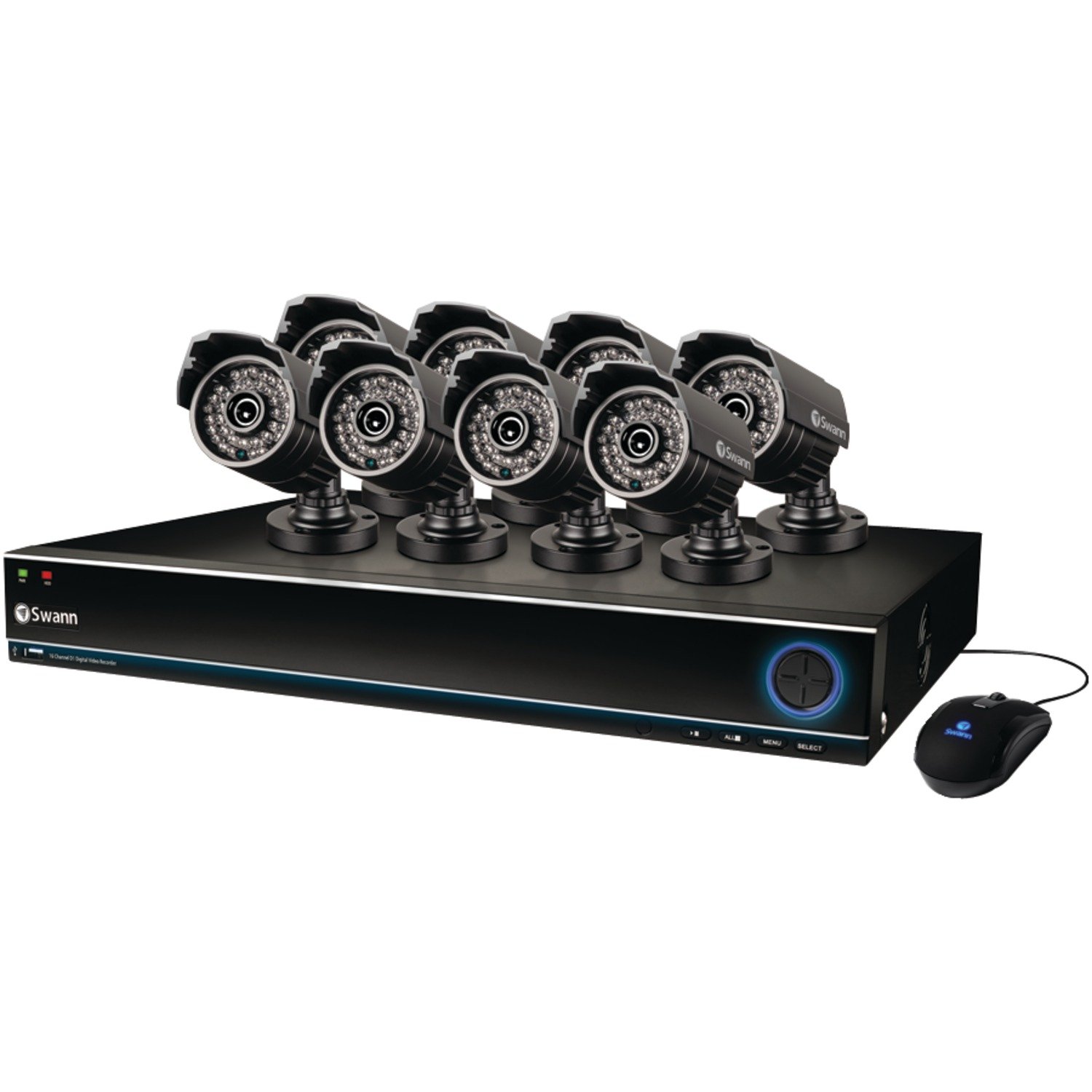
Image: The Swann SWDVK-163208S-US security system, showing the DVR unit and several cameras. The DVR features a blue-lit front panel with control buttons and status indicators.
- Güc göstəricisi: Illuminates when the DVR is powered on.
- HDD Göstərici: Sərt disk aktiv olduqda yanıb-sönür.
- Şəbəkə Göstərici: Şəbəkə bağlantısını göstərir.
- USB Port: For connecting a USB mouse or for data backup.
- Nəzarət Düymələri: Navigate menus and control playback.
4.2 DVR Rear Panel
The rear panel contains all the necessary ports for connecting cameras, monitors, and network cables.
- Video Girişi (BNC): 16 ports for connecting security cameras.
- Video Output (HDMI/VGA): For connecting a monitor or TV.
- Audio Giriş/Çıxış (RCA): For connecting microphones and speakers (if supported).
- Ethernet Portu (RJ45): Şəbəkə bağlantısı üçün.
- USB Portları: Periferik cihazlar üçün əlavə USB portları.
- eSATA Portu: For connecting an external hard drive for expanded storage.
- Güc Girişi: For connecting the DVR power adapter.
4.3 Kamera Xüsusiyyətləri
The included 700TVL cameras offer clear video surveillance with night vision capabilities.
- Qətnamə: 700TVL (Television Lines) for detailed images.
- Gecə Görmə: Infrared LEDs provide visibility up to 82ft (25m) in low light or complete darkness.
- Havaya davamlı: Designed for both indoor and outdoor installation.
- Montaj: Adjustable brackets for flexible positioning.
5. Quraşdırma
5.1 DVR-ın qoşulması
- Daxil olan USB siçanını DVR-dakı USB portlarından birinə qoşun.
- Connect the HDMI cable from the DVR's HDMI output to an HDMI input on your TV or monitor. Alternatively, use a VGA cable for VGA connections.
- Uzaqdan üçün viewing, connect an Ethernet cable from the DVR's Ethernet port to your router or network switch.
5.2 Kameraların birləşdirilməsi
- Mount each camera in your desired location using the provided screws and plugs. Ensure the camera has a clear field of view and is protected from direct impact.
- Connect one end of the BNC cable to the camera's video output.
- Connect the other end of the BNC cable to a video input port on the DVR (e.g., Video In 1, Video In 2, etc.).
- Connect the camera's power input to the power splitter cable, then connect the power adapter to the splitter and a power outlet.
5.3 Yandırılır
- Connect the DVR power adapter to the DVR's power input and then to a power outlet.
- The DVR will power on automatically. The power indicator light on the front panel will illuminate.
- Wait for the system to boot up. The Swann logo will appear on your connected monitor, followed by the live view göstərin.
5.4 İlkin Konfiqurasiya
Upon first boot-up, the DVR will guide you through an initial setup wizard.
- Dil seçimi: İstədiyiniz dili seçin.
- Tarix və Saat: Set the correct date, time, and time zone. This is crucial for accurate recording timestamps.
- Şəbəkə Parametrləri: Configure network settings (DHCP is usually sufficient for automatic setup).
- Parol Quraşdırma: Create a strong password for the administrator account to secure your system.
- Sərt Disk Format: The system may prompt to format the hard drive. Confirm to proceed.
6. Sistemin işlədilməsi
6.1 Canlı View
İlkin quraşdırmadan sonra DVR canlı görüntünü göstərəcək view bütün bağlı kameralardan. Siz tək kamera arasında keçid edə bilərsiniz view, multi-camera grids (e.g., 4-channel, 8-channel, 16-channel), and sequence modes using the on-screen menu or front panel controls.
6.2 Qeyd Rejimləri
The DVR supports various recording modes:
- Davamlı qeyd: Ən köhnə yeməyin üzərinə yazaraq 24/7 qeydlər aparırtage. sərt disk dolu olduqda.
- Hərəkət Algılama Qeydləri: Yalnız kamerada hərəkət aşkar edildikdə qeyd edir view. This conserves hard drive space. Sensitivity and detection areas can be configured for each camera.
- Planlaşdırılmış Qeyd: Günün və ya həftənin müəyyən vaxtlarında qeydlər.
- Əllə qeyd: Start and stop recording manually from the DVR interface.
Access recording settings via the DVR's main menu: Menu > Record > Record Schedule.
6.3 Oynatma
Parçaladıview foo qeyd etditage:
- Canlıdan view, right-click with the mouse to open the main menu.
- seçin Oynatma.
- Choose the desired date and camera channel(s).
- Use the timeline to navigate through recorded events. Different colors on the timeline indicate different recording types (e.g., continuous, motion).
- Yenidən oxutma üçün oxutma düymələrindən (oxutma, fasilə, irəli, geri çəkmə) istifadə edinview footage.
6.4 Yedəkləmə
You can back up important video footage to a USB flash drive or external hard drive.
- Insert a USB storage device into a USB port on the DVR.
- gedin Menu > Backup.
- Select the camera channel, date, and time range for the footage you wish to back up.
- Choose the backup device and file format (e.g., AVI).
- klikləyin Başlayın to begin the backup process.
6.5 Uzaqdan Viewing (SwannLink & SwannView)
The SwannLink and SwannView applications allow you to view your cameras remotely from a smartphone or tablet.
- Ensure your DVR is connected to the internet via the Ethernet port.
- Download the SwannView cihazınızın tətbiq mağazasından tətbiq.
- Open the app and follow the on-screen instructions to add your DVR. This typically involves scanning a QR code displayed on the DVR's monitor (Menu > Network > SwannLink) və ya cihaz ID-sini əl ilə daxil etmək.
- Enter the DVR's username and password when prompted.
- İndi edək view canlı footage and access playback remotely.
7. Baxım
7.1 Sərt diskin idarə edilməsi
The 1TB hard drive will automatically overwrite the oldest footage when full. To ensure optimal performance, it is recommended to periodically check the hard drive status via Menu > HDD > Disk Manage. You can also connect an external hard drive to the eSATA port for additional storage capacity.
7.2 Cleaning Cameras
Kamera linzalarını vaxtaşırı yumşaq, damp örtüyü gizlədə biləcək toz, kir və ya su ləkələrini təmizləmək üçün parça view. Do not use harsh chemicals or abrasive materials.
7.3 Mikroproqram yeniləmələri
Swann may release firmware updates to improve system performance or add new features. Check the Swann support website for the latest firmware for your model. Follow the instructions provided with the firmware update carefully to avoid damaging the DVR.
8. Giderme
| Problem | Mümkün Səbəb | Həll |
|---|---|---|
| Monitorda şəkil yoxdur | Boşalan video kabeli, monitorda səhv giriş seçilib, DVR işə salınmayıb. | Check HDMI/VGA cable connections. Ensure monitor is on correct input. Verify DVR power. |
| Kamera şəkli yoxdur | Loose BNC cable, camera power issue, faulty camera. | Check BNC and power connections for the specific camera. Test camera with a known working cable/power supply. |
| DVR qeyd etmir | Recording schedule not set, hard drive full or faulty, motion detection not configured. | Check recording schedule. Verify hard drive status. Ensure motion detection is enabled and configured correctly. |
| bilməz view uzaqdan | No network connection, incorrect network settings, app configuration error. | Verify DVR has internet access. Check network settings (DHCP). Reconfigure the DVR in the SwannView proqram. |
| Purple image on camera | IR filter stuck, camera malfunction. | Power cycle the camera. If the issue persists, the camera may be faulty and require replacement. |
9. Spesifikasiyalar
- Model nömrəsi: SWDVK-163208S-US
- Video Girişi: 16 Kanal BNC
- Video Çıxışı: HDMI, VGA
- Ekran Çözünürlüğü: Up to 1080p (HDMI)
- Qeyd Qərarı: 960H (960x576/960x480)
- Sərt Disk: 1TB SATA HDD (expandable via eSATA)
- Sıxılma formatı: H.264
- Şəbəkə interfeysi: RJ45 Ethernet portu
- USB interfeysi: 3 x USB 2.0 portu
- Kamera Çözünürlüğü: 700TVL
- Camera Night Vision: 82 fut (25 m) qədər
- Camera Weatherproof Rating: IP66 (xarici istifadə üçün)
- Dimensions (DVR): 22.5 x 15.3 x 8.1 düym (təxminən)
- Weight (DVR): 14 funt (təxminən)
- Güc mənbəyi: DC 12V
10. Zəmanət Məlumatı
Swann products are covered by a limited warranty. The specific terms and duration of your warranty may vary by region and product. Please refer to the warranty card included with your product or visit the official Swann webƏtraflı zəmanət məlumatı və qeydiyyat prosedurları üçün sayta daxil olun. Zəmanət iddiaları üçün alış sənədinizi saxlayın.
11. Dəstək
For technical assistance, product support, or to download the latest software and manuals, please visit the official Swann support website. You can typically find FAQs, troubleshooting guides, and contact information for customer service there. Have your product model number (SWDVK-163208S-US) ready when contacting support.
Swann Dəstəyi Websayt: https://www.swann.com/us/support


