1. Giriş
The Intel NUC DE3815TYKHE is a compact, fanless mini PC designed for various applications, including thin clients, digital signage, and embedded solutions. This kit provides a flexible platform with support for a 2.5-inch storage drive, offering a customizable computing experience in a small form factor.
2. Paketin məzmunu
Bütün əşyaların paketinizdə olduğunu yoxlayın:
- Intel NUC DE3815TYKHE Unit
- AC Güc Adapteri
- VESA Mounting Bracket (with screws)
- Tez Başlanğıc Bələdçisi (əgər daxil edilirsə)
3. Fiziki bitdiview
3.1 Ön Panel
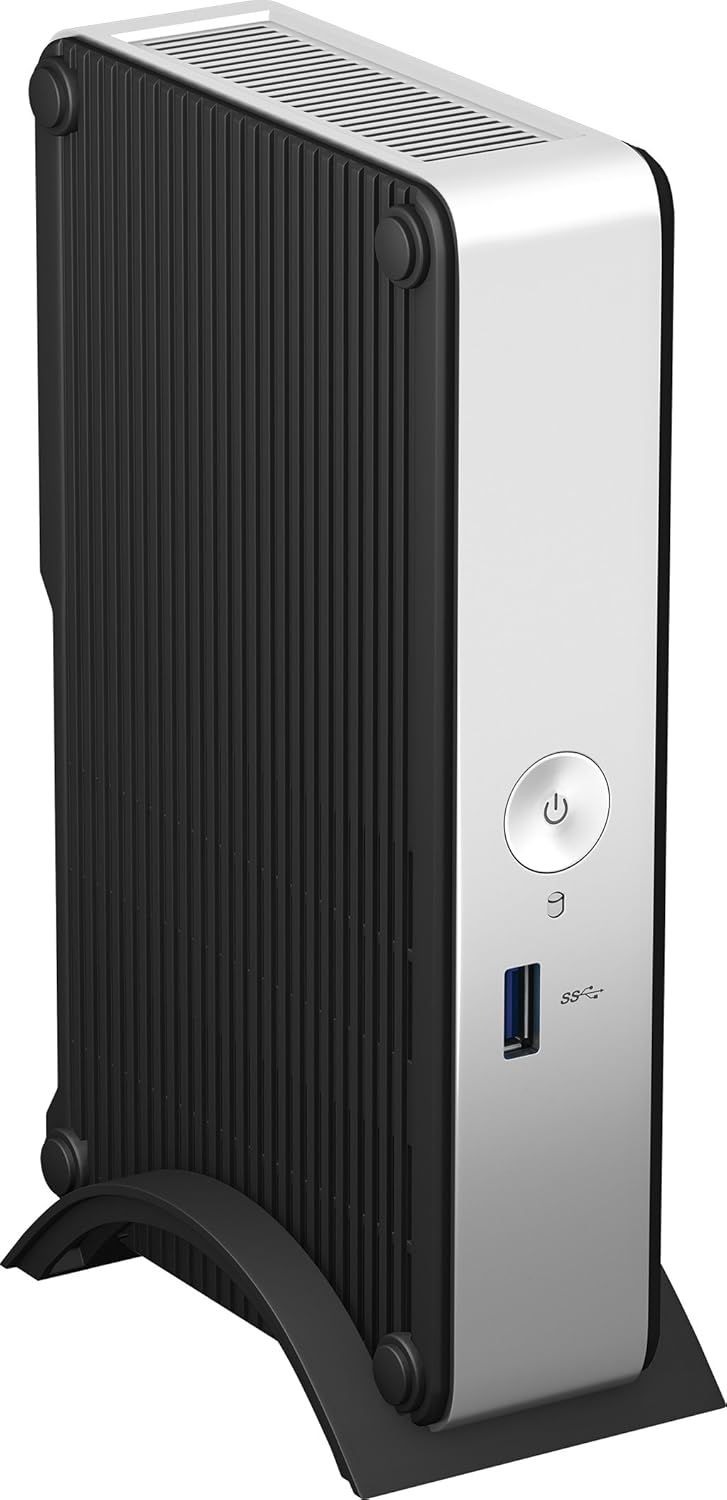
The front panel provides essential connectivity and controls.

Şəkil 1: Ön view of the Intel NUC DE3815TYKHE. This image displays the compact, fanless design of the unit, highlighting the power button and a single blue USB 3.0 port on the front for easy access.
- Güc düyməsi: Cihazı yandırmaq və ya söndürmək üçün istifadə olunur.
- USB 3.0 portu: Yüksək sürətli USB cihazlarını birləşdirmək üçün.
3.2 Arxa Panel
The rear panel houses various ports for display, network, and peripherals.

Şəkil 2: Arxa view of the Intel NUC DE3815TYKHE. This image details the available rear ports, including VGA, HDMI, two USB ports, an Ethernet port, and a headphone/microphone jack, along with the power input.
- VGA Port: Köhnə monitorlara və ya proyektorlara qoşulmaq üçün.
- HDMI portu: For connecting to modern displays with audio support.
- USB 2.0 Portları (x2): Standart USB cihazlarını birləşdirmək üçün.
- Ethernet Portu (RJ-45): Simli şəbəkə bağlantısı üçün.
- Qulaqlıq/Mikrofon yuvası: Audio giriş və çıxış üçün.
- DC Güc Girişi: AC güc adapterini qoşmaq üçün.
3.3 Daxili komponentlər
Accessing the internal components is necessary for memory and storage installation.
Şəkil 3: Intel NUC DE3815TYKHE unit displayed alongside its internal motherboard. This view illustrates the compact size of the main unit and the layout of the internal components, including the processor, memory slot, and connectors for storage.
- DDR3L SODIMM Slot: For installing system memory.
- 2.5-inch Drive Bay: For installing a SATA HDD or SSD.
- Simsiz Antenlər: Built-in for wireless connectivity.
- eMMC Storage: 4GB embedded storage for operating system or data.
4. Quraşdırma
Follow these steps to prepare your Intel NUC for operation.
4.1 Yaddaşın (RAM) quraşdırılması
- Unscrew and remove the bottom cover of the NUC unit.
- Locate the DDR3L SODIMM slot on the motherboard.
- Align the notch on the SODIMM module with the notch in the slot.
- Insert the module at a 45-degree angle and press down until the retaining clips snap into place.
4.2 Installing a 2.5-inch Storage Drive
- With the bottom cover removed, locate the 2.5-inch drive bay.
- Connect the SATA data and power cables from the NUC to your 2.5-inch HDD or SSD.
- Secure the drive within the bay using the provided screws (if applicable).
- Replace the bottom cover and secure it with screws.
4.3 Periferik qurğuların birləşdirilməsi
- Ekran: Connect your monitor to the HDMI or VGA port.
- Klaviatura və Siçan: Connect USB keyboard and mouse to any available USB ports.
- Şəbəkə: For wired internet, connect an Ethernet cable to the RJ-45 port. For wireless, ensure antennas are clear.
- Audio: Connect headphones or speakers to the audio jack if needed.
4.4 Yandırılır
- Connect the AC power adapter to the DC power input on the rear panel.
- Elektrik adapterini rozetkaya qoşun.
- Press the power button on the front panel to turn on the NUC.
5. Əməliyyat sisteminin quraşdırılması
The Intel NUC DE3815TYKHE supports multiple operating systems. You will need to install your preferred OS onto the internal eMMC storage or the 2.5-inch drive you installed.
- Prepare a bootable USB drive with your chosen operating system (e.g., Windows, Linux).
- Connect the USB drive to a USB port on the NUC.
- Power on the NUC and enter the BIOS/UEFI setup (usually by pressing F2 during boot) to configure the boot order.
- Əməliyyat sistemini qurmaq üçün ekrandakı təlimatları izləyin.
6. Baxım
The fanless design of the Intel NUC DE3815TYKHE minimizes maintenance requirements.
- Təmizləmə: Periodically wipe the exterior with a soft, dry cloth. Avoid using liquid cleaners directly on the unit.
- Havalandırma: Ensure the ventilation slots are not obstructed to allow for proper passive cooling.
- Proqram təminatı yeniləmələri: Optimal performans və təhlükəsizlik üçün əməliyyat sisteminizi və drayverlərinizi yeniləyin.
7. Giderme
Problemlərlə qarşılaşsanız, aşağıdakı ümumi problemlərin aradan qaldırılması addımlarına baxın.
- Güc yoxdur: Ensure the power adapter is securely connected to both the NUC and a working power outlet. Test the outlet with another device.
- Ekran yoxdur: Verify that the monitor is powered on and correctly connected to the NUC's HDMI or VGA port. Try a different cable or monitor if possible.
- Əməliyyat Sistemi Başlamır: Check the boot order in the BIOS/UEFI settings. Ensure the installed storage drive is detected and contains a valid operating system.
- Periferik aşkarlanmadı: Ensure USB devices are properly seated in the ports. Try a different USB port or device.
- Şəbəkə bağlantısı yoxdur: For wired connections, check the Ethernet cable and router. For wireless, ensure Wi-Fi is enabled in the OS and the NUC is within range of a network.
8. Spesifikasiyalar
| Xüsusiyyət | Detal |
|---|---|
| Model Adı | DE3815TYKHE |
| Prosessor | Intel Atom Processor (e.g., E3815) |
| RAM | 4 GB DDR3L 1333 (SODIMM slot for expansion) |
| Daxili yaddaş | 4GB eMMC (embedded MultiMediaCard) |
| Yaddaş Genişlənməsi | Internal 2.5-inch SATA HDD/SSD bay |
| Qrafika | İnteqrasiya edilmiş Intel Qrafikası |
| Video Çıxışı | HDMI, VGA |
| USB Portları | 1x USB 3.0 (ön), 2x USB 2.0 (arxa) |
| Audio | Qulaqlıq/Mikrofon Combo Jack |
| Şəbəkə | Ethernet (RJ-45), Built-in Wireless Antennas |
| Dizayn | Fansız |
| Əməliyyat sistemi dəstəyi | Multiple OS options (e.g., Windows, Linux) |
| Rəng | Metallic gray plastic ring with black sides |
9. Zəmanət və Dəstək
For warranty information and technical support, please refer to the official Intel websaytına daxil olun və ya alış-veriş nöqtənizlə əlaqə saxlayın. Zəmanət tələbləri üçün alış-veriş sənədinizi saxlayın.
- Onlayn dəstək: ziyarət edin Intel Support for DE3815TYKHE for drivers, downloads, and troubleshooting resources.
- Əlaqə: Refer to the Intel support page for contact options.


