Giriş
The Behringer NEKKST K8 is an ultra-linear 150-Watt reference-class studio monitor designed for accurate sound reproduction. It features an 8-inch woofer and a 1-inch silk dome tweeter, utilizing advanced waveguide technology for optimal acoustic dispersion and a wide 'sweet zone'. This monitor operates in a true bi-amping mode with two separate ampsəsin aydınlığını artırmaq üçün qaldırıcılar.

Şəkil: Ön view of the Behringer NEKKST K8 Studio Monitor, showcasing the 8-inch woofer and 1-inch tweeter.
Əhəmiyyətli Təhlükəsizlik Təlimatları
Please read and follow all safety instructions before operating the Behringer NEKKST K8 studio monitor. Retain these instructions for future reference.
- Elektrik çarpması riski: Do not open the device. Refer all servicing to qualified service personnel.
- Bu cihazı yağışa və ya nəmə məruz qoymayın.
- Bu cihazı suyun yaxınlığında istifadə etməyin.
- Yalnız quru parça ilə təmizləyin.
- Heç bir ventilyasiya açılışını bağlamayın. İstehsalçının göstərişlərinə uyğun olaraq quraşdırın.
- Radiatorlar, istilik registrləri, sobalar və ya digər aparatlar (o cümlədən) kimi istilik mənbələrinin yaxınlığında quraşdırmayın. ampistilik əmələ gətirən qaldırıcılar).
- Elektrik kabelini, xüsusən də tıxaclarda, prizlərdə və onların aparatdan çıxdığı yerdə gəzməkdən və ya sıxılmaqdan qoruyun.
- Yalnız istehsalçı tərəfindən göstərilən qoşmalardan/aksesuarlardan istifadə edin.
- İldırım fırtınası zamanı və ya uzun müddət istifadə edilmədikdə bu cihazı elektrik şəbəkəsindən ayırın.

Image: Safety and regulatory labels found on the Behringer NEKKST K8, indicating electrical warnings and compliance information.
Quraşdırma
Qablaşdırma
Carefully unpack your NEKKST K8 monitor. Inspect the unit for any signs of damage that may have occurred during transit. Retain the original packaging for future transport or storage.
Əlaqələr
The NEKKST K8 offers both balanced XLR and unbalanced RCA input options. Connect your audio source (e.g., audio interface, mixer) to the appropriate input on the rear panel of the monitor.
- XLR Girişi: For balanced audio signals, providing optimal noise rejection.
- RCA Girişi: For unbalanced audio signals, commonly used with consumer audio equipment.
Ensure the monitor is powered off before making any connections.
Placement and Room Compensation
Proper placement of your studio monitors is crucial for accurate sound reproduction. The NEKKST K8 features 'ROOM COMPENSATION' switches on the rear panel to help optimize its performance for your specific acoustic environment.
- Free Field: Use this setting when the monitor is placed away from walls and corners.
- Divar: Select this setting if the monitor is placed close to a wall.
- Künc: Choose this setting if the monitor is placed in a corner, which typically results in increased bass response.
Experiment with these settings to achieve the most balanced sound in your listening space.
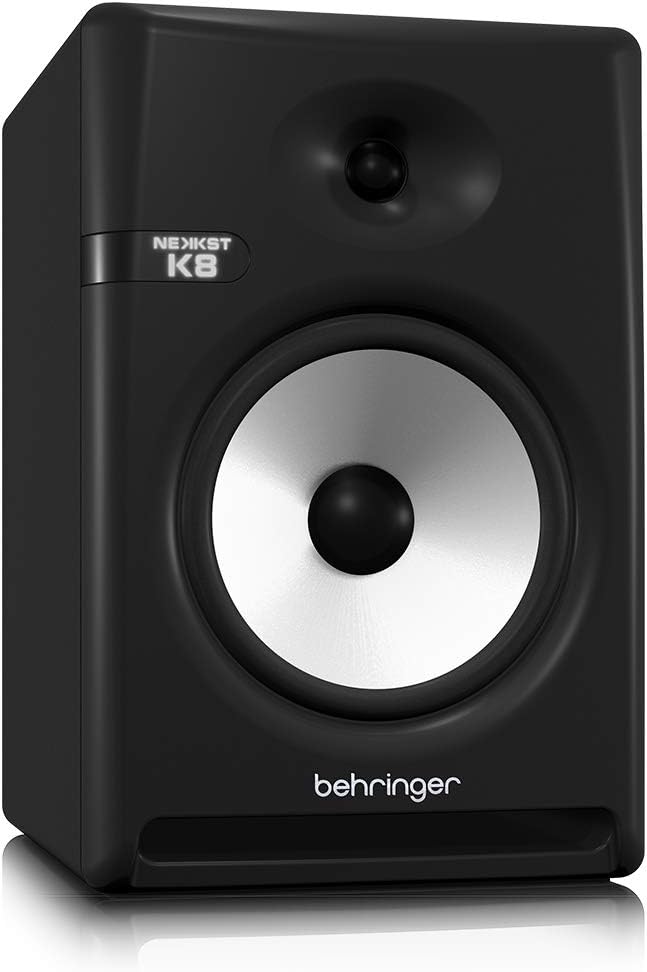
Image: Rear panel of the Behringer NEKKST K8, displaying XLR and RCA inputs, along with various control switches for room compensation and frequency adjustments.

Şəkil: Ətraflı view of the NEKKST K8's rear control panel, highlighting the input trim, frequency adjustments, and room compensation switches.
Güc Bağlantısı
Connect the provided power cord to the AC IN socket on the rear panel and then to a suitable power outlet. Ensure the power switch is in the OFF position before connecting to power.
Əməliyyat
Yandırılır/Söndürülür
After all connections are made, switch the power button on the rear panel to the ON position. It is recommended to power on your monitors last and power them off first to prevent any pops or clicks through your speakers.
Input Trim Adjustment
The 'INPUT TRIM' knob on the rear panel allows you to adjust the input sensitivity of the monitor. Start with the knob at a lower setting and gradually increase it to achieve a comfortable listening level without distortion. This control helps match the output level of your audio source to the monitor's input.
Frequency Adjustments
The NEKKST K8 provides 'HIGH FREQUENCY' and 'LOW FREQUENCY' switches for fine-tuning the monitor's response to your listening environment and personal preference. These switches allow you to cut or boost specific frequency ranges.
- YÜKSƏK TEZLİK: Adjusts the treble response. Options typically include flat, -2 dB, +2 dB.
- LOW FREQUENCY: Adjusts the bass response. Options typically include flat, -2 dB, -4 dB, -6 dB. This can be useful for compensating for room acoustics or when using a subwoofer.
Refer to the markings on the rear panel for specific dB adjustments.
Baxım
Təmizləmə
To clean the exterior of your NEKKST K8 monitor, use a soft, dry cloth. Do not use liquid cleaners, abrasive cleaners, or solvents, as these can damage the finish or internal components. Ensure the monitor is unplugged before cleaning.
Saxlama
If storing the monitor for an extended period, it is recommended to use the original packaging to protect it from dust and physical damage. Store in a cool, dry place away from direct sunlight and extreme temperatures.
Problemlərin aradan qaldırılması
| Problem | Mümkün Səbəb | Həll |
|---|---|---|
| Səs yoxdur |
|
|
| Təhrif edilmiş səs |
|
|
| Vuruş və ya səs-küy |
|
|
Bu həlləri sınadıqdan sonra problem davam edərsə, zəhmət olmasa, Behringer müştəri dəstəyi ilə əlaqə saxlayın.
Spesifikasiyalar
| Model Adı | K8 |
| Dinamik növü | Monitor |
| Vuferin diametri | 8 düym |
| Tweeter diametri | 1 düym |
| Dinamikin Maksimum Çıxış Gücü | 150 Vt |
| Wattage | 150 vatt |
| Tezliyə cavab | 20000 Hz (Upper limit; full range typically wider) |
| Bağlantı texnologiyası | RCA, XLR |
| Səs Çıxış Modu | Stereo |
| Güc mənbəyi | Kabelli Elektrik |
| Məhsul Ölçüləri | 13.4"D x 13.4"W x 18.8"H |
| Maddə Çəkisi | 19.18 funt sterlinq |
| Material | Plastic, Metal, Fabric |
| İstehsalçı | ABŞ Musiqi Qəbiləsi |
| UPC | 748252139344 |
Zəmanət Məlumatı
The Behringer NEKKST K8 Studio Monitor comes with a Limited Warranty. For detailed information regarding warranty terms, conditions, and registration, please refer to the official Behringer websayt və ya məhsulunuza daxil olan zəmanət kartı.
Dəstək
For further assistance, technical support, or to download the latest drivers and software, please visit the official Behringer websaytına daxil olun və ya müştəri xidməti şöbəsi ilə əlaqə saxlayın.
Siz də ziyarət edə bilərsiniz Amazonda Behringer Mağazası məhsul haqqında məlumat və aksesuarlar üçün.


