1. Giriş
This manual provides detailed instructions for the setup, operation, and maintenance of your EMOS E0114 Digital Thermometer and Hygrometer. This device accurately measures indoor temperature and humidity, and also functions as a quartz clock with an alarm, snooze feature, and date display. Please read this manual thoroughly before using the product to ensure correct operation and to prevent damage.
2. Təhlükəsizlik Məlumatı
- Cihazı həddindən artıq temperaturdan, birbaşa günəş işığından və yüksək rütubətdən uzaq saxlayın.
- Cihazı suya və ya digər mayelərə məruz qoymayın.
- Cihazı sökməyə və ya dəyişdirməyə çalışmayın. Bu, zəmanəti ləğv edəcək.
- İstifadə olunmuş batareyaları yerli qaydalara uyğun olaraq tullayın.
- Batareyaları uşaqların əli çatmayan yerdə saxlayın.
3. Paketin məzmunu
Lütfən, qablaşdırmadan çıxararkən paketin məzmununu yoxlayın:
- EMOS E0114 Digital Thermometer and Hygrometer
- İstifadəçi təlimatı
Note: 1 AA Mignon 1.5 V battery is required and not included in the package.

Figure 3.1: EMOS E0114 device in its retail packaging.
4. Məhsul bitdiview
Familiarize yourself with the components of your EMOS E0114 device.
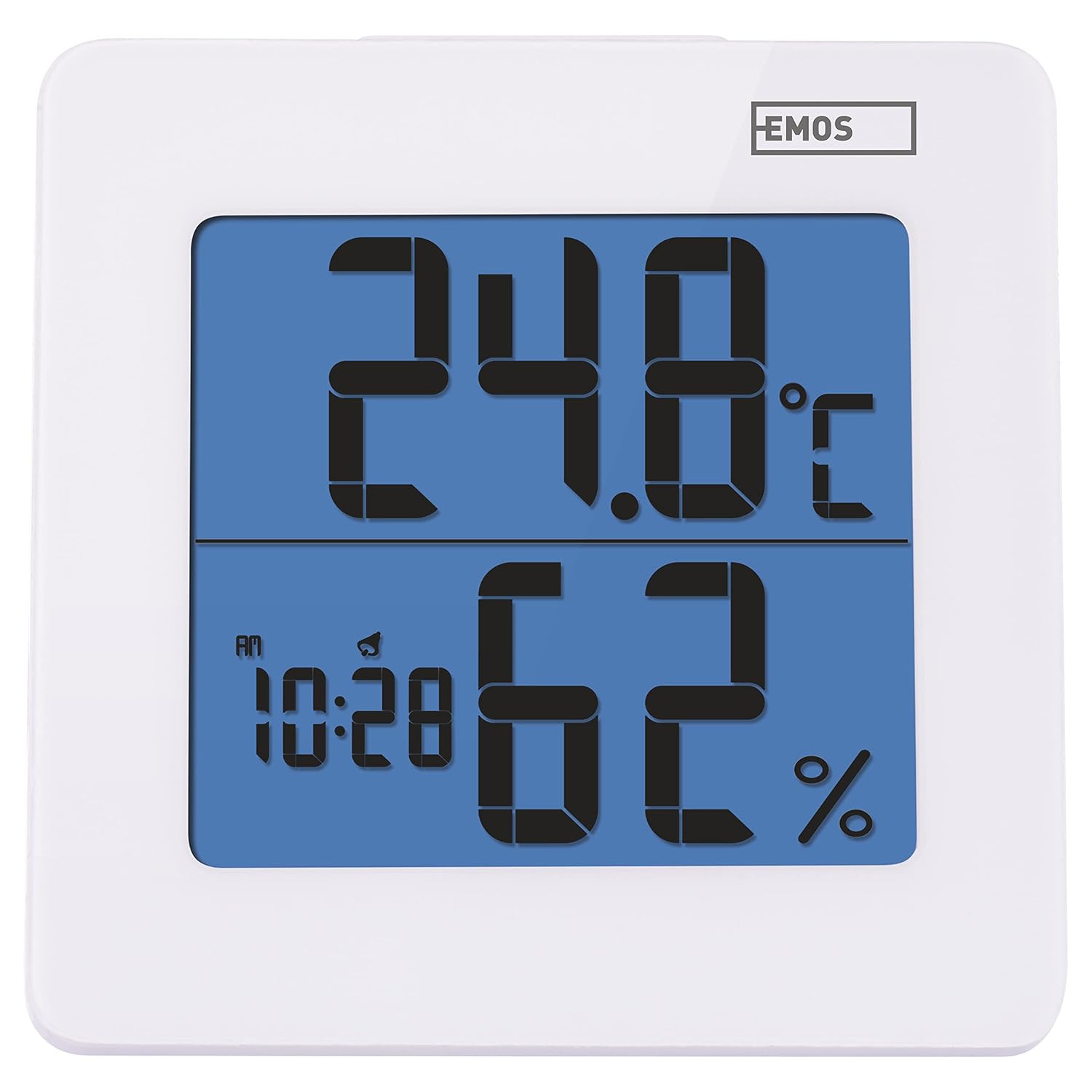
Şəkil 4.1: Ön view of the EMOS E0114 display, showing temperature, humidity, and time.

Şəkil 4.2: Geri view of the EMOS E0114, highlighting the control buttons and battery compartment.
Nəzarət Düymələri:
- Istiqamətləri: Switches between time display, alarm setting, and date setting.
- UP: Increases values during setting, activates/deactivates alarm.
- MEM: Displays maximum and minimum temperature/humidity records.
- C/F: Selsi və Fahrenheit temperatur vahidləri arasında keçid edir.
- YAZIN: Cihazı zavod parametrlərinə sıfırlayır.
- SNOOZE/LIGHT (Top Bar): Activates snooze function during alarm, illuminates the display backlight.
5. Quraşdırma
5.1 Batareyanın quraşdırılması
- Cihazın arxasındakı batareya bölməsini tapın (Şəkil 4.2-ə baxın).
- Batareya bölməsinin qapağını açın.
- Insert one (1) AA Mignon 1.5 V battery, ensuring correct polarity (+/-).
- Batareya bölməsinin qapağını etibarlı şəkildə bağlayın.
5.2 İlkin işə salınma
Upon battery installation, the device will power on automatically and display the current time (default 12:00 AM), temperature, and humidity. The backlight will briefly illuminate.
6. Əməliyyat Təlimatları
6.1 Vaxt və Tarixin qurulması
- Normal vaxt göstərmə rejimində düyməsini basın MODE Vaxt tənzimləmə rejiminə daxil olmaq üçün düyməni bir dəfə basın. Saat rəqəmləri yanıb-sönəcək.
- istifadə edin UP saatı tənzimləmək üçün düymə.
- basın MODE again to set the minutes. The minute digits will flash. Use the UP dəqiqələri tənzimləmək üçün düyməni basın.
- basın MODE again to set the year. The year digits will flash. Use the UP ili tənzimləmək üçün düymə.
- Basmağa davam edin MODE to set the month and then the day, adjusting each with the UP düyməsi.
- Günü təyin etdikdən sonra düyməni basın MODE to exit setting mode and return to normal time display.
6.2 Siqnalın qurulması
- Normal vaxt göstərmə rejimində düyməsini basın MODE button twice to enter alarm setting mode. The alarm time will be displayed, and the hour digits will flash.
- istifadə edin UP Zəngli saatı tənzimləmək üçün düymə.
- basın MODE again to set the alarm minutes. The minute digits will flash. Use the UP siqnal dəqiqələrini tənzimləmək üçün düymə.
- basın MODE siqnalizasiya parametrləri rejimindən çıxmaq üçün.
- Siqnalı aktivləşdirmək və ya söndürmək üçün düyməsini basın UP button once in normal time display mode. An alarm icon will appear on the display when activated.
6.3 Using Snooze and Backlight
- Siqnal səslənəndə, düyməsini basın SNOOZE / LIGHT bar on top of the device to activate the snooze function. The alarm will pause for approximately 5 minutes and then sound again.
- To turn off the alarm completely, press any other button (MODE, UP, MEM, C/F) on the back of the device.
- düyməsini basın SNOOZE / LIGHT bar at any time to briefly illuminate the display backlight for better visibility in low light conditions.
6.4 Temperatur vahidlərinin dəyişdirilməsi (°C/°F)
Normal ekran rejimində düyməsini basın C / F button on the back of the device to toggle between Celsius (°C) and Fahrenheit (°F) temperature readings.
6.5 Viewing Maximum and Minimum Records
The device stores the maximum and minimum temperature and humidity values recorded since the last reset or battery change.
- düyməsini basın MEM Maksimum qeydə alınmış temperatur və rütubəti göstərmək üçün düyməni bir dəfə basın.
- düyməsini basın MEM button again to display the minimum recorded temperature and humidity.
- basın MEM a third time to return to the current temperature and humidity display.
- To clear the maximum/minimum records, press and hold the MEM button for approximately 3 seconds while viewqeydləri daxil etmək.
7. Baxım
7.1 Təmizləmə
- Cihazı yumşaq, quru bir parça ilə silin.
- Do not use abrasive cleaners, solvents, or chemical agents, as these may damage the display or casing.
7.2 Batareyanın dəyişdirilməsi
When the display becomes dim or the device stops functioning, it is time to replace the battery.
- Cihazın arxasındakı batareya bölməsinin qapağını açın.
- Köhnə AA batareyasını çıxarın.
- Insert a new AA Mignon 1.5 V battery, observing correct polarity.
- Batareya bölməsinin qapağını bağlayın.
- You may need to reset the time and date after battery replacement.
8. Giderme
| Problem | Mümkün Səbəb | Həll |
|---|---|---|
| Ekran və ya zəif ekran yoxdur | aşağı və ya bitmiş batareya; batareyanın səhv quraşdırılması. | Replace the battery with a new AA 1.5V battery. Ensure correct polarity. |
| Yanlış vaxt/tarix | Time/date not set correctly after battery installation or reset. | Follow instructions in Section 6.1 to set the time and date. |
| Temperature/humidity readings seem inaccurate | Device placed in an unsuitable location (e.g., near heat source, vent, direct sunlight). | Relocate the device to a stable indoor environment away from direct influences. Allow 30 minutes for readings to stabilize. |
| Siqnal səslənmir | Siqnalizasiya aktivləşdirilməyib. | Ensure the alarm icon is visible on the display (refer to Section 6.2). |
| Cihaz cavab vermir | Müvəqqəti elektron nasazlıq. | düyməsini basın RESET button on the back of the device using a thin object (e.g., paperclip). Note: This will clear all settings. |
9. Spesifikasiyalar
- Model: E0114
- Brend: EMOS
- Temperatur Ölçmə Aralığı: 0 ° C - +50 ° C (32 ° F - 122 ° F)
- Temperatur həlli: 0.1 °C / 0.1 °F
- Rütubət Ölçmə Aralığı: Nisbi Nəmlik 20% -dən 90% -ə qədər
- Rütubətin həlli: 1% RH
- Saat: Quartz with 12/24 hour format
- Siqnal: Yes, with Snooze function
- Ekran: Arxa işıqlı LCD
- Yaddaş funksiyası: Maks/Min temperatur və rütubət
- Enerji təchizatı: 1 x AA Mignon 1.5 V battery (not included)
- Ölçülər (U x G x Y): 3.7 x 9.3 x 9.3 sm (təxminən 1.46 x 3.66 x 3.66 düym)
- Ekran Ölçüləri: 60 x 65 mm (approximately 2.36 x 2.56 inches)
- Çəki: 109 qram (təxminən 3.84 unsiya)
- Montaj növü: Wall mountable (integrated stand)
- Rəng: White (with blue display backlight)

Figure 9.1: Dimensions of the EMOS E0114 device.
10. Zəmanət və Dəstək
EMOS products are designed for reliability and performance. For warranty information or technical support, please refer to the warranty card included with your purchase or visit the official EMOS websayt. Zəmanət iddiaları üçün satınalma sübutunuzu özünüzdə saxlayın.


