1. Giriş
This manual provides essential instructions for the safe and efficient use of your Epson LQ-310 24-Pin Narrow Carriage Impact Printer. Please read this manual thoroughly before operating the printer and keep it for future reference.
The Epson LQ-310 is a compact and reliable dot matrix printer designed for fast and efficient printing of various documents, including multi-part forms, invoices, and reports. It features versatile connectivity options including USB, Serial, and Parallel ports.
2. Təhlükəsizlik Məlumatı
Observe the following safety precautions to ensure safe operation and to prevent damage to the printer or injury to yourself.
- Printeri həmişə sabit, düz bir səthə qoyun.
- Printerdəki ventilyasiya yuvalarını bağlamayın və ya örtməyin.
- Yalnız printerlə birlikdə verilən elektrik kabelindən istifadə edin.
- Do not expose the printer to water, moisture, or excessive heat.
- Təmizləmədən və ya texniki xidmət göstərməzdən əvvəl printeri elektrik rozetkasından ayırın.
- Uşaqların əli çatmayan yerdə saxlayın.
3. Paketin məzmunu
Bütün əşyaların paketdə olduğunu yoxlayın:
- Epson LQ-310 Printer Unit
- Elektrik kabeli
- Şerit Kartric
- İstifadəçi Təlimatı (bu sənəd)
- Driver CD (may vary by region)
4. Quraşdırma
4.1 Qabın açılması və yerləşdirilməsi
- Printeri qablaşdırmadan çıxarın.
- Bütün qoruyucu lentləri və qablaşdırma materiallarını çıxarın.
- Place the printer on a flat, stable surface with adequate ventilation.
4.2 Elektrik kabelinin qoşulması
Elektrik kabelini printerə, sonra isə torpaqlanmış elektrik rozetkasına qoşun.
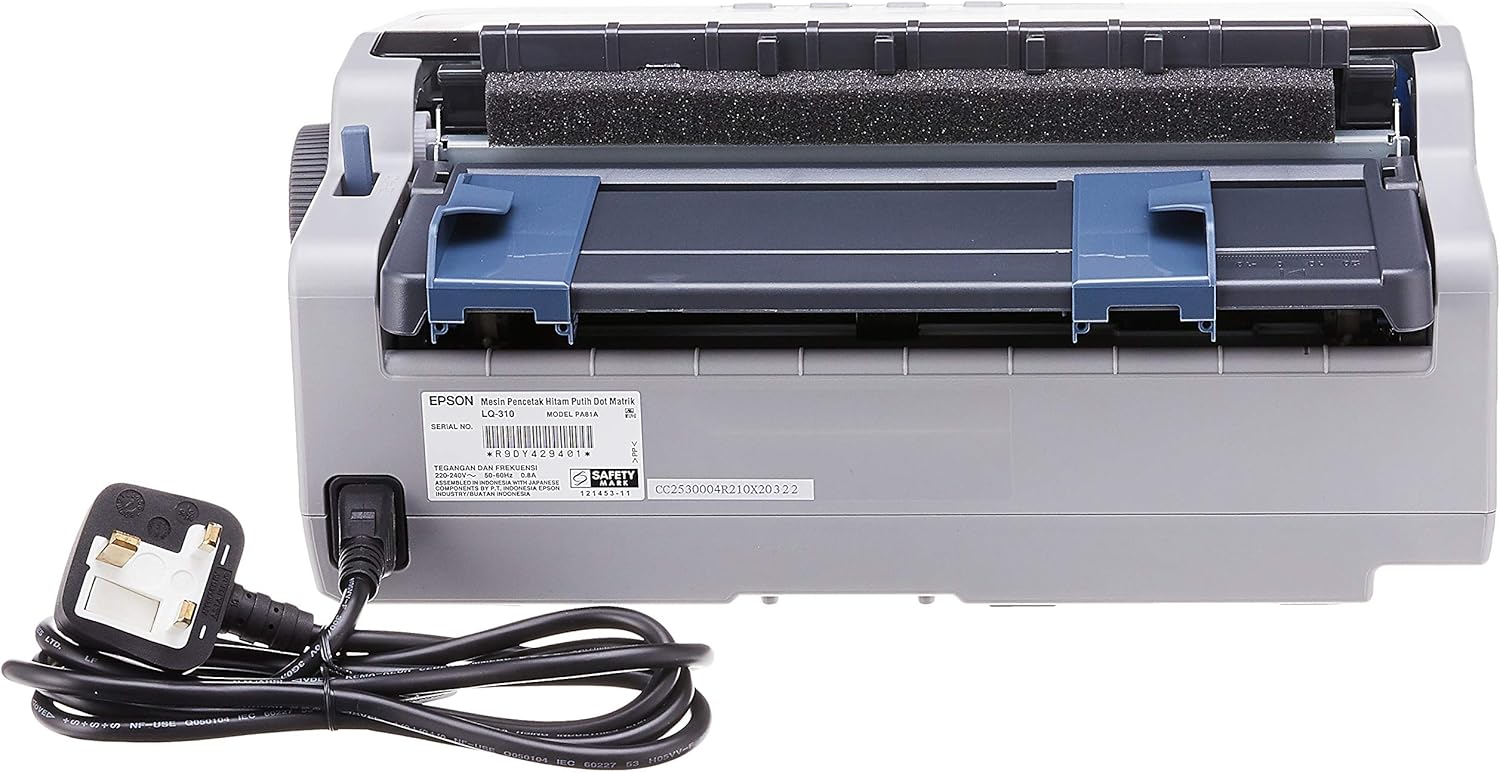
Şəkil 4.2.1: Arxa view of the Epson LQ-310 printer, highlighting the power input and various data ports (USB, Serial, Parallel) for connection to a computer.
4.3 Kompüterə qoşulma
The LQ-310 supports USB, Serial, and Parallel connections. Choose the appropriate cable for your computer and connect it to the corresponding port on the printer.
- USB Bağlantısı: Use a standard USB A-B cable.
- Serial Bağlantı: Use a serial cable (RS-232C).
- Paralel əlaqə: Use a parallel cable (Centronics).
4.4 Installing the Ribbon Cartridge
- Printerin söndürüldüyünə əmin olun.
- Printer qapağını açın.
- Unpack the new ribbon cartridge.
- Align the ribbon cartridge with the guides inside the printer and press down firmly until it clicks into place.
- Turn the ribbon feed knob on the cartridge to ensure the ribbon is taut and not twisted.
- Printer qapağını bağlayın.

Şəkil 4.4.1: The ribbon cartridge for the Epson LQ-310 printer, which needs to be installed correctly for printing.
4.5 Kağız Yükləmə
The LQ-310 can handle various paper types, including continuous forms and single sheets.
- For Continuous Forms: Place the forms on the tractor feed mechanism at the rear of the printer. Adjust the tractor guides to match the paper width and engage the pins.
- For Single Sheets: Insert a single sheet into the front paper slot, ensuring it is straight.
4.6 Sürücünün quraşdırılması
After connecting the printer, install the necessary drivers on your computer. You can typically find these on the included CD or download them from the official Epson support websayt.
5. Əməliyyat Təlimatları
5.1 İdarəetmə Paneli Bitdiview
The control panel on the front of the printer allows you to manage basic functions.

Şəkil 5.1.1: Ön view of the Epson LQ-310 printer, showing the control panel with buttons for Tear Off, LF/FF, Load/Eject, Paper Out, Pause, Lock, Font, Item, Micro Adjust, and Set.
- Güc düyməsi: Printeri yandırır və ya söndürür.
- Kağızın Çıxması Göstəricisi: Lights up when the printer is out of paper.
- Pauza düyməsi: Çapı müvəqqəti olaraq dayandırır. Davam etmək üçün yenidən basın.
- LF/FF (Line Feed/Form Feed) Button: Advances paper by one line or one page.
- Load/Eject Button: Tək bir kağız vərəqini yükləyir və ya cari vərəqi çıxarır.
- Tear Off Button: Davamlı kağızı qoparılan vəziyyətə gətirir.
- Font Button: Selects different fonts.
- Item/Set Buttons: Used for menu navigation and setting options.
5.2 Əsas Çap
- Printerin işə salındığından və kompüterinizə qoşulduğundan əmin olun.
- Load paper according to the instructions in Section 4.5.
- Kompüterinizdə çap etmək istədiyiniz sənədi açın.
- Select the Epson LQ-310 as your printer in the print dialog.
- Çap parametrlərini (məsələn, kağız ölçüsü, çap keyfiyyəti) lazım olduqda tənzimləyin.
- "Çap et" düyməsini basın.
6. Baxım
6.1 Ribbon Cartridge Replacement
Replace the ribbon cartridge when print quality deteriorates or the ribbon is visibly worn.
- Printeri söndürün və elektrik kabelini ayırın.
- Printer qapağını açın.
- Köhnə lent kartuşunu qaldıraraq diqqətlə çıxarın.
- Install a new ribbon cartridge as described in Section 4.4.
- Close the printer cover and reconnect the power.
6.2 Printerin təmizlənməsi
Regular cleaning helps maintain printer performance.
- Printeri söndürün və elektrik kabelini ayırın.
- Printerin xarici hissəsini yumşaq, d ilə silinamp parça. Aşındırıcı təmizləyicilərdən və ya həlledicilərdən istifadə etməyin.
- Gently clean the print head area with a soft, lint-free cloth if necessary, being careful not to touch the pins.
- Remove any paper dust or debris from the paper path.
7. Giderme
This section addresses common issues you might encounter with your LQ-310 printer.
7.1 Printer Does Not Turn On
- Elektrik kabelinin həm printerə, həm də işləyən elektrik rozetkasına etibarlı şəkildə qoşulduğundan əmin olun.
- Elektrik rozetkasının işlək olub-olmadığını başqa bir cihaza qoşaraq yoxlayın.
7.2 "Paper Out" Indicator is On
- Load paper correctly as described in Section 4.5.
- Ensure the paper sensor is not obstructed.
7.3 Çap Çıxışı Yoxdur
- Verify the printer is powered on and connected to the computer.
- Check if the correct printer driver is installed and selected in your application.
- Ensure the ribbon cartridge is installed correctly and has ink.
- Check the printer's status on your computer; clear any pending print jobs.
7.4 Zəif çap keyfiyyəti
- The ribbon cartridge may be old or running out of ink. Replace it if necessary.
- Ensure the paper type is suitable for impact printing.
- Clean the print head area if there is visible debris.
8. Spesifikasiyalar
| Xüsusiyyət | Spesifikasiya |
|---|---|
| Çap texnologiyası | 24-Pinli Dar Araba Zərbəsi Nöqtəli Matris |
| Çap Sürəti | Up to 347 / 416 cps (10 / 12 cpi) |
| Bağlantı | 1 Full-Speed USB 2.0, Serial Port, Parallel Port |
| Printer Çıxışı | Colour (Ink Color: Black) |
| Qətnamə | 240 x 170 dpi (Max Print Resolution Black and White: 240 dpi) |
| Maddə Çəkisi | 4.1 kiloqram |
| Məhsulun Ölçüləri (D x G x Y) | 27.5D x 36.2W x 15.4H santimetr |
| Maksimum Media Ölçüsü | Məktub/A4 |
| Çap mediası | Kağız (düz) |
| Model Adı | LQ 310 |
| Model nömrəsi | LQ-310 |
9. Zəmanət və Dəstək
The Epson LQ-310 printer comes with a limited warranty. For detailed warranty information, please refer to the warranty card included with your product or visit the official Epson websayt.
For technical support, driver downloads, or further assistance, please visit the Epson support website or contact your local Epson customer service center. Have your printer model number (LQ-310) and serial number ready when contacting support.


