1. Giriş
Aldığınız üçün təşəkkür edirikasing the ELECOM M-XGM10DBBK Wireless 5-Button BlueLED Mouse. This mouse is designed for comfort and precision, featuring an ergonomic shape that fits naturally in your hand and BlueLED technology for reliable tracking on various surfaces. This manual provides essential information for proper setup, operation, and maintenance of your device.
2. Məhsul bitdiview
The M-XGM10DBBK mouse is part of the "EX-G" series, known for its ergonomic design and comfortable grip. It features five buttons, including dedicated back and forward buttons, to enhance productivity.
Əsas Xüsusiyyətlər:
- Erqonomik Dizayn: Shaped to fit the hand for ultimate grip comfort.
- BlueLED Sensor: Provides precise tracking on a wide range of surfaces, including glass and fabric.
- 5-Button Functionality: Includes left, right, scroll wheel, and dedicated back/forward buttons.
- 2.4GHz Simsiz Bağlantı: Offers a stable connection with a range of approximately 10 meters (3 meters on steel desks).
- Fərdiləşdirilə bilən düymələr: Button functions can be re-assigned using the free "ELECOM Mouse Assistant" software (Windows/Mac only).
- Batareya göstəricisi: A lamp indicates remaining battery life.
Komponentlər:
Familiarize yourself with the mouse components:

Şəkil 2.1: Üst view of the mouse, highlighting the main buttons.
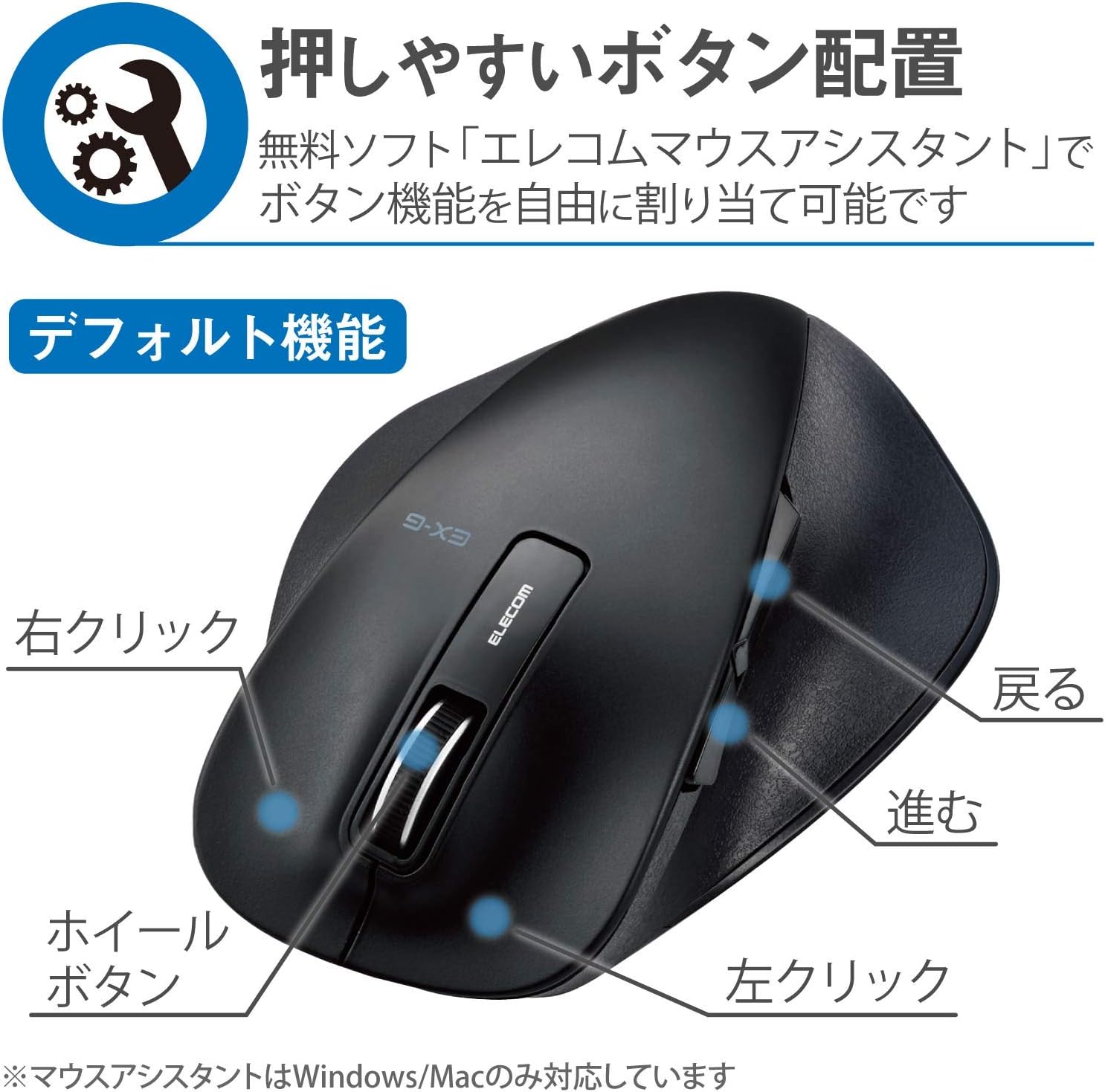
Şəkil 2.2: Yan view of the mouse, showing the back and forward buttons.
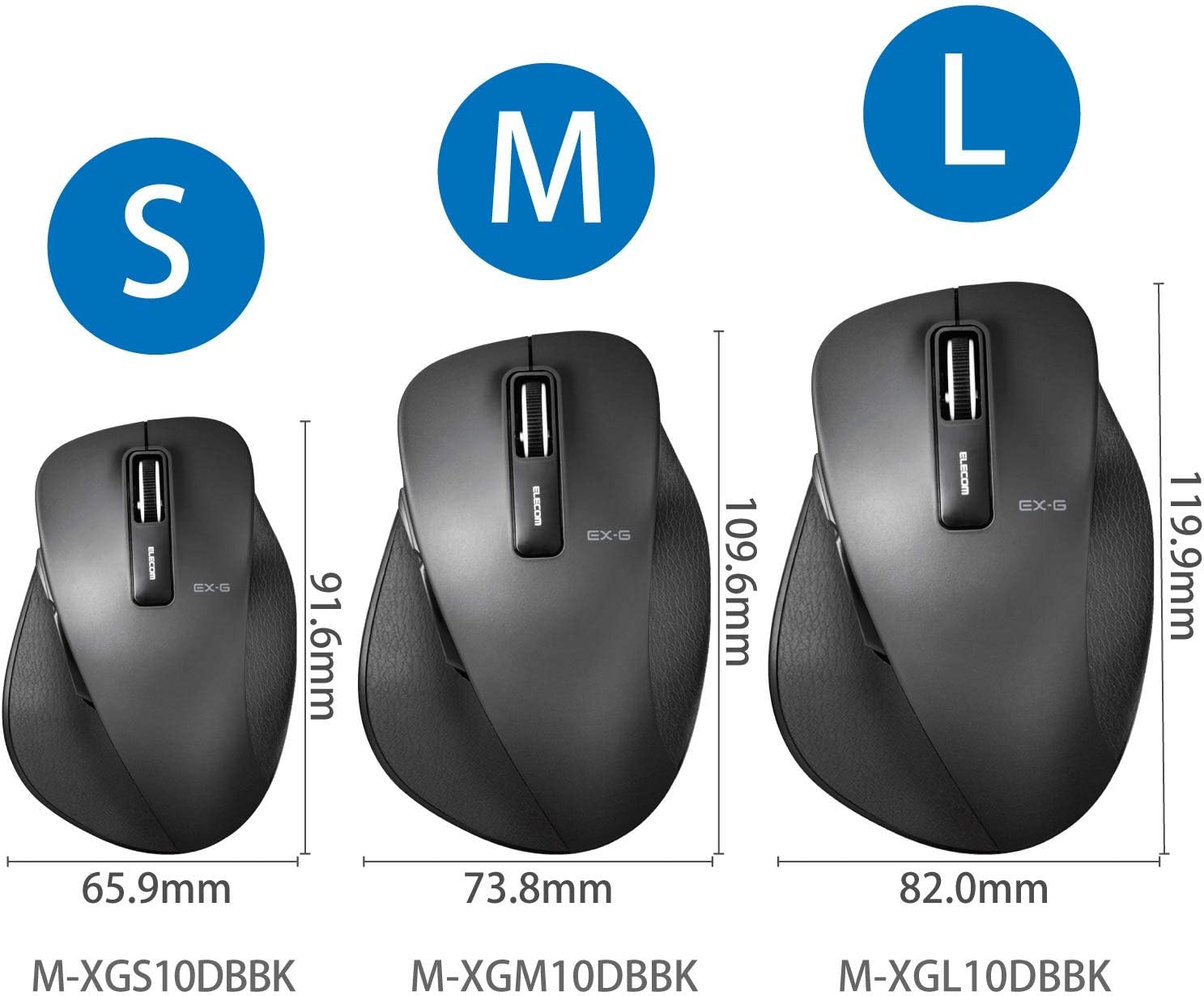
Figure 2.3: Size comparison of EX-G mice (S, M, L). The M-XGM10DBBK is the M size.

Şəkil 2.4: Aşağı view of the mouse, indicating the optical sensor, power switch, and receiver storage compartment.

Figure 2.5: Illustration of the durable Omron switches used for the left and right click buttons.
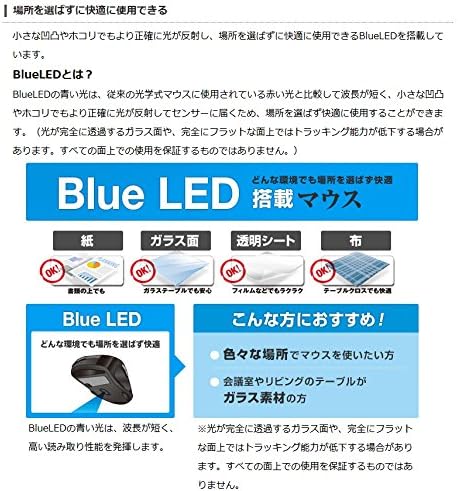
Figure 2.6: Explanation of BlueLED technology, demonstrating its versatility on different surfaces. Note: Tracking performance may decrease on completely transparent or perfectly flat surfaces.

Figure 2.7: Details on 2.4GHz wireless, battery indicator, and 2000 DPI resolution for smooth operation.

Figure 2.8: The ELECOM M-XGM10DBBK mouse is certified to work with Chromebooks.
3. Quraşdırma
3.1 Batareyanın quraşdırılması
- Locate the battery cover on the bottom of the mouse.
- Qapağı sürüşdürərək açın.
- Insert one AA alkaline, manganese, or nickel-metal hydride battery, ensuring correct polarity (+/-).
- Batareyanın qapağını etibarlı şəkildə bağlayın.
3.2 Qəbuledicinin qoşulması
- USB qəbuledicisini siçanın altındakı saxlama bölməsindən çıxarın.
- USB qəbuledicisini kompüterinizdəki mövcud USB-A portuna qoşun.
- Kompüteriniz lazımi sürücüləri avtomatik olaraq aşkar edib quraşdırmalıdır. Bu bir neçə dəqiqə çəkə bilər.
3.3 Yandırılır
- Slide the power switch on the bottom of the mouse to the "ON" position.
- Siçan artıq istifadəyə hazırdır.
4. Əməliyyat Təlimatları
4.1 Əsas funksiyalar
- Sol Klik: İlkin seçim və aktivləşdirmə.
- Sağ klikləyin: Kontekst menyularını açır.
- Sürüşmə çarxı: Scrolls documents and web pages vertically. Can also be clicked for middle-click functionality.
4.2 Back/Forward Buttons
The dedicated back and forward buttons located on the side of the mouse allow for quick navigation in web brauzerlər və file kəşfiyyatçılar.
- düyməsini basın Geri button to go to the previous page or folder.
- düyməsini basın İrəli button to go to the next page or folder.
4.3 Customizing Buttons (ELECOM Mouse Assistant)
For advanced customization, download the free "ELECOM Mouse Assistant" software from the official ELECOM website. This software allows you to re-assign functions to the mouse buttons according to your preferences. Please note that this software is compatible with Windows and macOS only.
5. Baxım
5.1 Təmizləmə
Optimal performansı və gigiyenanı qorumaq üçün siçanınızı mütəmadi olaraq təmizləyin:
- Güc düyməsindən istifadə edərək siçanı söndürün.
- Siçanın səthini silmək üçün yumşaq, quru bir parça istifadə edin.
- İnadkar kirlər üçün bir az dampparçanı su və ya yumşaq təmizləyici məhlul ilə yuyun, sonra dərhal qurulayın.
- Sərt kimyəvi maddələrdən, aşındırıcılardan və ya həlledicilərdən istifadə etməkdən çəkinin.
- Gently clean the optical sensor area on the bottom of the mouse with a cotton swab if tracking issues occur.
5.2 Batareyanın dəyişdirilməsi
When the battery indicator lamp flashes or the mouse performance degrades, replace the battery:
- Siçanı söndürün.
- Batareyanın qapağını açın.
- Köhnə batareyanı çıxarın və yerli qaydalara uyğun olaraq atın.
- Insert a new AA battery, ensuring correct polarity.
- Close the battery cover and turn the mouse back on.
6. Giderme
Siçanınızla bağlı problemlərlə qarşılaşsanız, aşağıdakı ümumi problemlərə və həllərə baxın:
| Problem | Mümkün Səbəb | Həll |
|---|---|---|
| Siçan cavab vermir | Low battery; Power switch off; Receiver not connected; Receiver interference. | Replace battery; Turn power switch ON; Ensure receiver is firmly plugged in; Try a different USB port; Move closer to the receiver. |
| Kursorun nizamsız hərəkəti | Çirkli optik sensor; Uyğun olmayan səth; Müdaxilə. | Clean optical sensor; Use on a suitable mouse pad or surface; Reduce interference from other wireless devices. |
| Düymələr işləmir | Software conflict; Driver issue. | Restart computer; Reinstall mouse drivers; Check for conflicting software. |
| Simsiz əlaqə problemləri | Distance too far; Obstructions; Interference. | Ensure mouse is within range (10m); Remove obstructions between mouse and receiver; Avoid using near other 2.4GHz devices. |
7. Spesifikasiyalar
| Xüsusiyyət | Detal |
|---|---|
| Model nömrəsi | M-XGM10DBBK |
| Qoşulma üsulu | 2.4GHz Wireless (USB-A Receiver) |
| Sensor növü | BlueLED Optical |
| Düymələr | 5 buttons (Left, Right, Scroll Wheel, Back, Forward) |
| Qətnamə | 2000 DPI |
| Ölçülər (G x D x Y) | 73.8 x 109.6 x 40.8 mm (M Size) |
| Çəki | təqribən. 151.95 q (batareya daxil) |
| Güc mənbəyi | 1 x AA battery (Alkaline, Manganese, or Ni-MH) |
| Təxmini Batareya Ömrü | Approx. 722 days (based on typical usage) |
| Uyğun OS | Windows 11, 10, RT8.1, 8.1, 7, Vista; macOS High Sierra 10.13, OS X 10.10; Chrome OS |
| Rəng | Qara |
8. Zəmanət və Dəstək
8.1 Zəmanət Məlumatı
Bu məhsul a ilə gəlir 6 ay zəmanət satın alındığı tarixdən etibarən. Zəmanət tələbləri üçün satın alma sənədinizi saxlayın. Zəmanət normal istifadə zamanı istehsal qüsurlarını əhatə edir. Sui-istifadə, qəzalar, icazəsiz modifikasiyalar və ya normal aşınma və yırtılma nəticəsində yaranan zərərləri əhatə etmir.
8.2 Müştəri dəstəyi
For technical assistance, troubleshooting, or warranty inquiries, please visit the official ELECOM website or contact ELECOM customer support. Contact details can typically be found on the ELECOM website under the 'Support' or 'Contact Us' section.