1. Əhəmiyyətli Təhlükəsizlik Məlumatı
Please read all instructions carefully before using the STIM-PRO Comfort TENS Unit. Failure to follow these instructions could result in injury or device malfunction.
- Do not use if you have a pacemaker, implanted defibrillator, or other implanted metallic or electronic device.
- Do not use on open wounds, rashes, swollen, red, infected, or inflamed skin areas.
- Consult your physician before use if you have epilepsy, heart disease, or are pregnant.
- Uşaqların əli çatmayan yerdə saxlayın.
- Pəhriz əlavələri ilə bağlı bəyanatlar FDA tərəfindən qiymətləndirilməyib və hər hansı bir xəstəlik və ya sağlamlıq vəziyyətinin diaqnozu, müalicəsi, müalicəsi və ya qarşısının alınması üçün nəzərdə tutulmayıb.
2. Məhsul bitdiview
The axion STIM-PRO Comfort is a 2-channel Transcutaneous Electrical Nerve Stimulation (TENS) device designed for drug-free pain relief. It features 8 pre-installed programs and adjustable intensity for personalized treatment.


Əsas Xüsusiyyətlər:
- 2-Channel Device: Allows for the use of up to 4 electrodes simultaneously.
- 8 Pre-installed Programs: Designed for various pain types, offering simple and intuitive operation.
- Tənzimlənən intensivlik: Continuous intensity adjustment up to 80mA for comfortable and effective treatment.
- Taymer funksiyası: Selectable treatment durations of 15, 30, 60 minutes, or continuous operation.
- Portativ dizayn: Compact and lightweight with a belt clip for use at home, work, or on the go.
3. Quraşdırma
Paketin tərkibi:
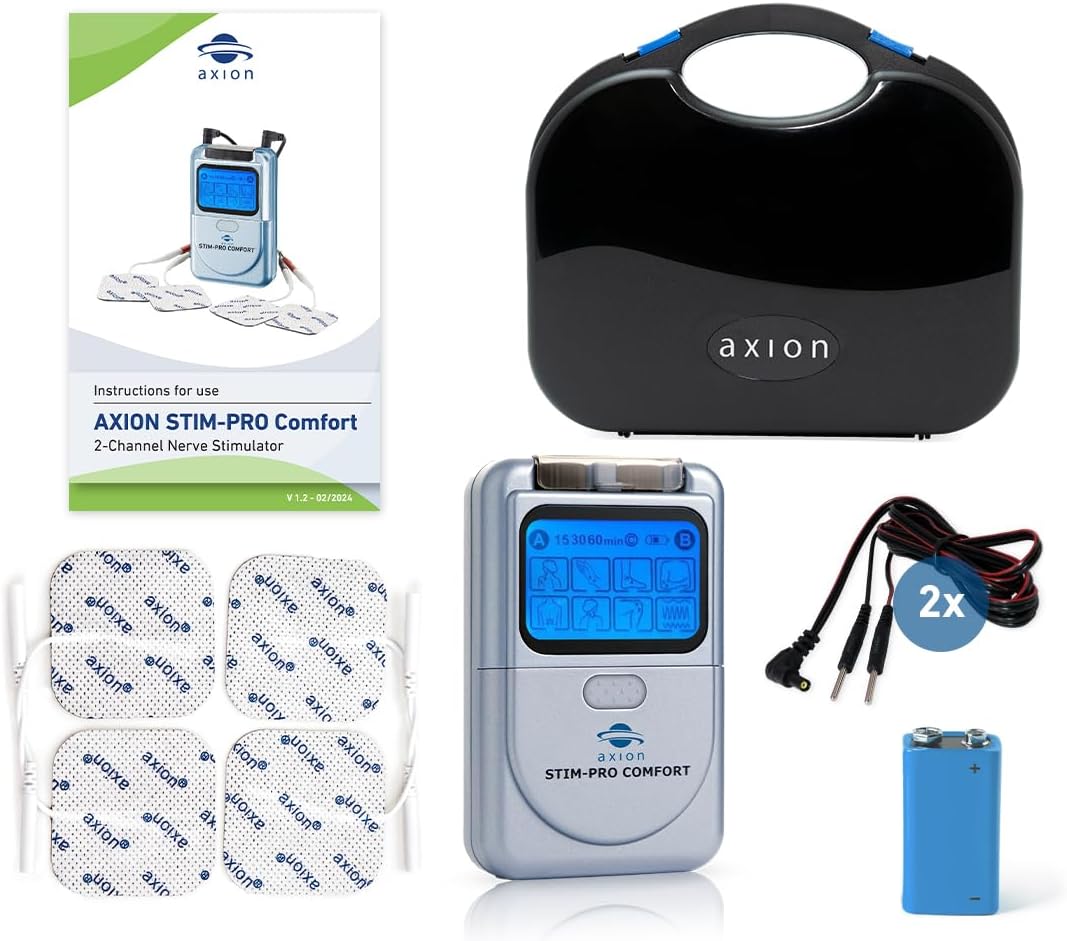
- Batareyanı quraşdırın: Open the battery compartment on the back of the device. Insert the included 9V battery, ensuring correct polarity. Close the compartment securely.
- Kabelləri birləşdirin: Plug the connection cables into the output jacks (A and B) on the top of the TENS unit.
- Elektrodları birləşdirin: Connect the electrode pads to the pin connectors on the end of the cables. Ensure a secure connection.
4. Əməliyyat Təlimatları
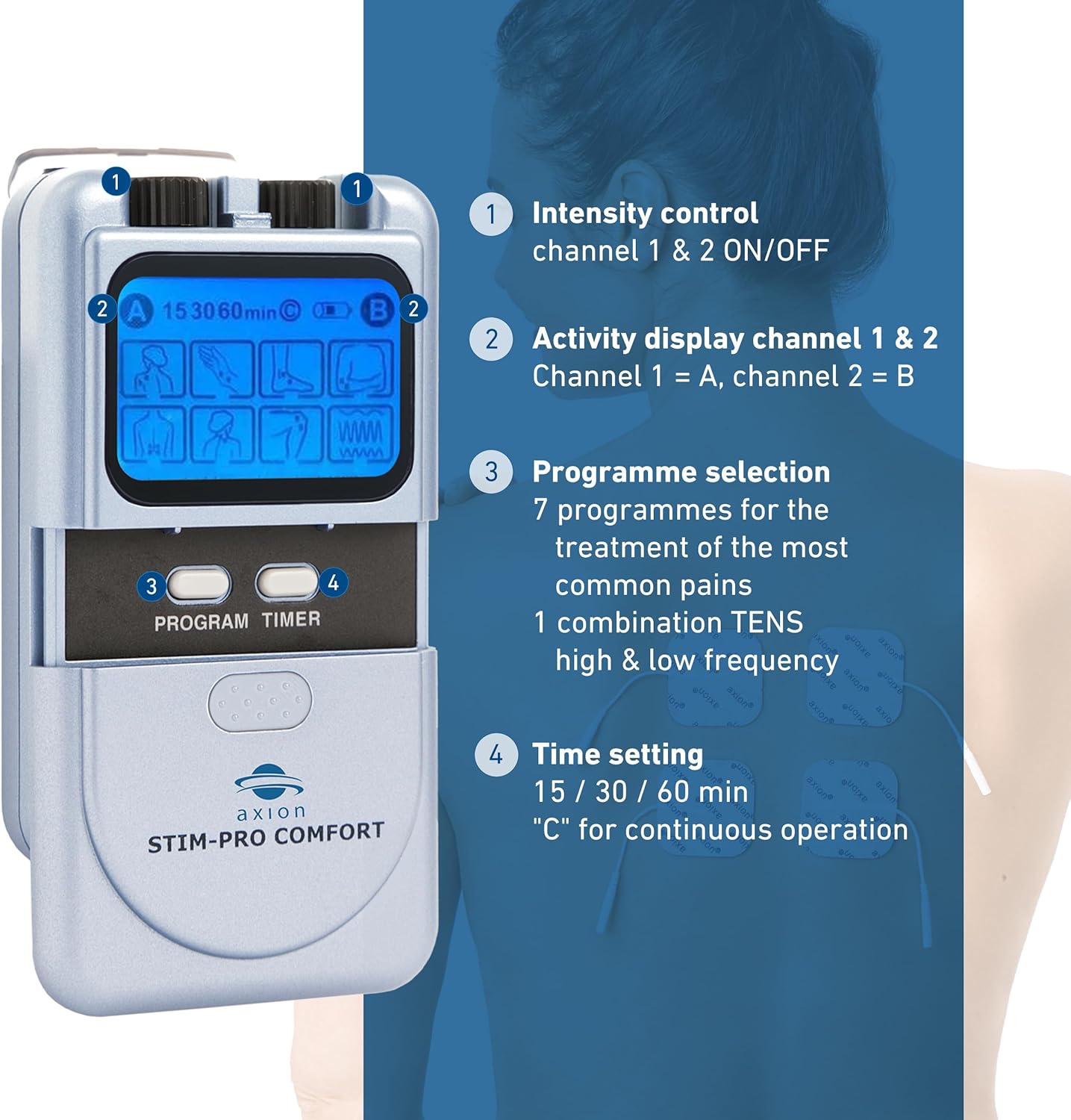
Üzərində Nəzarətlərview:
- Dərini hazırlayın: Ensure the skin where electrodes will be placed is clean, dry, and free of oils or lotions.
- Elektrodları yerləşdirin: Apply the electrode pads firmly to the desired treatment area. Refer to the diagram below for common placement suggestions. Ensure electrodes are not touching each other.
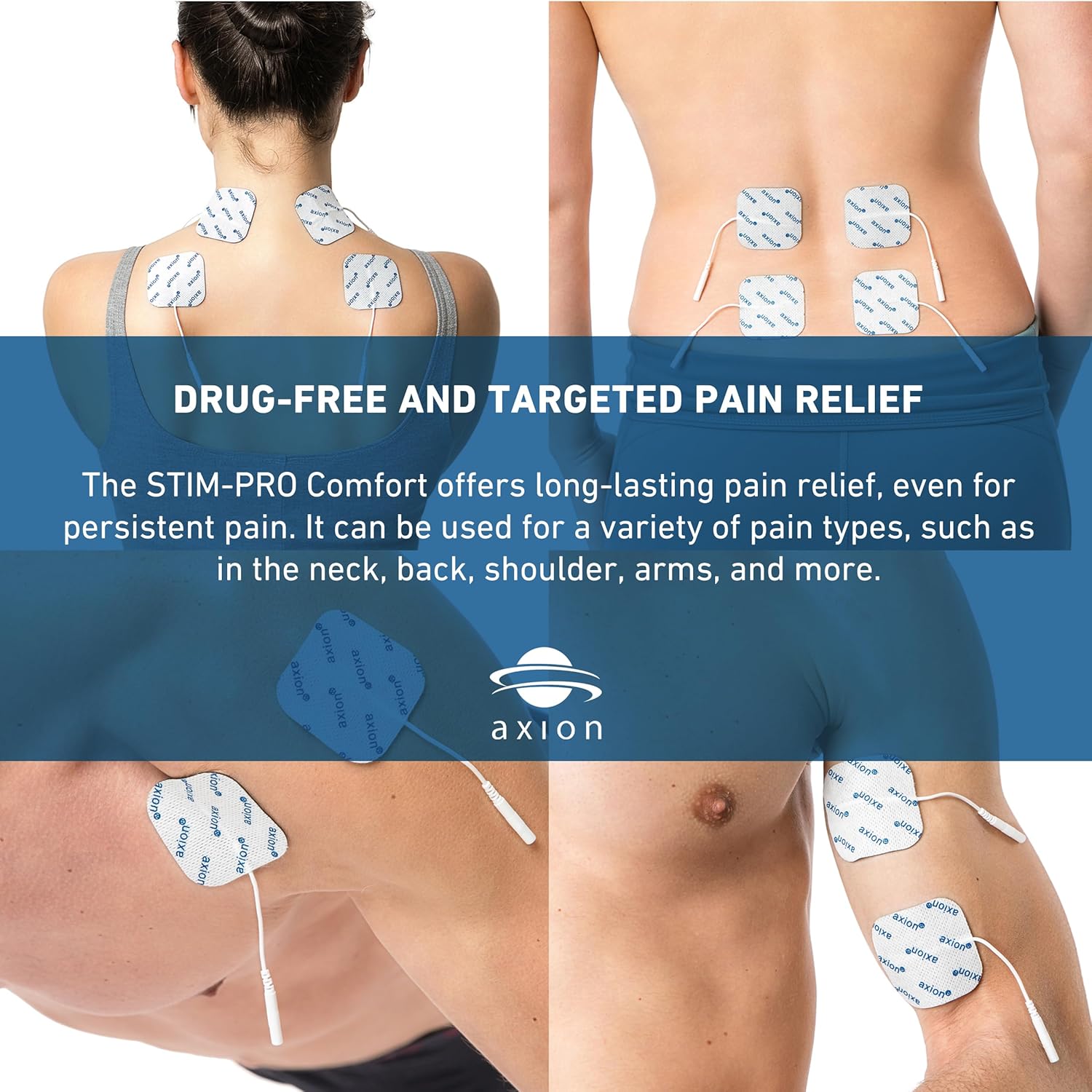
Electrode placement for various body areas for drug-free and targeted pain relief. - Cihazı yandırın: Rotate the intensity control knob (1) clockwise to turn on the device.
- Proqram seçin: Press the 'PROGRAM' button (3) to cycle through the 8 pre-installed programs. The selected program will be indicated on the display (2).
- Taymeri qurun: Press the 'TIMER' button (4) to select the desired treatment duration: 15 minutes, 30 minutes, 60 minutes, or continuous ('C').
- İntensivliyi tənzimləyin: Slowly rotate the intensity control knob (1) clockwise to increase the intensity to a comfortable level. You should feel a strong, but comfortable, tingling sensation. Do not increase intensity to a painful level.
- Son müalicə: Once the treatment time is complete, the device will automatically turn off. To manually stop treatment, rotate the intensity control knob (1) counter-clockwise until the device turns off. Carefully remove the electrodes from your skin.
5. Baxım
Cihaza qulluq:
- Cihazı yumşaq bir vasitə ilə təmizləyin, damp parça. Aşındırıcı təmizləyicilərdən istifadə etməyin və ya cihazı suya batırmayın.
- Store the device and accessories in the provided case when not in use.
Elektroda qulluq:
Proper care extends the life of your electrode pads.
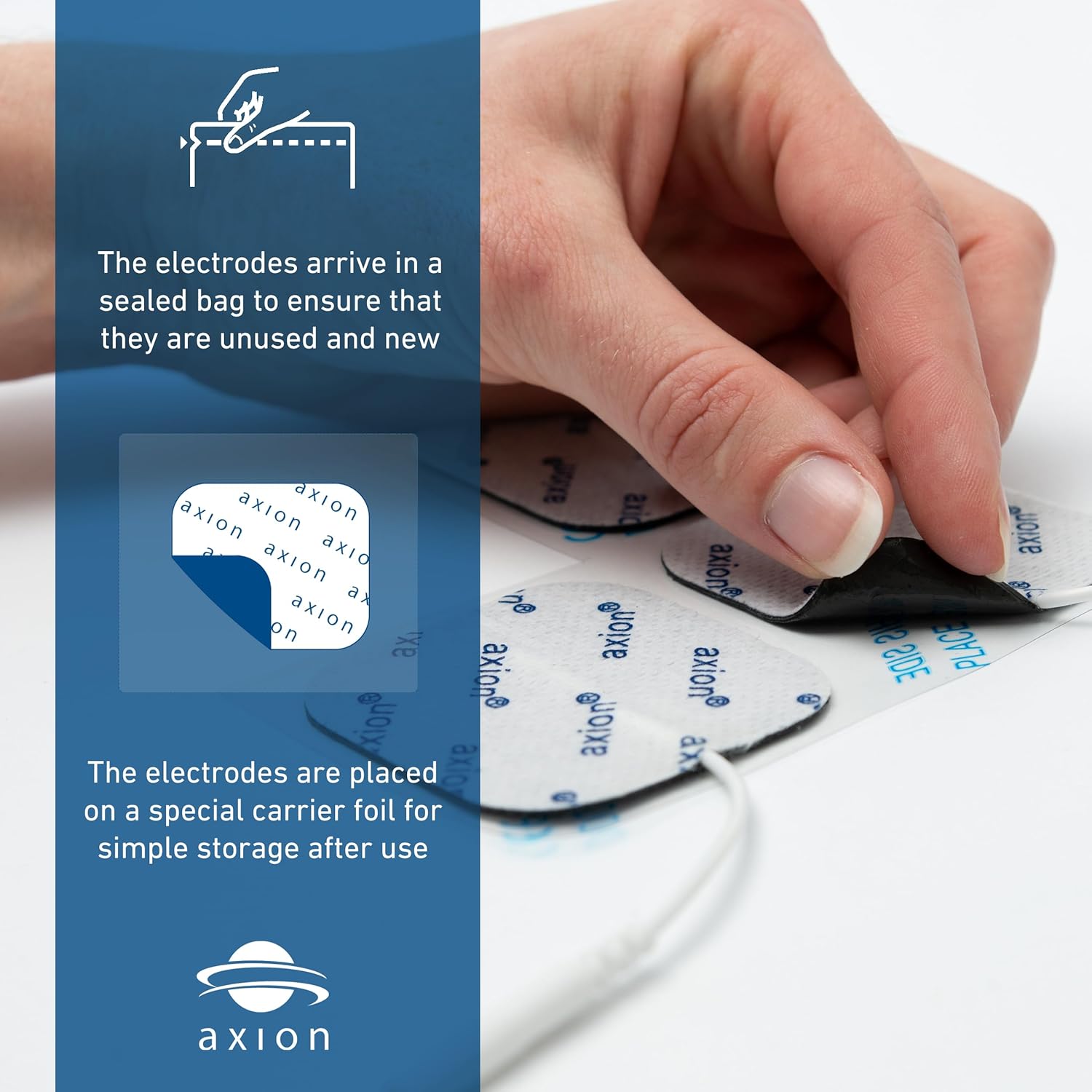
- After each use, place the electrodes back onto the clear plastic film or carrier foil they came with.
- If electrodes lose their stickiness, gently wipe the adhesive side with a damp cloth (water only) and let them air dry. Do not rub vigorously.
- Replace electrodes when they no longer adhere well to the skin or if they cause discomfort.
Batareyanın dəyişdirilməsi:
When the display dims or the device does not power on, it's time to replace the 9V battery. Follow the steps in Section 3. Setup to replace the battery.
6. Giderme
| Problem | Mümkün Səbəb | Həll |
|---|---|---|
| Cihaz açılmır. | Batareya bitib və ya səhv quraşdırılıb. | Replace the 9V battery or check its polarity. |
| Heç bir sensasiya və ya zəif hiss. | Electrodes not properly attached, electrodes are worn out, or intensity is too low. | Ensure electrodes are firmly attached to clean skin. Replace electrodes if worn. Slowly increase intensity. |
| Sensation is uncomfortable or painful. | İntensivlik çox yüksəkdir. | Slowly decrease intensity until comfortable. |
| Electrodes do not stick. | Skin is oily/dirty, or electrodes are worn out. | Clean and dry skin thoroughly before application. Replace electrodes if they have lost adhesion. |
7. Spesifikasiyalar
- Model nömrəsi: 1023
- Məhsul Ölçüləri: 8.98 x 2.13 x 7.64 düym; 1.06 funt sterlinq
- Güc mənbəyi: 1 x 9V batareya (daxildir)
- Kanallar: 2 müstəqil kanal
- Proqramlar: 8 pre-installed TENS programs
- İntensivlik: Continuously adjustable, 0 - 80 mA
- Taymer: 15, 30, 60 minutes, and continuous operation
- İstehsalçı: Axion USA LLC
8. Zəmanət və Dəstək
For warranty information, please refer to the documentation included with your purchase or visit the official axion website. For technical support or further assistance, please contact axion customer service directly.
Əlaqə məlumatı: Please refer to the contact details provided on the product packaging or the official axion webən müasir dəstək məlumatları üçün sayt.


