Giriş
The Master & Dynamic MW60 Wireless Bluetooth Foldable Headphones are designed to deliver a high-quality audio experience with effective sound isolation. They feature 45mm neodymium drivers for clear audio reproduction across various music genres. Equipped with Bluetooth 4.1, these headphones offer wireless connectivity and up to 16 hours of battery life. Constructed with lightweight stainless steel and aluminum, and featuring leather ear pads, the MW60 headphones are designed for comfort and durability, with a foldable design for portability.
Qutuda nə var
- Master & Dynamic MW60 Wireless Headphones
- Audio Kabel (3.5mm)
- Səs Adapteri
- Mikro USB -dən USB Şarj Kabeli
- Carry Case for Headphones
- Carry Pouch for Accessories
Məhsul Bitdiview
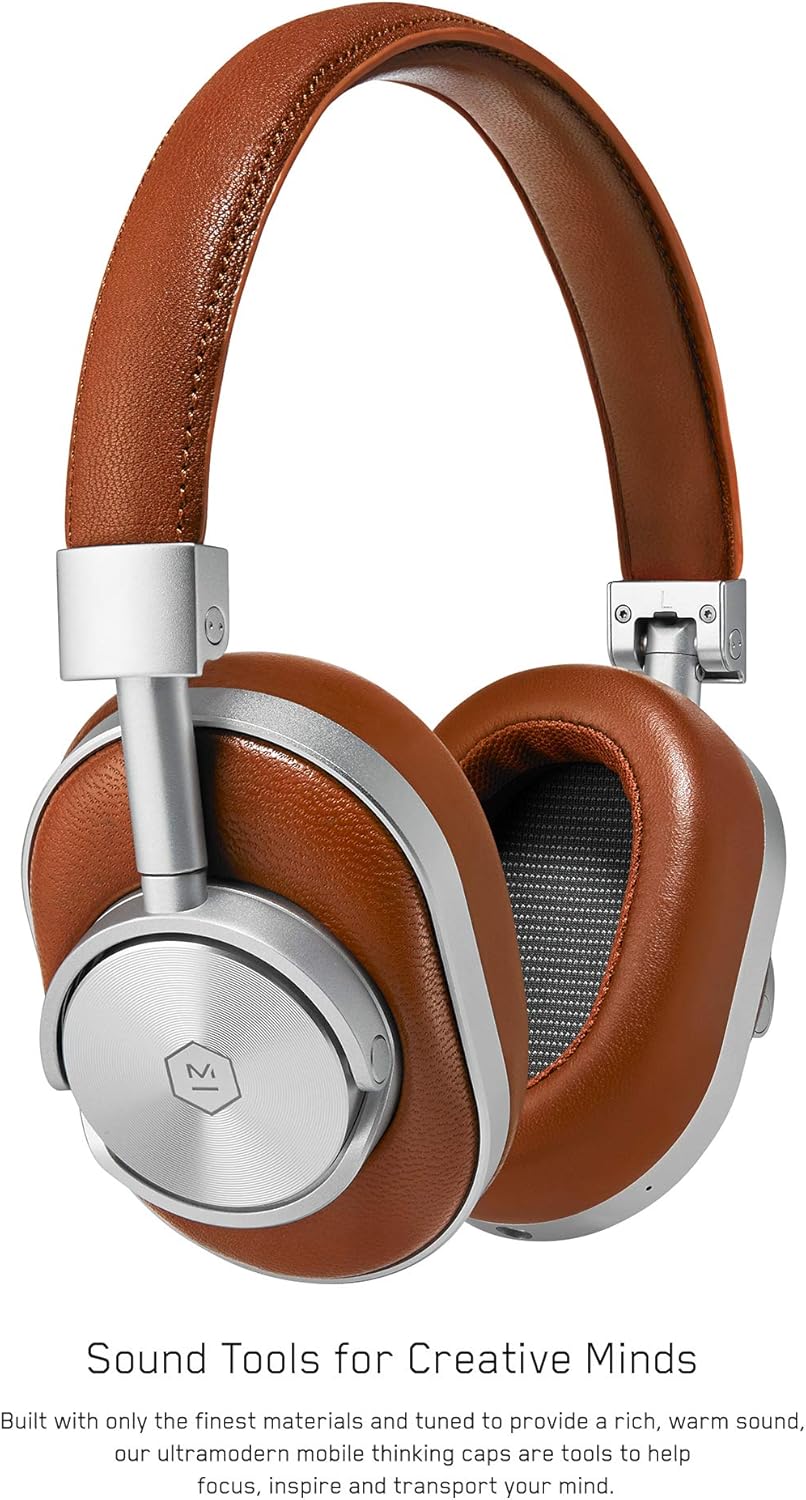
Şəkil 1: Ön view of the Master & Dynamic MW60 Wireless Headphones. This image displays the over-ear design with silver metal accents and brown leather earcups and headband.

Şəkil 2: Close-up of the right earcup showing the control buttons and ports. Visible controls include volume up/down, a multi-function button, and the power/pairing switch. A 3.5mm audio jack and micro USB charging port are also present.
Nəzarət və Portlar
- Power/Pairing Switch: Located on the earcup, used to turn the headphones on/off and initiate Bluetooth pairing.
- Çoxfunksiyalı Düymə: Controls playback (play/pause), call management, and voice assistant activation.
- Səs artırma / aşağı düymələri: Adjusts audio volume. Can also be used for track skipping (hold for next/previous track).
- 3.5 mm audio giriş: Simli qoşulma üçün daxil olan audio kabeldən istifadə edin.
- Mikro USB portu: Daxili batareyanı doldurmaq üçün.
- Mikrofon: Integrated for hands-free calls.
Quraşdırma
Qulaqlıqların doldurulması
- Connect the Micro USB end of the charging cable to the Micro USB port on the headphone earcup.
- Şarj kabelinin USB-A ucunu elektrikli USB portuna (məsələn, kompüter, divar adapteri) qoşun.
- Göstərici işığı şarj vəziyyətini göstərəcək. Tam doldurulması adətən təxminən 2 saat çəkir.
Bluetooth Cütləşdirmə
- Qulaqlıqların tam doldurulduğundan əmin olun.
- Slide the Power/Pairing switch to the ON position.
- To enter pairing mode, slide and hold the Power/Pairing switch to the far right (pairing icon) until the indicator light begins to flash.
- Cihazınızda (smartfon, planşet, kompüter) Bluetooth-u aktivləşdirin və mövcud cihazları axtarın.
- Select "MW60" from the list of detected devices.
- Once paired, the indicator light will turn solid blue or white, depending on the model.
Əməliyyat Təlimatları
Əsas funksiyalar
- Yandırma/Söndürmə: Slide the Power/Pairing switch to the ON or OFF position.
- Oynat/Pauza: Çox funksiyalı düyməni bir dəfə basın.
- Səs səviyyəsinə nəzarət: Səs artırma (+) və ya səs azaldma (-) düymələrini basın.
- Növbəti trek: Səs artırma (+) düyməsini basıb saxlayın.
- Əvvəlki Track: Səsi azaltma (-) düyməsini basıb saxlayın.
Zəng İdarəetmə
- Zəngə Cavab Vermək/Bitirmək: Çox funksiyalı düyməni bir dəfə basın.
- Zəngi rədd edin: Çoxfunksiyalı düyməni basıb saxlayın.
- Səs köməkçisini aktivləşdirin: Çoxfunksiyalı düyməni iki dəfə basın.
Simli əlaqə
To use the headphones with a wired connection, plug the included 3.5mm audio cable into the audio jack on the earcup and the other end into your audio source. The headphones will automatically switch to wired mode, conserving battery life.
Baxım
Təmizləmə
- Qulaqlıqları yumşaq, quru bir parça ilə silin.
- Sərt kimyəvi maddələr və ya aşındırıcı materiallardan istifadə etməyin.
- For leather parts, use a specialized leather cleaner if necessary, following product instructions.
Saxlama

Şəkil 3: The MW60 headphones folded into a compact form, demonstrating their portability and ease of storage in the included carry case.
- When not in use, fold the headphones and store them in the provided carry case to protect them from dust and damage.
- Həddindən artıq temperaturda və ya yüksək rütubətdə saxlamaqdan çəkinin.
Problemlərin aradan qaldırılması
| Problem | Mümkün Həll |
|---|---|
| Qulaqlıqlar işə düşmür | Ensure the headphones are fully charged. Connect to a power source using the Micro USB cable. |
| Bluetooth vasitəsilə cütləşdirmək mümkün deyil | Ensure headphones are in pairing mode (flashing indicator light). Turn off and on Bluetooth on your device. Try forgetting the device on your phone and re-pairing. Ensure no other devices are actively connected. |
| Intermittent audio or connection drops | Ensure your device is within the Bluetooth range. Avoid physical obstructions between the headphones and your device. Minimize interference from other wireless devices. |
| Simli rejimdə səs yoxdur | Ensure the 3.5mm audio cable is securely connected to both the headphones and the audio source. Check the volume levels on both the headphones and the audio source. |
| Earcups detach easily | Ensure earcups are properly aligned and securely attached to the magnetic mounts. |
Spesifikasiyalar
| Xüsusiyyət | Detal |
|---|---|
| Model Adı | MW60S2 |
| Bağlantı texnologiyası | Simsiz (Bluetooth 4.1) |
| Audio sürücü növü | 45 mm Neodim Dinamik Sürücülər |
| Batareya Ömrü | 16 saata qədər |
| Materiallar | Aluminum, Stainless Steel, Leather |
| Maddə Çəkisi | 3 funt (təxminən 1.36 kq) |
| Məhsul Ölçüləri | 10 x 3.75 x 8 düym (25.4 x 9.5 x 20.3 sm) |
| Empedans | 32 Ohm |
| Səs-küyə Nəzarət | Səs izolyasiyası (passiv) |
| Qulaqlıq yuvası | 3.5 mm Jack |
Zəmanət və Dəstək
Warranty information for your Master & Dynamic MW60 Wireless Headphones is typically provided with your purchase. Please refer to the documentation included in your product packaging for specific warranty terms and conditions.
For technical support, service, or further inquiries, please contact Master & Dynamic customer service directly. Contact details can usually be found on the manufacturer's official websaytda və ya məhsul sənədlərinizdə.


