1. Giriş
This manual provides essential information for the installation, operation, and maintenance of the Juniper EX2300-C-12T Ethernet Switch. The EX2300-C-12T is a compact, high-density, and cost-effective solution designed for small network environments where space and power efficiency are critical. It is ideal for access-layer deployments in micro branches, retail, and workgroup environments, as well as for converged network access in larger networks.
The EX2300-C-12T features 12 10/100/1000BASE-T ports and supports IEEE 802.3af Power over Ethernet (PoE) or 802.3at PoE+ for powering attached network devices. It also includes optional front panel 10GbE uplink ports for connections to higher-layer devices. This model supports Juniper's Virtual Chassis technology, allowing up to four switches to be interconnected and managed as a single logical device. It can also function as a satellite device in a Juniper Junos Fusion Enterprise deployment.
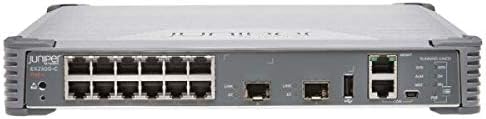
Şəkil 1: Ön view of the Juniper EX2300-C-12T Ethernet Switch. This image displays the compact design of the switch, highlighting its 12 Gigabit Ethernet ports, two SFP+ uplink ports, and various console and USB ports on the front panel. The device is grey with black ports and a Juniper logo on the left.
2. Quraşdırma və Quraşdırma
Before beginning installation, ensure you have all necessary components and that the installation environment meets the product specifications.
2.1 Paketin məzmunu
- Juniper EX2300-C-12T Ethernet Switch
- Elektrik kabeli
- Mounting Kit (Rack-mountable, Magnetic Mount, or Wall Mountable options)
- Sənədləşdirmə (Tez Başlanğıc Bələdçisi, Təhlükəsizlik Məlumatı)
2.2 Ətraf mühitin tələbləri
- Temperatur: Ensure the operating environment temperature does not exceed 100 degrees Fahrenheit (37.8 degrees Celsius).
- Rütubət: Maintain appropriate humidity levels to prevent condensation.
- Havalandırma: Ensure adequate airflow around the switch for proper cooling. Do not block ventilation openings.
- Güc mənbəyi: Connect to a stable power source within the specified voltage aralığı.
2.3 Quraşdırma Seçimləri
The EX2300-C-12T offers flexible mounting options:
- Rack-mountable: Use the provided rack-mount kit to install the 1U high switch in a standard equipment rack.
- Maqnit montajı: Utilize the magnetic mounting feature for easy attachment to metal surfaces.
- Divara quraşdırıla bilən: Secure the switch to a wall using the appropriate wall-mount brackets.
2.4 İlkin qoşulma
- Connect the power cord to the switch and a grounded electrical outlet.
- Connect an Ethernet cable from your management workstation to any of the 12 network ports on the switch.
- For initial configuration, you may need to connect a console cable to the console port.
- Power on the switch. Observe the system status indicators for proper boot-up.
3. Keçidin işlədilməsi
The Juniper EX2300-C-12T is a managed switch, offering extensive configuration capabilities through its operating system.
3.1 Əsas əməliyyat
- Yandırma/Söndürmə: Connect or disconnect the power cord. There is no dedicated power button.
- Port Connectivity: Connect network devices (computers, servers, other switches) to the 12 10/100/1000BASE-T ports using standard Ethernet cables.
- Uplink Portları: Use the 10GbE SFP+ uplink ports for high-speed connections to core network devices or other switches.
- PoE/PoE+: The switch provides Power over Ethernet capabilities on its ports, allowing compatible devices (e.g., IP phones, wireless access points) to receive power directly through the Ethernet cable.
3.2 İdarəetmə İnterfeysi
The switch can be managed via:
- Komanda xətti interfeysi (CLI): Access via console port (RJ-45) or SSH for detailed configuration.
- Web-based Interface (J-Web): A graphical user interface for easier management (requires initial IP configuration via CLI).
- SNMP: For network monitoring and management systems.
3.3 Virtual Chassis Technology
The EX2300-C-12T supports Juniper's Virtual Chassis technology, allowing up to four compatible EX Series switches to operate as a single logical device. This simplifies management and increases network resilience. Refer to the Juniper Networks documentation for detailed configuration steps for Virtual Chassis.
4. Baxım
Regular maintenance ensures optimal performance and longevity of your Juniper EX2300-C-12T switch.
4.1 Təmizləmə
- Keep the switch and its ventilation openings free from dust and debris.
- Use a soft, dry cloth for external cleaning. Do not use liquid cleaners or aerosols.
- Periodically use compressed air to clear dust from ventilation grilles.
4.2 Mikroproqram yeniləmələri
Periodically check the Juniper Networks support website for the latest firmware updates. Applying updates can provide new features, performance improvements, and security patches. Follow the instructions provided by Juniper for safe firmware upgrade procedures.
4.3 Environmental Monitoring
Continuously monitor the operating environment to ensure it remains within specified temperature and humidity ranges. Excessive heat can significantly reduce the lifespan of electronic components.
5. Giderme
This section provides basic troubleshooting steps for common issues. For more complex problems, refer to the official Juniper Networks documentation or contact technical support.
5.1 Enerji ilə bağlı problemlər
- Güc yoxdur:
- Elektrik kabelinin həm açara, həm də işləyən elektrik rozetkasına etibarlı şəkildə qoşulduğundan əmin olun.
- Verify the electrical outlet is supplying power.
5.2 Şəbəkə Bağlantısı Problemləri
- Port Link Down:
- Hər iki ucundakı Ethernet kabel bağlantısını yoxlayın.
- Fərqli Ethernet kabelini sınayın.
- Verify the connected device is powered on and functioning correctly.
- Check the port status via the management interface.
- No Network Access:
- Verify IP address configuration on the switch and connected devices.
- Check VLAN configurations if applicable.
- Ensure routing is correctly configured if devices are on different subnets.
5.3 Performans Məsələləri
- Yavaş Şəbəkə Sürəti:
- Check for duplex mismatches between the switch port and the connected device.
- Monitor port utilization for congestion.
- Firmware proqramının yeni olduğundan əmin olun.
6. Texniki spesifikasiyalar
| Xüsusiyyət | Spesifikasiya |
|---|---|
| Model nömrəsi | EX2300-C-12T |
| Brend | Juniper şəbəkələri |
| Portların sayı | 12 (10/100/1000BASE-T) |
| Genişləndirmə yuvaları | 2 (for 10GbE SFP+ uplinks) |
| Keçid Tipi | Managed, Multi-Layer, PoE Switch |
| İnterfeys növü | PoE (IEEE 802.3af/at) |
| Ölçülər (UxGxY) | 10.98 x 9.41 x 1.73 düym (27.89 x 23.90 x 4.39 sm) |
| Maddə Çəkisi | 5.47 funt (2.48 kq) |
| Dava materialı | Metal |
| Rəng | Boz |
| Üst Temperatur Reytinqi | 100°F (37.8°C) |
| Flash Yaddaş Ölçüsü | 2000 MB |
| Montaj Seçimləri | Rack-mountable, Magnetic Mount, Wall Mountable |
| UPC | 832938070912 |
| İlk Əlçatan Tarix | 31 avqust 2016-cü il |
7. Zəmanət Məlumatı
The Juniper EX2300-C-12T Compact Ethernet Switch comes with a Ömürlük Məhdud Zəmanət. This warranty covers defects in materials and workmanship under normal use and service. For full details regarding warranty terms, conditions, and limitations, please refer to the official Juniper Networks warranty policy documentation available on their website or contact Juniper Networks support.
Zəmanət iddiaları üçün satınalma sübutunuzu özündə saxlayın.
8. Texniki Dəstək
For technical assistance, product inquiries, or to report issues, please contact Juniper Networks technical support. Before contacting support, it is recommended to have your product model number (EX2300-C-12T) and serial number readily available.
You can find support resources, FAQs, and contact information on the official Juniper Networks websayt: www.juniper.net/support


