1. Giriş
This manual provides comprehensive instructions for the operation and maintenance of your MIDAS DM16 16 Input Analogue Live and Studio Mixer. The DM16 is designed for both live performance and studio recording environments, featuring award-winning MIDAS microphone preamplifiers and robust construction.
Please read this manual thoroughly before operating the device to ensure proper usage and to maximize its lifespan.
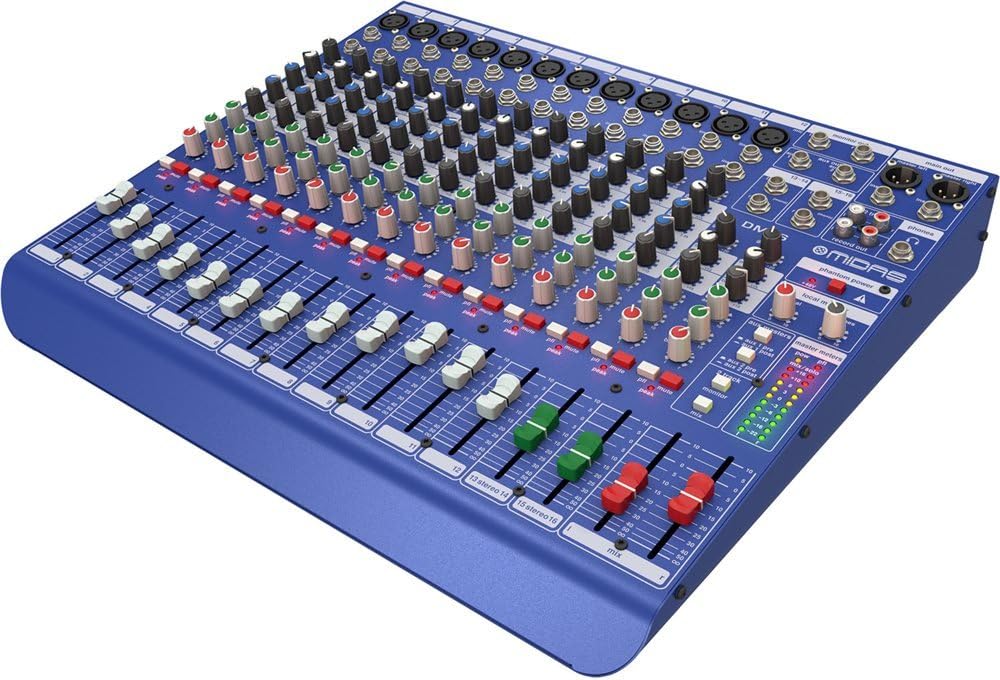
Şəkil 1.1: Ön bucaqlı view of the MIDAS DM16 mixer.
2. Quraşdırma
2.1 Qabın açılması və yoxlanılması
Upon receiving your MIDAS DM16, carefully unpack the unit and inspect it for any signs of damage that may have occurred during transit. Retain the original packaging materials for future transport or storage.
Qutuya daxildir:
- MIDAS DM16 16 Giriş Analoq Canlı və Studio Mikser
- Elektrik kabeli
- İstifadəçi Təlimatı (bu sənəd)
2.2 Enerji Bağlantısı
The DM16 operates on a standard AC power supply. Connect the provided power cord to the AC inlet on the rear panel of the mixer and then to a suitable power outlet. Ensure the power switch is in the 'Off' position before connecting to power.
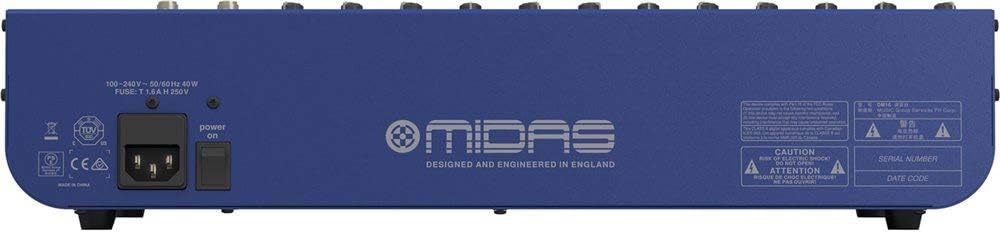
Figure 2.1: Rear panel of the MIDAS DM16 showing power input and warnings.
2.3 Giriş və Çıxış Əlaqələri
The DM16 features a variety of input and output options for connecting microphones, instruments, and other audio devices.
- Mikrofon girişləri: 12 mono input channels with XLR connectors for microphones. These channels feature MIDAS microphone preamphəyatını itirənlər.
- Xətt Girişləri: 2 electronically-balanced stereo line input channels on 1/4" TRS connectors for instruments or line-level devices.
- Əsas çıxışlar: Əsas PA sisteminizə və ya qeyd interfeysinizə qoşulun.
- Aux Göndərir: For monitor mixes or effects sends.
- Qulaqlıq Çıxışı: For monitoring audio.
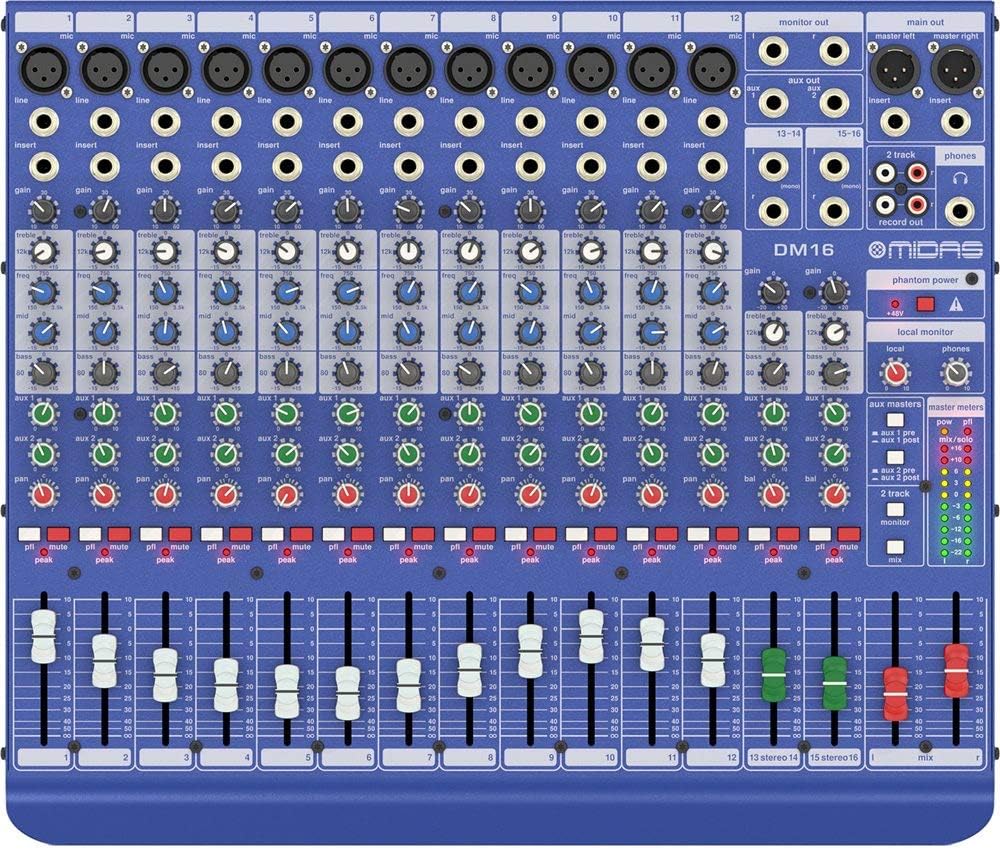
Şəkil 2.2: Üst view of the MIDAS DM16 showing all input/output connections and controls.
3. Əməliyyat Təlimatları
3.1 Kanal İdarəetmələri
Each mono input channel on the DM16 features the following controls:
- QAZANMA: Adjusts the input sensitivity for the microphone preampömürlük.
- EQ: A 3-band equalizer with a swept mid-band for precise tone shaping.

Şəkil 3.1: Ətraflı view of the 3-band EQ section on a mono channel.
- AUX 1/2: Controls the level sent to the auxiliary outputs. These can be switched pre/post fader.

Figure 3.2: Aux masters section with pre/post fader switching.
- Tava: Kanalın stereo mövqeyini tənzimləyir.
- SƏSSİZ: Kanalı susdurur.
- PEAK LED: Indicates when the input signal is clipping.
- FADER: Controls the output level of the channel to the main mix.

Figure 3.3: Channel faders for precise level control.
3.2 Fantom Gücü
The DM16 provides +48V phantom power for condenser microphones. This is a global switch, meaning it applies to all microphone inputs simultaneously. Ensure all connections are made before activating phantom power to prevent damage to non-phantom powered devices.

Figure 3.4: Phantom power switch.
3.3 Monitorinq
Use the headphone output and monitor controls to listen to the main mix or specific auxiliary sends. The monitor section includes controls for local monitor and phones output levels.

Figure 3.5: Monitor and headphone controls.
4. Baxım
Proper maintenance ensures the longevity and optimal performance of your MIDAS DM16 mixer.
- Təmizləmə: Mikserin xarici hissəsini təmizləmək üçün yumşaq, quru bir parça istifadə edin. Üzlük və ya idarəetmə elementlərinə zərər verə biləcək aşındırıcı təmizləyicilərdən və ya həlledicilərdən çəkinin.
- Tozdan qorunma: Xüsusilə də solğunlaşdırıcıların və düymələrin ətrafında toz yığılmasının qarşısını almaq üçün istifadə edilmədikdə mikseri örtülü saxlayın.
- Havalandırma: Həddindən artıq istiləşmənin qarşısını almaq üçün cihazın ətrafında kifayət qədər hava axını təmin edin. Havalandırma deliklərini bağlamayın.
- Yaddaş: Store the mixer in a cool, dry environment away from direct sunlight and extreme temperatures.
5. Giderme
This section addresses common issues you might encounter with your DM16 mixer.
- Güc yoxdur:
- Check if the power cord is securely connected to both the mixer and the power outlet.
- Elektrik rozetkasının işlək olduğunu yoxlayın.
- Ensure the power switch on the rear panel is in the 'On' position.
- Səs Çıxışı yoxdur:
- Bütün giriş və çıxış kabellərinin birləşmələrini yoxlayın.
- Kanal fayderlərinin və əsas miks fayderinin qaldırıldığından əmin olun.
- Verify that the MUTE buttons on active channels are not engaged.
- Check the gain settings for each channel.
- Confirm that your connected speakers or monitoring system are powered on and functioning correctly.
- Təhrif edilmiş səs:
- Reduce the GAIN setting on the input channel if the PEAK LED is frequently illuminating.
- Lower the output level of the connected source device.
- Nasaz kabelləri yoxlayın.
- Zümzümə və ya səs-küy:
- Bütün kabellərin düzgün şəkildə qorunduğundan və yaxşı vəziyyətdə olduğundan əmin olun.
- Check for ground loops; try connecting all audio equipment to the same power strip.
- Səs kabellərini elektrik kabellərindən uzaq tutun.
Burada əhatə olunmayan problemlərlə qarşılaşsanız, zəhmət olmasa dəstək bölməsinə baxın.
6. Spesifikasiyalar
| Xüsusiyyət | Detal |
|---|---|
| Məhsul növü | Analoq Canlı və Studio Mikser |
| Input Kanallar | 16 (12 mono, 2 stereo) |
| Mikrofon əvvəlcədənamphəyatını itirənlər | Award-winning MIDAS preamphəyatını itirənlər |
| EQ on Mono Channels | 3-band with swept mid band |
| Aux göndərir | 2 (with pre/post fader switching) |
| Güc mənbəyi | Kabelli Elektrik |
| Maddə Çəkisi | 11.02 funt (5.0 kq) |
| Məhsulun Ölçüləri (U x G x Y) | 17.24 x 14.57 x 3.74 düym (438 x 370 x 95 mm) |
| Mənşə ölkəsi | Çin |
| Model nömrəsi | DM16 |
| Bağlantı texnologiyası | Köməkçi |
7. Zəmanət və Dəstək
7.1 Zəmanət Məlumatı
Your MIDAS DM16 mixer is covered by a limited warranty against defects in materials and workmanship. Please refer to the warranty card included with your product or visit the official MIDAS webətraflı zəmanət şərtləri üçün sayt.
Qeyd: The warranty may not cover damage caused by improper use, unauthorized modifications, or natural disasters.
7.2 Müştəri dəstəyi
For technical assistance, troubleshooting, or service inquiries, please contact MIDAS customer support through their official websayt və ya məhsul sənədlərinizdə göstərilən əlaqə məlumatı.
Onlayn Resurslar:
- Official MIDAS Websayt: www.midasconsoles.com
- Product Support Page: (Specific link if available, otherwise general webSayt)
When contacting support, please have your product model number (DM16) and serial number ready.


