1. Giriş
This manual provides essential information for the proper use and maintenance of your WiMiUS Q4 4K Action Camera. Please read it thoroughly before operating the device to ensure optimal performance and longevity. Keep this manual for future reference.
Təhlükəsizlik tədbirləri
- Kameranı uzun müddət həddindən artıq temperaturlara və ya birbaşa günəş işığına məruz qoymayın.
- Kameranı yerə salmaqdan və ya güclü zərbələrə məruz qoymaqdan çəkinin.
- Kameranı güclü maqnit sahələrindən uzaq tutun.
- Ensure the waterproof case is properly sealed before submerging the camera in water.
- Yalnız təsdiq edilmiş aksessuarlar və şarj cihazlarından istifadə edin.
2. Məhsul bitdiview
Kamera komponentləri
Familiarize yourself with the main components of your WiMiUS Q4 Action Camera:
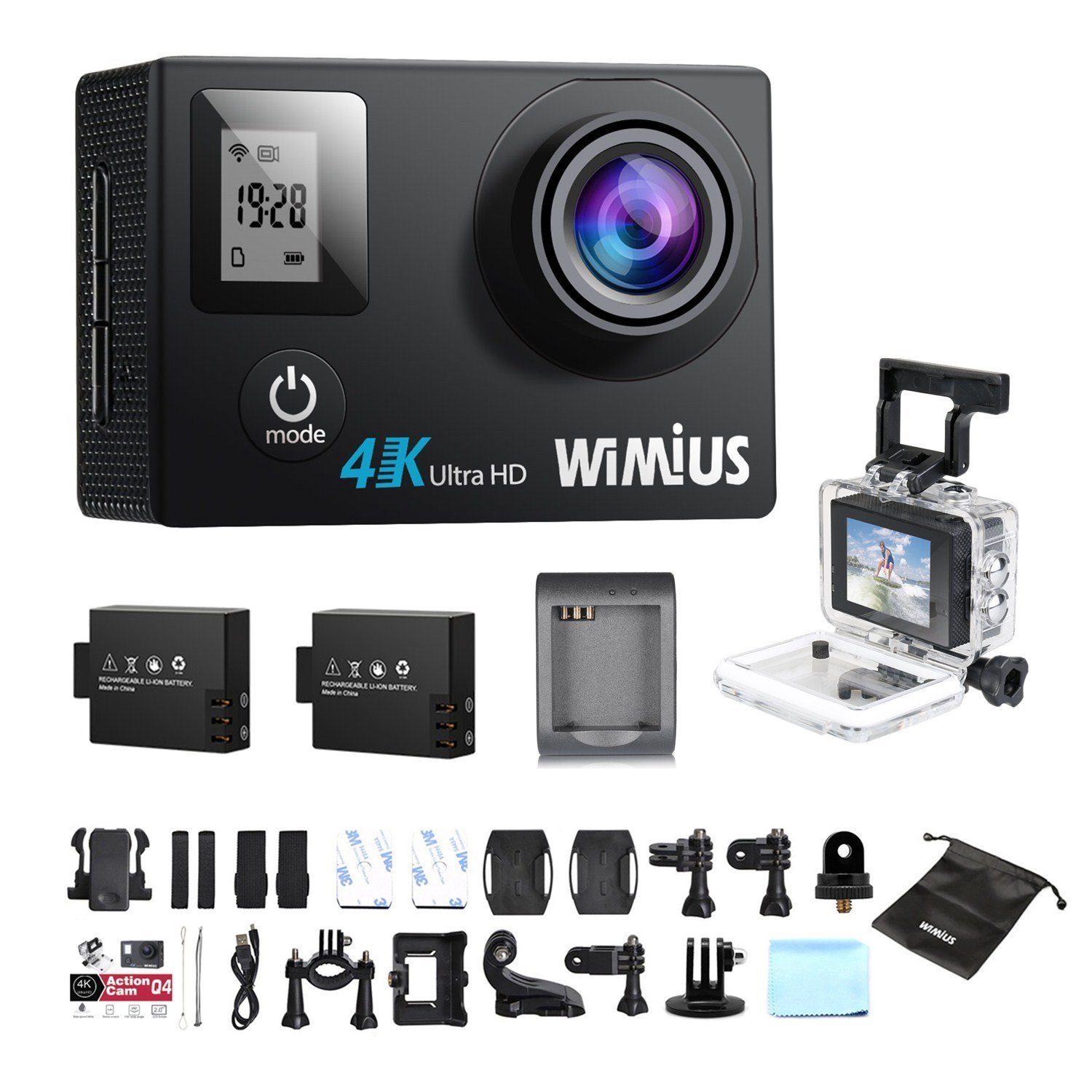
- Lens: Captures video and photo footage.
- Güc / Rejim Düyməsi: Powers the camera on/off and switches between modes.
- Shutter/OK Button: Starts/stops recording, takes photos, or confirms selections.
- Yuxarı/Aşağı Düymələri: Navigates menu options.
- Main LCD Screen (2.0 inches): Canlı göstərir view, playback, and menu interface.
- Status Screen (0.66 inches): Shows current mode, battery status, and recording time.
- Mikro USB portu: Şarj etmək və məlumat ötürmək üçün.
- Mikro HDMI Portu: Xarici ekrana qoşulmaq üçün.
- MicroSD Kart Yuvası: Yaddaş kartı daxil etmək üçün.
Daxil Aksesuarlar
Your camera comes with a comprehensive kit of accessories:

- Waterproof Case (up to 40M)
- Rechargeable Li-ion Batteries (x2)
- USB kabel
- Various Mounts and Adapters (e.g., helmet mount, bicycle mount)
- Yapışqan yastıqlar
- Təmizləyici parça
- Bands and Straps
3. Quraşdırma
3.1 Batareyanın quraşdırılması və doldurulması
- Kameranın altındakı batareya bölməsinin qapağını açın.
- Insert a fully charged Li-ion battery, ensuring the correct orientation.
- Batareya bölməsinin qapağını etibarlı şəkildə bağlayın.
- To charge, connect the camera to a USB power source (e.g., computer, USB wall adapter) using the provided USB cable. The charging indicator light will illuminate.
- Charging typically takes 2-3 hours. The indicator light will turn off or change color when fully charged.

3.2 MicroSD Kartının Quraşdırılması
A MicroSD card (not included) is required for recording. The camera supports up to 64GB Class 10 or UHS-I MicroSD cards.
- Kameranın yan tərəfində MicroSD kart yuvasını tapın.
- MicroSD kartını qızılı kontakt ucları kameranın arxasına baxaraq yerinə oturana qədər daxil edin.
- Çıxarmaq üçün kartı çıxana qədər yumşaq bir şəkildə itələyin.
- It is recommended to format the MicroSD card in the camera before first use and periodically thereafter to ensure stable recording.
3.3 Suya davamlı korpusun istifadəsi
The waterproof case allows the camera to be used up to 40 meters underwater.
- Kameranı suya davamlı korpusa yerləşdirməzdən əvvəl quru olduğundan əmin olun.
- Close the case firmly, ensuring the rubber seal is clean and free of debris.
- Perform a dry test by submerging the empty case in water for a few minutes to check for leaks before inserting the camera.
3.4 Quraşdırma aksesuarları
Utilize the various mounts and adapters to attach your camera to helmets, bicycles, or other surfaces. Refer to the accessory diagram for specific attachment methods.
4. Əməliyyat Təlimatları
4.1 Yandırma/Söndürmə
- Güc Aktivdir: Press and hold the Power/Mode button for 3-5 seconds.
- Söndürmək: Press and hold the Power/Mode button for 3-5 seconds.
4.2 Rejimin seçimi
Press the Power/Mode button repeatedly to cycle through the main modes:
- Video Yazma Rejimi: Indicated by a video camera icon.
- Şəkil rejimi: Indicated by a camera icon.
- Oynatma rejimi: Indicated by a play icon.
- Ayarlar Menyusu: Indicated by a gear icon.
4.3 Video çəkiliş
- Switch to Video Recording Mode.
- Press the Shutter/OK button to start recording. A red indicator light will flash, and the recording time will appear on the screen.
- Yazını dayandırmaq üçün Çekmece/OK düyməsini yenidən basın.
Video Settings (via Settings Menu)
- Qətnamə: Select from 4K 30fps, 2.7K 30fps, 1080p 60/30fps, 720p 120/60/30fps.
- Döngü qeydi: Set to 2min, 3min, 5min, or Off. When enabled, the camera will continuously record, overwriting the oldest files yaddaş kartı dolu olduqda.
- Sürətli Video: Set intervals (0.5s, 1s, 5s, 10s, 30s, 60s) or Off. The camera will capture frames at set intervals and compile them into a video.
- Yavaş Hərəkət: Available at 1080p/60fps and 720p/120fps.
4.4 Şəkillərin çəkilməsi
- Switch to Photo Mode.
- Şəkil çəkmək üçün Çekmece/OK düyməsini basın.
Photo Settings (via Settings Menu)
- Qətnamə: 16 meqapikselə qədər.
- Foto partlayış: Capture multiple photos in quick succession (e.g., 3P/1S, 5P/1S, 10P/1S).
4.5 WiFi Connection and App Usage
The camera features Wi-Fi connectivity for remote control via a smartphone app.
- Enable Wi-Fi on the camera via the Settings Menu. The Wi-Fi name (SSID) and password will be displayed.
- Download the compatible WiMiUS app from your smartphone's app store (e.g., App Store for iOS, Google Play for Android).
- On your smartphone, connect to the camera's Wi-Fi network using the provided password.
- Open the WiMiUS app to control the camera, view canlı footage, və köçürmə files.
4.6 Menu Navigation and General Settings
Access the Settings Menu by cycling through modes. Use the Up/Down buttons to navigate and the Shutter/OK button to select.
- Dil: Select your preferred language (French is available).
- Tarix/Saat: Düzgün tarix və vaxtı təyin edin. Note: The date/time setting may reset to 2016/09/01 00:00:00 when batteries are changed. This is a known behavior; reset manually after each battery change.
- Avtomobil Rejimi: (OUI/NON - Yes/No) This mode typically enables automatic recording when the camera detects power, useful for dashcam functionality.
- Kartı format edin: Erases all data on the MicroSD card.
- Zavod Sıfırlama: Restores all settings to their default values.
5. Baxım
5.1 Kameranın və obyektivin təmizlənməsi
- Kamera gövdəsini təmizləmək üçün yumşaq, tüysüz parça istifadə edin.
- For the lens, use a specialized lens cleaning cloth or pen to avoid scratches. Do not use abrasive materials.
- Ensure the camera is off and dry before cleaning.
5.2 Suya davamlı korpusa qulluq
- After each use in water, rinse the waterproof case with fresh water and allow it to air dry.
- Inspect the rubber seal for any dirt, sand, or damage. Clean or replace if necessary to maintain waterproofing.
5.3 Batareya Baxımı
- İstifadə edilmədikdə batareyaları sərin, quru yerdə saxlayın.
- Do not expose batteries to high temperatures or direct flame.
- Uzun müddət saxlasanız, batareyaları təxminən 50% tutumuna qədər doldurun.
5.4 Saxlama
When not in use, store the camera and accessories in a protective case to prevent damage from dust and impacts.
6. Giderme
This section addresses common issues you might encounter with your WiMiUS Q4 camera.
| Problem | Mümkün Səbəb | Həll |
|---|---|---|
| Kamera işə düşmür. | Az və ya tükənmiş batareya. | Batareyanı tam doldurun. Batareyanın düzgün yerləşdirildiyinə əmin olun. |
| Video yazmaq/şəkil çəkmək mümkün deyil. | No MicroSD card, card full, or card error. | MicroSD kartı daxil edin. Köhnəsini silin files or replace card. Format the card in the camera. |
| Date/Time resets after battery change. | Standard behavior for this model. | Manually reset the date and time in the settings menu after each battery change. |
| Aşağı işıqda zəif görüntü keyfiyyəti. | Limitations of the camera sensor in low light conditions. | Ensure adequate lighting. Adjust exposure settings if available. |
| Sound is muffled in waterproof case. | Waterproof case seals the microphone. | This is normal. For better audio, use the camera without the waterproof case in dry conditions. |
| Wi-Fi bağlantısı problemləri. | Incorrect password, app issues, or signal interference. | Verify Wi-Fi password. Restart camera and smartphone. Ensure app is updated. Try resetting camera Wi-Fi settings. |
| Accessories breaking easily. | Material quality or improper use. | Handle accessories with care. Consider purchasing higher quality third-party mounts if needed for demanding activities. |
Ümumi nasazlıqlar
- Kameranı yenidən başladın: Power off and then on again.
- Check MicroSD Card: Ensure it's correctly inserted and formatted. Try a different card if issues persist.
- Zavod Sıfırlama: If problems continue, perform a factory reset via the settings menu. Note that this will erase all custom settings.
7. Spesifikasiyalar
Key technical specifications for the WiMiUS Q4 Action Camera:
- Brend: WiMiUS
- Model: Q4
- Effektiv Qətnamə: 16 meqapiksel
- Video Çözünürlük: 4K (30fps), 2.7K (30fps), 1080p (60/30fps), 720p (120/60/30fps)
- Ekran Ölçüsü: 2.0 inches (main LCD), 0.66 inches (status screen)
- Bağlantı texnologiyası: Wi-Fi
- Suya davamlı dərinlik: Up to 40 meters (with waterproof case)
- Şəkil sabitləşməsi: yox
- Sensor Texnologiyası: CMOS
- Lens növü: Geniş bucaq
- Rəng: Gold (Note: Product title indicates 'Noir' (Black), but specifications list 'or' (Gold). This manual refers to the Q4 model generally.)
- Yaddaş: Supports MicroSD cards up to 64GB (Class 10 or UHS-I recommended)
8. Zəmanət və Dəstək
For warranty information and customer support, please refer to the documentation provided at the time of purchase or contact your retailer. Specific details regarding warranty duration and terms are typically included with your product packaging.
Software updates and spare parts availability information are not provided in the product specifications. Please check the manufacturer's official website or contact customer service for the most current information.


