1. artıqview
The Tascam CD-A580 is a versatile rackmount media player and recorder designed for professional and installation applications. It combines a cassette recorder, CD player, and USB flash drive recorder/player into a single unit, offering multiple playback and recording options.
Əsas xüsusiyyətlərə aşağıdakılar daxildir:
- Playback of various audio formats from cassette, CD, and USB flash media.
- Recording from cassette to USB to digitally archive cassette collections.
- Recording from CDs to cassettes.
- Recording audio from CDs and LINE inputs to USB flash drives in MP3 format.
- A single-direction logic-based transport control for stability and longevity.
- Pitch adjustment of up to ±10% during cassette tape playback.
- Support for CD-DA, CD-R, CD-RW, and data CDs containing MP3 files.
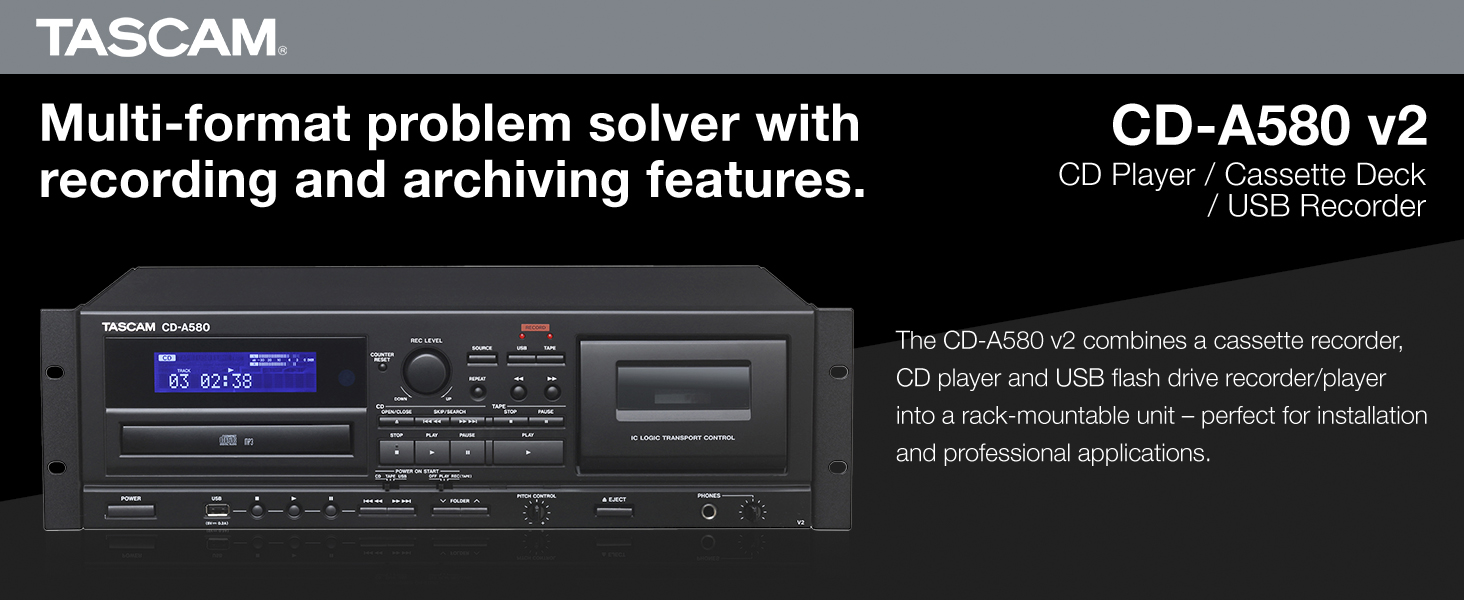
Şəkil 1: Ön view of the Tascam CD-A580 unit, highlighting its multi-format capabilities.
Video 1: A product summary video demonstrating the Tascam CD-A580's features and functions.
2. Quraşdırma
2.1 Qabın açılması
Carefully remove the CD-A580 unit from its packaging. Ensure all components, including the player/recorder unit, power cord, and remote control, are present. Retain the packaging for future transport or storage.
Video 2: This video provides a visual guide to what is included inside the box of the Tascam CD-A580.
2.2 Raf montajı
The CD-A580 is designed for standard 19-inch rack mounting. Secure the unit using appropriate rack screws (not included) through the mounting holes on the side flanges. Ensure adequate ventilation around the unit to prevent overheating.
2.3 Əlaqələr
Connect the CD-A580 to your audio system using the appropriate input and output jacks on the rear panel. This typically involves RCA audio cables for line input/output. Connect the power cord to a suitable AC outlet.

Figure 2: Rear panel of the Tascam CD-A580, illustrating the various audio input and output connections.
3. Əməliyyat Təlimatları
3.1 Yandırma/Söndürmə
düyməsini basın GÜC button on the front panel to turn the unit on or off. The display will illuminate upon power-up.
3.2 CD Oynatma
CD oxutmaq üçün:
- düyməsini basın AÇ/BAĞLA CD qabını açmaq üçün düyməni basın.
- Place a CD (CD-DA, CD-R, CD-RW, or data CD with MP3 files) etiket tərəfi yuxarı olmaqla qabın üzərinə qoyun.
- basın AÇ/BAĞLA Qabı bağlamaq üçün yenidən basın. Cihaz diski oxuyacaq.
- düyməsini basın OYNA oynatmağa başlamaq üçün düymə.
- istifadə edin KEÇİN buttons (◀◀ / ▶▶) to navigate between tracks.
- basın STOP to halt playback.
3.3 Kasetin səsləndirilməsi
Kaset lentini səsləndirmək üçün:
- düyməsini basın ÇIXARIN kaset qapısını açmaq üçün düymə.
- Insert a cassette tape into the compartment.
- Kaset qapısını bağlayın.
- düyməsini basın OYNA button for the cassette deck.
- tənzimləyin PİTÇƏ NƏZARƏT knob to fine-tune the playback speed (up to ±10%).
- istifadə edin GERİ YÜRÜŞ (◀◀) və Sürətli İrəli (▶▶) buttons to quickly move through the tape.
- basın STOP to halt playback.
3.4 USB MP3 Oxutma
MP3 oynamaq üçün files from a USB flash drive:
- USB flash sürücüsünü ön paneldəki USB portuna daxil edin.
- Select the USB source using the MƏNBƏ düyməsi.
- Use the navigation buttons to select folders and MP3 files.
- düyməsini basın OYNA oynatmağa başlamaq üçün düymə.
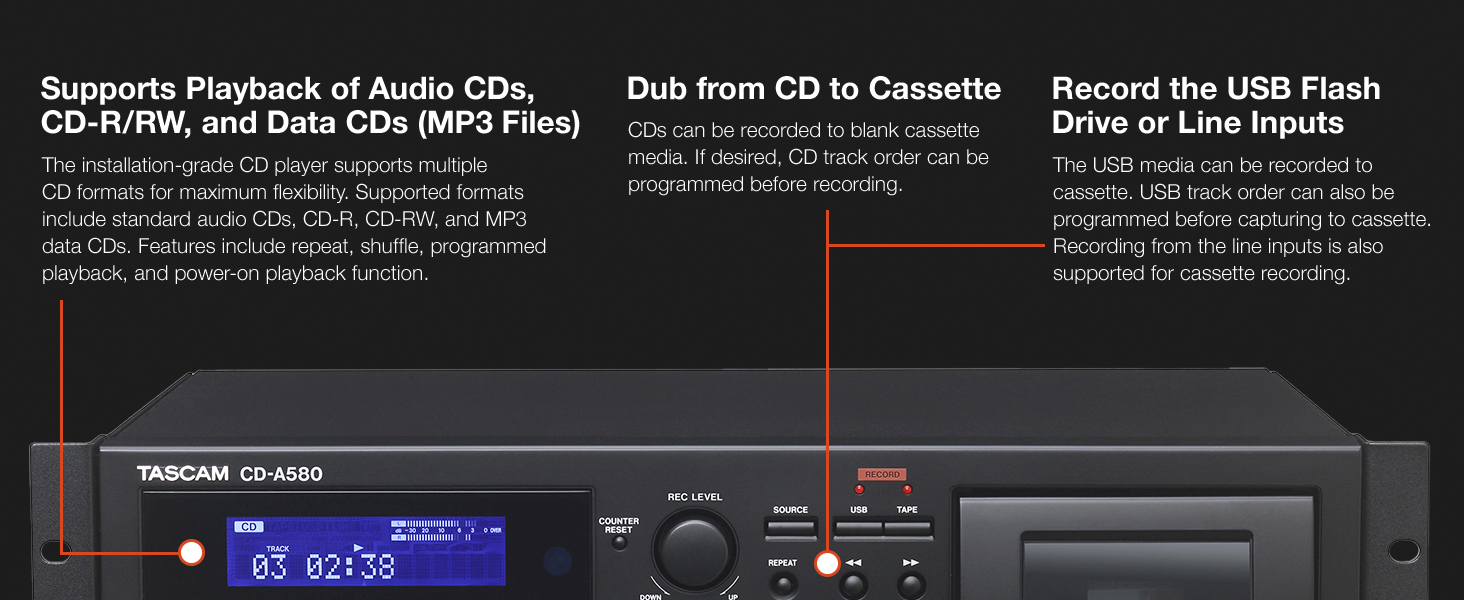
Figure 3: Front panel details of the CD-A580, illustrating controls for CD, USB, and cassette playback.
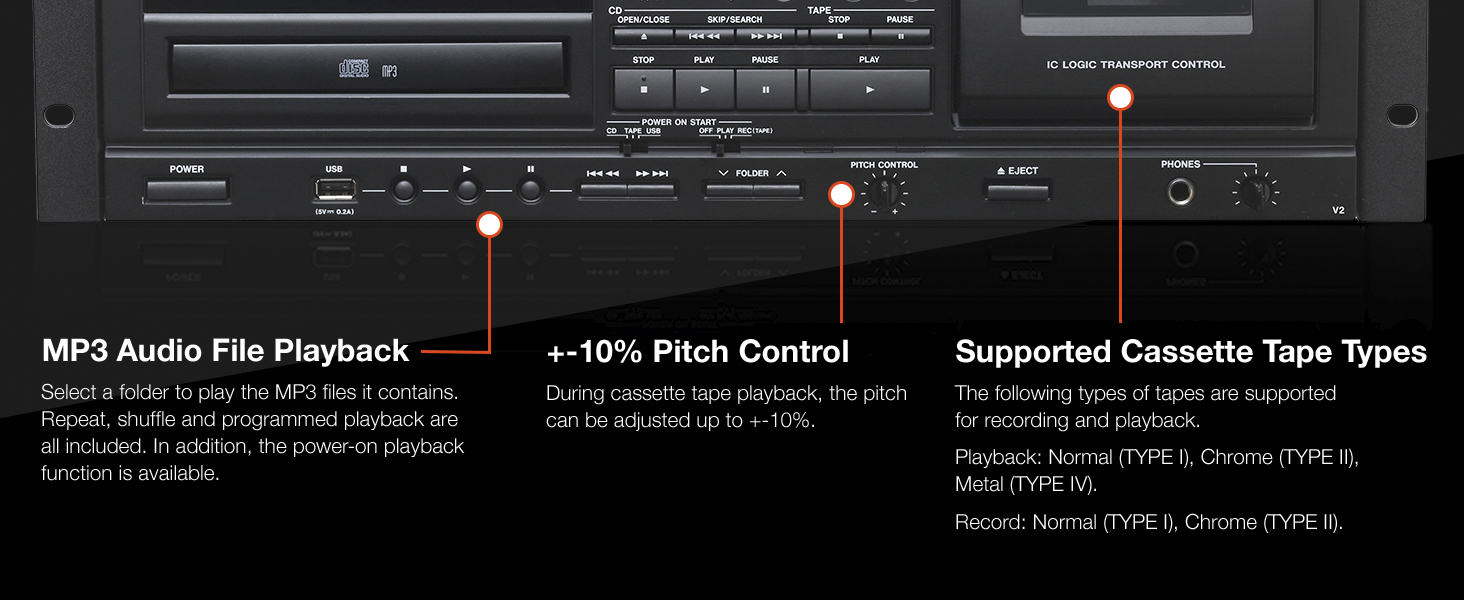
Figure 4: Close-up of the CD-A580's pitch control for cassette playback and information on supported tape types.
3.5 Qeyd Funksiyaları
The CD-A580 offers several recording options:
- Cassette to USB Recording: Insert a cassette and a USB flash drive. Select the cassette as the source and USB as the recording destination. Press QEYD EDİN on the USB section to begin digitizing your cassette collection into MP3 files.
- CD to Cassette Recording: Insert a CD and a blank cassette. Select the CD as the source and cassette as the recording destination. You can program the CD track order before recording. Press QEYD EDİN on the cassette section.
- CD/LINE Input to USB Recording: Audio from CDs or external devices connected to the LINE inputs can be recorded directly to a USB flash drive in MP3 format. CDs automatically create track-specific MP3 files, while tape and LINE input recordings can be manually divided.

Figure 5: Section of the CD-A580 front panel detailing the controls for dubbing audio from cassette to USB media.
3.6 Uzaqdan İdarəetmə (RC-1329)
The included RC-1329 wireless remote control provides convenient operation of all functions from a distance. Ensure batteries are correctly installed. Refer to the remote control diagram for button layout and functions.

Figure 6: The RC-1329 wireless remote control for the Tascam CD-A580.
Video 3: A closer look at the Tascam CD-A580, demonstrating various operational aspects and features.
4. Baxım
4.1 Təmizləmə
Regularly wipe the exterior of the unit with a soft, dry cloth. For stubborn dirt, use a slightly damp cloth and then dry thoroughly. Avoid using abrasive cleaners, solvents, or chemical sprays, as these can damage the finish.
For the CD tray and cassette head, use specialized cleaning kits designed for audio equipment. Refer to the cleaning kit instructions for proper use.
4.2 Saxlama
When not in use for extended periods, store the unit in a cool, dry place away from direct sunlight and extreme temperatures. It is recommended to remove any discs or cassettes from the trays/compartments before storage.
5. Giderme
If you encounter issues with your CD-A580, refer to the following common problems and solutions:
| Problem | Mümkün Səbəb | Həll |
|---|---|---|
| Cihaz işə düşmür. | Power cord not connected, power outlet faulty. | Elektrik kabeli bağlantısını yoxlayın, fərqli bir rozetkaya qoşun. |
| "NO DISC" error on CD player. | Disc inserted incorrectly, disc is dirty/scratched, disc format not supported. | Reinsert disc correctly, clean disc, try a different disc. |
| Kaset lenti səsləndirilmir/qeyd edilmir. | Tape inserted incorrectly, tape is damaged, recording tabs removed. | Reinsert tape, try a different tape, ensure recording tabs are present for recording. |
| USB recording not working. | USB drive not formatted correctly, insufficient space, USB drive not recognized. | Ensure USB is FAT32 formatted, check available space, try a different USB drive. |
| Audio çıxış yoxdur. | Incorrect cable connections, volume too low, wrong source selected. | Verify all audio cable connections, increase volume, select correct source. |
If the problem persists after attempting these solutions, please contact Tascam customer support.
6. Spesifikasiyalar
| Xüsusiyyət | Detal |
|---|---|
| Maddə Çəkisi | 15.7 funt sterlinq |
| Məhsul Ölçüləri | 22 x 10 x 15 düym |
| Element Model nömrəsi | CDA580 |
| İlk Əlçatan Tarix | 23 mart 2017-ci il |
| Rəng Adı | Qara |
| Uyğun Cihazlar | Dinamik, Qulaqlıq |
| Bağlayıcı növü | USB |
| Batareya növü | Manganese (for remote control) |
| Güc mənbəyi | Kabelli Elektrik |
| Wattage | 13 vatt |
| Brend | Tascam |
| Model Adı | CD-A580 |
| Bağlantı texnologiyası | USB |
| Xüsusi Xüsusiyyət | CD-R/RW Compatible |
| İşləmə temperaturu | 5 ilə 35 dərəcə arasında |
7. Zəmanət və Dəstək
7.1 Zəmanət Məlumatı
This product is covered by a manufacturer's warranty. Please refer to the warranty card included with your product or visit the official Tascam webətraflı zəmanət şərtləri üçün sayt. Zəmanət iddiaları üçün satınalma sübutunuzu saxlayın.
7.2 Müştəri dəstəyi
For technical assistance, troubleshooting, or service inquiries, please contact Tascam customer support. You can find contact information and additional resources on the official Tascam websayt: www.tascam.com.


