1. Giriş
Aldığınız üçün təşəkkür edirikasing the Supersonic SC-20H DVD Player. This manual provides essential information for the proper installation, operation, and maintenance of your device. Please read this manual thoroughly before using the product and retain it for future reference.
2. Təhlükəsizlik Məlumatı
Təhlükəsiz işləməyi təmin etmək və zərərin qarşısını almaq üçün aşağıdakı ehtiyat tədbirlərinə əməl edin:
- Güc mənbəyi: Connect the player only to a power supply within the specified range (110-240V, 50/60Hz).
- Havalandırma: Havalandırma deliklərini bağlamayın. Müvafiq hava axını üçün cihazın ətrafında kifayət qədər yer təmin edin.
- Nəmlik: Do not expose the player to rain, moisture, or dripping/splashing liquids. Do not place objects filled with liquids, such as vases, on the apparatus.
- İstilik: Keep the player away from heat sources such as radiators, heat registers, stoves, or other apparatus (including ampistilik əmələ gətirən qaldırıcılar).
- Təmizləmə: Unplug the player from the wall outlet before cleaning. Use a dry cloth for cleaning.
- Xidmət: Bu məhsula özünüz xidmət göstərməyə çalışmayın. Bütün xidmətlər üçün ixtisaslı xidmət personalına müraciət edin.
- Kaliforniya Təklifi 65 Xəbərdarlıq: Bu məhsulda xərçəng və doğuş qüsurları və ya digər reproduktiv zərərlərə səbəb olduğu Kaliforniya ştatında məlum olan kimyəvi maddələr var.
3. Paketin məzmunu
Bütün əşyaların paketdə olduğunu yoxlayın:
- Supersonic SC-20H DVD Player
- Enerji təchizatı kabeli
- AV Cables (Composite)
- Full Function Remote Control (Batteries not included)
- İstifadəçi Təlimatı (bu sənəd)
4. Məhsul bitdiview
4.1 Ön Panel
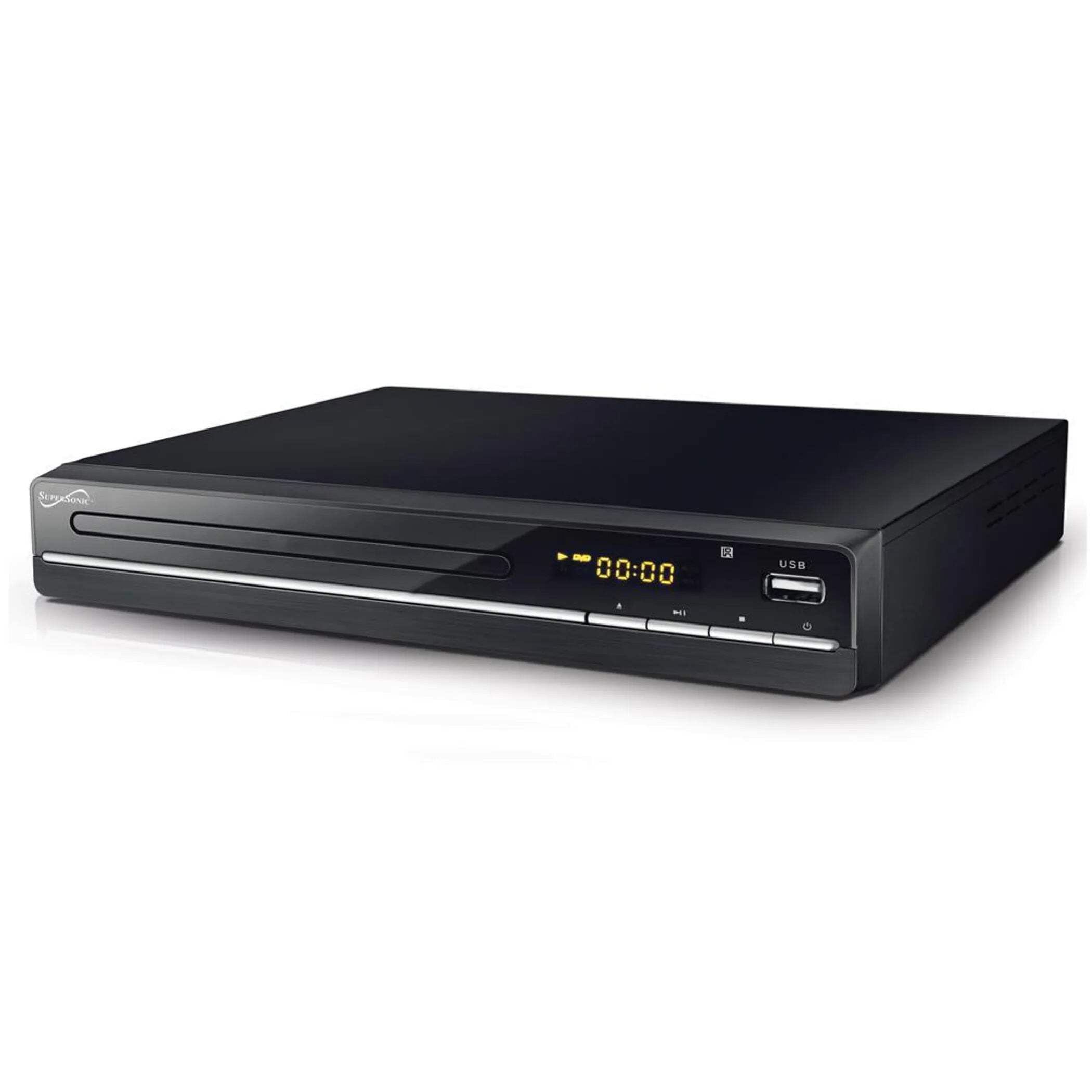
The image above displays the front panel of the SC-20H DVD Player. Key features include:
- Disk qabı: For inserting DVDs, VCDs, CDs, and other compatible discs.
- Ekran Ekranı: Shows playback time, track number, and other operational information.
- Nəzarət Düymələri: Includes Play/Pause, Stop, Previous, Next, and Power buttons for direct control.
- USB giriş: Allows connection of USB flash drives for media playback.
- SD Kart Yuvası: Medianı oxutmaq üçün SD kartları daxil etmək üçün files. (Note: The image primarily shows the USB port, but the product features indicate an SD input as well, typically located near the USB port or on the side).
4.2 Arxa Panel
The rear panel of the DVD player contains all the necessary connection ports for audio and video output.
- HDMI çıxışı: Connects to an HDMI-enabled TV or display for high-definition audio and video.
- Composite A/V Output (RCA): Yellow (Video), White (Left Audio), Red (Right Audio) jacks for standard definition connection to older TVs.
- Component YUV Output: Y (Luminance), Pb (Blue difference), Pr (Red difference) jacks for progressive scan video output, offering better quality than composite.
- Güc Girişi: For connecting the power supply cable.
5. Quraşdırma
5.1 Televiziyaya qoşulma
Aşağıdakı əlaqə üsullarından birini seçin:
- HDMI Bağlantısı (Tövsiyə olunur):
- HDMI kabelinin bir ucunu (daxil deyil) DVD pleyerdəki HDMI OUT portuna qoşun.
- Connect the other end of the HDMI cable to an HDMI IN port on your television.
- Televizorunuzdakı pultdan istifadə edərək müvafiq HDMI girişini seçin.
- Composite A/V Connection:
- Connect the yellow RCA cable to the VIDEO OUT port on the DVD player and the VIDEO IN port on your TV.
- Connect the white RCA cable to the L AUDIO OUT port on the DVD player and the L AUDIO IN port on your TV.
- Connect the red RCA cable to the R AUDIO OUT port on the DVD player and the R AUDIO IN port on your TV.
- Select the corresponding A/V input on your TV.
- Component YUV Connection:
- Connect the Y, Pb, and Pr cables to the corresponding YUV OUT ports on the DVD player and YUV IN ports on your TV.
- For audio, use the white and red RCA cables to connect the L/R AUDIO OUT ports on the DVD player to the L/R AUDIO IN ports on your TV.
- Select the corresponding Component input on your TV.
5.2 Enerji Bağlantısı
After connecting the audio/video cables, plug the power supply cable into the DVD player's power input and then into a wall outlet.
6. Əməliyyat Təlimatları
6.1 Əsas Disk Oynatma
- Güc Aktivdir: Press the Power button on the front panel or remote control.
- Disk daxil edin: Press the OPEN/CLOSE button to open the disc tray. Place a compatible disc (DVD, VCD, CD, KODAK CD, DVD±R/RW, CD-R, CD-RW) onto the tray with the label side facing up. Press OPEN/CLOSE again to close the tray.
- Oynatma: The player will typically begin playback automatically. If not, press the PLAY button.
- Fasilə/Davam et: Press the PAUSE button to temporarily stop playback. Press PLAY again to resume.
- Dayan: Oxumanı bitirmək üçün STOP düyməsini basın.
- Trekləri/Fəsilləri Keçin: Use the PREVIOUS and NEXT buttons to navigate between tracks or chapters.
6.2 USB/SD Media Playback
- Media daxil edin: USB fləş sürücüsünü USB portuna və ya SD kartı SD kart yuvasına daxil edin.
- Mənbə seçin: Use the SOURCE or USB/SD button on the remote control to switch to the USB or SD input.
- Gözdən keçirin Files: Use the navigation buttons (Up, Down, Left, Right) and OK button on the remote to browse through your media files (MP3, video formats).
- Oyna File: İstədiyinizi seçin file and press the PLAY button to begin playback.
6.3 System Settings (OSD Menu)
Access the On-Screen Display (OSD) menu to configure various settings:
- Menyuya daxil olun: Press the SETUP button on the remote control.
- Naviqasiya: Use the navigation buttons to move through menu options.
- Seçim: Press OK to select an option or enter a sub-menu.
- Çıxış: Press SETUP again to exit the menu.
Əsas parametrlərə aşağıdakılar daxildir:
- Dil: Set OSD menu language and subtitle language (supports multiple languages).
- Aspekt nisbəti: Choose between 4:3 (Standard) and 16:9 (Widescreen) for video output.
- Valideyn Nəzarəti: Set a password and rating level to restrict playback of certain content.
- Audio Parametrlər: Adjust audio output modes (e.g., Surround).
7. Baxım
Proper maintenance ensures the longevity of your DVD player:
- Cihazın təmizlənməsi: Wipe the exterior of the player with a soft, dry cloth. Do not use liquid cleaners or aerosol sprays.
- Təmizləmə diskləri: Use a soft, lint-free cloth to wipe discs from the center outwards. Do not use abrasive cleaners or solvents.
- Disklə işləmə: Always hold discs by their edges to avoid fingerprints and scratches. Store discs in their cases when not in use.
- Havalandırma: Həddindən artıq istiləşmənin qarşısını almaq üçün havalandırma deliklərinin toz və zibildən təmizləndiyinə əmin olun.
8. Giderme
Problemlərlə qarşılaşsanız, aşağıdakı ümumi problemlərə və həll yollarına müraciət edin:
| Problem | Mümkün Səbəb | Həll |
|---|---|---|
| Güc yoxdur | Elektrik kabeli qoşulmayıb; Elektrik rozetkası nasazdır | Elektrik kabelinin etibarlı şəkildə qoşulduğundan əmin olun. Rozetkanı başqa bir cihazla yoxlayın. |
| Şəkil yoxdur | Incorrect video connection; Wrong TV input selected | Check video cables (HDMI, Composite, Component) are correctly connected. Select the correct input source on your TV. |
| Səs yoxdur | Incorrect audio connection; TV/player volume too low; Mute activated | Check audio cables (HDMI, RCA) are correctly connected. Increase volume on TV and player. Deactivate mute function. |
| Disk oxunmur | Disc inserted incorrectly; Disc is dirty or scratched; Incompatible disc format | Ensure disc is inserted label-side up. Clean the disc. Check if the disc format is supported (DVD, VCD, CD, KODAK CD, DVD±R/RW, CD-R, CD-RW, MP3). |
| USB/SD media not playing | Incorrect source selected; Incompatible file format; USB/SD device faulty | Select USB or SD source. Ensure media files are compatible. Try another USB/SD device. |
9. Spesifikasiyalar
Detailed technical specifications for the Supersonic SC-20H DVD Player:
- Model: SC-20H
- Brend: Supersəs
- Disk Uyğunluğu: DVD, VCD, KODAK CD, DVD±R/RW, CD, CD-R, CD-RW, MP3
- Video Çıxışı: HDMI, Composite A/V, Component YUV
- Səs Çıxış Rejimi: Ətraf
- Qətnamə: 1920x1080 (via HDMI)
- Bağlantı: USB 2.0, SD Card Slot
- Enerji təchizatı: 110-240V, 50/60Hz
- Enerji istehlakı: 15W
- Ölçülər (U x G x Y): 10.5 x 10 x 3.3 düym
- Maddə çəkisi: 1.75 funt sterlinq
- Xüsusi Xüsusiyyətlər: Multi-language subtitles (up to 32 languages), PAL/NTSC compatible, Parental Lock, Aspect Ratio (4:3, 16:9)
10. Zəmanət və dəstək
Zəmanət məlumatı və texniki dəstək üçün lütfən, satınalmanıza daxil olan sənədlərə müraciət edin və ya rəsmi Supersonic-ə baş çəkin websayt. Hər hansı bir zəmanət iddiası üçün satınalma sübutunuzu saxlayın.


