Giriş
Aldığınız üçün təşəkkür edirikasing the Wireless Bluetooth Headset. This manual provides essential information for the proper use, setup, and maintenance of your new headset. Please read it thoroughly before use to ensure optimal performance and longevity of the product.
Paketin məzmunu
Zəhmət olmasa, aşağıda sadalanan bütün əşyaların paketinizə daxil olduğunu yoxlayın:
- Wireless Bluetooth Headset (2 units)
- USB Charging Cable (2 units)
- İstifadəçi təlimatı

Image: Contents of the headset package, showing one black headset and a white USB charging cable.
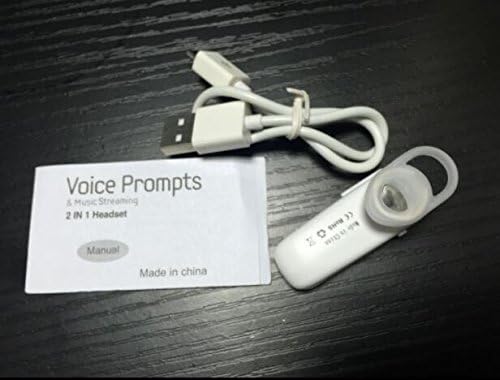
Image: Contents of the headset package, showing one white headset, a white USB charging cable, and the printed user manual.
Məhsul Bitdiview
The Wireless Bluetooth Headset is designed for convenience and portability, ideal for sports, driving, and daily use. It features a super mini design and supports voice prompts and music streaming.

Şəkil: Ön view of the product packaging, displaying the black wireless Bluetooth headset inside its clear plastic casing.
Spesifikasiyalar
| Xüsusiyyət | Təsvir |
|---|---|
| Bluetooth versiyası | V3.0 + EDR |
| Pro -ya dəstəkfiles | Headset, Handsfree, A2DP |
| Talk Time/Playing Time | 5 saata qədər |
| Gözləmə vaxtı | 80 saata qədər |
| Güc mənbəyi | Daxili təkrar doldurulan Li-ion batareyası |
| Bağlantı texnologiyası | Simsiz |
| Forma faktoru | Qulaqda |
| Maddə Çəkisi | 15.8 ounces (for 2 units) |
| Paket Ölçüləri | 1.97 x 1.57 x 1.18 düym |
| Model nömrəsi | Yu- TLXgo-2201 |

Image: Back of the product packaging, displaying a list of product specifications including Bluetooth version, talk time, and power source.
Quraşdırma
Qulaqlığın doldurulması
- Connect the small end of the USB charging cable to the charging port on the headset.
- USB şarj kabelinin daha böyük ucunu USB enerji mənbəyinə (məsələn, kompüterin USB portu, USB divar adapteri) qoşun.
- The indicator light on the headset will illuminate during charging. It will change color or turn off once fully charged.
- Tam şarj adətən təxminən 1-2 saat çəkir.
Bluetooth Cihazı ilə qoşalaşma
- Ensure the headset is fully charged before initial pairing.
- With the headset turned off, press and hold the Multi-function Button (MFB) for approximately 5-7 seconds until the indicator light flashes red and blue alternately. This indicates the headset is in pairing mode.
- On your Bluetooth-enabled device (smartphone, tablet, etc.), go to the Bluetooth settings and ensure Bluetooth is enabled.
- axtarın available devices. The headset should appear in the list, typically named "MBT2013" or similar.
- Select the headset from the list to connect. If prompted for a password, enter "0000" (four zeros).
- Once successfully paired, the indicator light will stop flashing and may show a steady blue light, and you may hear a voice prompt confirming the connection.
- The headset will automatically connect to the last paired device when turned on, if the device's Bluetooth is active and within range.
Əməliyyat Təlimatları
Gücü yandırın/söndürün
- Güc Aktivdir: Press and hold the Multi-function Button (MFB) for about 3 seconds until the blue indicator light flashes and you hear a voice prompt.
- Söndürmək: Press and hold the MFB for about 3-4 seconds until the red indicator light flashes and you hear a voice prompt.
Zəng İdarəetmə
- Zəngə cavab: MFB düyməsini bir dəfə basın.
- Zəngi bitir: Zəng zamanı MFB düyməsini bir dəfə basın.
- Zəngi rədd edin: Press and hold the MFB for about 2 seconds during an incoming call.
- Son nömrəni təkrar yığmaq: Double-press the MFB when not on a call.
Musiqi çalma
- Oynat/Pauza: Press the MFB once during music playback.
Note: Volume control may be managed directly from your connected device.
Baxım
- Təmizləmə: Qulaqlığı təmizləmək üçün yumşaq, quru bir parça istifadə edin. Sərt kimyəvi maddələrdən və ya aşındırıcı materiallardan istifadə etməyin.
- Yaddaş: Qulaqlığı birbaşa günəş işığından və həddindən artıq temperaturdan uzaq sərin, quru yerdə saxlayın.
- Batareyaya qulluq: To prolong battery life, charge the headset regularly, even if not in frequent use. Avoid fully discharging the battery for extended periods.
- Suya davamlılıq: This headset is not waterproof. Avoid exposure to water or excessive moisture.
Problemlərin aradan qaldırılması
- Qulaqlıq açılmır:
- Ensure the headset is fully charged. Connect it to a power source and try again.
- Cihazla qoşalana bilmir:
- Ensure the headset is in pairing mode (red and blue lights flashing alternately). Make sure Bluetooth is enabled on your device and it is within range (typically 10 meters). Try restarting both the headset and your device.
- Səs yoxdur və ya keyfiyyəti aşağıdır:
- Check the volume levels on both the headset and your connected device. Ensure the headset is properly connected to your device. Move closer to your device to avoid interference.
- Qulaqlıq tez-tez sönür:
- Ensure the headset is within range of your device. Check for potential interference from other wireless devices. Try re-pairing the headset.
Təhlükəsizlik Məlumatı
- Qulaqlığı sökməyin, təmir etməyin və ya dəyişdirməyin. Bu, yanğına, elektron cihazın sıradan çıxmasına və ya məhsulun tamamilə zədələnməsinə səbəb ola bilər.
- Qulaqlığı həddindən artıq temperaturdan, rütubətdən və aşındırıcı maddələrdən uzaq tutun.
- Qulaqlığı yerə atmaqdan və ya güclü təsirlərə məruz qalmaqdan çəkinin.
- Do not expose the headset to open flames or dispose of it in fire.
- Məhsulu və onun batareyasını yerli qaydalara uyğun olaraq tullayın.
Zəmanət və Dəstək
Zəmanət məlumatı və ya texniki dəstək üçün, zəhmət olmasa, pərakəndə satış şirkətiniz və ya istehsalçının rəsmisi tərəfindən təqdim edilən əlaqə məlumatlarına baxın. websayt. Zəmanət iddiaları üçün satınalma sübutunuzu özündə saxlayın.


