1. Giriş
This manual provides detailed instructions for the use and maintenance of your Jabra Elite 45e Wireless Earbuds. These earbuds are designed to deliver a superior wireless experience for both calls and music, featuring advanced 2-microphone technology for clear conversations and a flexible memory wire neckband for a secure fit. The Jabra Sound+ app allows for personalized audio settings, and the earbuds offer one-touch access to voice assistants like Amazon Alexa, Siri, and Google Assistant.
The Jabra Elite 45e is rated IP54 for water and dust resistance, ensuring durability for daily use. With up to 8 hours of battery life on a single charge, these earbuds are built to support your communication and entertainment needs throughout the day.
2. Qutuda nə var
Məhsulun qablaşdırmasında bütün komponentlərin olduğunu yoxlayın:
- Jabra Elite 45e Wireless Earbuds
- Mikro USB kabel
- 3 sets of EarGels and Earwings (various sizes)
- İstifadəçi Təlimatı (bu sənəd)
- Zəmanət və Xəbərdarlıq Vərəqələri
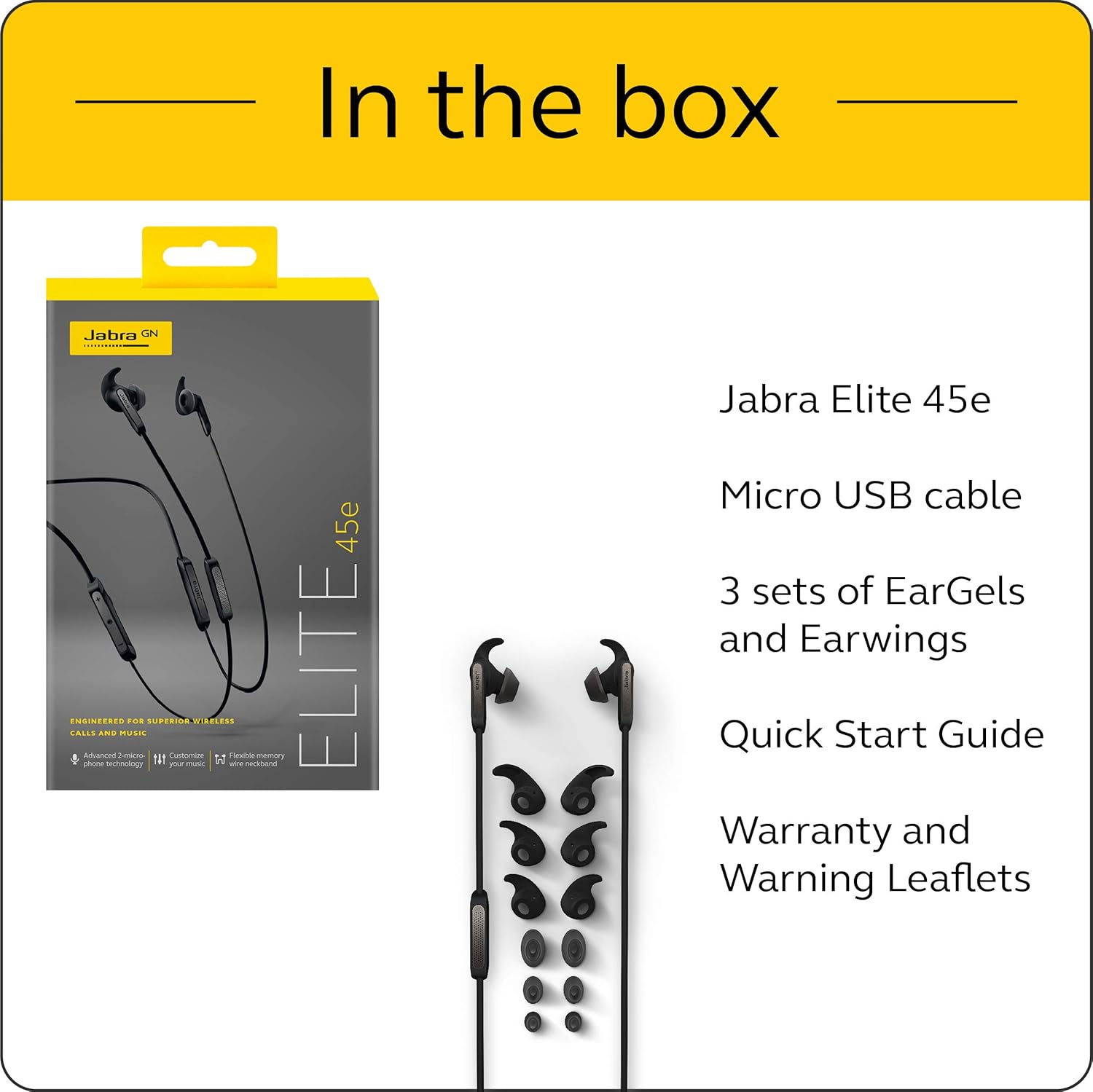
Image: The Jabra Elite 45e packaging and its contents, including the earbuds, Micro USB cable, and multiple sets of EarGels and Earwings.
3. Quraşdırma
3.1 Qulaqlıqların doldurulması
Before first use, fully charge your Jabra Elite 45e earbuds. Connect the included Micro USB cable to the charging port on the neckband and to a power source. A full charge takes approximately 2 hours and provides up to 8 hours of battery life for calls and music.

Image: The Jabra Elite 45e earbuds, highlighting the long battery life of up to 8 hours on a single charge.
3.2 Bluetooth Qoşulması
- Qulaqlıqların doldurulduğundan əmin olun.
- Turn on the earbuds by pressing and holding the Multi-function button until the LED indicator flashes blue.
- Smartfonunuzda və ya cihazınızda Bluetooth parametrlərinə keçin.
- Select 'Jabra Elite 45e' from the list of available devices.
- Cütləndikdən sonra LED göstərici mavi rəngə çevriləcək.
3.3 Achieving a Secure Fit
The Jabra Elite 45e features a flexible memory wire neckband that conforms to the shape of your neck for a comfortable and secure fit. Experiment with the different sizes of EarGels and Earwings provided to find the best fit for your ears. A proper fit is crucial for optimal sound quality and call performance.

Image: The Jabra Elite 45e earbuds showcasing the flexible memory wire neckband designed for a secure and comfortable fit around the user's neck.
4. Qulaqcıqların işlədilməsi
4.1 Əsas idarəetmə vasitələri
The integrated controls on the neckband allow you to manage calls, adjust volume, and control music playback. Refer to the quick start guide for a detailed diagram of button functions.
4.2 Voice Assistant Access
The Jabra Elite 45e provides one-touch access to your preferred voice assistant, including Amazon Alexa, Siri, and Google Assistant. Simply press the dedicated voice assistant button to activate and issue commands.

Image: A user interacting with the Jabra Elite 45e earbuds, demonstrating one-touch access to voice assistants like Alexa, Google Assistant, and Siri.
4.3 Zənglərin idarə edilməsi
The advanced 2-microphone technology ensures crystal-clear calls by filtering out background noise. Use the integrated controls to answer, end, or reject calls.
4.4 Musiqi oxutma
Enjoy your music with personalized sound settings. Download the Jabra Sound+ app to customize your audio experience with the built-in equalizer.
Video: An official product video demonstrating the features of the Jabra Elite 45e Wireless Earbuds, including call quality, music personalization, and design.
5. Baxım
5.1 Suya və toza davamlılıq
The Jabra Elite 45e earbuds are IP54-rated, meaning they are protected against dust ingress and splashing water from any direction. This makes them suitable for various environments, including workouts. However, they are not designed for submersion in water.
5.2 Təmizləmə
To maintain optimal performance and hygiene, regularly clean your earbuds. Use a soft, dry cloth to wipe the surfaces. For the EarGels and Earwings, you may gently clean them with a damp parça və yumşaq sabunla silin, yenidən bərkitməzdən əvvəl tamamilə quru olduğundan əmin olun.
6. Giderme
If you encounter issues with your Jabra Elite 45e earbuds, try the following steps:
- Güc yoxdur: Ensure the earbuds are fully charged. Connect them to a power source using the Micro USB cable.
- Cütləşdirmək mümkün deyil: Make sure Bluetooth is enabled on your device and the earbuds are in pairing mode (LED flashing blue). Try unpairing and re-pairing the device.
- Zəif səs keyfiyyəti: Check the fit of the EarGels and Earwings. Ensure they create a good seal in your ear. Adjust settings in the Jabra Sound+ app.
- Zəng problemləri: Ensure the earbuds are connected to your phone. Check your phone's audio output settings to confirm the Jabra Elite 45e is selected.
- Cavabsız Nəzarətlər: Try resetting the earbuds (refer to the Jabra support webxüsusi təlimatlar üçün sayt).
For more detailed troubleshooting or persistent issues, please visit the official Jabra support websayt.
7. Spesifikasiyalar
| Xüsusiyyət | Spesifikasiya |
|---|---|
| Model Adı | Elit 45e |
| Bağlantı texnologiyası | Bluetooth, Simsiz |
| Bluetooth versiyası | 5.0 |
| Batareya Ömrü | 8 saata qədər |
| Doldurma vaxtı | 2 saat |
| Suya davamlılıq səviyyəsi | IP54 (Suya davamlı) |
| Nəzarət növü | Alexa, Siri, Google Assistant (Voice) |
| Qulaqların Yerləşdirilməsi | Qulaqda |
| Maddə Çəkisi | 7.8 unsiya (0.49 funt) |
| Məhsul Ölçüləri | 4.88 x 2.17 x 7.35 düym |
| İstehsalçı | Cəbra |
| Element Model nömrəsi | 100-98900000-02 |
| UPC | 615822009461 |
8. Zəmanət və Dəstək
The Jabra Elite 45e Wireless Earbuds come with a 2-year warranty against sweat and dust. Registration is required through the Jabra Sound+ app to activate this warranty.
For further assistance, product registration, or to access the latest firmware updates and support resources, please visit the official Jabra support websaytına daxil olun və ya müştəri xidmətləri ilə əlaqə saxlayın.


