Giriş
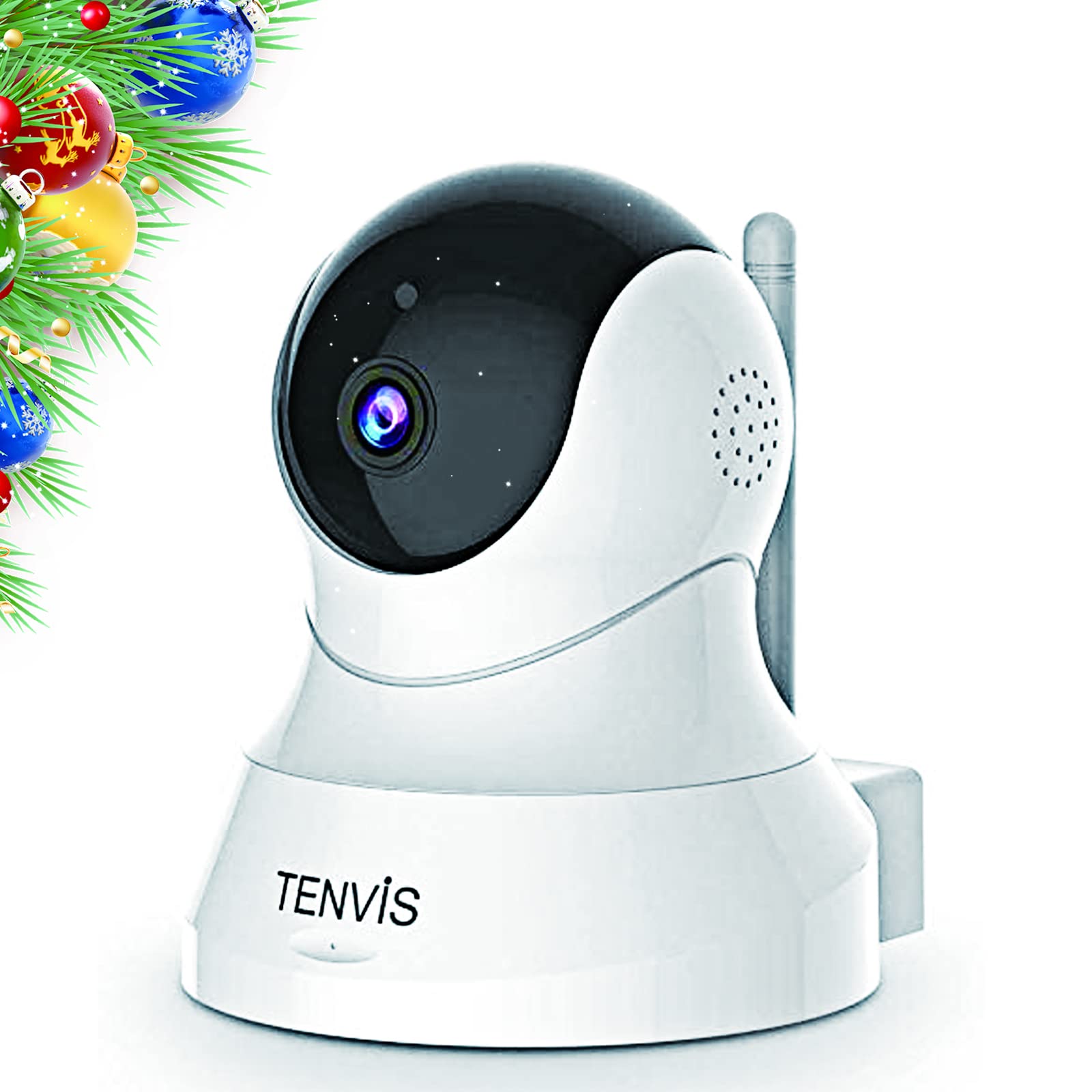
Welcome to your TENVIS 1080P Pet Camera. This manual provides detailed instructions for setting up, operating, and maintaining your device to ensure optimal performance and security. This camera is designed for indoor use, offering features like 1080P Full HD resolution, 2-way audio, motion detection, and night vision to help you monitor your pets or home environment.
Məhsul Bitdiview
Əsas Xüsusiyyətlər
- Full Coverage 1080P FHD Resolution: This home security camera covers a full range of horizontal 355° & vertical 120°. 1920x1080 Mega Pixels delivers clear and sharp images. No dead angle coverage guarantees perfect capture of every image in the surveillance range.
- 32ft Broad Range Night Vision & Automatic Switch Mode: With the core technology ‘Smart Eyes’, TENVIS dog camera provides a clear vision through infrared light at night. This dog camera supports a night vision range up to 32FT, which could act as a deterrent against theft and burglaries.
- Two-Way Audio & One-Click Installation: Based on two-way audio, you are able to talk with your pet through this pet dog camera! This pet dog camera allows one-click Wi-Fi (2.4 GHz) configuration! You don't need to waste your time for installing due to its "Sound Wave Smart Connection"!
- 3-Second Motion Detection & Instant Phone Alarm: Smart Motion detection technology allows you to avoid taping hours of inactivity. With the help of this pet dog monitor camera, every potential risk will be identified and notifications will be sent to your phone immediately.
- Protects Your Privacy with Local Storage: This wireless pet dog monitor camera does not support cloud storage. You may save the footage into your SD card or cell phone and never worry about privacy leaks. Ideal choice for gift giving! (SD card is not included in the package.)
Paketin məzmunu
- TENVIS 1080P Pet Camera Unit
- Güc adapteri
- USB Güc Kabeli
- Montaj Avadanlıqları (vintlər və lövbərlər)
- İstifadəçi təlimatı

Quraşdırma
İlkin Cihaz Quraşdırması
- Güc Aktivdir: Plug the USB power cable into the camera's power port and connect the power adapter to a wall outlet. The camera will power on and initiate its self-check.
- App Download: Download the VicoHome app from your mobile device's app store (Android or iOS).
- Hesabın Qeydiyyatı: Open the VicoHome app and register for a new account or log in if you already have one.
- Cihaz əlavə edin: Tap the '+' icon in the app to add a new device. Select the appropriate camera type (Plug-in device).
- Wi-Fi Bağlantısı: Follow the in-app instructions to connect your camera to your 2.4 GHz Wi-Fi network. Ensure your phone is also connected to the same 2.4 GHz network during setup. The camera will emit a sound to indicate it's ready for connection.
- Device Naming & Location: Once connected, name your camera and assign it a location within your home (e.g., Living Room, Pet Camera).
- Proqram təminatı güncəlləməsi: The app may prompt you to update the camera's firmware. It is recommended to perform this update for optimal performance and features.
Əməliyyat
Canlı View və Nəzarətlər
Access the live feed of your camera through the VicoHome app. From the live view interface, you can control various functions:
- Pan və Tilt: Use the directional controls (arrows) in the app to remotely rotate the camera horizontally (355°) and vertically (120°) to get a full view otağın.
- İki yollu səs: Tap the microphone icon to speak through the camera's speaker, allowing you to communicate with pets or family members. Tap the speaker icon to listen to audio from the camera's environment.
- Hərəkət Algılama və Xəbərdarlıqlar: Enable motion detection in the app settings. You will receive instant notifications on your phone when motion is detected. You can adjust sensitivity settings to minimize false alarms.
- Gecə Görmə: Kamera, az işıq şəraitində avtomatik olaraq gecə görmə rejiminə keçir və 32 fut məsafəyə qədər aydın ağ-qara video təmin edir.
- Yerli Yaddaş: Insert a Micro SD card (not included) into the camera's slot to record footage locally. You can access and manage recorded videos directly from the app.


Baxım
Cihaza qulluq
- Təmizləmə: Kamera obyektivini və gövdəsini yumşaq, quru bir parça ilə yumşaq bir şəkildə silin. Sərt kimyəvi maddələrdən və ya aşındırıcı materiallardan istifadə etməyin.
- Yerləşdirmə: Ensure the camera is placed in a stable location with good ventilation. Avoid direct sunlight or extreme temperatures.
- Firmware Güncellemeleri: Regularly check for and install firmware updates through the VicoHome app to ensure your camera has the latest features and security enhancements.
Problemlərin aradan qaldırılması
Ümumi məsələlər və həllər
- Kamera Wi-Fi-a qoşulmur: Ensure your Wi-Fi network is 2.4 GHz. Check your Wi-Fi password and signal strength. Try restarting your router and the camera.
- Zəif görüntü keyfiyyəti: Ensure the lens is clean. Check your internet connection speed. Adjust video quality settings in the app if necessary.
- Motion detection false alarms: Adjust the motion detection sensitivity in the app settings. Ensure the camera is not facing areas with constant movement (e.g., tree branches swaying outside a window).
- Səs problemləri: Check the volume settings in the app. Ensure there are no obstructions blocking the camera's microphone or speaker.
- Kamera oflayn: Check the power connection and Wi-Fi status. Restart the camera and router.
Spesifikasiyalar
Texniki Detallar
- Model nömrəsi: TH661D
- Video çəkiliş həlli: 1080p
- Bağlantı texnologiyası: Wireless (Wi-Fi 2.4 GHz)
- Xüsusi Xüsusiyyətlər: Hərəkət Sensoru, Gecə Görmə, 2 Yollu Audio
- Daxili / Xarici İstifadə: Daxili
- Gece Görmə Aralığı: 32 Fut
- Ölçülər (U x G x Y): 4.72 x 5.12 x 3.94 düym
- Maddə çəkisi: 8.8 unsiya
- Nəzarət metodu: Proqram İdarəsi, Uzaqdan İdarəetmə
- Uyğun Cihazlar: Smartphone (Android & iOS)
Zəmanət və Dəstək
Zəmanət Məlumatı
No specific warranty information is provided in the product data. Please refer to the manufacturer's website or contact customer support for warranty details.
Müştəri dəstəyi
For further assistance, troubleshooting, or product inquiries, please visit the TENVIS website or contact their customer support channels. You can often find FAQs and additional resources on their official websayt.


