Giriş
This manual provides instructions for the operation and maintenance of your Senville Remote Control, model AR2015-IR. This remote is designed for use with Senville AURA Series and LETO Series mini split air conditioning systems. Please read this manual thoroughly before using the remote control to ensure proper function and longevity.
Məhsul Bitdiview
The Senville AR2015-IR remote control allows you to manage various functions of your compatible Senville mini split system, including temperature settings, operating modes, fan speed, and special features.
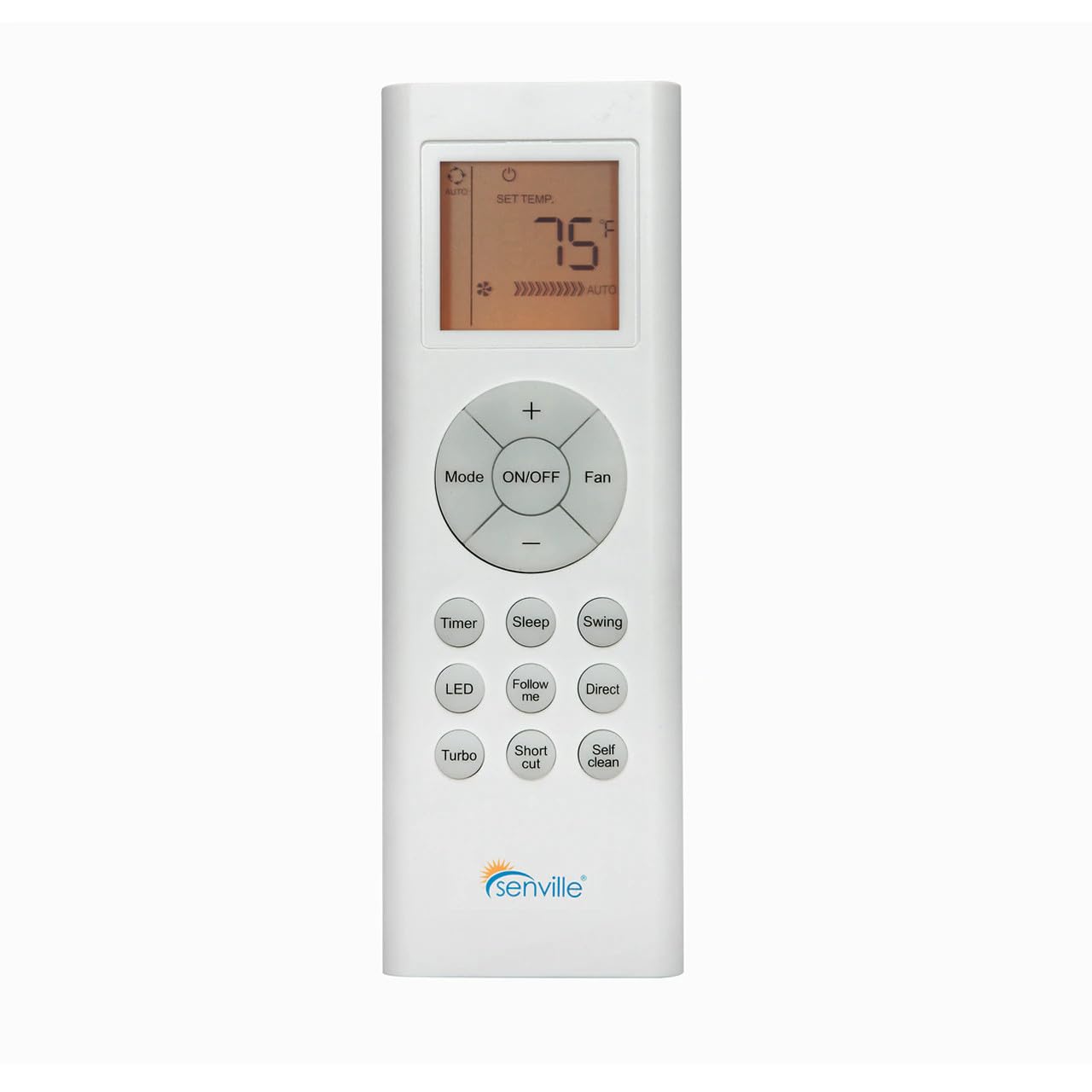
Şəkil 1: Ön view of the Senville AR2015-IR Remote Control. It features an LCD screen at the top, a central circular button cluster for power, mode, fan, and temperature adjustment, and additional function buttons below.
Quraşdırma
1. Batareyanın quraşdırılması
- Pultun arxasındakı batareya bölməsinin qapağını tapın.
- Qapağı aşağı sürüşdürün və ya açmaq üçün mandalı basın.
- Bölmənin içərisində göstərildiyi kimi düzgün qütblüyü (+ və -) təmin edərək iki AAA batareyasını (daxil deyil) daxil edin.
- Batareya bölməsinin qapağını dəyişdirin.
Qeyd: The remote control does not require programming and should function immediately upon battery installation with compatible Senville AURA and LETO series units.
Əməliyyat Təlimatları
Düymə funksiyaları
- ON/OFF: Kondisioner cihazını yandırmaq və ya söndürmək üçün düyməni basın.
- Rejim: İş rejimləri arasında dövr edir: Avtomatik, Soyutma, Qurutma, İstilik, Ventilyator.
- Azarkeş: Ventilyator sürətini tənzimləyir: Avtomatik, Aşağı, Orta, Yüksək.
- Temperature (+/-): Increases or decreases the set temperature. The display shows the set temperature in Fahrenheit or Celsius.
- Taymer: Avtomatik yandırma və ya avtomatik söndürmə taymerini təyin edir.
- Yuxu: Activates or deactivates the Sleep mode for energy-efficient operation during sleep.
- Yelləncək: Şaquli jalüz yellənmə funksiyasını idarə edir.
- LED: Turns the indoor unit's display LED light on or off.
- Məni izləyin: Activates the Follow Me function, which senses the temperature at the remote's location.
- Birbaşa: Adjusts the horizontal louver direction.
- Turbo: Qısa müddət ərzində sürətli soyutma və ya isitməni aktivləşdirir.
- Qısayol: Tercih etdiyiniz parametrləri xatırlayır.
- Özünü Təmiz: Initiates the self-cleaning function of the indoor unit.
İstilik vahidi seçimi
To switch between Fahrenheit (°F) and Celsius (°C), ensure the unit is off. Press and hold the Temperature (+) and Temperature (-) buttons simultaneously for approximately 3 seconds. The display will change to the alternate unit.
Baxım
Batareyanın dəyişdirilməsi
Replace batteries when the display becomes dim or the remote's range decreases. Always replace both batteries at the same time with new AAA batteries. Dispose of used batteries according to local regulations.
Pultun təmizlənməsi
Pultu yumşaq, quru parça ilə silin. Maye təmizləyicilər və ya aşındırıcı materiallar istifadə etməyin, çünki bunlar pultun səthinə və ya daxili komponentlərinə zərər verə bilər.
Problemlərin aradan qaldırılması
- Pult cavab vermir:
- Batareyaların düzgün quraşdırıldığını və tükənmədiyini yoxlayın. Lazım gələrsə, dəyişdirin.
- Ensure there are no obstructions between the remote control and the indoor unit's receiver.
- Pultun birbaşa qapalı bölməyə yönəldildiyini təsdiqləyin.
- Ekran tutqun və ya boşdur:
- Batareyaları dəyişdirin.
- Unit not responding to specific functions:
- Verify that your specific Senville unit model supports the function you are trying to use. Refer to your air conditioner's manual for compatibility.
Spesifikasiyalar
| Model nömrəsi | AR2015-IR |
| Uyğun Cihazlar | Senville AURA Series, Senville LETO Series mini split air conditioners (HF, HF/Z, CD/X Models) |
| Bağlantı texnologiyası | İnfraqırmızı |
| Güc mənbəyi | 2 x AAA Batareya (daxil deyil) |
| Ölçülər (U x G x Y) | 6.89 x 2.68 x 0.83 düym |
| Çəki | 2.89 unsiya (batareyalarsız) |
Zəmanət və Dəstək
For warranty information or technical support regarding your Senville Remote Control or compatible air conditioning unit, please refer to the documentation provided with your main Senville product or visit the official Senville website. Contacting Senville customer service directly is recommended for specific inquiries.
Ətraflı məlumat və dəstək resurslarını burada tapa bilərsiniz Senville Store on Amazon.


