Giriş
Thank you for choosing the EZQuest USB C Hub Docking Station 8-in-1. This manual provides detailed instructions for setting up, operating, and maintaining your device. Please read this manual thoroughly before use to ensure optimal performance and longevity of your product.
Məhsul Bitdiview
The EZQuest USB C Hub Docking Station 8-in-1 is designed to expand the connectivity of your USB-C enabled devices, offering a comprehensive solution for various peripherals and display needs. It features multiple ports for data transfer, video output, network connection, and power delivery.
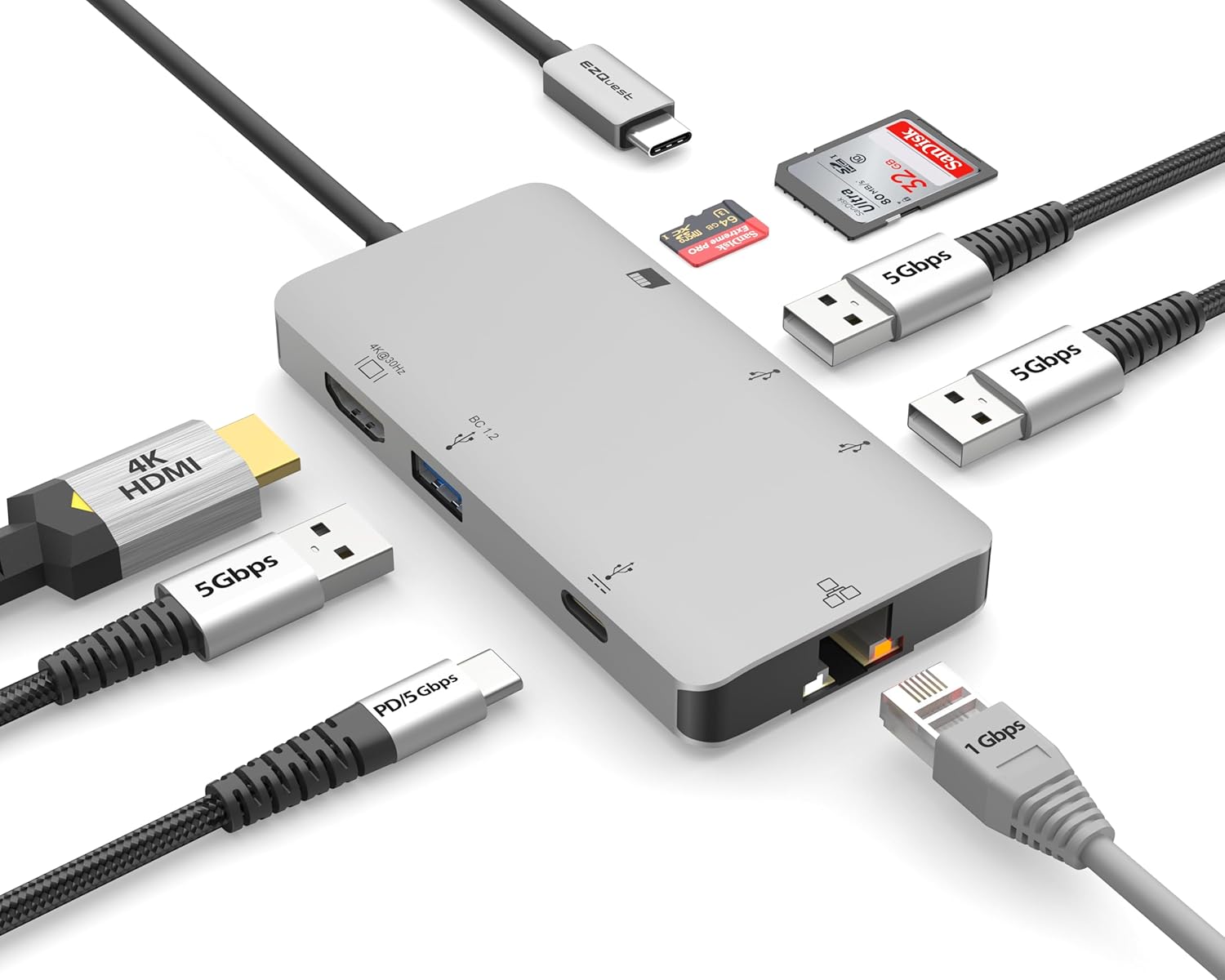
Image: The EZQuest USB C Hub Docking Station 8-in-1, showcasinkompakt dizaynı və inteqrasiya olunmuş USB-C kabeli ilə təchiz olunub.

Image: A diagram illustrating the 8-in-1 expansion capabilities of the hub, including HDMI, USB-C PD, USB 3.0, Ethernet, and card readers.
Quraşdırma Təlimatları
- Host Cihazına qoşulun: Plug the integrated USB-C cable of the EZQuest hub into an available USB-C/Thunderbolt 3/4 port on your laptop, tablet, or smartphone.
- Enerji Çatdırılması (İsteğe bağlı): For charging your host device, connect your USB-C power adapter to the USB-C Power Delivery port on the hub. The hub supports up to 100W input with 85W pass-through charging.
- HDMI Ekranı: Connect an HDMI cable from your monitor to the HDMI port on the hub for 4K 30Hz video output.
- Ethernet Bağlantısı: For a stable wired network, connect an Ethernet cable to the Gigabit Ethernet port on the hub.
- USB periferik qurğular: Connect your USB-A devices (e.g., mouse, keyboard, external hard drive) to the three USB-A 3.0 ports.
- SD/Micro SD Cards: Insert your SD or Micro SD cards into the respective slots for data transfer.

Image: A user connecting the EZQuest USB C Hub to a laptop's USB-C port.

Image: Illustrates connecting a power adapter to the hub for pass-through charging of a laptop.
Əməliyyat Təlimatları
Ekran Çıxışı (HDMI)
The HDMI port supports 4K resolution at 30Hz. Connect an HDMI-enabled display to extend or mirror your desktop for enhanced productivity or multimedia viewing. Ensure your display and device support 4K 30Hz for optimal performance. Note that the USB-C ports on the hub are for data and power delivery, not for connecting a monitor.
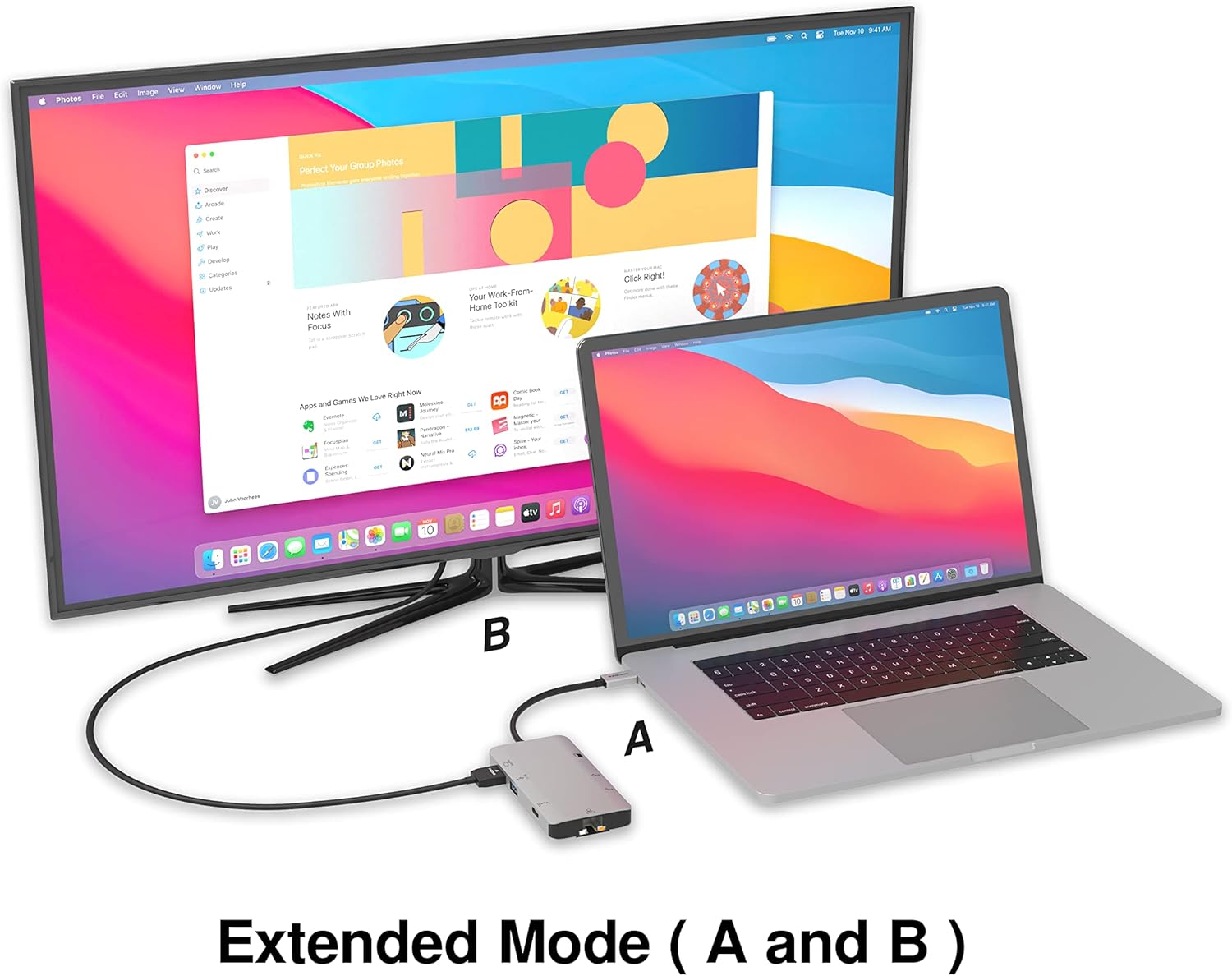
Image: A laptop connected to an external monitor via the hub, demonstrating extended display mode.
Data Transfer (USB-A & SD/Micro SD)
The three USB-A 3.0 ports offer data transfer speeds up to 5Gbps. The SD and Micro SD card slots allow for simultaneous read and write operations, facilitating quick file transfers from memory cards.

Image: Various devices like USB drives, SD cards, and an Ethernet cable connected to the EZQuest hub.
Network Connection (Gigabit Ethernet)
The Gigabit Ethernet port provides a stable and high-speed wired internet connection, ideal for large downloads, uploads, or streaming where Wi-Fi might be unreliable. An LED indicator confirms network activity.
Güc paylanması
The USB-A ports distribute power efficiently. One USB-A port with BC1.2 outputs 5V/1.5A (7.5W), while the other two USB-A ports deliver 5V/0.9A (4.5W) each. The total shared power when all ports are in use is 10 watts.

Image: A diagram detailing the power output and data transfer speeds of the USB-A ports on the hub.
Xüsusiyyətlər və Portlar
| Port Növü | Kəmiyyət | Funksionallıq |
|---|---|---|
| HDMI | 1 | 4K @ 30Hz Video Output (Extended/Mirror Mode) |
| USB-C Power Delivery/Data | 1 | Up to 100W Power Input (85W Pass-Through), 5Gbps Data Transfer |
| USB-A 3.0 | 3 | 5Gbps Data Transfer (One port BC1.2 5V/1.5A, two ports 5V/0.9A) |
| Gigabit Ethernet | 1 | 10/100/1000 Mbps Wired Network Connection with LED Indicator |
| SD kart oxuyucusu | 1 | SDHC/SDXC Read/Write |
| Micro SD kart oxuyucusu | 1 | Micro SDHC/SDXC Read/Write |
Uyğunluq
This USB C Hub is compatible with a wide range of devices:
- Computers featuring USB-C, USB 4, Thunderbolt 4, or Thunderbolt 3 ports.
- USB-C smartphones and tablets equipped with OTG (On-The-Go) support.
Unsupported Device:
- The USB-A ports on this docking station do not support Apple SuperDrive. For connecting an Apple SuperDrive, an alternative adapter (e.g., EZQuest X40100 USB-C to USB-A Female Mini Adapter) directly to your Mac is recommended.
Problemlərin aradan qaldırılması
- Ekran çıxışı yoxdur:
- Əsas cihazınızın USB-C portunun video çıxışını dəstəklədiyinə əmin olun (DisplayPort Alternativ Rejimi).
- Bütün kabel bağlantılarını yoxlayın (mərkəzdən cihaza USB-C, mərkəzdən monitora HDMI).
- Verify your monitor input source is set correctly to HDMI.
- Mümkünsə, fərqli bir HDMI kabeli və ya monitor sınayın.
- Doldurma Problemləri:
- Ensure your USB-C power adapter is connected to the hub's USB-C PD port.
- Güc adapterinizin kifayət qədər güc təmin etdiyinə əmin oluntage (up to 100W recommended for laptops).
- Check if the host device's USB-C port supports Power Delivery.
- Yavaş məlumat ötürülməsi:
- Ensure you are using USB 3.0 compatible devices and cables for optimal speeds.
- The total shared power for USB-A ports is 10W; excessive power draw from multiple devices may affect performance.
- Ethernet işləmir:
- Həm mərkəzə, həm də router/modeminizə Ethernet kabelinin qoşulmasını yoxlayın.
- Əsas cihazınızdakı şəbəkə parametrlərini yoxlayın.
- Ensure the LED indicator on the Ethernet port is active.
- SD/Micro SD Card Not Recognized:
- Ensure the card is fully inserted into the correct slot.
- Try reinserting the card or using a different card.
- Check if the card is damaged or corrupted.
Spesifikasiyalar
| Xüsusiyyət | Detal |
|---|---|
| Model nömrəsi | X40030 |
| Məhsul Ölçüləri | 0.81 x 1.63 x 0.2 düym |
| Maddə Çəkisi | 1.6 unsiya |
| Avadanlıq interfeysi | USB Tip C |
| HDMI çıxışı | 4K @ 30Hz |
| USB-C PD Girişi | 100 Vt-a qədər |
| USB-C PD Çıxışı | 85 Vt-a qədər |
| USB-A 3.0 Data Speed | 5Gbps |
| Ethernet sürəti | 1 Gigabit (10/100/1000 Mbit/s) |
| Card Reader Support | SDHC, SDXC, Micro SDHC, Micro SDXC |
| Material | Anodized Aluminum Housing |
Baxım
- Təmizləmə: Use a soft, dry cloth to clean the hub. Avoid liquid cleaners or aerosols.
- Yaddaş: Hubı birbaşa günəş işığından və həddindən artıq temperaturdan uzaq sərin, quru yerdə saxlayın.
- İdarəetmə: Cihazı yerə salmaqdan və ya güclü zərbələrə məruz qoymaqdan çəkinin. Qovşağı sökməyə çalışmayın.
Zəmanət və Dəstək
The EZQuest USB C Hub Docking Station 8-in-1 comes with a 1 il Narahatsız Zəmanət. This warranty covers manufacturing defects and ensures peace of mind regarding your investment.
For technical support, warranty claims, or any product-related inquiries, please visit the official EZQuest website or contact their customer service team through the contact information provided with your product packaging.


