Giriş
This manual provides detailed instructions for the proper setup, operation, and maintenance of your Timex TW4B17400 Analog-Digital Watch. Please read this manual thoroughly to ensure optimal performance and longevity of your timepiece. Keep this manual for future reference.
Məhsul Bitdiview
The Timex TW4B17400 is a men's analog-digital watch featuring a black dial and a brown leather strap. It combines traditional analog timekeeping with digital functionalities.
Əsas Xüsusiyyətlər:
- Analoq və Rəqəmsal Vaxt Göstəricisi
- Durable Leather Strap
- Indiglo Gecə İşığı
- Xronoqraf Funksionallığı
- Siqnal funksiyası
Saat Komponentləri:
Saatınızın əsas komponentləri ilə tanış olun:

Şəkil: Yan view of the Timex TW4B17400 watch. This image displays the watch case from the side, highlighting the crown (center knob) and two pushers (buttons) on either side of the crown, used for adjusting time and accessing digital functions. The brown leather strap is also visible.
- Tac: Used for setting analog time.
- Düymələr (İtələyicilər): Used for operating digital functions such as setting digital time, date, alarm, and chronograph.
- Yığım: Displays analog time and includes a digital display window.
- Kəmər: Brown leather strap with a buckle closure.
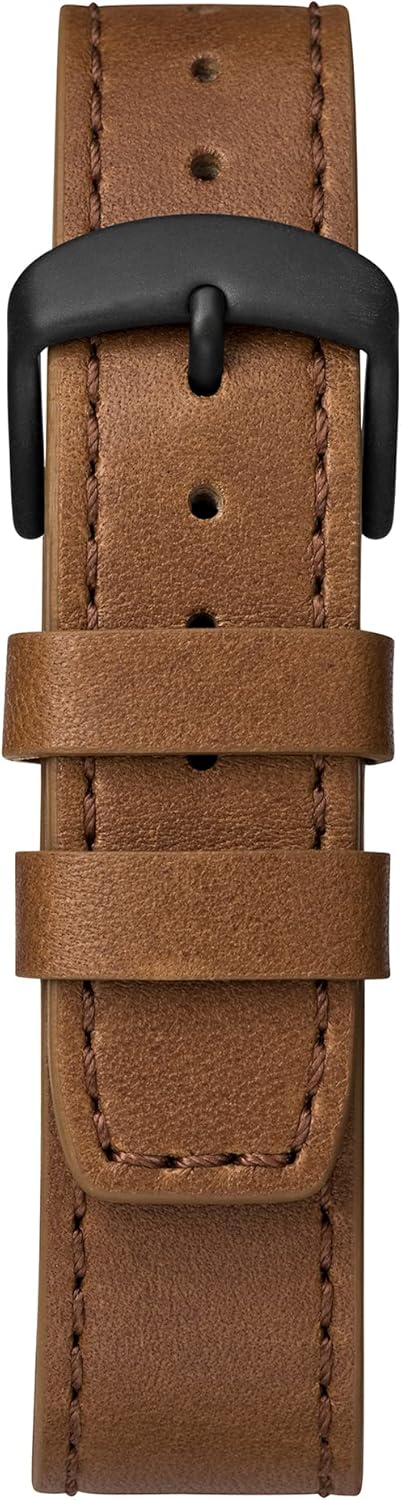
Image: Close-up of the brown leather strap and black buckle of the Timex TW4B17400 watch. The detailed stitching on the leather and the two strap loops are clearly visible.
Quraşdırma
Battery Installation (If Required):
Your watch comes with a CR2 battery installed. If the watch is not functioning, the battery may need to be replaced. It is recommended to have battery replacement performed by a qualified watch technician to ensure proper sealing and water resistance.
Setting Analog Time:
- Pull the crown (center knob) out to the furthest position.
- Saat və dəqiqə əqrəblərini düzgün vaxta keçirmək üçün tacı saat əqrəbi istiqamətində və ya saat yönünün əksinə çevirin.
- Vaxt təyin edildikdən sonra, saat mexanizmini işə salmaq üçün tacı orijinal vəziyyətinə qaytarın.
Rəqəmsal Saat və Tarixin qurulması:
The digital functions are typically controlled by the pushers. Refer to the specific instructions below for common digital settings. The exact sequence may vary slightly; consult the full Timex manual for your movement if detailed steps are needed.
- Press the MODE button (usually one of the side pushers) repeatedly until the digital display shows the time setting mode (often indicated by flashing digits).
- Use the SET/ADJUST button (another pusher) to select the digit you wish to change (e.g., hours, minutes, 12/24-hour format).
- Use the START/STOP button (another pusher) to increase the value of the flashing digit.
- Repeat steps 2 and 3 for minutes, year, month, and day.
- Once all settings are correct, press the MODE button to exit the setting mode.
Əməliyyat
Reading Analog Time:
The hour and minute hands indicate the current time in a traditional format.
Using Digital Functions:
- Rejim düyməsi: Cycles through different digital modes (Time, Date, Alarm, Chronograph, Timer).
- Set/Adjust Button: Used to select items for adjustment within a mode.
- Başlat/Durdur düyməsi: Used to start/stop functions (e.g., chronograph) or increment values during setting.
Indiglo Gecə İşığı:
To illuminate the watch face in low-light conditions, press and hold the crown or a designated pusher (refer to your watch's specific button layout). The Indiglo feature will light up the dial for a few seconds.
Siqnal funksiyası:
- Press the MODE button until the alarm mode is displayed.
- Use the SET/ADJUST button to select the hour or minute to set.
- Use the START/STOP button to change the alarm time.
- Press the MODE button to confirm and exit.
- To activate/deactivate the alarm, typically press a specific pusher while in alarm mode.
Xronoqraf (Saniyəölçən):
- Press the MODE button until the chronograph mode is displayed (usually shows 00:00:00).
- Press the START/STOP button to start timing.
- Press the START/STOP button again to stop timing.
- Press the RESET button (often the same as SET/ADJUST) to clear the chronograph to zero.
Baxım
Saatınızın Təmizlənməsi:
Saat qutusunu və kristalını yumşaq bir parça ilə silin, damp parça. Dəri kəmər üçün quru, yumşaq parça istifadə edin. Sərt kimyəvi maddələrdən və ya aşındırıcı materiallardan istifadə etməkdən çəkinin, çünki bunlar saatın səthinə və ya kəmərinə zərər verə bilər.
Suya davamlılıq:
While your watch may be water-resistant, it is not waterproof. Avoid prolonged exposure to water, such as swimming or showering, unless the specific water resistance rating (e.g., 50m, 100m) is clearly indicated on the watch and suitable for such activities. Always ensure the crown is pushed in completely to maintain water resistance.
Dəri Qayış Baxımı:
Dəri qayışlar nəm, tər və birbaşa günəş işığından təsirlənə bilər. Dəri qayışınızın ömrünü uzatmaq üçün:
- Uzun müddət suya məruz qalmaqdan çəkinin.
- Quru, yumşaq bir parça ilə təmizləyin.
- Allow the strap to air dry if it gets wet; do not use direct heat.
- Avoid contact with cosmetics, oils, and perfumes.
Problemlərin aradan qaldırılması
Watch Not Running / Digital Display Blank:
- Tacın tam içəriyə salındığını yoxlayın.
- The battery may need replacement. Consult a professional watch technician.
Yanlış Vaxt Göstəricisi:
- Refer to the "Setting Analog Time" and "Setting Digital Time and Date" sections to reset the time.
- Ensure the watch has not been exposed to strong magnetic fields, which can affect accuracy.
Indiglo İşləmir:
- Batareyanın kifayət qədər gücə malik olduğundan əmin olun.
- Confirm you are pressing the correct button for Indiglo activation.
Spesifikasiyalar
| Xüsusiyyət | Detal |
|---|---|
| Brend | Timex |
| Model nömrəsi | TW4B17400 |
| şöbəsi | Kişilər üçün |
| Material | Leather (Strap) |
| Məhsul Ölçüləri | 3.99 x 10.01 x 5.99 sm |
| Maddə Çəkisi | 66.3 qram |
| Batareya növü | 1 CR2 (daxildir) |
| İlk Mövcud Tarix | 26 avqust 2019-cü il |
| ASIN | B07PJCC2TK |
Zəmanət və Dəstək
Zəmanət məlumatı və müştəri dəstəyi üçün rəsmi Timex-a müraciət edin websayt və ya alış-verişinizə daxil olan zəmanət kartı. Hər hansı zəmanət iddiası üçün alış-veriş sənədinizi saxlayın.
For further assistance, you may visit the official Timex support page: Timex Dəstəyi


